|
By armondtanz - 4 Years Ago
|
Ok we should establish a rule here------> Please dont post , "you need to but a $3000 mocap suit"...We know this is the best option, just trying to work out ways around MOCAP AI issues, and find solutions.
.. Ive spent nearly 5k on computer and x2 versions of reallusion software (ic7+cc3 plus ic8+cc4 plus plug ins). so im broke and having to pay for loans on said purchases!!!... 3k is about 5 years away (*sniff*)
Just wondering if on the skeleton you can kill the feet to stop them from moving?
How could you combat shakey limbs? limbs twisting? Usually twists on torso, The legs have odd twists as well.
I find it just a constant fight. Wondering if there are any Advanced tutorials out there on maybe using the curves? setting linear keyframes?.
I always find if you remove the keyframes the motion still moves, its just a constant battle and would love to know if there are fixes for these issues im not too familiar with.
|
|
By charly Rama - 4 Years Ago
|
I was considering to buy mocap suit but I've fixed all my foot sliding issues by this so, try it, may be....
|
|
By darkstyle8 - 4 Years Ago
|
|
Yeah the mocap twitchy foot thing is annoying. The current tools don’t do much to fight it without ruining the entire animation.I’ve tried everything too using direct puppet masks and edit motion layers but the thing loves twitching
|
|
By armondtanz - 4 Years Ago
|
I found a secret weapon and its cheap. Not a great fix, but again im not 100% 3d artist so maybe if a few people get into it we can share and find solutions...
The foot thing is half the battle, when working with Deepmotion or Plask after you sort the foot movement then your left with rotating limbs and twisting torso.
Ive downloaded a free version of Cascadeur. its free but only exports out 300 frames.... prob best go for 24fps export
heres my workflow...
1. try to fix issues in iclone. I usually go for the torso and any silly stuff but dont be too worried, cascadeur does some magic.
2.export as maya fbx (there is no textures in cascadeur so just save texture size as low as can be).
3.a Import model. 3b rig model (dead easy it recognises maya rigs). 3c select ALL joints and then import> add animation to object
4. (heres the magic and heres what i do)... i delete every 12 frames and set the animation from BEZIER to STEP... what im left is like blocking out poses. then i can start to line up the feet (on seperate layers) and i can set these to LINEAR so they dont roll thru the floor.
5. When finished tweaking set ALL the keyframes back to BEZIER. What u get is same animation but with vast majority of shakes and foot slides gone.
6.(more magic) Finally there is a real world physics , you can add this and jumping goes from cringe to quite elegant looking.
7. export out as fbx, iclone recognises it and finally touch up with hand gestures , heads etc all using layers.
Again i need to learn how to get rid of twist and turns on limbs and torso (DAMN F*CKERS!!!) but its best ive come up with!. for free.
I bought Cascadeur and its cost me £78 (50% sale) for 1 year, its says after a year its perpetual you just dont get future updates. Think its about $200 a year
As i said its free to try. I bought it because my only option was ipisoft and that was £420 a year.
I use plask. a guy on youtube who sells the plask mannequin to fit into iclone for £5.
Hope this wasnt too confusing. Im no expert, im 50 yrs old and if i can do it anyone can !!!
|
|
By armondtanz - 4 Years Ago
|
Be good to see a video on this?
The workflow between MOCAP AI and your final results
have u a youtube channel, the name looks familiar?
|
|
By mark - 4 Years Ago
|
|
charly Rama (7/13/2022)
I was considering to buy mocap suit but I've fixed all my foot sliding issues by this so, try it, may be....
This feature is HUGE in fixing the issue as far as I'm concerned ! :D
|
|
By 4u2ges - 4 Years Ago
|
|
I found a secret weapon and its cheap.
I do not do much MOCAP and it sounds like an interesting solution.
However it could be even cheaper, because most you described (except physics) can be done in iClone with Curve Editor.
Switching to Step/Linear/Smooth, create blocking poses and then even more, you could preliminary use optimise filter to lighten up the animation off of an excessive keys.
And then Motion Correction is a great addition alone, which is based on revised Reach Dummies routine and it works quite well in IC8 to fight sliding.
|
|
By armondtanz - 4 Years Ago
|
Hey man,
Hows it going. Been a long time since we spoke.
Be great if u could do a vid on this. Im just lost with words and technical jargon. Be good to see this format in action. Infact it would be b-e-y-o-n-d awesome.
Or is there an example of this process on youtube?
I have a love hate relationship with curves. I usually spend forever fiddling with areas i think are going to sort stuff out, but then end up screaming at the screen half an hour later with a worse rendition than when i first started...grrrrrrr
Cheers
|
|
By armondtanz - 4 Years Ago
|
|
mark (7/15/2022)
[quote]charly Rama (7/13/2022)
I was considering to buy mocap suit but I've fixed all my foot sliding issues by this so, try it, may be....
This feature is HUGE in fixing the issue as far as I'm concerned ! :D
Any solution on janky shakey-ness? Thats a real killer :(
|
|
By 4u2ges - 4 Years Ago
|
Doing alright, thanks for asking...
Now lets see, as I said I do not do MOCAPS often, and I was just reading the routine you came up with.
And then I saw that you can do all that you described (and you have been doing in Cascadeur), right there in Curve Editor.
I believe there are some other things you have been doing in between, which I certainly do not know.
But if I ever hit the screwed up MOCAP, I will make a video.
Meantime, you can sure delete every 12-th frame in iClone (might take a bit to cover a long clip though).
But Sample Clip first with all parts - per frame.
Now, in Curve Editor if you go to Filter in Curve Editor menu, you will find Optimize to clean up a bit. Just play with it.
But always have a backup copy of the clip.
Then select all bones with Shift and then select all frames by dragging mouse and convert to Step (for Poses) with icon at the top.
Like that:
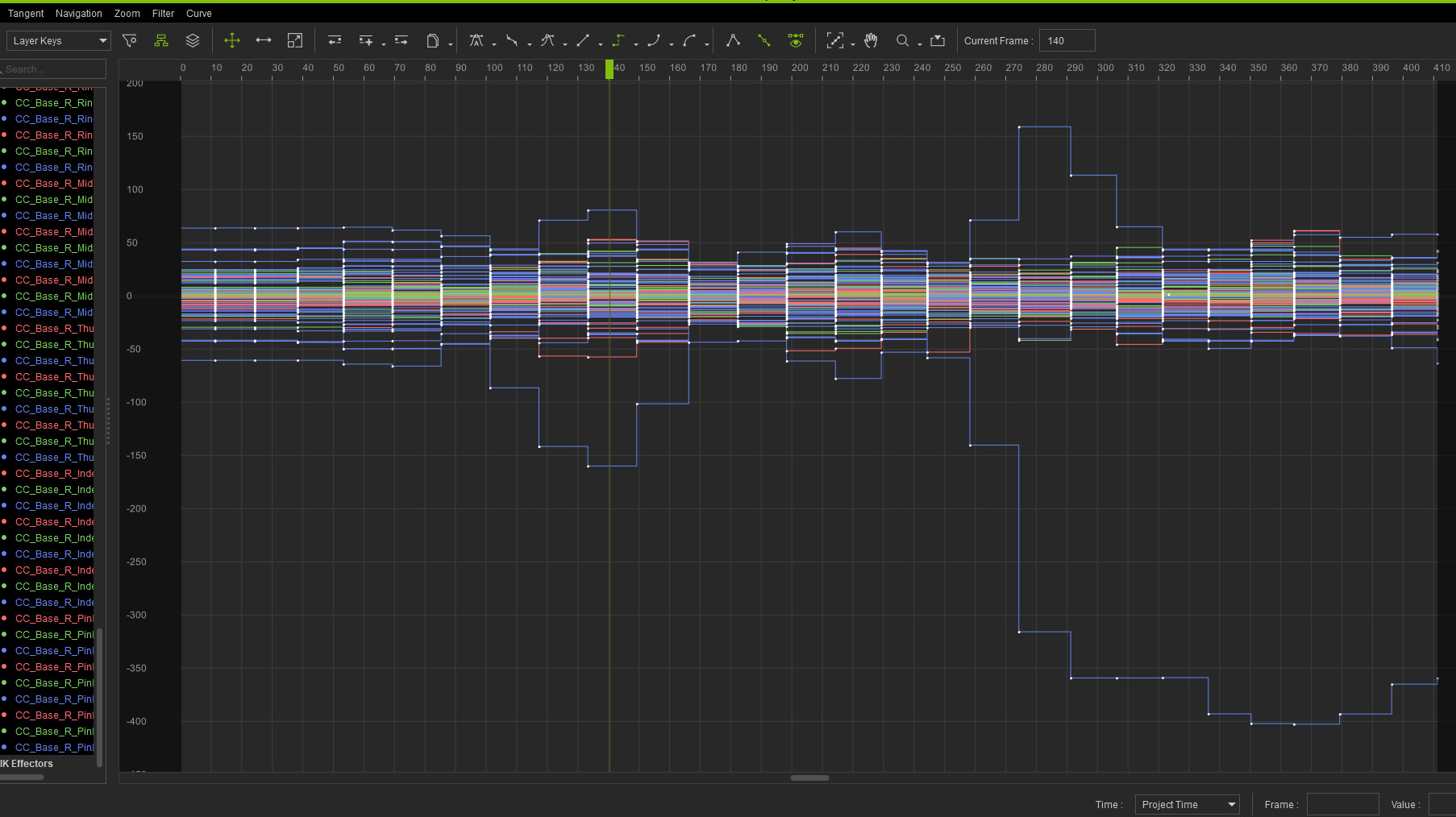
If you have something in IK Effectors section at the bottom (less likely you have something from a MOCAP) then select all bones, curves/frames and delete.
Now you have Poses as you described in you step-by-step. Continue working out between iClone and Curve Editor.
When you finish a major clean up with your routine (I hope you do - cause I did not try this method), fix the remaining slides/shakes with Motion Correction (video above).
And here I put a quick video with manual routine which I was using since iClone 7 and which became a WHOLE lot easier in iClone 8 (tor twists you may also utilize Toes dummy locks, which were never part of iClone 7).
This basically what is behind an automated Motion Correction:
|
|
By armondtanz - 4 Years Ago
|
Damn!!!...
Just spent $100 on Cascadeur..lol!!
Wow, didnt even know it had a step feature??? Cool stuff.
So if i set all these back from step to bezier, iclone will interpret the movement? This is great news.
I think Cascaduer and the physics looks good. It also has path lines on each limb/point which is useful when u know all body movements have a gracious curve. So i can use the them both.
Ha. I dont know how many time i said this but thanks a lot 4u2ges.
Very Much Appreciated.
|
|
By xzevlin - 4 Years Ago
|
From the AI mocap side of things, I've been getting pretty good results on feet with RADiCAL. Had to use 3DXchange from 7 to make a retargeting profile to work in iClone 8, but now that I have that it's been very simple to drop data onto my iClone characters. Still need to animate wrists and hands manually (I've got a LeapMotion, but I wish iClone would update/add some kind of smoothing to it. It's basically unuseable now for the forearms and wrist motion).
RADiCAL's footlocking is a beta option that you have to turn on after you convert a video to mocap data. It still defaults to their very slippery feet.
|
|
By armondtanz - 4 Years Ago
|
I always have a nightmare in xchange. I use cascadeur.
Its UI is great. Rigging is a lot easier and user friendly.
Good to hear about radical. There are a lot of Motion AIs out there.
Plask is free.
Is radical free and do you hav to pay for footslide?
|
|
By bad_character - 4 Years Ago
|
|
I’ve been trying to convince myself to pay 3-5k for mocap vs use plask, kinetix, machinema, and every time I’ve dug up more info about it I’m not convinced it’s not a complete waste of money. So many limitations and problems and crap data. Can you track a foot that doesn’t leave the ground moving? Can you track leaving the ground? Will the faintest magnetic field send you for a loop or kill your hardware? Do you have to transport and store like it’s a dirty bomb? Is it 45 min to setup? Do you have to take the crappy output data and shove that in some software to get some less crappy, crappy data? Is the real-time pipeline actually a pipe dream? Do you need expensive addons and subscriptions for the full still crappy experience? It’s a grab bag of yuck depending which you go with. With pretty much all mocap needing manual cleanup even at the high end, even in the best case at the low end, you are gonna get some data that needs a lot of work and you are gonna have tons of limitations around the how and what you can do. I think these AI video solutions are likely to hold up quite well against mocap under 10k, maybe 20.
|
|
By Kelleytoons - 4 Years Ago
|
Um, nope.
My PN3 suit works flawlessly, is basically impervious to magnetic issues, and captures perfectly without foot sliding or any other issues. It also does hands and fingers (it uses AI to solve for the pinky and ring but it works fine in that regard). Calibration (if you travel) takes all of five minutes. It's even water resistant (they say it's water proof but don't promise it - I won't be swimming with it, but a little rain doesn't worry me).
I've used ALL those other solutions you mention and they are nothing more than the biggest waste of time POS stuff I've ever wasted time with. I will never waste even one more minute chasing after solutions that will never be ready for prime time. There's a reason Hollywood uses suits - it's the only way to go.
But - to each his own. If you're younger than I am (and you are) you have a lot more time to waste and in the end you'll find out I'm right. But it may take a few years. Relax, you have PLENTY of time (even hand animating - I did that for a couple of decades and there's nothing wrong with learning that). For me in less than 10 minutes I can get perfect mocap for any situation and for that there is (almost) no price too high.
|
|
By armondtanz - 4 Years Ago
|
Good to hear both sides.
Its always fiddly when calculating EVERYTHING you need. Take iclone. When i first got it, i was informed well u need xchange, iray, cc3, skingen, popcorn, curves... just went on & on...
Can u list the entire set up including add ons, plugins, software, and cost. I go on the website and it is a bit confusing.
Also what is the basic you need? lowest amount of trackers, you obviously dont NEED gloves, although can be a bonus, that can save about a grand $$$$.
Thanks
|
|
By Kelleytoons - 4 Years Ago
|
You need to check on this because the rules may or may not have changed (for example - I *think* Motion Live is already included in iClone 8. If it is that changes the $$).
If you buy a PN3 suit (which I would recommend) you get software that allows you to export as FBX which iClone 8 will import correctly with no issues. The software you get even does smoothing for you, although frankly I've never used it because it seems just fine for me (then again I tend to do more "cartoony" stuff). So nothing really needed other than iClone 8. You can buy the gloves separately and they do add around $1k but I would recommend them.
If you want to have your animations come directly into iClone (which is to say, you want to wear the suit and as you perform have iClone record your animations) then you do need additional software. Specifically you need Motion Live and the PN plugin for it. For years (when I had the PN1 and PN2 suits - which, to be fair, weren't NEARLY as nice as the PN3 and did have the issues others have mentioned) I never used the Motion Live approach. I just did my "takes" and then brought the animation in through 3DX (nowadays you do it directly through iClone). There are still times I do this when I want to do multiple takes (the problem with recording in iClone is you need a project long enough - you don't want to "run out" of room, whereas recording with the PN software you can do it for hours at a time). But more and more I'm doing it directly through Motion Live because it just eliminates a step for me. It's really up to you and whether you want to spend the money or not (I already had Motion Live for my facial capture, so I just needed the PN plugin, and they were offering it at half price at the time).
The PN suit itself currently is around 3.5K. But that has gone up in recent months (it was nearly 1K cheaper just three months ago but the cost of EVERYTHING is going up. Um, thanks, politicians). I'm actually going to buy ANOTHER suit soon before it goes up any further (because I want to do multiple people captures at the same time).
|
|
By armondtanz - 4 Years Ago
|
Damn. Heres me sittin' Pretty thinking this will come down...
I guess its economics as well, the more ppl buy it, it brings the price down. But this is very niche product.
Thanks for the reply. Good to hear it comes with the software.
|
|
By armondtanz - 3 Years Ago
|
But if I ever hit the screwed up MOCAP, I will make a video
Did u ever make a video on this step technique? I just a mocopi and was going over what you said, I always struggle with words, vids and pics i can understand 100%. Cheers
|
|
By 4u2ges - 3 Years Ago
|
|
armondtanz (8/11/2023)
But if I ever hit the screwed up MOCAP, I will make a video
Did u ever make a video on this step technique? I just a mocopi and was going over what you said, I always struggle with words, vids and pics i can understand 100%. Cheers
No, I have not. But if you need to see how to make a step motion, here it is.
There actually not much wrong with this clip. So it's just a demonstration.
After you made a step motion, you may start aligning feet and other bones as you see fit.
Once done, select all frames in curve editor again and use either Auto or Smooth curve.
Finalize with either Motion Correction (tutorial was referenced by Charly Rama), or as I have shown previously.
|
|
By armondtanz - 3 Years Ago
|
Hey, thanks. I think i need to understand this mocap to animation a lot better. If i can ask a few more questions...
Why is it if i have a knee (always the frikken legs) making some 's' shape motion, if i completely delete ALL keys, and make it a step value in curves editor, the knee still makes the 's' curve shape?
Is it possible to move the FK points in curve editor? All the IK ones seem to be ok to move, But if you change the skeleton list in Left hand column to FK then you cant move them points? Very frustrating.
Thanks once again for the vids + help.
|
|
By armondtanz - 3 Years Ago
|

IK Problem - Greyed out?
FK works as you suggested
Checks:
Saved animation as a motion file, then re assigned it to character
Checked the sample layer unlocked in animation layer
|
|
By 4u2ges - 3 Years Ago
|
Grayed or not, you have to select and delete ALL keys from IK Effectors section, before assigning stepped curve in FK (check my video again).
BTW: it is such a shame the Curve Editor online manual has not been updated since IC7.1 (5 years ago!) and it does not cover new features added since.
iClone v7.1 Curve Editor Online Manual - 2018. Nov. 21st
|
|
By armondtanz - 3 Years Ago
|
the perils of 3D, one checkbox not ticked, one incorrect link, select un select, lol.... Why cant everything be like Photoshop, looking back that was doddle!
Hey thanks once again, hopefully some others will learn a new technique which i seen via cascadeur workflow.
|
|
By animagic - 3 Years Ago
|
|
4u2ges (8/11/2023)
BTW: it is such a shame the Curve Editor online manual has not been updated since IC7.1 (5 years ago!) and it does not cover new features added since.
iClone v7.1 Curve Editor Online Manual - 2018. Nov. 21st
I have submitted an FT entry for that: https://www.reallusion.com/FeedBackTracker/Issue/Request-updated-online-documentation-for-Curve-Editor.
|
|
By 4u2ges - 3 Years Ago
|
Yes, I see and it has been assigned. I added my vote anyway...
|