|
By dexterhu - 4 Years Ago
|
Hi,
Please help. I found I have no headshot folder with my cc3/cc4 base avatar, and after I active Sculpt Morph and after I click a section on the face and drag nothing happen.
I'm using Character Creator 4 v4.0 with Headshot Plug-in for Character Creator 4 v1.0 which is the latest version I could get from hub.

|
|
By dexterhu - 4 Years Ago
|
Hello,
Could anyone help me?
Thanks!
|
|
By Rampa - 4 Years Ago
|
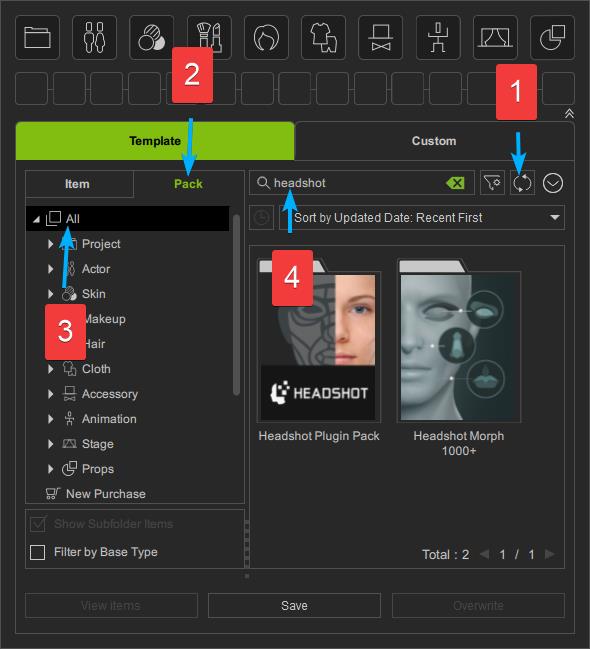
Try this:
Sync.
Select the Pack tab.
Chooser the "All" category.
Search "headshot".
Double click the thumbnail of the pack to install it. The thumbnail will switch to color when installed.
|
|
By dexterhu - 4 Years Ago
|
Thank you for your replying.
I did what exactly like you said. As attached image headshot not found. Again I'm using cc4 v4.0 with headshot plug-in for Character Creator 4 v1.0

|
|
By cgpaarseh - 4 Years Ago
|
I have the same problem here. i can't Morph with Headshot's sculpt morph. But i can morph with basic morph feature of cc4 .
CC4 Ver : 4.0.0511.1
Headshot Ver :1.0.0506
thanks .
|
|
By cgpaarseh - 4 Years Ago
|
|
Hi . This solution didn't work.
|
|
By dexterhu - 4 Years Ago
|
|
My problem exactly like @cgpaarseh described, and like we said Rampa's solution seems not working for us. Please help us.
|
|
By santeri.oksanen - 4 Years Ago
|
|
Have you registered the headshot key and installed plugin in hub? After that I had the same issue in CC4.01 until I did that Rampa's step (install the headshot morph and headshot plugin packs in content->template->pack-> search "headshot").
|
|
By Rampa - 4 Years Ago
|
|
Find the update link for your plugins and resource packs here: This update link is also available at the top of your registration page in your account: Once you have claimed your updated plugins and resource packs, you will find them listed in your account and in the Hub. Then search for the packs in the Content Manager.
|
|
By zeugmatrix - 4 Years Ago
|
I believe I have found the answer to your question
Download the Headshot Morph 1000+ (these are the sliders you need to sculpt) and unzip the files. Place them at this path: C:\Users\Public\Documents\Reallusion\Reallusion Custom\Actor\Avatar Control\
When you're done, your folder will be like that: C:\Users\Public\Documents\Reallusion\Reallusion Custom\Actor\Avatar Control\Headshot Morph 1000+\Embed\Pack
Now open Character Creator 4 and load a character. Go to the Help tab and click at Refresh Sliders
You should be able to sculpt now
Tell us if it worked anytime soon :)
|
|
By Goatcheese - 3 Years Ago
|
Sorry for the bump but I am facing the exact same issue. Regardless of which tab I choose, I cannot find the Headshot 1000+ morphs. I have done the following:
1.) I have installed Headshot via the installer provided on the RL website, it installs and I can see the 1000+ morphs showing as it installs, but it does not do anything when using the Sculpt Morph in Headshot.
2.) I have installed the Headshot plugin via the Smart Content Manager, but do not see the 1000+ morphs. This remains true whether I am in the items or packs. I have used the refresh option, but it is still not there. :(
3.) I have uninstalled and reinstalled everything, still no success on using the Sculpt Morph.
I do not know what to do now. :( I want to use Headshot but can't do those very detailed changes I was hoping to do. Hope someone might be able to assist.
Here is a video of the issue: https://www.youtube.com/watch?v=2GjI699U-Fo
Edit: Just tried to install it from the RL Hub, still doesn't work for some reason. I also don't have the 1000+ morphs after doing that. :(
|
|
By yepkoo - 3 Years Ago
|
I fixed this issue by rescanning the library.
Maybe it can work for you.


|
|
By Goatcheese - 3 Years Ago
|
|
Thanks for the suggestion, yepkoo. :) I just tried that now and still nothing. My directory is set the same as yours, and I can actually see the morphs in those folders, yet they don't reflect on my CC4 for some odd reason. I've refreshed the sliders and the problem still occurs. If you have some other suggestions, I'd appreciate it. Maybe I'll get lucky and strike the right fix. I've reverted back to CC3 until I can find a solution for this, but man, do I want to use CC4. :(
|
|
By yepkoo - 3 Years Ago
|
Peter had shared a patch.
Maybe it will work for this issue.
https://forum.reallusion.com/FindPost528073.aspx
If your problem doesn't improve, maybe Peter has more information on this.
Or it may be more useful to get support from RL support.
|
|
By Goatcheese - 3 Years Ago
|
Will give it a go! Thank you so much for the assistance.
I'm in contact with the support team as well at the moment, but it's worth a shot to try the patch and see if that changes anything. :) Holding thumbs.
|
|
By rosuckmedia - 3 Years Ago
|
|
You'd better take another look. maybe you have overlooked something. Greetings Robert   |
|
By Goatcheese - 3 Years Ago
|
rosuckmedia (1/19/2023)
You'd better take another look. maybe you have overlooked something. Greetings Robert
Hi there. Nope, I've posted a link in the post I made 4 days ago, in the video you will see me searching in both of those, with only the "Headshot Plugin" appearing. There is no Headshot 1000+ morphs there which is odd. Here is the link: https://www.youtube.com/watch?v=2GjI699U-Fo
|
|
By rosuckmedia - 3 Years Ago
|
sorry I had overlooked I have added a photo in my post
Without inserting a photo into theHeadshoot plugin it will not work. |
|
By 4u2ges - 3 Years Ago
|
I did not see it in your video. If you click that arrow for the menu, what is checked - "All" or "Installed"?
It's better be "All".

On Yepkoo screenshot I see "Installed" checked. Meaning if he buys something tomorrow, it will not be seen in the packs list until "All" or "Not-installed" checked.
|
|
By Goatcheese - 3 Years Ago
|
|
@4u2ges Hi! :) Yes, the "All" was selected. Still, nothing. I've literally nuked all my old folders and created a brand new, clean directory under my E:/ drive without ANYTHING in it. I then uninstalled and reinstalled Character Creator 4 for the third time with the plugins (SkinGen and Headshot) before opening it up. Nothing.... It just does not load up for me under my Content. I only see the Headshot Plugin Pack and nothing else.
|
|
By 4u2ges - 3 Years Ago
|
OK, just want to make sure. You mentioned the plug-in, but did you install the Resource Pack? (Rampa posted the link at the first page).

Otherwise, it's probably something with database behind Content Manager. RL Support might need to reset it.
|
|
By Goatcheese - 3 Years Ago
|
4u2ges (1/20/2023)
OK, just want to make sure. You mentioned the plug-in, but did you install the Resource Pack? (Rampa posted the link at the first page). Otherwise, it's probably something with database behind Content Manager. RL Support might need to reset it.
Just installed it via the Upgrade Redemption page to see what happens, it installed successfully, but it seems to be the same contents as the "Headshot Plugin Pack", so the Headshot Ref stuff, but no morphs unfortunately. :(
|