|
By mcmikexx - 4 Years Ago
|
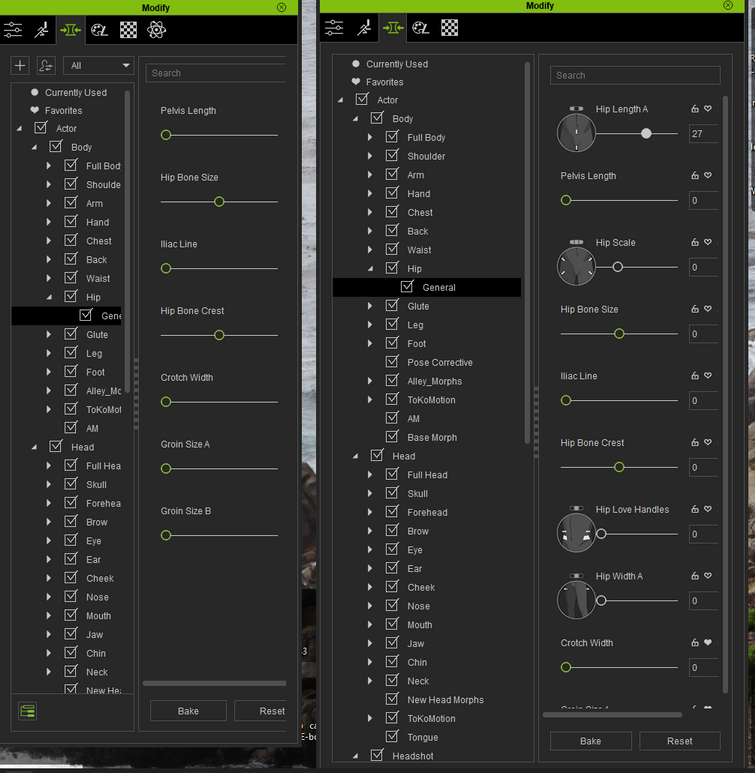
Hello, I cannot figure out how to restore missing CC3 morph sliders in my new copy of CC4. I think they came from a package that I have not loaded yet but I don't see anything I've missed. How can I get Hip Length, Hip Scale, Love Handles, etc. visible in CC4?
|
|
By Peter (RL) - 4 Years Ago
|
Hi...
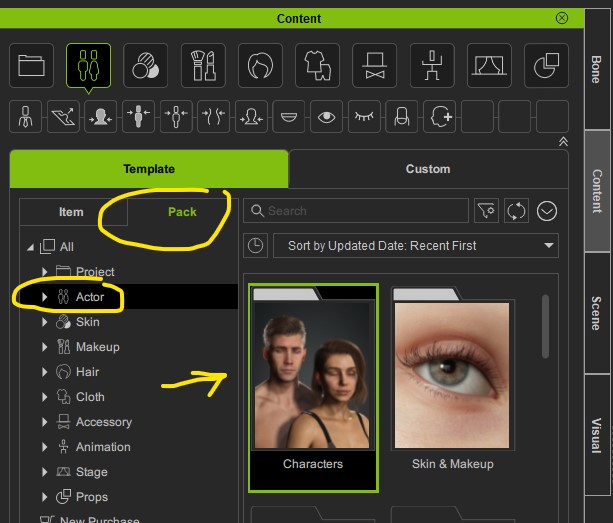
The morphs you are looking for are in the free "Characters" pack in Content Manager. So just click on "Free Resources" in Content Manager and you will see a "Characters" resource pack. Just double click the thumbnail to install it. Once installed you should have the morphs you need.
|
|
By mcmikexx - 4 Years Ago
|
|
Peter, thanks for the guidance. I had already loaded that package and just now refreshed it. Those morphs are still missing. Can I uninstall and reinstall that package without messing up any existing projects I've started?
|
|
By Jeffster The Mighty - 4 Years Ago
|
|
Thanks for this.. I knew I would have to address this sooner or later. Now it's done.
|
|
By mcmikexx - 4 Years Ago
|
|
I decided to uninstall/reinstall CC4, Headshot and SkinGen from the Hub. That seems to have fixed my missing sliders problem.
|
|
By esemgee - 4 Years Ago
|
|
I have waded through all the morphs in the resource pack - some have a question mark - and still can't find 'Chest Front Depth'. Missing or just not included? It is 'essential' for getting shallow, natural breathing or has CC4 come up with a better way of doing this? Or, because it is essential, does that now mean it is in a pack one has to buy?
|
|
By esemgee - 4 Years Ago
|
|
Have found the answer to one of my own questions - morph pack had to be tracked down and installed, so have the slider back. I also seem to have managed to make a morph but I am sure I am complicating the process as I am told my bones and scale don't match. Surely that's the point of morphing? :-)
|
|
By AriaRedux - 4 Years Ago
|
Just to add to this...
For me, I was missing a ton of common sliders, even though I had the character pack installed.
Arms had no sliders at all, and many others were missing from every category.
What fixed it for me was right clicking on the characters pack in the content manager, and uninstalling just that.
Then installing it again and clicking yes on the question.
It rebuilt the morph library and everything was fixed. It's all pretty quick.
Chest front depth does not seem to be a core slider though. Just front & back combined.
|
|
By oberdoofus - 4 Years Ago
|
|
I have followed the different solutions above and am still having issues :(
1. uninstalled and reinstalled the characters pack works BUT if I close the program and then reopen - I am back where I started - with all morph sliders (except for custom ones) gone.
I also have to do the same thing for my Headshot Morph plugins/packs
|
|
By Peter (RL) - 4 Years Ago
|
oberdoofus (7/15/2022)
I have followed the different solutions above and am still having issues :(
1. uninstalled and reinstalled the characters pack works BUT if I close the program and then reopen - I am back where I started - with all morph sliders (except for custom ones) gone.
I also have to do the same thing for my Headshot Morph plugins/packs
Hi...
One of your screenshots on the FT shows you don't have Show Sub-Items" turned on which will prevent the morphs from showing when you are on the parent categories. Try toggling on the "Show Sub-Items" button at the bottom left of the Morph tab and your morphs should appear.
|
|
By oberdoofus - 4 Years Ago
|
Peter (RL) (7/15/2022)
oberdoofus (7/15/2022)
I have followed the different solutions above and am still having issues :(
1. uninstalled and reinstalled the characters pack works BUT if I close the program and then reopen - I am back where I started - with all morph sliders (except for custom ones) gone.
I also have to do the same thing for my Headshot Morph plugins/packs Hi...
One of your screenshots on the FT shows you don't have Show Sub-Items" turned on which will prevent the morphs from showing when you are on the parent categories. Try toggling on the "Show Sub-Items" button at the bottom left of the Morph tab and your morphs should appear.
Hi Peter

I've been toggling that on and off all along - but no difference. Still can't see any morph sliders except for the old custom ones I made back in CC3 and Eye Occlusion and Tearline in Actor Parts
|
|
By Peter (RL) - 4 Years Ago
|
Thanks for clarifying that you have tried the "Show Sub-Items" option and still nothing appears.
As this is an urgent issue, I would advise contacting our Technical Support department who may be able to help you resolve the problem quicker than using the Feedback Tracker.
If you would like to do so, please use the link below. Thanks.
https://www.reallusion.com/CustomerSupport/UserEx/QForm.html
|