|
By BatMorph - 4 Years Ago
|
Here's an example of a very frustrating thing that happens a lot with iclone 7. Let's say I'm making a scene with 5000 frames. It's a superhero flying into a bad guy, pinning the bad guy up against the wall, etc. Now this happens in the first 2k frames. Then there is dialog, then I have the hero back off and the bad guy turn around to fight.
This happens say around 3500 frames. Why is it that the bad guy starts moving towards his movement right away? He will slide down the wall and start floating to his next move. I know iclone can't be made for tiny scenes, why would it have the capability to do scenes of say 50k(My largest to date was 22,149 so far) frames then?
I am constantly forced to cut scenes because of avatars moving too soon. You look at the timeline and nothing is there, they should not be moving until it gets to the action/motion I placed there.
If anyone knows a way to stop the avatars from moving before they are supposed to, I would be grateful for the help.
|
|
By Wacky-Wabbit - 4 Years Ago
|
Timeline issue involving transition. Every character move from one location to another has a point on the timeline which you can adjust / fix. Without me attempting to try to explain it in detail. Watch this tutorial on motion editing:
iClone 7 Tutorial - Timeline: Sampling, Editing & Flattening Motion Clips - Reallusion Courses
|
|
By BatMorph - 4 Years Ago
|
I'm going to render exactly what I mean so you see what's happening, I will try to link it here. Right now I just have 2 avatars talking, after they talk, I have one start moving up in a flying motion. The other goes from standing, a simple stand pose, to assassin sneak. The second they start talking both avatars start moving toward their future motion.
The one flying starts rising up too early. The assassin starts turning to her side, since after the conversation, i turn her to use the sneak motion in the proper direction. I will watch this tutorial, yet this happens a lot.
Just starting this tutorial I'm seeing Motion timeline things I can't somehow open. I have iclone 7. The curve editor is always gray for me. I can open the presets, yet not that, is that an addon I would need to purchase to get the moves to work properly? I just want my avatars doing their motions when they are supposed to and not early.
|
|
By BatMorph - 4 Years Ago
|
Ok, I cannot post this on my shows site, I have too many folks looking forward to the Season Finale and this would be a spoiler. Yet this is the video link to the problem that I do not see in that tutorial. This is VERY important that I stop this extra motion from happening, it would save me a LOT of time. I am forced to make tiny scenes to get around this.
Pinene(in red) is rising up and the movement is hundreds to a thousand frames away. Why is she rising with no movement in the timeline? Indica, on left starts turning to her side too early. That doesn't happen in the timeline until later either. As I mentioned my avatars are moving too early ruining scenes. Please show me how to stop this.
https://youtu.be/3kUJK3411O4 Is the link to the scene. It does have light profanity, just FYI in case you're sensitive. I think the word used is @$$ if you get me.
If you could help me stop this early motion, I'd be so very grateful.
|
|
By BatMorph - 4 Years Ago
|
|
I have a feeling this has to do with the curve editor and it's a way to force you to buy it. Without it, movements own the scene. This causes me to end scene before and after movements. I hope I'm wrong here, otherwise, that's kind of scammy.
|
|
By Rampa - 4 Years Ago
|
|
You need to set a key at the position you want them to start moving. Basically, they are moving from the first key at frame 1 to the last key you set. You can Cntrl-drag a copy of the key at frame 1 to where you want to the motion to actually start.
|
|
By BatMorph - 4 Years Ago
|
|
I wish I understood that, I really do. Yet they are set to stand, and the one in red to talk, not move in ANY other way until at least a thousand frames later. How are they moving from frame 1 then? Other than the talk motion the one in red does of course. The avatars are moving before the motion ever starts in the timeline. Again, I do not own curve editor, I can't afford it. Nor was I warned I'd need it when I bought iclone 7, if that's how you fix this.
|
|
By BatMorph - 4 Years Ago
|
|
|
By BatMorph - 4 Years Ago
|
|
|
By BatMorph - 4 Years Ago
|
|
|
By BatMorph - 4 Years Ago
|
|
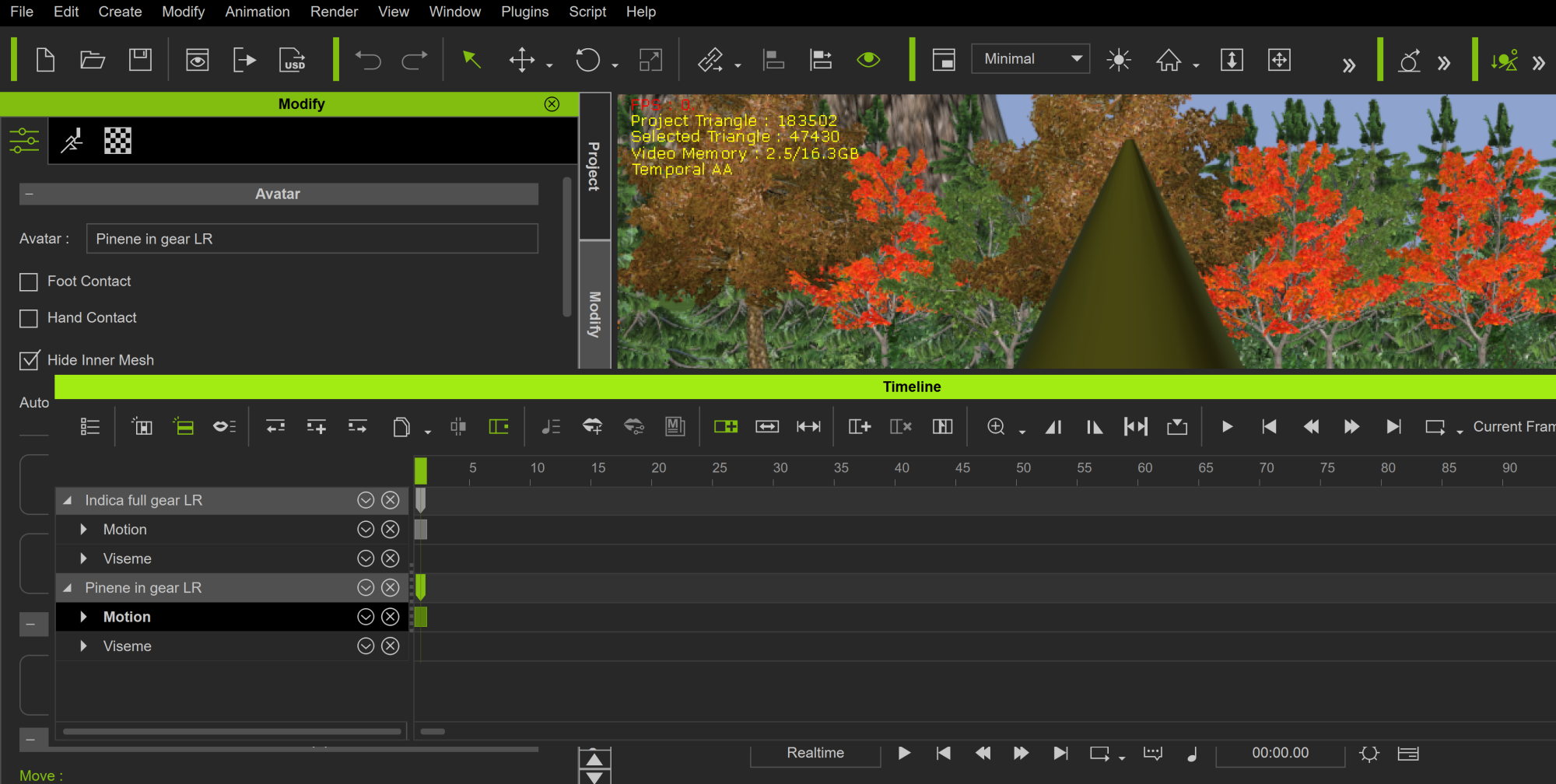
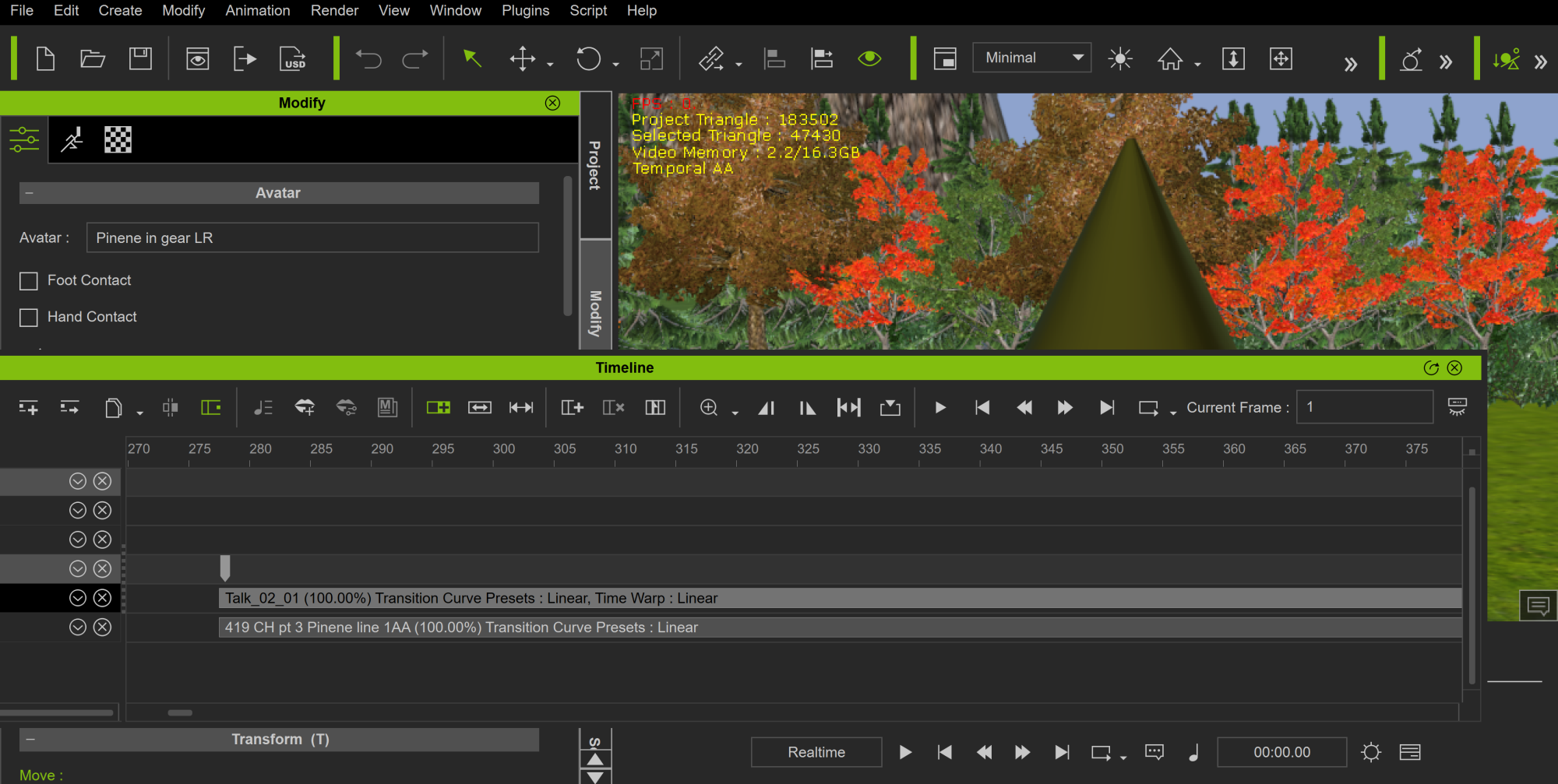
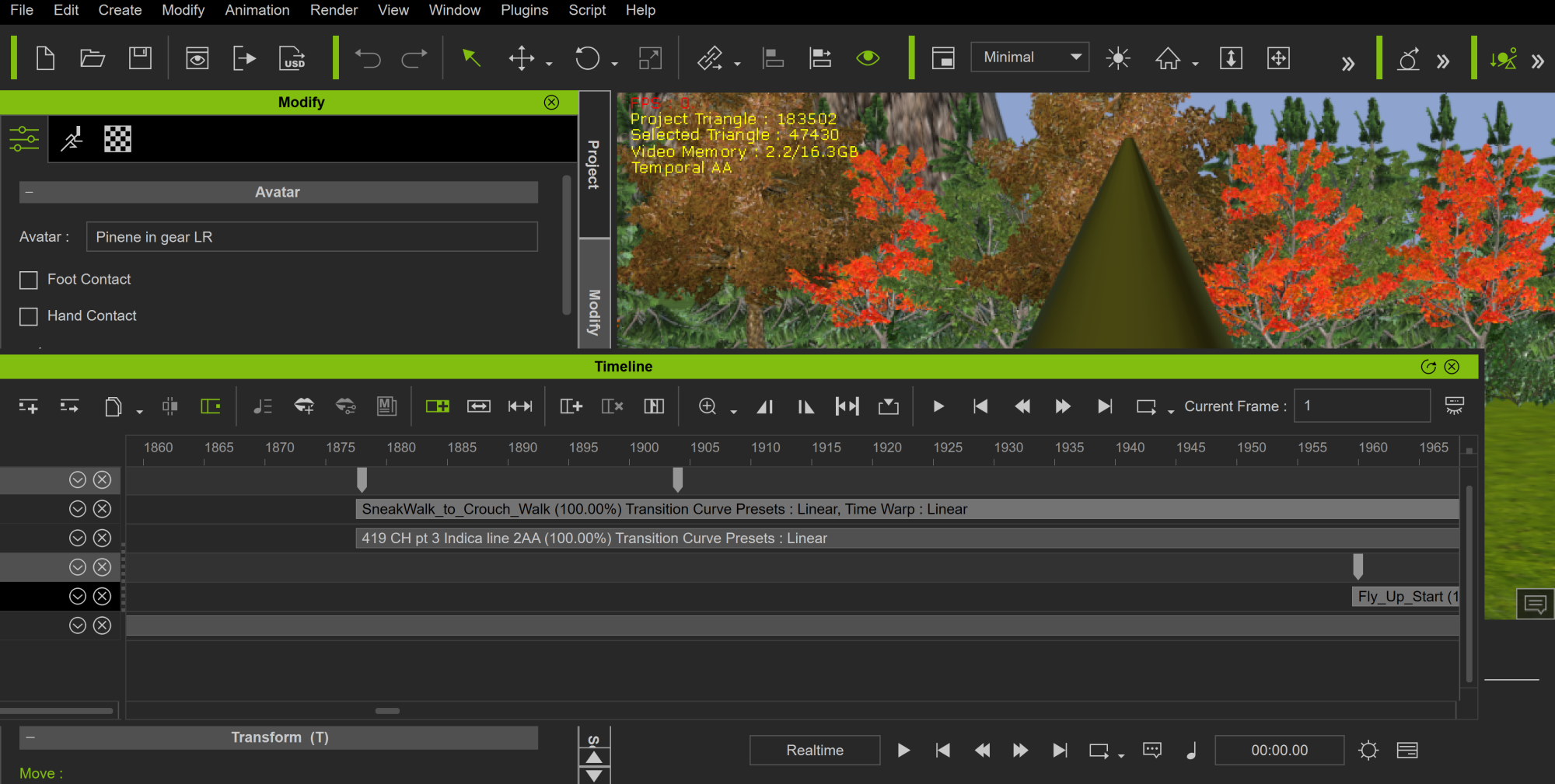
Please look at all 3 pics. Notice they do NOT start moving until I think around 1800 frames. Why are they moving from frame 1 to do a move that starts at a frame set down the timeline?
|
|
By BatMorph - 4 Years Ago
|
|
Again, there are things in that tutorial I do not have. So what you're telling me is that to see that in my timeline I need the Curve Editor. If what I am saying is not true, someone would have already answered with how simple of a solution there is. I put in a ticket leading them to this page because I need to know that it can be fixed without that editor.
|
|
By BatMorph - 4 Years Ago
|

|
|
By BatMorph - 4 Years Ago
|
|
The pic above is a good example, it is of the tutorial. I do NOT have that in my timeline nor will my Motion open to that. I have clicked on everything and everywhere to find it, so it must be part of the curve editor or not part of my iclone 7.
|
|
By Rampa - 4 Years Ago
|
Can you see what this key is"

That may a translate key you should not have in there. My guess is that you probably moved the character at that frame and it set the translate key. Try just deleting it.
|
|
By BatMorph - 4 Years Ago
|
|
I'll test the reset thing from tutorial, yet I have to say...really????? I have to stop a move from starting to early with key frames? Who designed that? If a motion is placed at line 1800, that avatar should NOT be moving toward or be doing part of the motion until it hits that exact keyframe. Ugh, what a drag if that's true.
|
|
By BatMorph - 4 Years Ago
|
|
Tutorial makes me think I have to set keyframes between frame 278 and 1878 where the actual moves start. He doesn't cover that much of an area in the tutorial, so can someone else help that won't keep showing me the wrong tutorial?
|
|
By BatMorph - 4 Years Ago
|
Rampa (5/5/2022)
Can you see what this key is" That may a translate key you should not have in there. My guess is that you probably moved the character at that frame and it set the translate key. Try just deleting it.
That is probably the turn so she is facing the right way, if I delete it she walks the wrong way, or I have to have her stand a way I don't want her to. Now let's say that were true. The real problem is the woman in red lifting. She starts rising at 278 I think and the actual move start in the 1800's. Do I have to make keyframes to stop her from moving? Because that is not in the tutorial that gent in this post showed me and swears by. That tutorial deals with raising his avatar in a very small section. My avatar needs to be stopped from moving all together before that movement frame hits.
|
|
By BatMorph - 4 Years Ago
|
|
...and actually her move starts at 1960. Not 278. How do I use keyframes to stop her from moving, add one for every single frame? That would take forever and couldn't be correct.
|
|
By BatMorph - 4 Years Ago
|
Here's why the tutorial is a problem, when he clicks reset, it adds a key, when I do, it adds nothing. So again, do you need Curve editor to be able to do this? he clicks reset, it adds a key, when I do, it adds nothing. So again, do you need Curve editor to be able to do this?
|
|
By BatMorph - 4 Years Ago
|
|
Ok, forums work well, pic covered up my post. In that video tutorial he has all of these lines when he open Motion up in the timeline, I do not. When I click Reset as he does, even while watching tutorial, it does NOT add a keyframe in my timeline. I do nothing different. Do I need an addon to do this?
|
|
By BatMorph - 4 Years Ago
|

|
|
By BatMorph - 4 Years Ago
|
|
The above pic is mine, notice no keyframe and I hit that Reset button in a few places to test it. So this is a lot of no one understanding the problem, or no one knowing that you may need an addon to do this. I can't say that enough, since no one is able to explain why these events are happening. Especially that tutorial.
|
|
By BatMorph - 4 Years Ago
|
|
The above pic is mine, notice no keyframe and I hit that Reset button in a few places to test it. So this is a lot of no one understanding the problem, or no one knowing that you may need an addon to do this. I can't say that enough, since no one is able to explain why these events are happening. Especially that tutorial.
|
|
By BatMorph - 4 Years Ago
|
|
Sorry for that extra post, I'm frustrated with iclone and Reallusion badly at this point. I got it to add keyframes, yet they do nothing. As I mentioned I need motion to stop, not add one and no one here in the forums seems to understand that, along with the fact that the tutorial only made this more confusing. I'll wait and see of they look at this post because of the ticket, and actually have support to help me, if not, this has been a MAJOR waste of money because nothing works without addons, so it's a scam to me.
|
|
By BatMorph - 4 Years Ago
|
I will say this Reallusion once your techs supposedly see this, making folks have to cut a scene for talking, then another for motion, then another for conversation again is lame beyond extreme. Someone has to eventually understand, I mean folks here on these forums BRAG about how long they have used iclone. If so, why can't ANYONE help me with this added motion for so many frames?
I will not make keyframes from 278 - 1960, that is stupid and I don't even think it can be done, because NONE of you can tell me exactly how to do it. So truth is this program was made for one minute skits or rich folks who can buy all of the addons at once. I'd love for someone to prove me wrong so I don't feel so ripped off right now.
|
|
By 4u2ges - 4 Years Ago
|
You do not need any extra plugins. Timeline is the most complex iClone attribute.
What you really need, is to go down to the timeline basic operations before you can understand what problem you are facing:
https://manual.reallusion.com/iClone_7/ENU/Content/iClone_7/Pro_7.4/09_Animation_Timeline_Editing/Timeline.htm
|
|
By BatMorph - 4 Years Ago
|
Here's the solution that could been typed out by anyone;
Almost like tutorial yet WAY more frames involved so I had to figure out exactly how this works myself. I had to reset at frame 2, then a reset at 1905. Then at 1904 I drag her down creating a keyframe for that, yet can't do via Edit Motion layer because any way I do, she bends or moves funny, so I used control Q then my mouse wheel to lower her.
That made the keyframe that I could now copy and paste to frame 3. Now she stays down until she is supposed to. I could type that our pretty easily to explain. I didn't have to throw any tutorials at myself over and over. Once with an full explanation as I just did would have solved this hours ago.
|
|
By Rampa - 4 Years Ago
|
Glad you found a method. I would also highly recommend going over some beginner tutorials. You will have a much better experience with iClone. :)
https://www.youtube.com/playlist?list=PLNV5zSFadPdlGb3RdfizSW5WjFUnJziI0
|
|
By mark - 4 Years Ago
|
WOW! Folks are going to be fighting over themselves to help out this guy next time!! :P
|
|
By BatMorph - 4 Years Ago
|
Yea, because I'll be back to ask for more help from folks who just throw tutorials at you. No thanks. Their tutorials need to be redone badly. They have pretty much the worst support I've dealt with, & I've dealt with T-Mobile. This is not a cheap program and should have much better support. The wise user will not buy their products right away and wait for hot fixes and patches, then a sale. I admit, I grow to love the program more daily, yet I have no love for large corps that have bad support, it shows they are all about the money only.
Give me a year and I could make them tutorials that actually help others and can be understood easily. Of course today I opened my 4:19 Studio. My shows are taking off. So I wouldn't have time. Yet please don't act like folks here are super helpful, throwing tutorials at people isn't even trying. Rampa rocks though. He used pics and arrows to try to help me, now that's how it's done.
|
|
By shmedia - 4 Years Ago
|
Hi,
What the previous person said about setting a key is the best way to handle it. Usually even if your action and voices start later in the time line. You should still see a keyframe on frame one. That keyframe tells your action what position to have your character in when they first were added to the scene. Go back and check frame one animation as well as transition tracks to see if there is a dot (key frame). Copy that dot (transition track or bar in the animation track) then go to the frame where your character animation is suppose to start and paste the dot (keyframe).
Also right click on the dot and chose transform (I think that is what it is called) often times there are choices like linear, bounce, easy in and easy out). These choices will adjust the tension between keys. You don't want any tension in this case. So chose the option with no curve or slope. I think it is called linear.
Hope that helps.
|
|
By animagic - 4 Years Ago
|
|
On second thought, it's not worth it, but there is no delete option for posts.
|
|
By BatMorph - 4 Years Ago
|
Thank you very much for the thought out explanation. I ended up figuring it out with trial and error really. The episode aired & folks love it. I ended up opening an LLC so I have my own Studio. 4:19 Studios. I had investors come to me within minutes, I of course refused because I plan on doing this by myself & with the help of other creators I have met who also love my ideas.
I am thankful there are kind folks like you on this forum that take the time to explain. When I ran my PC repair company that is how I helped folks. I didn't just charge them and repair their PC, I taught them all about it, why certain problems happen, and if they wanted to know how to fix it and not need to pay for help next time, I showed them how. So no lie, I thank you again for taking the time to explain. You are the second person I met on these forums that were kind enough to do so. I thought everyone relied on tutorials.
|