|
By MaxxPowr - 3 Years Ago
|
Could be me, probably is, but I imported a book prop. Has a colorful cover. The textures look good when I look in the Modify window.
Diffuse texture is fine, specular is fine.
If I turn up Saturation on both the book actually gets less colorful, almost whiting out.
It doesn't always do this, so I'm confused.
Any suggestions?
Thanks,
Maxx Powr
|
|
By MaxxPowr - 3 Years Ago
|
Found the answer if anyone else needs it.
Just set the Specular Color to Black and all the colors pop!
|
|
By animagic - 3 Years Ago
|
You found your answer, but another thing to check is the Strength value of the Diffuse texture.
On some items (even items bought from third-party vendors) the Strength is at 80% or so, which results in a washed-out look.
|
|
By MaxxPowr - 3 Years Ago
|
Thank you! I don't know why they are imported with WHITE diffuse and White Specular. I never even thought of looking at the strength, so thank you very much.
Maxx
|
|
By animagic - 3 Years Ago
|
I wanted to show you an example from an actual pack that I bought, and I found it in the "Dirty Lobby" pack:
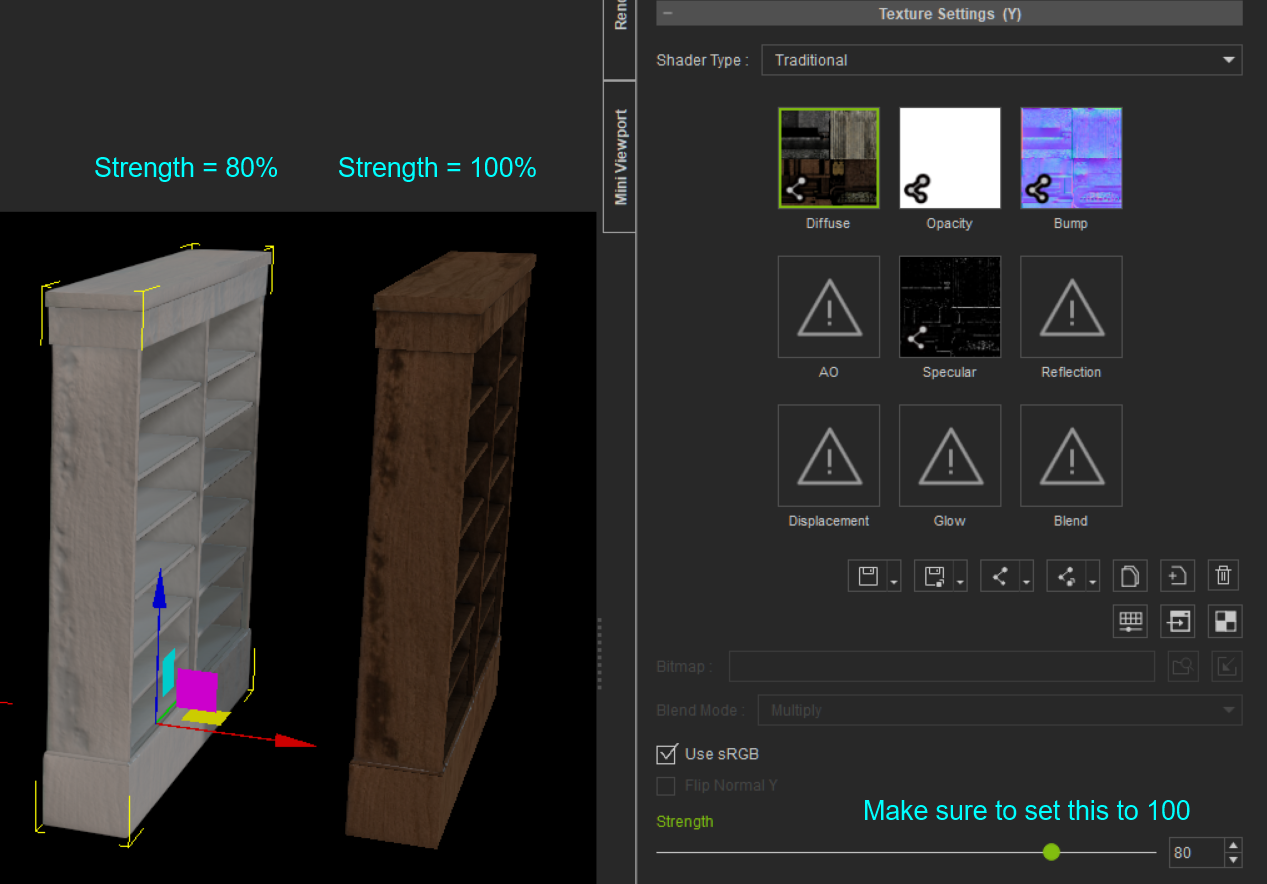
On the left is a bookcase as it is in the pack. The strength for the Diffuse texture is at 80%, so all washed out. On the right is the corrected bookcase with the texture showing correctly.
So even though this pack is from the Content Store, there are nonetheless issues with it.
|