|
By shadybearbklyn - 4 Years Ago
|
|
I just upgraded from a 1080ti to a 3090 and I have a scene that was running at 7fps. Even with the upgrade it’s still running slowly. I have seven characters in the scene but even with four of them hidden I can’t get much more out of it.
|
|
By Kelleytoons - 4 Years Ago
|
|
Check the number of objects in your scene. More than a dozen will bring ANY computer/GPU to its knees (I've had a 3090 for nearly a year and it still won't even render a scene I have that is only around 4GB... but with hundreds of objects. Until I combine them into one object).
|
|
By shadybearbklyn - 4 Years Ago
|
|
I’ve seen you post that issue before. Does the number of characters affect it as well? Should I just combine all of the props?
|
|
By 4u2ges - 4 Years Ago
|
I've been reading a lot of comments about upgrading GPU and not gaining much for the real-time render speed and scene handling.
Which makes me believe the GPU computing has very little to do with real-time render (except for the amount of VRAM - so you can feed larger scenes into).
Fastest CPU is what you are looking to get for fastest possible real-time render. Do not forget, a bottleneck could also be created if you slide a full blown 3090 into PC with slower CPU than it requires.
Google it - there are sites which could identify such a bottleneck according to your PC specs.
As oppose, for ray-tracing (Iray) (which rely solely on GPU computing) you'd see much more speed gain upgrading from GTX to the latest RTX for instance.
|
|
By sungod - 4 Years Ago
|
@shadybearbklyn
Kindly mention your CPU and RAM ?
|
|
By Kelleytoons - 4 Years Ago
|
|
shadybearbklyn (4/5/2022)
I’ve seen you post that issue before. Does the number of characters affect it as well? Should I just combine all of the props?
I haven't actually tested this out - in the past, prior to my 3090, the max characters practical for iClone was about 3-4 (depending on the details). 4 or more was troublesome and after 5 you were just asking for trouble (I had one scene with 6 characters that would crash whenever I tried saving it, although I could render it just fine). But I have not tested whether the 3090 allows you to work with more.
My gut tells me that it depends on the way the characters are constructed. If you have, say, 5 "raw" characters (without clothing or accessories) then it *should* be fine as the 3090 will have the memory needed to handle things. But props is still the biggest problem - more than a dozen can't be handled by ANY GPU (and it has nothing to do with your CPU or other computer characteristics - this problem with props is an iClone issue, not a computer specs issue. It has been both proven and acknowledged by the devs - if you have a lot of props you will bring ANY system down to its knees, but if you combine them all into one all will then be well, independent of RAM load).
I guess I could experiment and find out - I rarely have more than a couple of main characters and if I'm going to have a lot more they invariably end up as background characters (where I use things like Anima to fake - there you can have hundreds without issues with some care). But you can also test yourself - if you have a bare scene, devoid of props, just start loading your characters in one by one until it becomes unworkable. Then you'll know your limit and adjusts your workflow accordingly.
|
|
By jeff.davies - 4 Years Ago
|
I continue to learn from Kellytoons! I had never heard of Anima (axyz-design.com) before! For my crowd scenes I would render short videos of low LOD characters on a transparent background and then play those videos on planes behind the main characters. Here is an example of it https://m.youtube.com/watch?v=iwilbkFG70M&t=4m18s.
This technique also works for bottles on shelves, etc.
|
|
By Data Juggler - 4 Years Ago
|
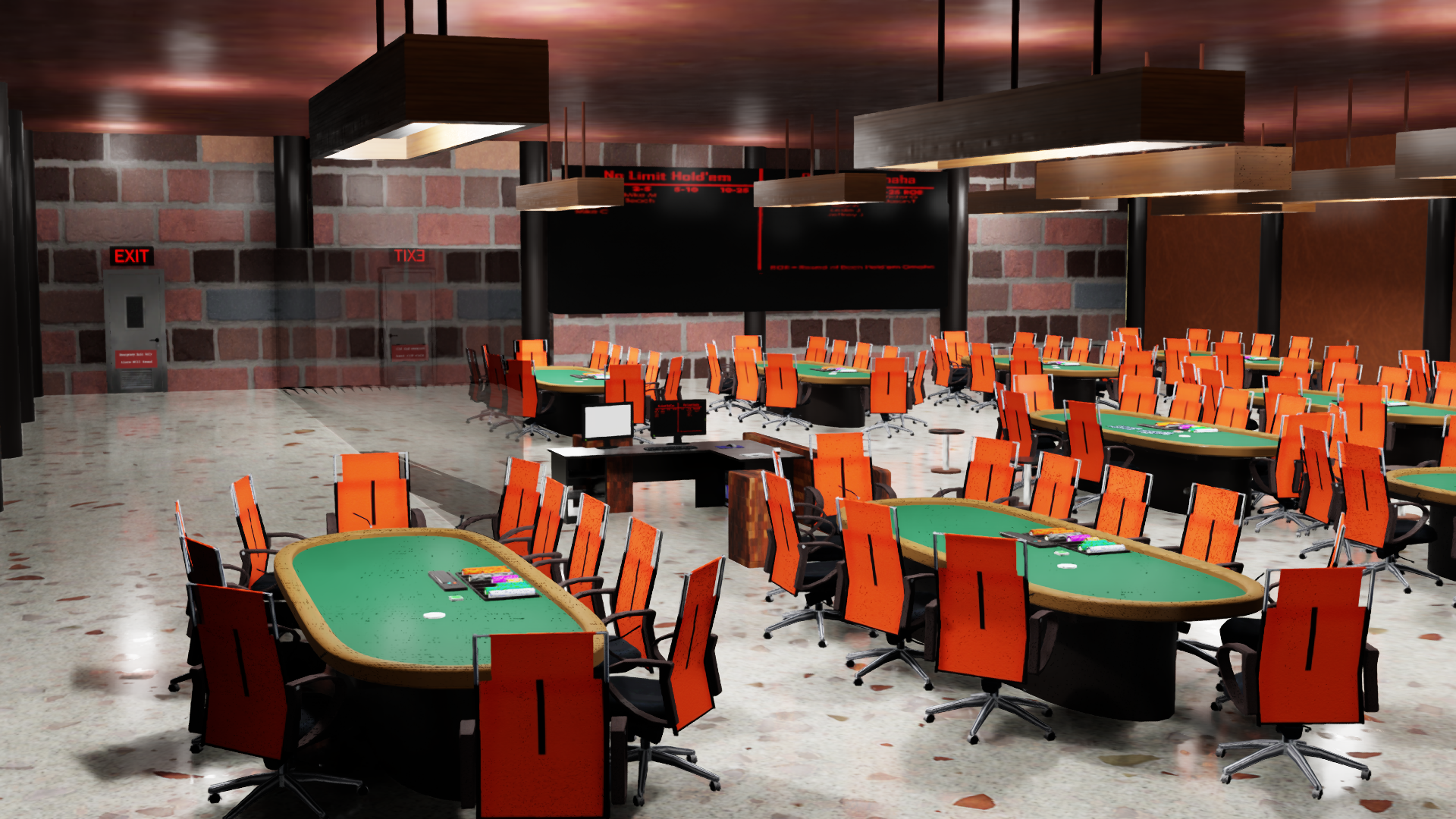
I waited for Alder Lake 19-12900K with an RTX 3090, and my poker room scene still bogs with 6 characters or more than 5 tables. That is with combing the chips in the chip rack.
I look forward to IClone 8 where the preview video they showed mentions non-animated objects can be static and use a lot less memory.
I exported my poker room to Omniverse, and I was able to add a bunch more tables. I can't export my characters for some reason yet, so I can't test that.
12 Tables isn't a problem for Omniverse, so hopefully IClone has some improvements in the near future.
|
|
By planetstardragon - 4 Years Ago
|
i believe it's related to poor memory management - reason - I see big iclone improvements when I use a memory optimizer that regularly clears 1+ gig of ram when optimizing iclone on the fly. What I suspect is happening is that iclone bursts an unlimited amount of data - it's a scaling problem so when you get a faster card / system it will flood your ram even harder - so there really is no such thing as a perfect iclone system if Iclone sends out massive bursts of data that only become more massive when the gear is upgraded. I told another user about this who did a test swapping their old vid card and a new one - the older video card actually had more fps than the newer one - meaning that iclone adapted it's output capacity based on the system power. - so more powerful system, larger iclone data burst, lower fps.
iclone 7 needs to be regulated by some 3rd party approach to stop it from flooding the system buffers.
|
|
By mr_vidius - 4 Years Ago
|
|
planetstardragon (4/5/2022)
i believe it's related to poor memory management - reason - I see big iclone improvements when I use a memory optimizer that regularly clears 1+ gig of ram when optimizing iclone on the fly. What I suspect is happening is that iclone bursts an unlimited amount of data - it's a scaling problem so when you get a faster card / system it will flood your ram even harder - so there really is no such thing as a perfect iclone system if Iclone sends out massive bursts of data that only become more massive when the gear is upgraded. I told another user about this who did a test swapping their old vid card and a new one - the older video card actually had more fps than the newer one - meaning that iclone adapted it's output capacity based on the system power. - so more powerful system, larger iclone data burst, lower fps.
iclone 7 needs to be regulated by some 3rd party approach to stop it from flooding the system buffers.
interesting.. very interesting. may i ask what memory optimizer you use? or is there one you can recommend?
vidius
|
|
By planetstardragon - 4 Years Ago
|
this is the one I've been using, https://www.wisecleaner.com/wise-memory-optimizer.html with mixed results - sometimes when I multi task - different programs have different reactions to the memory optimizing - like my browser will act up - other times when i'm just using iclone and cc3, and I see a big increase in performance So, while this may not be the perfect solution, it seems to be heading in the right direction
and the usual formal disclaimer - i always test different stuff and put my system through major drama - this is just a test to find ways to improve iclone performance, not a solution. While I have seen some improvements, I'm still not sure of any adverse effects it may have on any other given software - so use at your own risk.
|
|
By mr_vidius - 4 Years Ago
|
planetstardragon (4/5/2022)
this is the one I've been using, https://www.wisecleaner.com/wise-memory-optimizer.html with mixed results - sometimes when I multi task - different programs have different reactions to the memory optimizing - like my browser will act up - other times when i'm just using iclone and cc3, and I see a big increase in performance So, while this may not be the perfect solution, it seems to be heading in the right direction and the usual formal disclaimer - i always test different stuff and put my system through major drama - this is just a test to find ways to improve iclone performance, not a solution. While I have seen some improvements, I'm still not sure of any adverse effects it may have on any other given software - so use at your own risk.
thank you for your advice.
vidius
|
|
By ultimativity - 4 Years Ago
|
Hello, your computer's ability to handle scenes is determined by the total build, not just the graphics card.- Uncertain whether you also upgraded RAM as in more or faster (determined by your motherboard).
- Uncertain whether you upgraded storage to M2 or NVMe
- Uncertain whether you upgraded motherboard to PCIe 4.0, which facilitates storage to operate faster by a power of 10.
|
|
By Data Juggler - 4 Years Ago
|
Only slightly related to this topic, but I have a program called Shirt Maker, that uses random numbers and draws hundreds of textures by drawing gradients and slicing them together.
The program is kind of slow, and I didn't write any CUDA code at all, but if I start Character Creator, the program speeds up by 3 to 5 times faster.
Somehow CC activates my RTX 3090, and / or gets my CPU into turbo mode. I discovered it by accident just starting CC and noticed it went from 1 or 2 images a minute to 5 to 10.
|