|
By TimothyMasters - 4 Years Ago
|
Here's a question for you particle experts; I hope it's not impossible. I want to show a snowplow moving down the street after a snowstorm, and I need it to be throwing out a huge, dense volume of snow off to the side of the road. Does anyone have a thought on how I might go about this?
|
|
By BiggsTrek - 4 Years Ago
|
|
If you are ok with legacy particle emitters, then I can probably whip something up for you. Shouldn't be too hard. Just let me know.
|
|
By TimothyMasters - 4 Years Ago
|
Wow, that's super kind of you. I do have an idea for a great little video if I can get snow in a dense, fast stream as from a snowplow as the plow drives down the road in a heavy snowstorm. But I'd just as soon do it myself if you could just write a couple sentences to point me in the right direction; then I can figure out the details myself. Give a man a fish... teach a man to fish, you know. But if you just want to make it and put it in Marketplace, I'll surely buy it. Thanks!
Hey, I just checked out your link to your particle emitters in Marketplace. You have some really nice stuff there. You should package them all into one big pack for Smart Gallery import. I'd definitely buy it! I'll probably buy some of your things anyway, though it's best if they are together in one package to make finding them easy. One of my pet peeves in Marketplace is items that have to be manually downloaded instead of automatically imported, and then they never appear in Smart Gallery, but instead just get hidden away somewhere in Contents and are impossible to find when I need them.
Tim
|
|
By BiggsTrek - 4 Years Ago
|
I definitely understand your "give a man fish" desire, but it would also be easier (for me) to just create something that you could then adjust to your liking (which I'll be happy to help you with - I think that's like meeting you half way?) As a help, check out the online Help section (search for "Particle") - there should be a section called "Particles" that has the basics of the system (this is the iClone 6 version, though it hasn't changed in many many versions): https://manual.reallusion.com/iClone_6/ENU/Pro_6.0/default.html
[EDIT: here's the iClone 7 version - https://manual.reallusion.com/iClone_7/ENU/Content/iClone_7/Pro_7.4/11_Set/Particle/SFX_particle.htm?Highlight=particle ]
And you don't have to buy it, I'll just send it to you. I do this stuff mainly for fun. :)
As to packaging up my existing stuff, I do have a number of "six packs" of particle emitters (and other themed packs) but as I don't have Smart Gallery, I have no idea how they integrate into that system. I'm kind of living in the past having not upgraded from iClone 6 due to my PC's (lack of) performance. (And I think/assume Smart Gallery is part of iClone 7...?) (All that might change soon, but that's another story...)
Anyway, give me a few hours to play around and see what I come up with and get back to you. And I'll try my best to explain it when I send it.
|
|
By TimothyMasters - 4 Years Ago
|
Okay! And tomorrow, when I get some free time, I'll go over to Marketplace and buy some of your stuff.
Tim
|
|
By BiggsTrek - 4 Years Ago
|
Before I get too carried away, he's a quick demo of what I have so far:
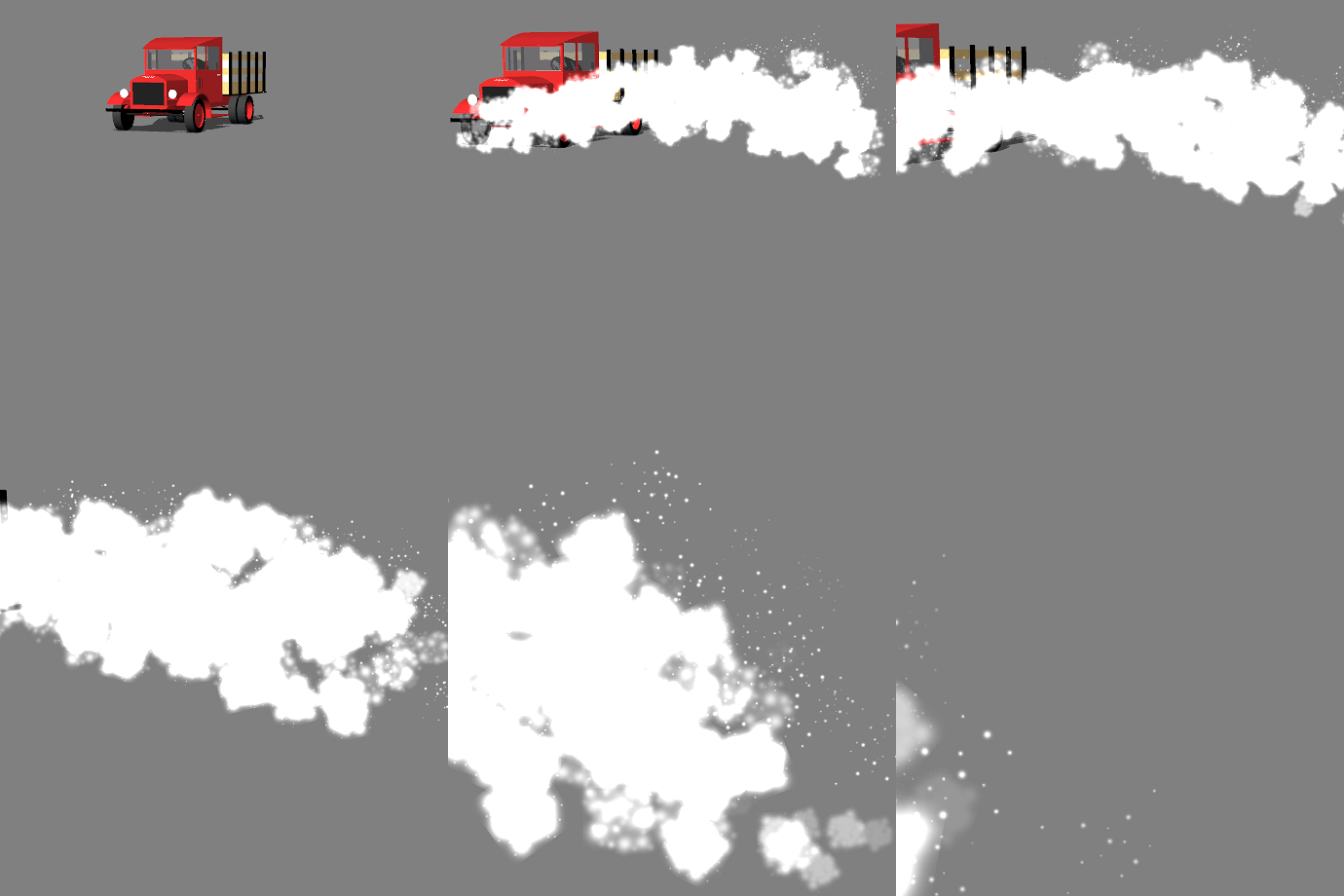
Am I heading in the right direction? Is this what you are after?
Basically that's three very similar emitters spraying off to one side as they are all moving with the truck (no actual plow showing, but you get the point...:) )
|
|
By BiggsTrek - 4 Years Ago
|
And here's another variation, now with a fourth emitter added, as well as a second set rotated along the Z axis 180 degrees for the other side (so basically 8 emitters):

OK, for what it's worth, I now have 4 particle emitters located roughly at the same point, all emitting in a similar Spread and Diagonal and Longtitude and Latitude. All slightly different to each other to make things more "real".
They are: a Small (sprinkle?), Medium and Large emitter of snow. The fourth I call BackGround and is mostly a cloudy white "filler".
As I don't know your level of knowledge of Particle Emitters I don't know what I need to tell you. If you're a novice, I suggest playing with a simple emitter and change each setting and see what happens. Definitely read through the help pages as this should give you an idea of the settings involved.
Anyway, I'll send you the emitters as-is and you can do with them as you will. If you want to change something and don't know exactly how, shoot me a message and I'll try and describe what I think it is you need to do.
[EDIT: I should also mention thebiz did a great video showing the basics of Particle Emitters. Check it out if you haven't already: ]
https://youtu.be/WlA8A0JDJ6Y
|
|
By TimothyMasters - 4 Years Ago
|
Thanks! I'm a pro with Popcorn FX and use it a lot, but I've never worked at a lower level. I hope to learn a lot with this project. I look forward to getting your stuff.
Tim
|
|
By TimothyMasters - 4 Years Ago
|
I want to publicly thank you for those excellent snow emitters. They work extremely well and are exactly what I need. Even better, they are models of good work that can serve as a leaping-off point for my learning more about particles.
Tim
|
|
By BiggsTrek - 4 Years Ago
|
|
You are most welcome. :)
|
|
By TimothyMasters - 4 Years Ago
|
>> but as I don't have Smart Gallery, I have no idea how they integrate into that system. <<
Good news! I just bought a bunch of your sixpacks, and every one of them automatically loaded and integrated into SmartGallery.
Tim
|
|
By BiggsTrek - 4 Years Ago
|
|
Good to know, thanks (And thanks for buying them! Hope they come in handy.)
|
|
By TimothyMasters - 4 Years Ago
|
You kindly said that I could ask a question if needed. I think I've pretty much mastered Legacy particles, meaning that I can pretty much do whatever I want with them now (thanks to studying your many excellent examples). But there's one thing that still has me stumped. No matter what I do, the particles generate their own light. Even in a completely black environment, with no lights at all, the particles glow. In some cases I want my particles to be illuminated by the lights in the scene rather than being their own source of light. If there is no light (such as a spotlight) shining on them, I want them to be invisible. I've tried everything I can think of, and nothing works. Reducing their opacity helps a little but is far from a good solution. Is there a way, or is this just a property of Legacy particles? Thanks!
Tim
|
|
By BiggsTrek - 4 Years Ago
|
|
TimothyMasters (3/28/2022)
You kindly said that I could ask a question if needed. I think I've pretty much mastered Legacy particles, meaning that I can pretty much do whatever I want with them now (thanks to studying your many excellent examples). But there's one thing that still has me stumped. No matter what I do, the particles generate their own light. Even in a completely black environment, with no lights at all, the particles glow. In some cases I want my particles to be illuminated by the lights in the scene rather than being their own source of light. If there is no light (such as a spotlight) shining on them, I want them to be invisible. I've tried everything I can think of, and nothing works. Reducing their opacity helps a little but is far from a good solution. Is there a way, or is this just a property of Legacy particles? Thanks!
Tim
Sorry to say, but there isn't a way for them to react to light dynamically (as in move from a lighted place to darkness and appear different.) The only way I could think of that would be to have two different emitters, one constructed to be in light, the other to be in darkness. And the simplest way to make them darker would be to darken the texture map in your photo editor, and/or darken the 4 particle "keys".
They certainly have limitations (don't even get me started on Depth of Field!) so judicious use is recommended.
EDIT: Just to clarify a little, think of these particles as "sprites" (may not be accurate, but that's as close as I can come) - they aren't really a part of the scene. They aren't affected by light, gravity (physics), movement, etc. They live in their own world and barely interact with the scene they are placed in. And Depth of Field seems to work like this: they inherit the DOF of what's behind them. i.e.: They don't have their own DOF, they just blur if the prop/background directly behind them is also blurry, and if it's sharp, they are sharp no matter if the particles are technically within the DOF range or not.
Dumb question back to you: Can Popcornfx particles handle lighting changes? (I have always assumed that whatever Legacy Particles can do, Popcornfx can do better. Right? Or is that a fallacy? (Just curious as I hope to upgrade soon, all being well.))
|
|
By TimothyMasters - 4 Years Ago
|
I don't know the answer to that. I use the Popcorn library often, and even use their full plugin to do neat things like making a complete mesh into an emitter. And I use their super-tools sometimes. But I've never used them in a situation in which they would be lit; I always wanted self-light, such as fire. But in this case, I have snow at night and a snowplow whose headlights I want to illuminate the snow. It's not working out the way I hoped. I may have to switch to Popcorn particles anyway. Sigh. I've read the manual, and it's vastly more complicated than Legacy particles.
Tim
|
|
By BiggsTrek - 4 Years Ago
|
|
TimothyMasters (3/28/2022)
I don't know the answer to that. I use the Popcorn library often, and even use their full plugin to do neat things like making a complete mesh into an emitter. And I use their super-tools sometimes. But I've never used them in a situation in which they would be lit; I always wanted self-light, such as fire. But in this case, I have snow at night and a snowplow whose headlights I want to illuminate the snow. It's not working out the way I hoped. I may have to switch to Popcorn particles anyway. Sigh. I've read the manual, and it's vastly more complicated than Legacy particles.
Tim
That's a bummer.
The only thing that comes to mind is maybe a cone of bright snow flakes (one for each headlight) and keep the other snow darker?
|
|
By 4u2ges - 4 Years Ago
|
Very quick snow blow made from Popcorn "Spout" texture emitter.
https://drive.google.com/file/d/1c83rN-6wig6Kf4OuDHQYpNzvX8KgBcOK/view?usp=sharing
There is a lot can be changed there to make it better.
You'd have to set a floor and enable physics (static box) for it with maximum friction, if you want a snow to stay and accumulate.

|
|
By TimothyMasters - 4 Years Ago
|
Wow, that is really, really good!
I realize now that I have to bite the bullet and plow through the Popcorn manual. It's very intimidating, but if I want to have particles that can be lit with spotlights I obviously have to go that route. Thank you for that excellent demo.
Tim
|
|
By Rampa - 4 Years Ago
|
There are lots of PopFX videos here:
https://www.youtube.com/playlist?list=PLNV5zSFadPdnnsQgETl2SSUcsX_OfdDk8
A good starting point is probably the mesh emitter. But a texture emitter is probably pretty good too.
|
|
By TimothyMasters - 4 Years Ago
|
Thanks for that. I'm starting to dig in today.
Tim
|