|
By Apollonius - 3 Years Ago
|
I've literally been trying for years at this point. I've opened 3 separate service tickets about it, which were all marked "solved", although the problem persists. In that time, the software has been updated multiple times. Each time I install it, I get the same directx error when I try to run it. I can still use the functions that you can only use if you have 3DX installed like morph creation/animation, but I have *NEVER* been able to rig a mesh, export a morph, easily import an obj as a prop, etc.
I have screamed "PLEASE PLEASE TAKE MY MONEY" because I need to do these things so badly, and I've already invested nearly $1,200 on the software at this point.
Apparently they don't need my money, because 4 years later they still can't help me solve this seemingly simple directx error. I should already be able to do what I need to do for the price I paid, period.
...And now I find that they are FINALLY just integrating 3DX into the main program, but that won't help me unless I invest another grand at least, to buy new versions of everything. They're not going to do it for CC3/iClone7.
Not only that, but they are discontinuing 3DX, so if I want to try and get it up and running finally, I'd better try and do it now.
Here is the error I'm getting:
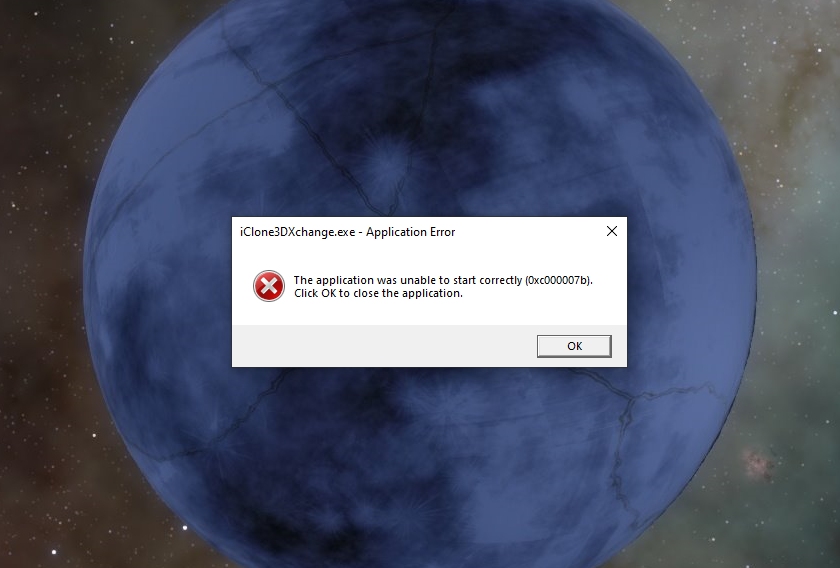
So... is there anybody who can help me solve this?
I have un-installed and re-installed both 3DX and directx about a million times, and it doesn't fix anything. I still get the exact same error. I have updated everything. I am not having issues with any other game, media playback, or any other graphics-related directx errors - just 3DX.
To say that this issue is a thorn in my side at this point is an understatement, so any help would be greatly appreciated!!
|
|
By planetstardragon - 3 Years Ago
|
have you tried cleaning your registry with https://www.ccleaner.com/
Disclaimer - I don't know your system, I've never heard of issues with this software but all the same cleaning a registry is a risk, so in good conscience I say use at your own risk.
if you do - then the free version should be enough - in some cases uninstalling some software is not enough because they leave files in the registry after uninstallation - so reinstalling will just have errors again until the rogue registry entries are removed. First uninstall the problem software, then in cc do a general cleaning of garbage files from your system, then click on the registry tab and let the software scan your system for left over unused garbage registry entries. Not saying this is your case, but this is one aspect that you didn't seem to mention. Good luck!
Ps - don't do it with the software installed, else the problem files could be ignored by ccleaner - it has to be removed so ccleaner can see what was left behind.
|
|
By Apollonius - 3 Years Ago
|
Thank you very much for the response!
Sadly I already tried a registry clean and it didn't work, but I appreciate the advice all the same. :)
I honestly am out of ideas at this point. I have no idea why it's happening, and it frustrates me to no end.
|
|
By Kelleytoons - 3 Years Ago
|
So if you've been trying for years I assume you first started on, what Windows 8? Or are you an early adopter and were already on Win 10?
If the former then what happened when you updated to Win 10? You STILL had that issue? And have you tried updating to Win 11?
My gut tells me this is an OS problem and that somehow you need to reinstall your OS (or use a different machine). Now - I've spent 30+ years in IT but I retired a while ago and things have definitely passed me by so I can't say for sure. But all of this sure smells like a core OS problem that can only be solved with a completely new OS (either upgrade or reformat your machine).
|
|
By Apollonius - 3 Years Ago
|
|
Kelleytoons (3/14/2022)
So if you've been trying for years I assume you first started on, what Windows 8? Or are you an early adopter and were already on Win 10?
If the former then what happened when you updated to Win 10? You STILL had that issue? And have you tried updating to Win 11?
My gut tells me this is an OS problem and that somehow you need to reinstall your OS (or use a different machine). Now - I've spent 30+ years in IT but I retired a while ago and things have definitely passed me by so I can't say for sure. But all of this sure smells like a core OS problem that can only be solved with a completely new OS (either upgrade or reformat your machine).
Windows 10 has been available for over 6 years, and I've had it for 5, so I'm not sure why you would assume that. No early access was necessary.
In any case I have already reformatted my machine, restoring back to factory, and it didn't fix the issue, but thank you very much for your suggestion!
|
|
By planetstardragon - 3 Years Ago
|
what anti virus are you using ? RL Products are known for false flags because of how they interact and maybe your antivirus blocked it ?
|
|
By Rampa - 3 Years Ago
|
You should install both 32-bit and 64-bit versions of this C++ runtime from Microsoft:
https://www.microsoft.com/en-us/download/details.aspx?id=40784
Set your display scaling in the Windows Display settings panel to 100%. That insures the window will not be larger than the display because of the scaling. You can also try running 3DXchange maximized. See here for instructions to run an application maximized. |
|
By Apollonius - 3 Years Ago
|
Thank you to Planetstardragon and Rampa for the new suggestions!
I am working currently, but will try these things when I'm done!
|
|
By Apollonius - 3 Years Ago
|
Rampa (3/14/2022)
You should install both 32-bit and 64-bit versions of this C++ runtime from Microsoft: https://www.microsoft.com/en-us/download/details.aspx?id=40784Set your display scaling in the Windows Display settings panel to 100%. That insures the window will not be larger than the display because of the scaling. You can also try running 3DXchange maximized. See here for instructions to run an application maximized.
I now remember doing all of these things already when you tried to help me before, but I went ahead and tried them again anyway. I chose "Repair" in the installation of the runtimes, since I already had them installed.
My display was already set to 100%.
I already had 3DX set to open maximized. I'm not sure if it's actually doing that or not, because it's still not opening at all.
I turned off windows defender while I uninstalled and re-installed 3DX.
NONE of those things worked.
What in the world could be causing this??
I noticed that those runtimes are only supported for windows 8 and before. There are updates here. Should I try to install those, or would they even help? I'm going to wait until I've heard back from you on this, there's a lot there, and I'm not even sure what I would need.
|
|
By 4u2ges - 3 Years Ago
|
You said you reformatted your drive and loaded OS fresh. Is this Home or Pro edition? What about your user account? Have you transferred your profile/settings over from old installation?
Try to create some account fresh, login with it and try running 3DX. Also try running app as an Administrator.
About C++ runtime, as far as I remember they are getting installed as you install RL apps, but never hurts to reinstall.
This is how my runtime installs look like (I do not remember which particular version is required by RL).
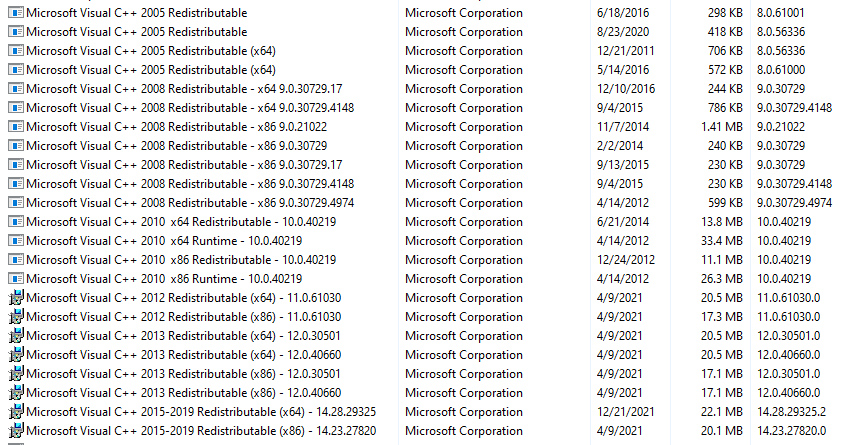
Try running Check Disk.
Try to see what is written about this error in the Application Events Log.
|
|
By Apollonius - 3 Years Ago
|
4u2ges (3/15/2022)
You said you reformatted your drive and loaded OS fresh. Is this Home or Pro edition? What about your user account? Have you transferred your profile/settings over from old installation? Try to create some account fresh, login with it and try running 3DX. Also try running app as an Administrator. About C++ runtime, as far as I remember they are getting installed as you install RL apps, but never hurts to reinstall. This is how my runtime installs look like (I do not remember which particular version is required by RL). Try running Check Disk. Try to see what is written about this error in the Application Events Log.
I have done a disk check, I did a complete reinstall.
I will try to make a new profile and run 3DX that way, thank you for your suggestions!
I have been trying something...
I downloaded a program called Dependency Walker and ran it, which tells you which dependencies are causing issues for you, when trying to open a program.
According to it, the following DLL's are missing:
"Error opening file. The system cannot find the file specified (2)."
API-MS-WIN-CORE-COMM-L1-1-0.DLL
API-MS-WIN-CORE-CONSOLE-L1-1-0.DLL
API-MS-WIN-CORE-CONSOLE-L1-2-0.DLL
API-MS-WIN-CORE-CONSOLE-L1-2-1.DLL
API-MS-WIN-CORE-CONSOLE-L2-1-0.DLL
API-MS-WIN-CORE-CONSOLE-L2-2-0.DLL
API-MS-WIN-CORE-CONSOLE-L3-2-0.DLL
API-MS-WIN-CORE-CRT-L1-1-0.DLL
API-MS-WIN-CORE-CRT-L2-1-0.DLL
API-MS-WIN-CORE-DATETIME-L1-1-0.DLL
API-MS-WIN-CORE-DATETIME-L1-1-1.DLL
API-MS-WIN-CORE-DATETIME-L1-1-2.DLL
API-MS-WIN-CORE-DEBUG-L1-1-0.DLL
API-MS-WIN-CORE-DEBUG-L1-1-1.DLL
API-MS-WIN-CORE-DELAYLOAD-L1-1-0.DLL
API-MS-WIN-CORE-DELAYLOAD-L1-1-1.DLL
API-MS-WIN-CORE-ERRORHANDLING-L1-1-0.DLL
API-MS-WIN-CORE-ERRORHANDLING-L1-1-2.DLL
API-MS-WIN-CORE-ERRORHANDLING-L1-1-3.DLL
API-MS-WIN-CORE-FEATURESTAGING-L1-1-0.DLL
API-MS-WIN-CORE-FIBERS-L1-1-0.DLL
API-MS-WIN-CORE-FIBERS-L1-1-1.DLL
API-MS-WIN-CORE-FIBERS-L2-1-0.DLL
API-MS-WIN-CORE-FIBERS-L2-1-1.DLL
API-MS-WIN-CORE-FILE-L1-1-0.DLL
API-MS-WIN-CORE-FILE-L1-2-0.DLL
API-MS-WIN-CORE-FILE-L1-2-1.DLL
API-MS-WIN-CORE-FILE-L1-2-2.DLL
API-MS-WIN-CORE-FILE-L2-1-0.DLL
API-MS-WIN-CORE-FILE-L2-1-1.DLL
API-MS-WIN-CORE-FILE-L2-1-2.DLL
API-MS-WIN-CORE-FILE-L2-1-3.DLL
API-MS-WIN-CORE-HANDLE-L1-1-0.DLL
API-MS-WIN-CORE-HEAP-L1-1-0.DLL
API-MS-WIN-CORE-HEAP-L2-1-0.DLL
API-MS-WIN-CORE-HEAP-OBSOLETE-L1-1-0.DLL
API-MS-WIN-CORE-INTERLOCKED-L1-1-0.DLL
API-MS-WIN-CORE-IO-L1-1-0.DLL
API-MS-WIN-CORE-IO-L1-1-1.DLL
API-MS-WIN-CORE-JOB-L1-1-0.DLL
API-MS-WIN-CORE-JOB-L2-1-0.DLL
API-MS-WIN-CORE-KERNEL32-LEGACY-L1-1-0.DLL
API-MS-WIN-CORE-KERNEL32-LEGACY-L1-1-1.DLL
API-MS-WIN-CORE-KERNEL32-LEGACY-L1-1-2.DLL
API-MS-WIN-CORE-KERNEL32-PRIVATE-L1-1-0.DLL
API-MS-WIN-CORE-KERNEL32-PRIVATE-L1-1-2.DLL
API-MS-WIN-CORE-LARGEINTEGER-L1-1-0.DLL
API-MS-WIN-CORE-LIBRARYLOADER-L1-1-0.DLL
API-MS-WIN-CORE-LIBRARYLOADER-L1-2-0.DLL
API-MS-WIN-CORE-LIBRARYLOADER-L1-2-1.DLL
API-MS-WIN-CORE-LIBRARYLOADER-L1-2-2.DLL
API-MS-WIN-CORE-LIBRARYLOADER-L2-1-0.DLL
API-MS-WIN-CORE-LOCALIZATION-L1-2-0.DLL
API-MS-WIN-CORE-LOCALIZATION-L1-2-2.DLL
API-MS-WIN-CORE-LOCALIZATION-L2-1-0.DLL
API-MS-WIN-CORE-LOCALIZATION-OBSOLETE-L1-2-0.DLL
API-MS-WIN-CORE-LOCALIZATION-PRIVATE-L1-1-0.DLL
API-MS-WIN-CORE-MARSHAL-L1-1-0.DLL
API-MS-WIN-CORE-MEMORY-L1-1-0.DLL
API-MS-WIN-CORE-MEMORY-L1-1-1.DLL
API-MS-WIN-CORE-MEMORY-L1-1-2.DLL
API-MS-WIN-CORE-MEMORY-L1-1-3.DLL
API-MS-WIN-CORE-MISC-L1-1-0.DLL
API-MS-WIN-CORE-NAMEDPIPE-L1-1-0.DLL
API-MS-WIN-CORE-NAMEDPIPE-L1-2-1.DLL
API-MS-WIN-CORE-NAMEDPIPE-L1-2-2.DLL
API-MS-WIN-CORE-NAMESPACE-L1-1-0.DLL
API-MS-WIN-CORE-NORMALIZATION-L1-1-0.DLL
API-MS-WIN-CORE-PATH-L1-1-0.DLL
API-MS-WIN-CORE-PCW-L1-1-0.DLL
API-MS-WIN-CORE-PRIVATEPROFILE-L1-1-0.DLL
API-MS-WIN-CORE-PROCESSENVIRONMENT-L1-1-0.DLL
API-MS-WIN-CORE-PROCESSENVIRONMENT-L1-2-0.DLL
API-MS-WIN-CORE-PROCESSSNAPSHOT-L1-1-0.DLL
API-MS-WIN-CORE-PROCESSTHREADS-L1-1-0.DLL
API-MS-WIN-CORE-PROCESSTHREADS-L1-1-1.DLL
API-MS-WIN-CORE-PROCESSTHREADS-L1-1-2.DLL
API-MS-WIN-CORE-PROCESSTHREADS-L1-1-3.DLL
API-MS-WIN-CORE-PROCESSTOPOLOGY-L1-1-0.DLL
API-MS-WIN-CORE-PROFILE-L1-1-0.DLL
API-MS-WIN-CORE-PSAPI-ANSI-L1-1-0.DLL
API-MS-WIN-CORE-PSAPI-L1-1-0.DLL
API-MS-WIN-CORE-PSM-KEY-L1-1-0.DLL
API-MS-WIN-CORE-QUIRKS-L1-1-0.DLL
API-MS-WIN-CORE-REALTIME-L1-1-0.DLL
API-MS-WIN-CORE-REGISTRY-L1-1-0.DLL
API-MS-WIN-CORE-REGISTRY-L1-1-1.DLL
API-MS-WIN-CORE-REGISTRY-L1-1-2.DLL
API-MS-WIN-CORE-REGISTRY-L2-1-0.DLL
API-MS-WIN-CORE-REGISTRYUSERSPECIFIC-L1-1-0.DLL
API-MS-WIN-CORE-RTLSUPPORT-L1-1-0.DLL
API-MS-WIN-CORE-SHLWAPI-LEGACY-L1-1-0.DLL
API-MS-WIN-CORE-SHLWAPI-OBSOLETE-L1-1-0.DLL
API-MS-WIN-CORE-SIDEBYSIDE-L1-1-0.DLL
API-MS-WIN-CORE-STRING-L1-1-0.DLL
API-MS-WIN-CORE-STRING-L2-1-0.DLL
API-MS-WIN-CORE-STRING-L2-1-1.DLL
API-MS-WIN-CORE-STRING-OBSOLETE-L1-1-0.DLL
API-MS-WIN-CORE-STRINGANSI-L1-1-0.DLL
API-MS-WIN-CORE-SYNCH-L1-1-0.DLL
API-MS-WIN-CORE-SYNCH-L1-2-0.DLL
API-MS-WIN-CORE-SYNCH-L1-2-1.DLL
API-MS-WIN-CORE-SYSINFO-L1-1-0.DLL
API-MS-WIN-CORE-SYSINFO-L1-2-0.DLL
API-MS-WIN-CORE-SYSINFO-L1-2-1.DLL
API-MS-WIN-CORE-SYSINFO-L1-2-3.DLL
API-MS-WIN-CORE-SYSTEMTOPOLOGY-L1-1-0.DLL
API-MS-WIN-CORE-SYSTEMTOPOLOGY-L1-1-1.DLL
API-MS-WIN-CORE-THREADPOOL-L1-2-0.DLL
API-MS-WIN-CORE-THREADPOOL-LEGACY-L1-1-0.DLL
API-MS-WIN-CORE-THREADPOOL-PRIVATE-L1-1-0.DLL
API-MS-WIN-CORE-TIMEZONE-L1-1-0.DLL
API-MS-WIN-CORE-URL-L1-1-0.DLL
API-MS-WIN-CORE-UTIL-L1-1-0.DLL
API-MS-WIN-CORE-VERSION-L1-1-0.DLL
API-MS-WIN-CORE-VERSIONANSI-L1-1-0.DLL
API-MS-WIN-CORE-WINDOWSERRORREPORTING-L1-1-0.DLL
API-MS-WIN-CORE-WINDOWSERRORREPORTING-L1-1-1.DLL
API-MS-WIN-CORE-WINDOWSERRORREPORTING-L1-1-2.DLL
API-MS-WIN-CORE-WINDOWSERRORREPORTING-L1-1-3.DLL
API-MS-WIN-CORE-WINRT-ERROR-L1-1-0.DLL
API-MS-WIN-CORE-WOW64-L1-1-0.DLL
API-MS-WIN-CORE-WOW64-L1-1-1.DLL
API-MS-WIN-CORE-WOW64-L1-1-3.DLL
API-MS-WIN-CORE-XSTATE-L2-1-0.DLL
API-MS-WIN-CORE-XSTATE-L2-1-1.DLL
API-MS-WIN-CRT-LOCALE-L1-1-0.DLL
API-MS-WIN-CRT-MATH-L1-1-0.DLL
API-MS-WIN-CRT-PRIVATE-L1-1-0.DLL
API-MS-WIN-CRT-RUNTIME-L1-1-0.DLL
API-MS-WIN-CRT-STRING-L1-1-0.DLL
API-MS-WIN-CRT-TIME-L1-1-0.DLL
API-MS-WIN-DEVICES-CONFIG-L1-1-1.DLL
API-MS-WIN-EVENTING-CLASSICPROVIDER-L1-1-0.DLL
API-MS-WIN-EVENTING-CONSUMER-L1-1-0.DLL
API-MS-WIN-EVENTING-CONSUMER-L1-1-1.DLL
API-MS-WIN-EVENTING-CONTROLLER-L1-1-0.DLL
API-MS-WIN-EVENTING-PROVIDER-L1-1-0.DLL
API-MS-WIN-GDI-DPIINFO-L1-1-0.DLL
API-MS-WIN-GDI-INTERNAL-UAP-L1-1-0.DLL
API-MS-WIN-MM-TIME-L1-1-0.DLL
API-MS-WIN-POWER-BASE-L1-1-0.DLL
API-MS-WIN-POWER-SETTING-L1-1-0.DLL
API-MS-WIN-SECURITY-APPCONTAINER-L1-1-0.DLL
API-MS-WIN-SECURITY-AUDIT-L1-1-0.DLL
API-MS-WIN-SECURITY-AUDIT-L1-1-1.DLL
API-MS-WIN-SECURITY-BASE-L1-1-0.DLL
API-MS-WIN-SECURITY-BASE-L1-2-0.DLL
API-MS-WIN-SECURITY-BASE-PRIVATE-L1-1-0.DLL
API-MS-WIN-SECURITY-GROUPPOLICY-L1-1-0.DLL
API-MS-WIN-SECURITY-LSALOOKUP-L2-1-0.DLL
API-MS-WIN-SECURITY-SDDL-L1-1-0.DLL
API-MS-WIN-SECURITY-SYSTEMFUNCTIONS-L1-1-0.DLL
API-MS-WIN-SERVICE-CORE-L1-1-0.DLL
API-MS-WIN-SERVICE-CORE-L1-1-1.DLL
API-MS-WIN-SERVICE-CORE-L1-1-2.DLL
API-MS-WIN-SERVICE-MANAGEMENT-L1-1-0.DLL
API-MS-WIN-SERVICE-MANAGEMENT-L2-1-0.DLL
API-MS-WIN-SERVICE-PRIVATE-L1-1-0.DLL
API-MS-WIN-SERVICE-PRIVATE-L1-1-2.DLL
API-MS-WIN-SERVICE-PRIVATE-L1-1-3.DLL
API-MS-WIN-SERVICE-PRIVATE-L1-1-4.DLL
API-MS-WIN-SERVICE-WINSVC-L1-1-0.DLL
API-MS-WIN-SHCORE-OBSOLETE-L1-1-0.DLL
API-MS-WIN-SHELL-SHELLCOM-L1-1-0.DLL
API-MS-WIN-SHELL-SHELLFOLDERS-L1-1-0.DLL
API-MS-WIN-STATESEPARATION-HELPERS-L1-1-0.DLL
API-MS-WIN-APPMODEL-IDENTITY-L1-2-0.DLL
API-MS-WIN-APPMODEL-RUNTIME-INTERNAL-L1-1-1.DLL
API-MS-WIN-APPMODEL-RUNTIME-INTERNAL-L1-1-2.DLL
API-MS-WIN-APPMODEL-RUNTIME-INTERNAL-L1-1-3.DLL
API-MS-WIN-APPMODEL-RUNTIME-INTERNAL-L1-1-7.DLL
API-MS-WIN-APPMODEL-RUNTIME-L1-1-0.DLL
API-MS-WIN-APPMODEL-RUNTIME-L1-1-1.DLL
API-MS-WIN-APPMODEL-STATE-L1-2-0.DLL
API-MS-WIN-BASE-UTIL-L1-1-0.DLL
API-MS-WIN-CONTAINERS-CMCLIENT-L1-1-0.DLL
API-MS-WIN-CONTAINERS-CMCLIENT-L1-2-0.DLL
API-MS-WIN-CORE-COM-L1-1-3.DLL
API-MS-WIN-CORE-COM-L2-1-1.DLL
API-MS-WIN-CORE-COM-MIDLPROXYSTUB-L1-1-0.DLL
API-MS-WIN-CORE-COM-PRIVATE-L1-1-1.DLL
API-MS-WIN-CORE-COM-PRIVATE-L1-2-0.DLL
API-MS-WIN-CORE-COM-PRIVATE-L1-3-0.DLL
API-MS-WIN-CORE-DEBUG-MINIDUMP-L1-1-0.DLL
API-MS-WIN-CORE-KERNEL32-PRIVATE-L1-1-1.DLL
API-MS-WIN-CORE-LOCALIZATION-L1-1-0.DLL
API-MS-WIN-CORE-LOCALREGISTRY-L1-1-0.DLL
API-MS-WIN-CORE-MEMORY-L1-1-5.DLL
API-MS-WIN-CORE-PRIVATEPROFILE-L1-1-1.DLL
API-MS-WIN-CORE-PROCESSTOPOLOGY-OBSOLETE-L1-1-0.DLL
API-MS-WIN-CORE-PSM-APP-L1-1-0.DLL
API-MS-WIN-CORE-PSM-APPNOTIFY-L1-1-0.DLL
API-MS-WIN-CORE-REALTIME-L1-1-1.DLL
API-MS-WIN-CORE-REGISTRY-PRIVATE-L1-1-0.DLL
API-MS-WIN-CORE-SHUTDOWN-L1-1-0.DLL
API-MS-WIN-CORE-SYNCH-ANSI-L1-1-0.DLL
API-MS-WIN-CORE-SYSINFO-L2-1-0.DLL
API-MS-WIN-CORE-TEXTINPUT-CLIENT-L1-1-0.DLL
API-MS-WIN-CORE-TEXTINPUT-CLIENT-L1-1-1.DLL
API-MS-WIN-CORE-TOOLHELP-L1-1-0.DLL
API-MS-WIN-CORE-VERSION-L1-1-1.DLL
API-MS-WIN-CORE-VERSION-PRIVATE-L1-1-0.DLL
API-MS-WIN-CORE-VERSIONANSI-L1-1-1.DLL
API-MS-WIN-CORE-WINRT-ERROR-L1-1-1.DLL
API-MS-WIN-CORE-WINRT-ERRORPRIVATE-L1-1-0.DLL
API-MS-WIN-CORE-WINRT-L1-1-0.DLL
API-MS-WIN-CORE-WINRT-PROPERTYSETPRIVATE-L1-1-0.DLL
API-MS-WIN-CORE-WINRT-PROPERTYSETPRIVATE-L1-1-1.DLL
API-MS-WIN-CORE-WINRT-REGISTRATION-L1-1-0.DLL
API-MS-WIN-CORE-WINRT-ROBUFFER-L1-1-0.DLL
API-MS-WIN-CORE-WINRT-STRING-L1-1-0.DLL
API-MS-WIN-COREUI-SECRUNTIME-L1-1-0.DLL
API-MS-WIN-CRT-CONVERT-L1-1-0.DLL
API-MS-WIN-CRT-ENVIRONMENT-L1-1-0.DLL
API-MS-WIN-CRT-FILESYSTEM-L1-1-0.DLL
API-MS-WIN-CRT-HEAP-L1-1-0.DLL
API-MS-WIN-CRT-PROCESS-L1-1-0.DLL
API-MS-WIN-CRT-STDIO-L1-1-0.DLL
API-MS-WIN-CRT-UTILITY-L1-1-0.DLL
API-MS-WIN-DEVICES-QUERY-L1-1-0.DLL
API-MS-WIN-DOWNLEVEL-ADVAPI32-L1-1-0.DLL
API-MS-WIN-DOWNLEVEL-ADVAPI32-L2-1-0.DLL
API-MS-WIN-DOWNLEVEL-KERNEL32-L1-1-0.DLL
API-MS-WIN-DOWNLEVEL-KERNEL32-L2-1-0.DLL
API-MS-WIN-DOWNLEVEL-NORMALIZ-L1-1-0.DLL
API-MS-WIN-DOWNLEVEL-OLE32-L1-1-0.DLL
API-MS-WIN-DOWNLEVEL-SHELL32-L1-1-0.DLL
API-MS-WIN-DOWNLEVEL-SHLWAPI-L1-1-0.DLL
API-MS-WIN-DOWNLEVEL-SHLWAPI-L2-1-0.DLL
API-MS-WIN-DOWNLEVEL-USER32-L1-1-0.DLL
API-MS-WIN-DOWNLEVEL-VERSION-L1-1-0.DLL
API-MS-WIN-DWMAPI-L1-1-0.DLL
API-MS-WIN-DX-D3DKMT-L1-1-0.DLL
API-MS-WIN-DX-D3DKMT-L1-1-1.DLL
API-MS-WIN-DX-D3DKMT-L1-1-3.DLL
API-MS-WIN-DX-D3DKMT-L1-1-4.DLL
API-MS-WIN-EVENTING-LEGACY-L1-1-0.DLL
API-MS-WIN-EVENTING-OBSOLETE-L1-1-0.DLL
API-MS-WIN-EVENTING-TDH-L1-1-0.DLL
API-MS-WIN-EVENTLOG-LEGACY-L1-1-0.DLL
API-MS-WIN-HTTP-TIME-L1-1-0.DLL
API-MS-WIN-MM-MISC-L1-1-0.DLL
API-MS-WIN-MM-MISC-L1-1-1.DLL
API-MS-WIN-MM-MISC-L2-1-0.DLL
API-MS-WIN-MM-MME-L1-1-0.DLL
API-MS-WIN-NETWORKING-INTERFACECONTEXTS-L1-1-0.DLL
API-MS-WIN-NTUSER-RECTANGLE-L1-1-0.DLL
API-MS-WIN-NTUSER-SYSPARAMS-L1-1-0.DLL
API-MS-WIN-OLE32-IE-L1-1-0.DLL
API-MS-WIN-OOBE-NOTIFICATION-L1-1-0.DLL
API-MS-WIN-RO-TYPERESOLUTION-L1-1-0.DLL
API-MS-WIN-RTCORE-NTUSER-CLIPBOARD-L1-1-0.DLL
API-MS-WIN-RTCORE-NTUSER-PRIVATE-L1-1-0.DLL
API-MS-WIN-RTCORE-NTUSER-PRIVATE-L1-1-1.DLL
API-MS-WIN-RTCORE-NTUSER-PRIVATE-L1-1-2.DLL
API-MS-WIN-RTCORE-NTUSER-PRIVATE-L1-1-4.DLL
API-MS-WIN-RTCORE-NTUSER-PRIVATE-L1-1-7.DLL
API-MS-WIN-RTCORE-NTUSER-PRIVATE-L1-1-9.DLL
API-MS-WIN-RTCORE-NTUSER-SHELL-L1-1-0.DLL
API-MS-WIN-RTCORE-NTUSER-SYNCH-L1-1-0.DLL
API-MS-WIN-RTCORE-NTUSER-WINDOW-L1-1-0.DLL
API-MS-WIN-RTCORE-NTUSER-WINEVENT-L1-1-0.DLL
API-MS-WIN-RTCORE-NTUSER-WMPOINTER-L1-1-0.DLL
API-MS-WIN-SECURITY-ACCESSHLPR-L1-1-0.DLL
API-MS-WIN-SECURITY-ACTIVEDIRECTORYCLIENT-L1-1-0.DLL
API-MS-WIN-SECURITY-ACTIVEDIRECTORYCLIENT-L1-1-1.DLL
API-MS-WIN-SECURITY-BASE-L1-2-1.DLL
API-MS-WIN-SECURITY-BASE-PRIVATE-L1-1-1.DLL
API-MS-WIN-SECURITY-CAPABILITY-L1-1-0.DLL
API-MS-WIN-SECURITY-CREDENTIALS-L1-1-0.DLL
API-MS-WIN-SECURITY-CREDENTIALS-L2-1-0.DLL
API-MS-WIN-SECURITY-CRYPTOAPI-L1-1-0.DLL
API-MS-WIN-SECURITY-ISOLATEDCONTAINER-L1-1-0.DLL
API-MS-WIN-SECURITY-ISOLATIONPOLICY-L1-2-0.DLL
API-MS-WIN-SECURITY-LOGON-L1-1-0.DLL
API-MS-WIN-SECURITY-LOGON-L1-1-1.DLL
API-MS-WIN-SECURITY-LSALOOKUP-ANSI-L2-1-0.DLL
API-MS-WIN-SECURITY-LSALOOKUP-L1-1-0.DLL
API-MS-WIN-SECURITY-LSALOOKUP-L1-1-1.DLL
API-MS-WIN-SECURITY-LSALOOKUP-L1-1-2.DLL
API-MS-WIN-SECURITY-LSAPOLICY-L1-1-0.DLL
API-MS-WIN-SECURITY-PROVIDER-L1-1-0.DLL
API-MS-WIN-SECURITY-SDDLPARSECOND-L1-1-0.DLL
API-MS-WIN-SERVICE-CORE-L1-1-4.DLL
API-MS-WIN-SHCORE-COMHELPERS-L1-1-0.DLL
API-MS-WIN-SHCORE-PATH-L1-1-0.DLL
API-MS-WIN-SHCORE-REGISTRY-L1-1-0.DLL
API-MS-WIN-SHCORE-REGISTRY-L1-1-1.DLL
API-MS-WIN-SHCORE-SCALING-L1-1-0.DLL
API-MS-WIN-SHCORE-SCALING-L1-1-1.DLL
API-MS-WIN-SHCORE-STREAM-L1-1-0.DLL
API-MS-WIN-SHCORE-STREAM-WINRT-L1-1-0.DLL
API-MS-WIN-SHCORE-SYSINFO-L1-1-0.DLL
API-MS-WIN-SHCORE-TASKPOOL-L1-1-0.DLL
API-MS-WIN-SHCORE-THREAD-L1-1-0.DLL
API-MS-WIN-SHCORE-UNICODEANSI-L1-1-0.DLL
API-MS-WIN-SHELL-ASSOCIATIONS-L1-1-1.DLL
API-MS-WIN-SHELL-CHANGENOTIFY-L1-1-0.DLL
API-MS-WIN-SHELL-NAMESPACE-L1-1-0.DLL
API-MS-WIN-SHELL-SHDIRECTORY-L1-1-0.DLL
API-MS-WIN-SHLWAPI-IE-L1-1-0.DLL
API-MS-WIN-SHLWAPI-WINRT-STORAGE-L1-1-1.DLL
API-MS-WIN-STORAGE-EXPORTS-EXTERNAL-L1-1-0.DLL
API-MS-WIN-STORAGE-EXPORTS-INTERNAL-L1-1-0.DLL
EXT-MS-MF-PAL-L2-1-0.DLL
EXT-MS-ONECORE-APPDEFAULTS-L1-1-0.DLL
EXT-MS-ONECORE-APPMODEL-STATEREPOSITORY-CACHE-L1-1-0.DLL
EXT-MS-ONECORE-APPMODEL-STATEREPOSITORY-CACHE-L1-1-2.DLL
EXT-MS-ONECORE-APPMODEL-STATEREPOSITORY-INTERNAL-L1-1-1.DLL
EXT-MS-ONECORE-APPMODEL-STATEREPOSITORY-INTERNAL-L1-1-3.DLL
EXT-MS-ONECORE-APPMODEL-STATEREPOSITORY-INTERNAL-L1-1-4.DLL
EXT-MS-ONECORE-DCOMP-L1-1-0.DLL
EXT-MS-ONECORE-HLINK-L1-1-0.DLL
EXT-MS-ONECORE-ORIENTATION-L1-1-0.DLL
EXT-MS-ONECORE-SERVICE-DEVICEDIRECTORY-CLAIMS-L1-1-0.DLL
EXT-MS-ONECORE-SHELLCHROMEAPI-L1-1-0.DLL
EXT-MS-WIN-ADSI-ACTIVEDS-L1-1-0.DLL
EXT-MS-WIN-ADVAPI32-ENCRYPTEDFILE-L1-1-0.DLL
EXT-MS-WIN-ADVAPI32-HWPROF-L1-1-0.DLL
EXT-MS-WIN-ADVAPI32-LSA-L1-1-0.DLL
EXT-MS-WIN-ADVAPI32-MSI-L1-1-0.DLL
EXT-MS-WIN-ADVAPI32-NPUSERNAME-L1-1-0.DLL
EXT-MS-WIN-ADVAPI32-NTMARTA-L1-1-0.DLL
EXT-MS-WIN-ADVAPI32-PSM-APP-L1-1-0.DLL
EXT-MS-WIN-ADVAPI32-REGISTRY-L1-1-0.DLL
EXT-MS-WIN-ADVAPI32-REGISTRY-L1-1-1.DLL
EXT-MS-WIN-ADVAPI32-SAFER-L1-1-0.DLL
EXT-MS-WIN-APPCOMPAT-AEINV-L1-1-0.DLL
EXT-MS-WIN-APPCOMPAT-AEPIC-L1-1-0.DLL
EXT-MS-WIN-APPCOMPAT-APPHELP-L1-1-0.DLL
EXT-MS-WIN-APPMODEL-APPEXECUTIONALIAS-L1-1-0.DLL
EXT-MS-WIN-APPMODEL-APPEXECUTIONALIAS-L1-1-1.DLL
EXT-MS-WIN-APPMODEL-APPEXECUTIONALIAS-L1-1-2.DLL
EXT-MS-WIN-APPMODEL-DAXCORE-L1-1-0.DLL
EXT-MS-WIN-APPMODEL-DEPLOYMENT-L1-1-0.DLL
EXT-MS-WIN-APPMODEL-RESTRICTEDAPPCONTAINER-INTERNAL-L1-1-0.DLL
EXT-MS-WIN-APPMODEL-STATE-EXT-L1-2-0.DLL
EXT-MS-WIN-APPMODEL-USERCONTEXT-L1-1-0.DLL
EXT-MS-WIN-APPMODEL-VIEWSCALEFACTOR-L1-1-0.DLL
EXT-MS-WIN-APPXDEPLOYMENTCLIENT-APPXDEPLOY-L1-1-0.DLL
EXT-MS-WIN-APPXDEPLOYMENTCLIENT-APPXDEPLOYONECORE-L1-1-0.DLL
EXT-MS-WIN-AUDIOCORE-PAL-L1-2-0.DLL
EXT-MS-WIN-AUDIOCORE-SPATIAL-L1-1-0.DLL
EXT-MS-WIN-AUTHZ-CONTEXT-L1-1-0.DLL
EXT-MS-WIN-AUTHZ-REMOTE-L1-1-0.DLL
EXT-MS-WIN-BIOMETRICS-WINBIO-CORE-L1-1-0.DLL
EXT-MS-WIN-COM-APARTMENTRESTRICTION-L1-1-0.DLL
EXT-MS-WIN-COM-CLBCATQ-L1-1-0.DLL
EXT-MS-WIN-COM-COML2-L1-1-1.DLL
EXT-MS-WIN-COM-OLE32-L1-1-0.DLL
EXT-MS-WIN-COM-OLE32-L1-1-1.DLL
EXT-MS-WIN-COM-OLE32-L1-1-2.DLL
EXT-MS-WIN-COM-OLE32-L1-1-3.DLL
EXT-MS-WIN-COM-OLE32-L1-1-4.DLL
EXT-MS-WIN-COM-OLE32-L1-1-5.DLL
EXT-MS-WIN-COM-PSMREGISTER-L1-1-0.DLL
EXT-MS-WIN-COM-SUSPENDRESILIENCY-L1-1-0.DLL
EXT-MS-WIN-CONTAINERS-POLICYMANAGERCLI-L1-1-0.DLL
EXT-MS-WIN-CORE-PKEYHELPER-L1-1-0.DLL
EXT-MS-WIN-CORE-RESOURCEPOLICY-L1-1-0.DLL
EXT-MS-WIN-CORE-WINRT-REMOTE-L1-1-0.DLL
EXT-MS-WIN-DESKTOPAPPX-L1-1-0.DLL
EXT-MS-WIN-DESKTOPAPPX-L1-1-3.DLL
EXT-MS-WIN-DEVMGMT-DM-L1-1-0.DLL
EXT-MS-WIN-DEVMGMT-DM-L1-1-1.DLL
EXT-MS-WIN-DEVMGMT-DM-L1-1-2.DLL
EXT-MS-WIN-DEVMGMT-POLICY-L1-1-0.DLL
EXT-MS-WIN-DEVMGMT-POLICY-L1-1-1.DLL
EXT-MS-WIN-DIRECT2D-DESKTOP-L1-1-0.DLL
EXT-MS-WIN-DOMAINJOIN-NETJOIN-L1-1-0.DLL
EXT-MS-WIN-DRIVER-SETUP-L1-1-0.DLL
EXT-MS-WIN-DWMAPI-EXT-L1-1-0.DLL
EXT-MS-WIN-DWMAPIDXGI-EXT-L1-1-0.DLL
EXT-MS-WIN-DWMAPIDXGI-EXT-L1-1-1.DLL
EXT-MS-WIN-DX-D3DKMT-DXCORE-L1-1-0.DLL
EXT-MS-WIN-DX-D3DKMT-GDI-L1-1-0.DLL
EXT-MS-WIN-DXCORE-INTERNAL-L1-1-0.DLL
EXT-MS-WIN-DXCORE-L1-1-0.DLL
EXT-MS-WIN-EDPUTIL-POLICY-L1-1-0.DLL
EXT-MS-WIN-EDPUTIL-POLICY-L1-1-1.DLL
EXT-MS-WIN-ELS-ELSCORE-L1-1-0.DLL
EXT-MS-WIN-EVENTING-RUNDOWN-L1-1-0.DLL
EXT-MS-WIN-FAMILYSAFETY-CHILDACCOUNT-L1-1-0.DLL
EXT-MS-WIN-FECLIENT-ENCRYPTEDFILE-L1-1-0.DLL
EXT-MS-WIN-FECLIENT-ENCRYPTEDFILE-L1-1-1.DLL
EXT-MS-WIN-FECLIENT-ENCRYPTEDFILE-L1-1-2.DLL
EXT-MS-WIN-FECLIENT-ENCRYPTEDFILE-L1-1-3.DLL
EXT-MS-WIN-FIREWALLAPI-WEBPROXY-L1-1-0.DLL
EXT-MS-WIN-FVEAPI-QUERY-L1-1-0.DLL
EXT-MS-WIN-GDI-CLIPPING-L1-1-0.DLL
EXT-MS-WIN-GDI-DC-CREATE-L1-1-0.DLL
EXT-MS-WIN-GDI-DC-L1-2-0.DLL
EXT-MS-WIN-GDI-DC-L1-2-1.DLL
EXT-MS-WIN-GDI-DEVCAPS-L1-1-0.DLL
EXT-MS-WIN-GDI-DRAW-L1-1-0.DLL
EXT-MS-WIN-GDI-DRAW-L1-1-1.DLL
EXT-MS-WIN-GDI-DRAW-L1-1-2.DLL
EXT-MS-WIN-GDI-DRAW-L1-1-3.DLL
EXT-MS-WIN-GDI-FONT-L1-1-0.DLL
EXT-MS-WIN-GDI-FONT-L1-1-1.DLL
EXT-MS-WIN-GDI-FONT-L1-1-2.DLL
EXT-MS-WIN-GDI-FONT-L1-1-3.DLL
EXT-MS-WIN-GDI-GDIPLUS-L1-1-0.DLL
EXT-MS-WIN-GDI-INTERNAL-DESKTOP-L1-1-0.DLL
EXT-MS-WIN-GDI-INTERNAL-DESKTOP-L1-1-1.DLL
EXT-MS-WIN-GDI-INTERNAL-DESKTOP-L1-1-2.DLL
EXT-MS-WIN-GDI-INTERNAL-DESKTOP-L1-1-3.DLL
EXT-MS-WIN-GDI-METAFILE-L1-1-0.DLL
EXT-MS-WIN-GDI-METAFILE-L1-1-1.DLL
EXT-MS-WIN-GDI-METAFILE-L1-1-2.DLL
EXT-MS-WIN-GDI-PATH-L1-1-0.DLL
EXT-MS-WIN-GDI-PRINT-L1-1-0.DLL
EXT-MS-WIN-GDI-PRIVATE-L1-1-0.DLL
EXT-MS-WIN-GDI-RENDER-L1-1-0.DLL
EXT-MS-WIN-GDI-WCS-L1-1-0.DLL
EXT-MS-WIN-GPAPI-GROUPPOLICY-L1-1-0.DLL
EXT-MS-WIN-GUI-DUI70-L1-1-0.DLL
EXT-MS-WIN-IMM-L1-1-0.DLL
EXT-MS-WIN-KERNEL32-APPCOMPAT-L1-1-0.DLL
EXT-MS-WIN-KERNEL32-DATETIME-L1-1-0.DLL
EXT-MS-WIN-KERNEL32-ERRORHANDLING-L1-1-0.DLL
EXT-MS-WIN-KERNEL32-FILE-L1-1-0.DLL
EXT-MS-WIN-KERNEL32-LOCALIZATION-L1-1-0.DLL
EXT-MS-WIN-KERNEL32-PACKAGE-CURRENT-L1-1-0.DLL
EXT-MS-WIN-KERNEL32-PACKAGE-L1-1-0.DLL
EXT-MS-WIN-KERNEL32-PACKAGE-L1-1-2.DLL
EXT-MS-WIN-KERNEL32-QUIRKS-L1-1-0.DLL
EXT-MS-WIN-KERNEL32-QUIRKS-L1-1-1.DLL
EXT-MS-WIN-KERNEL32-REGISTRY-L1-1-0.DLL
EXT-MS-WIN-KERNEL32-SIDEBYSIDE-L1-1-0.DLL
EXT-MS-WIN-KERNELBASE-PROCESSTHREAD-L1-1-0.DLL
EXT-MS-WIN-KERNELBASE-PROCESSTHREAD-L1-1-1.DLL
EXT-MS-WIN-MININPUT-INPUTHOST-L1-1-0.DLL
EXT-MS-WIN-MM-MSACM-L1-1-0.DLL
EXT-MS-WIN-MM-PEHELPER-L1-1-0.DLL
EXT-MS-WIN-MPR-MULTIPLEPROVIDERROUTER-L1-1-0.DLL
EXT-MS-WIN-MRMCORER-RESMANAGER-L1-1-0.DLL
EXT-MS-WIN-NETWORKING-WCMAPI-L1-1-0.DLL
EXT-MS-WIN-NETWORKING-WLANAPI-L1-1-0.DLL
EXT-MS-WIN-NETWORKING-WLANSTORAGE-L1-1-0.DLL
EXT-MS-WIN-NTDSAPI-ACTIVEDIRECTORYCLIENT-L1-1-0.DLL
EXT-MS-WIN-NTDSAPI-ACTIVEDIRECTORYCLIENT-L1-1-1.DLL
EXT-MS-WIN-NTUSER-DC-ACCESS-EXT-L1-1-0.DLL
EXT-MS-WIN-NTUSER-DIALOGBOX-L1-1-0.DLL
EXT-MS-WIN-NTUSER-DRAW-L1-1-0.DLL
EXT-MS-WIN-NTUSER-DRAW-L1-1-1.DLL
EXT-MS-WIN-NTUSER-DRAW-L1-1-2.DLL
EXT-MS-WIN-NTUSER-GUI-L1-1-0.DLL
EXT-MS-WIN-NTUSER-KEYBOARD-L1-1-0.DLL
EXT-MS-WIN-NTUSER-MENU-L1-1-2.DLL
EXT-MS-WIN-NTUSER-MESSAGE-L1-1-0.DLL
EXT-MS-WIN-NTUSER-MESSAGE-L1-1-1.DLL
EXT-MS-WIN-NTUSER-MESSAGE-L1-1-2.DLL
EXT-MS-WIN-NTUSER-MISC-L1-1-0.DLL
EXT-MS-WIN-NTUSER-MISC-L1-2-0.DLL
EXT-MS-WIN-NTUSER-MISC-L1-5-0.DLL
EXT-MS-WIN-NTUSER-MISC-L1-5-1.DLL
EXT-MS-WIN-NTUSER-MOUSE-L1-1-0.DLL
EXT-MS-WIN-NTUSER-PRIVATE-L1-1-0.DLL
EXT-MS-WIN-NTUSER-PRIVATE-L1-1-1.DLL
EXT-MS-WIN-NTUSER-PRIVATE-L1-2-0.DLL
EXT-MS-WIN-NTUSER-PRIVATE-L1-3-1.DLL
EXT-MS-WIN-NTUSER-PRIVATE-L1-3-2.DLL
EXT-MS-WIN-NTUSER-PRIVATE-L1-3-3.DLL
EXT-MS-WIN-NTUSER-RECTANGLE-EXT-L1-1-0.DLL
EXT-MS-WIN-NTUSER-ROTATIONMANAGER-L1-1-0.DLL
EXT-MS-WIN-NTUSER-SERVER-L1-1-0.DLL
EXT-MS-WIN-NTUSER-STRING-L1-1-0.DLL
EXT-MS-WIN-NTUSER-SYNCH-L1-1-0.DLL
EXT-MS-WIN-NTUSER-UICONTEXT-EXT-L1-1-0.DLL
EXT-MS-WIN-NTUSER-WINDOW-L1-1-0.DLL
EXT-MS-WIN-NTUSER-WINDOW-L1-1-1.DLL
EXT-MS-WIN-NTUSER-WINDOW-L1-1-2.DLL
EXT-MS-WIN-NTUSER-WINDOW-L1-1-3.DLL
EXT-MS-WIN-NTUSER-WINDOWCLASS-L1-1-0.DLL
EXT-MS-WIN-NTUSER-WINDOWSTATION-L1-1-0.DLL
EXT-MS-WIN-ODBC-ODBC32-L1-1-0.DLL
EXT-MS-WIN-OLE32-BINDCTX-L1-1-0.DLL
EXT-MS-WIN-OLE32-IE-EXT-L1-1-0.DLL
EXT-MS-WIN-OLE32-OLEAUTOMATION-L1-1-0.DLL
EXT-MS-WIN-OLEACC-L1-1-1.DLL
EXT-MS-WIN-OOBE-QUERY-L1-1-0.DLL
EXT-MS-WIN-PRINTER-PRNTVPT-L1-1-0.DLL
EXT-MS-WIN-PROFILE-EXTENDER-L1-1-0.DLL
EXT-MS-WIN-PROFILE-USERENV-L1-1-0.DLL
EXT-MS-WIN-PROFILE-USERENV-L1-1-1.DLL
EXT-MS-WIN-RAS-RASAPI32-L1-1-0.DLL
EXT-MS-WIN-RAS-TAPI32-L1-1-1.DLL
EXT-MS-WIN-RDR-DAVHLPR-L1-1-0.DLL
EXT-MS-WIN-REINFO-QUERY-L1-1-0.DLL
EXT-MS-WIN-RESOURCEMANAGER-CRM-L1-2-0.DLL
EXT-MS-WIN-RESOURCES-DEPLOYMENT-L1-1-0.DLL
EXT-MS-WIN-RESOURCES-LANGUAGEOVERLAY-L1-1-0.DLL
EXT-MS-WIN-RESOURCES-LANGUAGEOVERLAY-L1-1-1.DLL
EXT-MS-WIN-RO-TYPERESOLUTION-L1-1-0.DLL
EXT-MS-WIN-RPC-SSL-L1-1-0.DLL
EXT-MS-WIN-RTCORE-GDI-DEVCAPS-L1-1-0.DLL
EXT-MS-WIN-RTCORE-GDI-OBJECT-L1-1-0.DLL
EXT-MS-WIN-RTCORE-GDI-RGN-L1-1-0.DLL
EXT-MS-WIN-RTCORE-GDI-RGN-L1-1-1.DLL
EXT-MS-WIN-RTCORE-MINUSER-INPUT-L1-1-1.DLL
EXT-MS-WIN-RTCORE-MINUSER-INTERNAL-L1-1-0.DLL
EXT-MS-WIN-RTCORE-MINUSER-PRIVATE-EXT-L1-1-0.DLL
EXT-MS-WIN-RTCORE-MINUSER-PRIVATE-EXT-L1-1-1.DLL
EXT-MS-WIN-RTCORE-NTUSER-CURSOR-L1-1-0.DLL
EXT-MS-WIN-RTCORE-NTUSER-DC-ACCESS-L1-1-0.DLL
EXT-MS-WIN-RTCORE-NTUSER-DPI-L1-1-0.DLL
EXT-MS-WIN-RTCORE-NTUSER-DPI-L1-2-0.DLL
EXT-MS-WIN-RTCORE-NTUSER-DPI-L1-2-1.DLL
EXT-MS-WIN-RTCORE-NTUSER-IAM-L1-1-0.DLL
EXT-MS-WIN-RTCORE-NTUSER-INTEGRATION-L1-1-0.DLL
EXT-MS-WIN-RTCORE-NTUSER-RAWINPUT-L1-1-0.DLL
EXT-MS-WIN-RTCORE-NTUSER-SYNCH-EXT-L1-1-0.DLL
EXT-MS-WIN-RTCORE-NTUSER-SYSCOLORS-L1-1-0.DLL
EXT-MS-WIN-RTCORE-NTUSER-SYSPARAMS-L1-1-0.DLL
EXT-MS-WIN-RTCORE-NTUSER-WINDOW-EXT-L1-1-0.DLL
EXT-MS-WIN-RTCORE-NTUSER-WINDOW-EXT-L1-1-1.DLL
EXT-MS-WIN-SECUR32-TRANSLATENAME-L1-1-0.DLL
EXT-MS-WIN-SECURITY-AUTHZ-HELPER-L1-1-0.DLL
EXT-MS-WIN-SECURITY-CAPAUTHZ-L1-1-0.DLL
EXT-MS-WIN-SECURITY-CAPAUTHZ-L1-1-1.DLL
EXT-MS-WIN-SECURITY-CHAMBERS-L1-1-0.DLL
EXT-MS-WIN-SECURITY-CREDUI-INTERNAL-L1-1-0.DLL
EXT-MS-WIN-SECURITY-CREDUI-L1-1-0.DLL
EXT-MS-WIN-SECURITY-CREDUI-L1-1-1.DLL
EXT-MS-WIN-SECURITY-CRYPTUI-L1-1-0.DLL
EXT-MS-WIN-SECURITY-CRYPTUI-L1-1-1.DLL
EXT-MS-WIN-SECURITY-EFS-L1-1-0.DLL
EXT-MS-WIN-SECURITY-EFSWRT-L1-1-0.DLL
EXT-MS-WIN-SECURITY-EFSWRT-L1-1-1.DLL
EXT-MS-WIN-SECURITY-NGC-LOCAL-L1-1-0.DLL
EXT-MS-WIN-SECURITY-SLC-L1-1-0.DLL
EXT-MS-WIN-SECURITY-WINSCARD-L1-1-0.DLL
EXT-MS-WIN-SECURITY-WINSCARD-L1-1-1.DLL
EXT-MS-WIN-SESSION-USERMGR-L1-1-0.DLL
EXT-MS-WIN-SESSION-USERTOKEN-L1-1-0.DLL
EXT-MS-WIN-SESSION-WINSTA-L1-1-0.DLL
EXT-MS-WIN-SESSION-WTSAPI32-L1-1-0.DLL
EXT-MS-WIN-SETUPAPI-CLASSINSTALLERS-L1-1-0.DLL
EXT-MS-WIN-SETUPAPI-CLASSINSTALLERS-L1-1-2.DLL
EXT-MS-WIN-SETUPAPI-INF-L1-1-0.DLL
EXT-MS-WIN-SETUPAPI-INF-L1-1-1.DLL
EXT-MS-WIN-SHELL-DIRECTORY-L1-1-0.DLL
EXT-MS-WIN-SHELL-EMBEDDEDMODE-L1-1-0.DLL
EXT-MS-WIN-SHELL-FILEPLACEHOLDER-L1-1-0.DLL
EXT-MS-WIN-SHELL-SHELL32-L1-2-0.DLL
EXT-MS-WIN-SHELL-SHLWAPI-L1-1-0.DLL
EXT-MS-WIN-SHELL32-SHELLCOM-L1-1-0.DLL
EXT-MS-WIN-SHELL32-SHELLFOLDERS-L1-1-0.DLL
EXT-MS-WIN-SMBSHARE-BROWSERCLIENT-L1-1-0.DLL
EXT-MS-WIN-STORAGE-SENSE-L1-1-0.DLL
EXT-MS-WIN-STORAGE-SENSE-L1-2-0.DLL
EXT-MS-WIN-SXS-OLEAUTOMATION-L1-1-0.DLL
EXT-MS-WIN-TSF-MSCTF-L1-1-0.DLL
EXT-MS-WIN-TSF-MSCTF-L1-1-1.DLL
EXT-MS-WIN-UI-VIEWMANAGEMENT-L1-1-0.DLL
EXT-MS-WIN-USP10-L1-1-0.DLL
EXT-MS-WIN-WER-UI-L1-1-0.DLL
EXT-MS-WIN-WER-XBOX-L1-1-0.DLL
EXT-MS-WIN-WEVTAPI-EVENTLOG-L1-1-0.DLL
EXT-MS-WIN-WINRT-DEVICE-ACCESS-L1-1-0.DLL
EXT-MS-WIN-WINRT-STORAGE-L1-1-0.DLL
EXT-MS-WIN-WLAN-ONEXUI-L1-1-0.DLL
EXT-MS-WIN-WLAN-SCARD-L1-1-0.DLL
EXT-MS-WIN-WPC-WEBFILTER-L1-1-0.DLL
EXT-MS-WIN-WWAN-WWAPI-L1-1-0.DLL
EXT-MS-WIN-WWAN-WWAPI-L1-1-1.DLL
EXT-MS-WIN32-SUBSYSTEM-QUERY-L1-1-0.DLL
EXT-MS-WINDOWSCORE-DEVICEINFO-L1-1-0.DLL
HVSIFILETRUST.DLL
IESHIMS.DLL
I know I have all of those DLL's because I've downloaded and installed all of these:
https://www.techpowerup.com/download/visual-c-redistributable-runtime-package-all-in-one/
And all of these:
https://dotnet.microsoft.com/download/dotnet-framework
Also I tried my best to get both versions of everything, but Dependency Walker is telling me that the following files are the wrong version (x64)
ADVAPI32.DLL
BCRYPT.DLL
CFGMGR32.DLL
COMBASE.DLL
COMCTL32.DLL
CRYPT32.DLL
CRYPTBASE.DLL
D2D1.DLL
D3D11.DLL
D3D9.DLL
D3DCOMPILER_43.DLL
D3DX9_43.DLL
DPAPI.DLL
DWMAPI.DLL
DXGI.DLL
DXVA2.DLL
EVR.DLL
GDI32.DLL
IMM32.DLL
KERNEL32.DLL
KERNELBASE.DLL
KSUSER.DLL
MF.DLL
MFC120U.DLL
MFCORE.DLL
MFPLAT.DLL
MFREADWRITE.DLL
MPR.DLL
MSVCP120.DLL
MSVCP_WIN.DLL
MSVCR120.DLL
MSVCRT.DLL
NTDLL.DLL
OLE32.DLL
OLEAUT32.DLL
PROPSYS.DLL
RPCRT4.DLL
RTWORKQ.DLL
SECHOST.DLL
SHCORE.DLL
SHELL32.DLL
SHLWAPI.DLL
USER32.DLL
UXTHEME.DLL
WIN32U.DLL
WININET.DLL
WINMM.DLL
WS2_32.DLL
X3DAUDIO1_7.DLL
ACLUI.DLL
ACTIVEDS.DLL
ADSLDPC.DLL
ADVPACK.DLL
AEPIC.DLL
APPHELP.DLL
AUDIOSES.DLL
AUTHZ.DLL
AVRT.DLL
BCD.DLL
BCP47LANGS.DLL
BCP47MRM.DLL
BCRYPTPRIMITIVES.DLL
BROWCLI.DLL
CABINET.DLL
CERTCA.DLL
CERTENROLL.DLL
CHAKRA.DLL
CHARTV.DLL
CLDAPI.DLL
COMCTL32.DLL
COMDLG32.DLL
COML2.DLL
COMPPKGSUP.DLL
CONTACTACTIVATION.DLL
COREMESSAGING.DLL
COREUICOMPONENTS.DLL
CREDUI.DLL
CRYPTNET.DLL
CRYPTNGC.DLL
CRYPTSP.DLL
CRYPTTPMEKSVC.DLL
CRYPTUI.DLL
CRYPTXML.DLL
CSCAPI.DLL
D3D11ON12.DLL
D3D12.DLL
D3DSCACHE.DLL
DAVHLPR.DLL
DBGCORE.DLL
DBGENG.DLL
DBGHELP.DLL
DBGMODEL.DLL
DCOMP.DLL
DEVMGR.DLL
DEVOBJ.DLL
DEVRTL.DLL
DFSCLI.DLL
DHCPCSVC.DLL
DHCPCSVC6.DLL
DMCMNUTILS.DLL
DMENTERPRISEDIAGNOSTICS.DLL
DMPUSHPROXY.DLL
DNSAPI.DLL
DRVSETUP.DLL
DRVSTORE.DLL
DSCLIENT.DLL
DSPARSE.DLL
DSREG.DLL
DSROLE.DLL
DUI70.DLL
DUSER.DLL
DWRITE.DLL
DXILCONV.DLL
EAPPCFG.DLL
EAPPPRXY.DLL
EDGEISO.DLL
EDPAUDITAPI.DLL
EDPUTIL.DLL
EFSADU.DLL
EFSCORE.DLL
EFSUTIL.DLL
EFSWRT.DLL
ELSCORE.DLL
ESENT.DLL
FECLIENT.DLL
FIREWALLAPI.DLL
FLTLIB.DLL
FMS.DLL
FVEAPI.DLL
FVECERTS.DLL
FVESKYBACKUP.DLL
FWBASE.DLL
FWPOLICYIOMGR.DLL
GDIPLUS.DLL
HID.DLL
HTTPAPI.DLL
ICU.DLL
ICUIN.DLL
ICUUC.DLL
IEADVPACK.DLL
IEAPFLTR.DLL
IEFRAME.DLL
IERTUTIL.DLL
IEUI.DLL
IMAGEHLP.DLL
IMGUTIL.DLL
INETCOMM.DLL
IPHLPAPI.DLL
IRI.DLL
LINKINFO.DLL
LOGONCLI.DLL
MDMREGISTRATION.DLL
MFASFSRCSNK.DLL
MFC42U.DLL
MFNETCORE.DLL
MFNETSRC.DLL
MFTRANSCODE.DLL
MI.DLL
MIUTILS.DLL
MLANG.DLL
MMDEVAPI.DLL
MPRMSG.DLL
MRMCORER.DLL
MSASN1.DLL
MSCTF.DLL
MSFEEDS.DLL
MSHTML.DLL
MSI.DLL
MSILTCFG.DLL
MSIMG32.DLL
MSISO.DLL
MSLS31.DLL
MSOERT2.DLL
MSVCP110_WIN.DLL
NCRYPT.DLL
NETAPI32.DLL
NETUTILS.DLL
NEWDEV.DLL
NGCRECOVERY.DLL
NSI.DLL
NTASN1.DLL
NTDSAPI.DLL
NTSHRUI.DLL
OCCACHE.DLL
ODBC32.DLL
OLEACC.DLL
OLEDLG.DLL
OMADMAPI.DLL
ONEX.DLL
POLICYMANAGER.DLL
POWRPROF.DLL
PRINTUI.DLL
PROFAPI.DLL
PUIAPI.DLL
RASAPI32.DLL
RASMAN.DLL
REGAPI.DLL
RMCLIENT.DLL
RTUTILS.DLL
SAMCLI.DLL
SAMLIB.DLL
SCECLI.DLL
SECUR32.DLL
SETUPAPI.DLL
SHDOCVW.DLL
SLC.DLL
SPFILEQ.DLL
SPINF.DLL
SPPC.DLL
SRPAPI.DLL
SRVCLI.DLL
SSPICLI.DLL
TBS.DLL
TEXTINPUTFRAMEWORK.DLL
TEXTSHAPING.DLL
TOKENBINDING.DLL
TPMCOREPROVISIONING.DLL
TWINAPI.APPCORE.DLL
TWINAPI.DLL
UIAUTOMATIONCORE.DLL
UMPDC.DLL
URLMON.DLL
USERDATATYPEHELPERUTIL.DLL
USERENV.DLL
VAULTCLI.DLL
VERSION.DLL
VIRTDISK.DLL
W32TOPL.DLL
WEBAUTHN.DLL
WEBIO.DLL
WEBSERVICES.DLL
WEBSOCKET.DLL
WER.DLL
WEVTAPI.DLL
WFDSCONMGR.DLL
WINBRAND.DLL
WINDOWSCODECS.DLL
WINDOWSPERFORMANCERECORDERCONTROL.DLL
WINHTTP.DLL
WINIPCFILE.DLL
WINMMBASE.DLL
WINMSIPC.DLL
WINNSI.DLL
WINSPOOL.DRV
WINSTA.DLL
WINTRUST.DLL
WKSCLI.DLL
WLANAPI.DLL
WLDAP32.DLL
WLDP.DLL
WMICLNT.DLL
WPAXHOLDER.DLL
WTSAPI32.DLL
WUCEFFECTS.DLL
XMLLITE.DLL
I am seriously about to pull my hair out, but this is at least a step in the right direction
...???
|
|
By sungod - 3 Years Ago
|
Just for record, I had once reinstalled windows 10 since I wanted to run all reallusion better and it worked.
Also I have since reinstalled all on Windows 11 and all is working fine.
Also you have to use missing file checker if you havent already
https://support.microsoft.com/en-us/topic/use-the-system-file-checker-tool-to-repair-missing-or-corrupted-system-files-79aa86cb-ca52-166a-92a3-966e85d4094e
DISM.exe /Online /Cleanup-image /Restorehealth
Important: When you run this command, DISM uses Windows Update to provide the files that are required to fix corruptions. However, if your Windows Update client is already broken, use a running Windows installation as the repair source, or use a Windows side-by-side folder from a network share or from a removable media, such as the Windows DVD, as the source of the files. To do this, run the following command instead:
Next use
-
At the command prompt, type the following command, and then press ENTER:
sfc /scannow
The sfc /scannow command will scan all protected system files, and replace corrupted files with a cached copy that is located in a compressed folder at %WinDir%\System32\dllcache.
All the best.
|
|
By planetstardragon - 3 Years Ago
|
after reading this thread some more, I'm starting to think that maybe it's something you are installing that's affecting your whole system - to have the same exact directx problem on a fresh windows installation is highly improbable. you've done the hardware checks, and your system is returning reliable results, so it's not a hardware issue.
which narrows it down to something you had in common with your previous install - leaving a re-installed issue from an outdated or questionable software a probable cause, it could be malware, ( run the free malwarebytes as a system check ) or maybe even an old software thats installing outdated drivers and causing issues - I experienced that recently when trying to play some old dvds - their old school dvd players were trash code with trash drivers and in some cases blatant malware. This was back when corporate america was just learning to become pirates lol.
so you may want to review old software you could have re-installed that may have forced you to install windows 97 drivers that make 3DX type softwares crash.
|
|
By Apollonius - 3 Years Ago
|
sungod (3/15/2022)
Just for record, I had once reinstalled windows 10 since I wanted to run all reallusion better and it worked. Also I have since reinstalled all on Windows 11 and all is working fine. Also you have to use missing file checker if you havent already https://support.microsoft.com/en-us/topic/use-the-system-file-checker-tool-to-repair-missing-or-corrupted-system-files-79aa86cb-ca52-166a-92a3-966e85d4094eDISM.exe /Online /Cleanup-image /Restorehealth Important: When you run this command, DISM uses Windows Update to provide the files that are required to fix corruptions. However, if your Windows Update client is already broken, use a running Windows installation as the repair source, or use a Windows side-by-side folder from a network share or from a removable media, such as the Windows DVD, as the source of the files. To do this, run the following command instead: Next use -
At the command prompt, type the following command, and then press ENTER:
sfc /scannow
The sfc /scannow command will scan all protected system files, and replace corrupted files with a cached copy that is located in a compressed folder at %WinDir%\System32\dllcache.
All the best.
Thank you for the suggestion! I ran both DISM and sfc. It caught some corrupted files and replaced them, but I haven't looked at the log file yet. 3DX still gives me the same error message. :(
planetstardragon (3/15/2022)
after reading this thread some more, I'm starting to think that maybe it's something you are installing that's affecting your whole system - to have the same exact directx problem on a fresh windows installation is highly improbable. you've done the hardware checks, and your system is returning reliable results, so it's not a hardware issue.
which narrows it down to something you had in common with your previous install - leaving a re-installed issue from an outdated or questionable software a probable cause, it could be malware, ( run the free malwarebytes as a system check ) or maybe even an old software thats installing outdated drivers and causing issues - I experienced that recently when trying to play some old dvds - their old school dvd players were trash code with trash drivers and in some cases blatant malware. This was back when corporate america was just learning to become pirates lol.
so you may want to review old software you could have re-installed that may have forced you to install windows 97 drivers that make 3DX type softwares crash.
You may be onto something... I have several emulators for old game platforms installed. I wonder if one of those might be causing an issue? I wish I could determine which one of them was doing so, if any of them were, so that I wouldn't have to uninstall 20 different emulators.
And I tend to agree, I don't see how this could be anything else at this point.
planetstardragon (3/15/2022)
This was back when corporate america was just learning to become pirates lol.
They sure figured it out! lol!
|
|
By sungod - 3 Years Ago
|
Is your machine Win 11 compatible ?
Please post full system specifications.
|
|
By Apollonius - 3 Years Ago
|
|
sungod (3/15/2022)
Is your machine Win 11 compatible ?
Please post full system specifications.
I'm not sure, but I definitely don't want windows 11 anyway.
Processor AMD Ryzen 5 1600 Six-Core Processor 3.20 GHz
Installed RAM 16.0 GB
System type 64-bit operating system, x64-based processor
Pen and touch No pen or touch input is available for this display
|
|
By sungod - 3 Years Ago
|
|
Which motherboard and Graphic card?
|
|
By Apollonius - 3 Years Ago
|
|
sungod (3/15/2022)
Which motherboard and Graphic card?
Sorry, I just realized I didn't include those!
My graphics are: NVIDIA GeForce GTX 1060 6gb
My mobo:

|
|
By planetstardragon - 3 Years Ago
|
one possible way for finding rogue elements - find a 3rd party software that monitors your system for whats running. And look at your start up programs to see what hooks are being started up with your computer - it may be as simple as disablilng a start up tsr program.
another thing you can try is a software compatibility check, some softwares still install even though incompatible - I learned that one from the old dvds and their player software. it could very well be that one software is using an older OS registry format and blocking the registraty entries of 3DX. - remember 3DX almost installs like malware in that it communicates and interacts with other software - which is the cause of false flags.
3rd - why would your system let iclone and cc3 function properly and not 3DX - that's another lead to find out what 3DX does different from iclone and cc3.
1st thing I can think of is that 3DX is 32 bit - whereas iclone and cc3 are 64 - so that can be a relevant lead as well, an old 32 bit program could be the culprit.
|
|
By animagic - 3 Years Ago
|
I wonder if starting in safe mode and then trying to run 3DX might work, just to test. The idea is to minimize interference with startup programs.
The lack of a solution unfortunately seems to have to do with something unique in your setup. As others have mentioned that hints at a software incompatibility with one or more emulators as a culprit.
|
|
By Apollonius - 3 Years Ago
|
Thank you to everybody who has offered help and support for this issue I'm having, I really appreciate it!
And now, in hindsight, I feel kind of bad for referring to this as "a simple directx error", because it's anything but that.
I am going to look into starting a new, 2nd user account on this PC, and installing the demo versions of iClone and 3DX. If they both work, then I will consider migrating my installations to that user account so that I can finally use them.
Wish me luck, I will keep everybody informed!
|
|
By Apollonius - 3 Years Ago
|
Sorry to double-post, but I wanted to go ahead and say that I created a new user account and it made my keyboard ENGdvorak BY DEFAULT for some idiotic reason, and after dealing with that trying to log in, I get the exact same error when I run 3DX.
I've given up for now.
I simply cannot get that program to run on my PC, and I cannot afford to buy everything again, even though it would be MUCH MUCH cheaper to do so right now.
The result is that I cannot do many of the things that I began investing in the software for, years ago.
They are rewarding people who buy the software right now with free upgrades, but people who already bought it get $99 off. That's just awesome. I wish I had spent that money on something else.
I'm sorry, but I'm just really frustrated right now, and I think I need to just go and do something else for a while before I cry in a corner.
|
|
By Kelleytoons - 3 Years Ago
|
Unfortunately, given your computer situation, I don't see this as an RL problem.
Most serious animators have a dedicated machine for animation. It's asking a lot to have the complicated programs necessary for this task also behave well with all the other crap that is out there. As a hobbyist I well understand that may be the situation for a lot of folks but they also then need to understand that things may not always work properly.
The good news is we don't know for sure the upgrade policy of RL concerning the release of 8 and 4, only the offers that are being made while it's in pre-release. It may well be that as an owner of 3DX Pipeline you will get a big enough discount upon release to make it worthwhile. We'll all just have to wait and see.
|
|
By yepkoo - 3 Years Ago
|
This is really interesting.
The program does not work even though you formatted and reinstalled your computer.
I can only give a few recommendations.
1- After formatting, before installing 3DXChange, if there are other programs related to computer management, you can try to remove them. For example, some computers have management programs and this can have an effect.
2- Right click on the 3DX icon and check the run as administrator box and you can try to change the compatibility mode.
If you installed the program via HUB, it needs to download the exe file to a temporary folder. You can try to uninstall the program and manually install it as an administrator from this exe file.
3- Try installing the program on a different drive. If you don't have a different driver, you can try installing it on a USB disk. Maybe there is a problem while installing to your C drive.
4- Finally, restore the previous version of your graphics driver. If it is separated as studio-game, install the studio driver.
I found a similar thread about the same error code 6 years ago. Maybe it can help.
https://forum.reallusion.com/299587/Reallusion%20Products%20will%20not%20start
|
|
By sungod - 3 Years Ago
|
|
yepkoo (3/16/2022)
This is really interesting.
The program does not work even though you formatted and reinstalled your computer.
I think he just used another User Account to test which is very different from reinstalling and formatting.
If RL is important enough then you need to clean format.
Then install a good security suite like Bitdefender Total Security.
Then Install Studio version Driver.
Also, don't forget to uninstall properly while connected to the internet and via RL hub if possible.
This will ensure proper deactivation and later reinstallation.
My strong opinion is to clean install Windows 10 and follows the above steps.
Also, get a reputable security suite... e.g. Bitdefender Total Security for us is very cheap on amazon.
Bottom line get a good security suite and do not entertain anyone USB etc to be plugged in which can carry any risks.
All the best.
|