|
By bloodofnp - 4 Years Ago
|
As I'm very fresh to 3dxchange and running into a lot of problems, I search here and find that the general consensus is that Reallusion ripped everyone off with 3dxchange, and that its getting incorporated into cc4 and icl8. I'm not finding any current topics with the issues I'm dealing with (or any like the forum kinda went blank as far as 3dxc issues), although it seems ppl have dealt with very similar issues in the past. Has everyone given up and if so is there a fix or go around? Any help would be greatly appreciated.And look how small the windows/txt are at the right in comp to the notification (which is normal size for all other apps etc 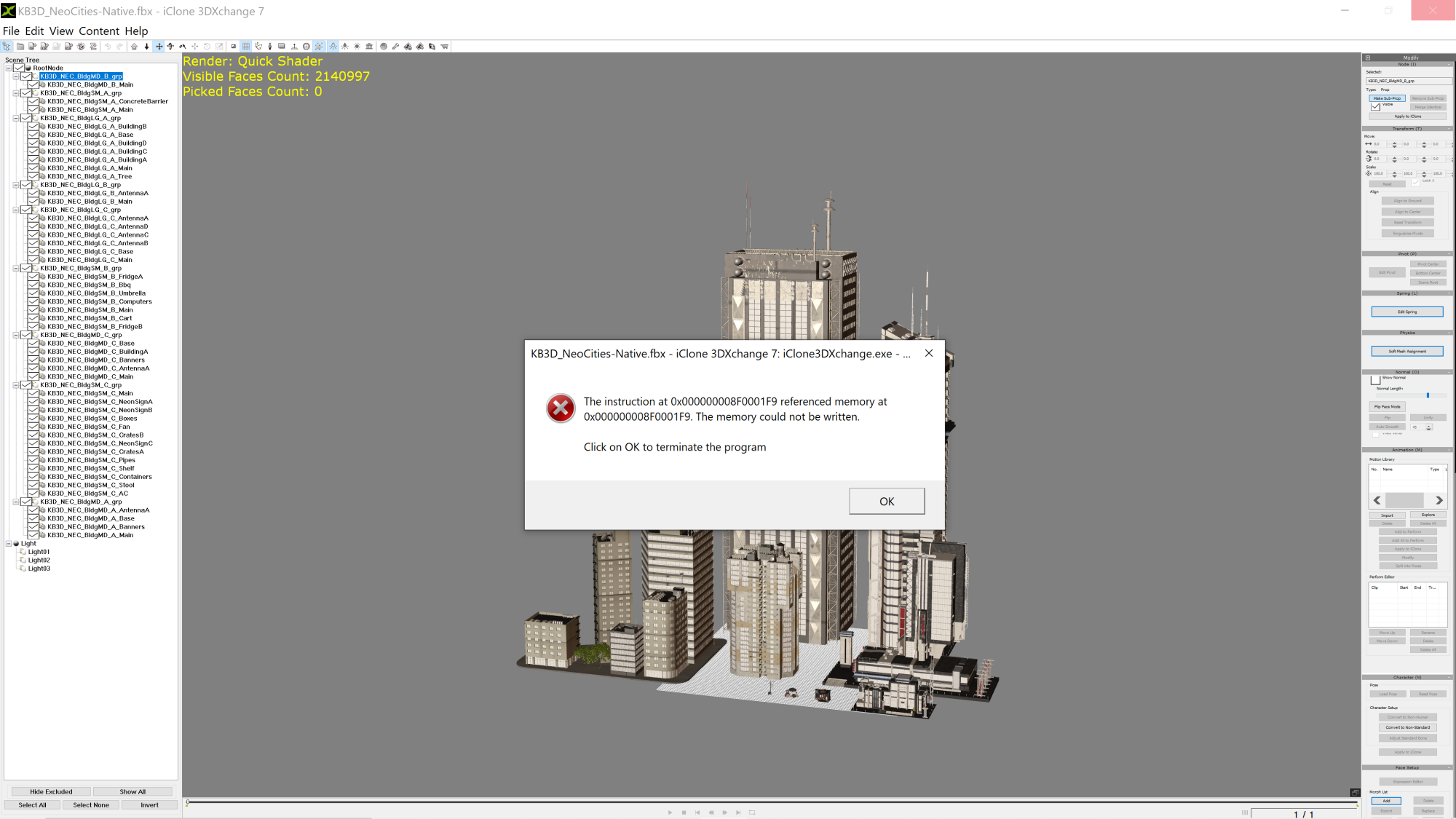
|
|
By michaelrbarton - 4 Years Ago
|
 I think 3DXChange is a 32 bit program. There is a 4GB patch to enable more memory for 3DXChange. I think 3DXChange is a 32 bit program. There is a 4GB patch to enable more memory for 3DXChange.
Here is the link to download the free 4GB patch. 4GB Patch – NTCore I use it and it works. Before loading 3DXChange,
or any 32 bit program, you have to open the 4GB patch first, then locate the 3  DXChange.exe file and click or double click it, and it should DXChange.exe file and click or double click it, and it should
say loaded successfully. Then open up 3DXChange, and it should have the extra GB to work better.
|
|
By animagic - 4 Years Ago
|
|
RL didn't rip anybody off. You can import directly into iClone and work around the 32-bit limitation.
|
|
By AutoDidact - 4 Years Ago
|
|
Still vital to my hybrid pipeline for retargeting Mixamo to Daz Genesis.
|
|
By General Picture Animation - 4 Years Ago
|
|
animagic (3/18/2022)
RL didn't rip anybody off. You can import directly into iClone and work around the 32-bit limitation.
What? Can you unpack that remark?
|
|
By michaelrbarton - 4 Years Ago
|
|
I think you have to own 3DXChange to import FBX and OBJ using IC7.
|
|
By animagic - 4 Years Ago
|
|
michaelrbarton (3/18/2022)
I think you have to own 3DXChange to import FBX and OBJ using IC7.
You are correct. I assumed the OP had 3DXchange. But that enables the direct import function in iClone.
|
|
By Jeffster The Mighty - 4 Years Ago
|
|
What else is running? I only get memory can't be referenced errors when I'm running iClone for a while, rendering in Iray and tweaking. It doesn't happen when I'm just rendering hundreds of frames. Only when I'm rendering and working and rendering and working. Or working while the standalone renderer is plodding along in the background. The video memory starts getting lower and lower, and then I get a similar error. Is the program you exported from still running? Is there a game on pause in the background?
|
|
By planetstardragon - 4 Years Ago
|
despite it's 32 bit limitation - 3DX is actually one of my fav tools to use, it's fast to work with, it's useful beyond just iclone and imo 3DX6 and 3DX7 will both be collectors items, for reasons I won't go into detail about. It's one of those things that RL probably wants me to keep to myself lol :w00t:
|
|
By wires - 4 Years Ago
|
There's no way that I'm giving up on 3DXchange. It's the only way to get simple SketchUp models in to iClone, and when it was announced that it would be integrated in iClone and CC for the next releases I was told in a post on the Forum that SketchUp support would not be included.
For simple lo-poly background stuff I still use SketchUp 8 to make them - 8 was the last Google version that did not have any of the restrictions forced on users by Trimble, and as long as it does what I require then it's staying on my system.
|
|
By planetstardragon - 4 Years Ago
|
one way 3DXchange is a stand alone product - aside from iclone is retargetting motions - you import any biped character, normalize it to a maya standard rig - then let 3DX auto retarget a batch of motions ...export as fbx with motions. no other software will do this as fast and easy.
sometimes i think the RL guys spend so much time using other "latest" softwares, they don't realize the gems they've created in the process. Time savers in a shrinking budget industry are a big deal.
|
|
By animagic - 4 Years Ago
|
Another very useful application is to split up a prop in subprops.
I often create buildings using an architectural program and the exported file has no subprops but has separate meshes (spit by materials) for each part (walls, doors, floors, windows, etc.). In 3DXchange you simply select the meshes that belong to a single item and create a subprop. I don't know if that functionality is carried over to iClone 8.
|
|
By Rampa - 4 Years Ago
|
Animagic
You can do that in iClone as well. Just choose to import as separate props, and then attach the parts you need as sub-props to your main prop. An attached prop is a sub-prop.
PSD
That functionality has been mentioned as being integrated into iC8/CC4 a few times.
|
|
By planetstardragon - 4 Years Ago
|
i never said it wasn't, i was just saying what was cool about 3DX ;)
|
|
By animagic - 4 Years Ago
|
|
Rampa (3/20/2022)
Animagic
You can do that in iClone as well. Just choose to import as separate props, and then attach the parts you need as sub-props to your main prop. An attached prop is a sub-prop.
It is not exactly the same. If I have several materials that belong to one prop, I can combine them easily into ONE subprob in 3DXchange. In iClone I would have to patch the pieces together. This is one reason for me to keep using 3DXchange.
I also use it to split up existing iProps. I don't think you would be able to that via iClone.
|
|
By planetstardragon - 4 Years Ago
|
I've been trying to avoid comparing to Iclone 8, but now that the thread has taken it there - tbh, it feels like we are at a fork in the road with iclone. I won't go into details, because again...I'm happy with 7 and not trying to rain on anyone's parade, if I had something to gain from that, it would be pouring lol. But as a paying customer who's been using the software for over a decade, I've seen several forks in the iclone path - including when 3DX first came out. IC8 is a next gen of customers tool now, nothing wrong with that. RL has been focusing on new customers, and it shows. I do have the creative right to say what I like in my preferred tools, and that's ok too. I'm not a software salesman, I'm an artist. :cool:
|