|
By debbie harmon - 4 Years Ago
|
Help. I cannot figure out how to get rid of this light reflection in this shot. I have turned off all interior lights and still can't figure out where it is coming from. Is there possibly a camera light or the sun light? I have this problem on all my windows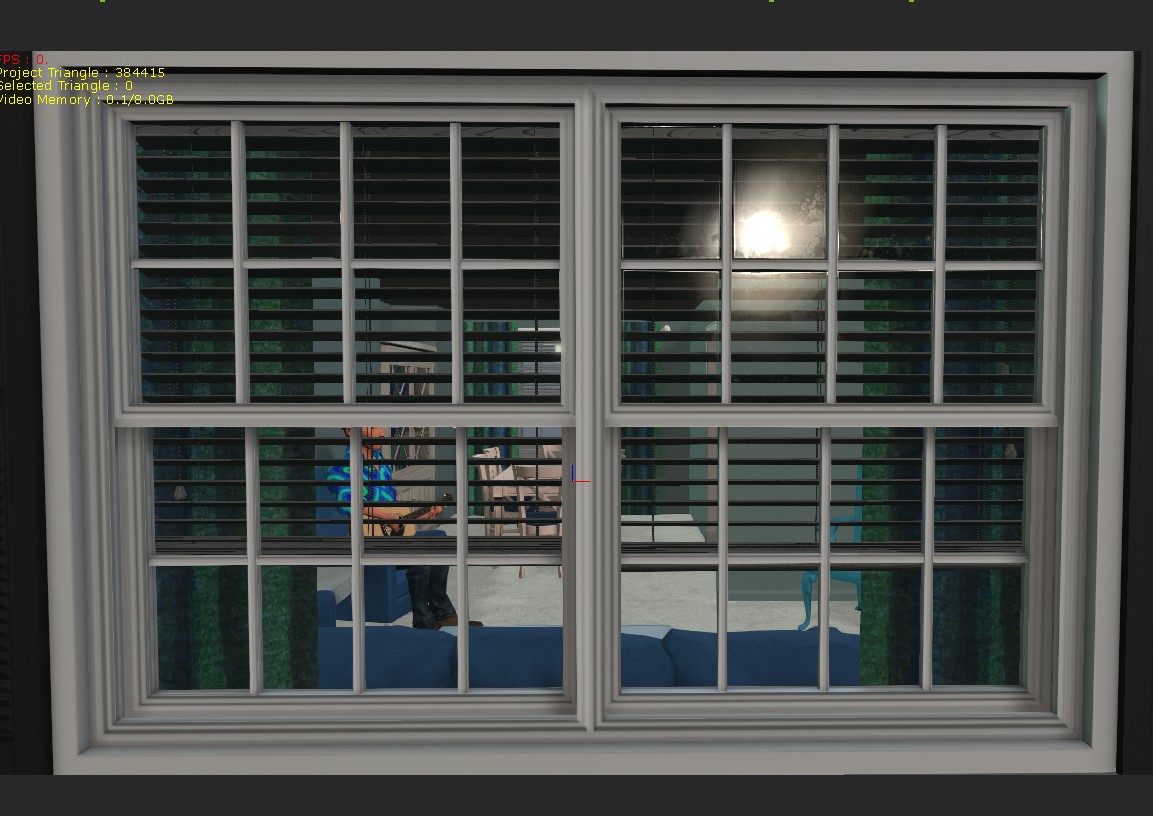 when I want to film through them. Thanks for your help. when I want to film through them. Thanks for your help.
|
|
By mark - 4 Years Ago
|
Depending on if the Glass texture is PBR then it might mean you would adjust the Roughness and Metallic settings. It it's a Traditional texture there might be a Reflection Map that can be turned off. There is also a Reflection adjustment that might need adjustment as well. Or you can just take the Glass texture's Opacity all the way down...course I kinda like seeing a little reflection in the glass just to make things real ;)
|
|
By Rampa - 4 Years Ago
|
|
Try turning off the IBL in the visual tab, or change the IBL image. If the glass ps PBR and shiny, then it will reflect the IBL image, which may have a bright spot in it to represent a light.
|
|
By 4u2ges - 4 Years Ago
|
.. Or try to rotate IBL image (there is a button for that in IBL transform section) until the light is not reflecting anymore.
Note: IBL transform like any other can be animated on the timeline.
Just do not forget to click the button again after you are done with IBL rotation.
It's weird, but you will not be able to rotate anything else until you click it OFF.
|
|
By debbie harmon - 4 Years Ago
|
|
Thank you for your help
|
|
By debbie harmon - 4 Years Ago
|
|
Thank you for your help
|
|
By debbie harmon - 4 Years Ago
|
Thanks for your help
|