Video attached to prop


https://forum.reallusion.com/Topic506096.aspx
Print Topic | Close Window

By CRANK - 4 Years Ago
Is it possible to upload a video as part of a prop. I loaded it through Materials path C:\Users\Public\Videos\...To the prop then saved in iC7.But it doesn't load for purchasers. Any advice greatly appreciated
By wires - 4 Years Ago
The problem with videos is that it is not possible to embed them in either a prop or project. They need to be in the exact place where they were when first used. Normally a warning pops up informing the user that the file is missing or can not be located as shown below:
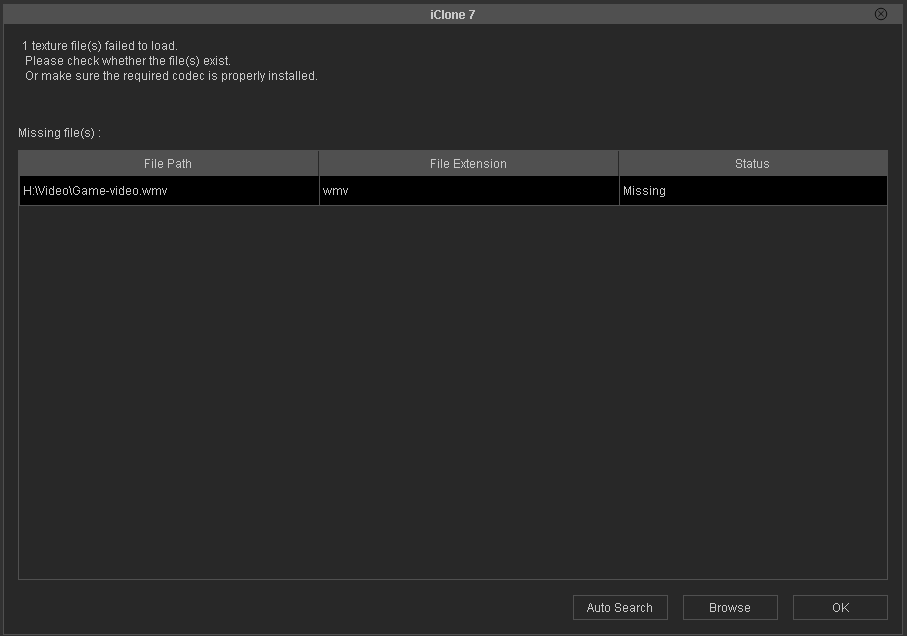
https://forum.reallusion.com/uploads/images/04351827-428b-4c0f-a352-d868.png

If the user has saved the file to another location then clicking on "Browse" will open an explorer winder that can be used to locate the file and use in in the prop/project. If you wish to share a video file for use with the project then it is possible to upload it as a zipped file that the user can download.


By CRANK - 4 Years Ago
Thanks Gerry. As I suspected. I sent the purchaser the video and location. Sadly not ideal.
By BatMorph - 4 Years Ago
wires (2/3/2022)
The problem with videos is that it is not possible to embed them in either a prop or project. They need to be in the exact place where they were when first used. Normally a warning pops up informing the user that the file is missing or can not be located as shown below:

https://forum.reallusion.com/uploads/images/04351827-428b-4c0f-a352-d868.png

If the user has saved the file to another location then clicking on "Browse" will open an explorer winder that can be used to locate the file and use in in the prop/project. If you wish to share a video file for use with the project then it is possible to upload it as a zipped file that the user can download.


How do you get this window to open? On on Monitor that came with a News station package it does this for me, I can locate a video and import it. Yet I just bought a TV for 299 points that says drag and drop a video, yet when I bring TV in, it does not open this box, when I target TV and try to Import, it doesn't see any type of video or iclone project, just audio. When I open explorer and try to drag one on, it has the red no circle. Did I buy a TV from marketplace with a false description? Or am I missing something? I have tried various types of video that worked in the New station prop, and they don't work.

By 4u2ges - 4 Years Ago
Drag'n Drop does not always work. You have to open material section of the TV, find which material is the TV screen (easily identified by the current screen diffuse image) and then double click on Base Color (or Diffuse for traditional shader) map and open your video.