|
By harris.josephd - 4 Years Ago
|
I saw a post by someone who commented that it is very difficult to create faces that look very different using CC's tools. This is very true if you only have the base sliders and you don't have skin gen. Even with skin gen, I frequently need to go into GIMP or a similar program to create dark skin that looks real.
That said, the first thing you need to make radically different characters are the extended slider set (Ultimate Morphs I think) and headshot. If you are patient and experiment a lot, you can produce very different results. I realized long ago this was the business model and I simply forked over the cash. Because I am very into this, it was worth it to me.
Taking some time to just do normal artschool things like accquainting yourself with Grey's Anatomy is also essential. It's one thing to think "His nose needs to be longer." It's another thing to be able to think about how different facial structures must change when you make a nose longer.
Sadly, if you don't have these, the best you can really do is make different combinations of CC's base heads and then morph from there as much as you can. You can also use the mesh editor to push pull and smooth features, but that is very difficult to do in CC's engine successfully. However, in many of my earlier models, that I then used as morphs to combine with more recent projects, I did exactly that. If you have Blender and Daz, I believe you could, in principle, sculpt a head in Blender, convert it in DAZ and import your morphed character into CC. I've never tried.
You can tell me if these look real (some look more real than others as my skills have grown) and or very different. The thing about CC, is that learning to get everything you can out of it takes work and time. It will always be faster than starting from a sphere in Blender in producing something that at least looks human. However, I chose each of the following images because they showcase a skill set that needed to be developed to make the characters work.
If anyone finds these potentially useful and wants to chat about how I did any of these, please ask. I don't want to sound like some self appointed expert, but I did want to show some of the things I've found possible and I believe I've figured a few things out.
In the end, I have skin gen, ultimate morphs, headshot, hair and beard builder, and the IRAY extension to render these. I also use Blender to make hair and have imported other hair models from other places and meticulously fit them to my avatars. These are all the sorts of things that just take time and effort in CC.
If I were going to complain, the biggest things I want from CC4 are:
1. Better ways to make African, Latin and/or Asian skin.
2. More base skin types that dont have all sorts of blemishes built in, but rather the ability to add them as wanted without spending hours trying to clean things up.
3. More control over sculpting the cheek regions and the mouth.
4. An overall, higher poly count avatar for closeups. There are simply not enough polys in the model to make a realistic chin cleft.
5. Better cloth physics so I can just render my scene in CC4 and not have to import to Iclone and then have it balk if I have too many polys. I just want skirts to drape properly without having to spend an hour or two transferring weights and playing with lateral partitioning. I get that there is a thrust towards animation in Iclone, but sometimes, I just want a realistic still photo.
If I were going to ask for things from the content store I would want:
1. First and foremost, better, higher poly, hair models.
2. Did I mention better, hgher quality hair models?
3. NO really guys... HAIR.


|
|
By Wacky-Wabbit - 4 Years Ago
|
These look very nice!
To add to what you already said, basically one's only limit is their imagine and tools...which can be overcome with the right budget. I purchased the same add-ons, which gave me much needed flexibility in my character creations.
As I experimented with the various add-ons, I found myself improving with facial variations. Thus, I could, fairly easy, create many different character face, and I am certainly no expert, and definitely not an artist.
|
|
By harris.josephd - 4 Years Ago
|
|
Earl-1 (1/27/2022)
These look very nice!
To add to what you already said, basically one's only limit is their imagine and tools...which can be overcome with the right budget. I purchased the same add-ons, which gave me much needed flexibility in my character creations.
As I experimented with the various add-ons, I found myself improving with facial variations. Thus, I could, fairly easy, create many different character face, and I am certainly no expert, and definitely not an artist.
I agree. Using the expression and pose editor is key.
|
|
By AutoDidact - 4 Years Ago
|
|
Those women all look like they are from the same family.
|
|
By harris.josephd - 4 Years Ago
|
|
AutoDidact (1/27/2022)
Those women all look like they are from the same family.
If you think so, you think so... I don't. But thank you for your reply.
|
|
By gicag14102 - 4 Years Ago
|
|
Ladies face structure almost same, nose and color change. They looks almost same.
|
|
By harris.josephd - 4 Years Ago
|
|
AutoDidact (1/27/2022)
Those women all look like they are from the same family.
Her and her too?


What about her?

|
|
By harris.josephd - 4 Years Ago
|
|
gicag14102 (1/27/2022)
Ladies face structure almost same, nose and color change. They looks almost same.
Well the red head is the same avatar with different hair and expressions.
If you really think she looks almost the same as the blonde or the African or the Latin lady... I don't know how to respond. The have different eyes, different cheekbones, different facial depths, different mouths and different noses... I am afraid I just have to dissagree.
|
|
By yepkoo - 4 Years Ago
|
I don't think it's a big deal.
In fact, the nose and forehead structure that makes the characters look similar. Especially since they all have the same forehead.
However, this is not something that will be noticed at first glance and I don't think it's very important :)
The reason you get these answers may be the words you wrote when starting the topic.
This caused the things you shared to be examined in more detail :)
|
|
By harris.josephd - 4 Years Ago
|
|
gicag14102 (1/27/2022)
Ladies face structure almost same, nose and color change. They looks almost same.
Perhaps some different angles and expressions on the same models will help.


|
|
By harris.josephd - 4 Years Ago
|
|
yepkoo (1/27/2022)
I don't think it's a big deal.
In fact, the nose and forehead structure that makes the characters look similar. Especially since they all have the same forehead.
However, this is not something that will be noticed at first glance and I don't think it's very important :)
The reason you get these answers may be the words you wrote when starting the topic.
This caused the things you shared to be examined in more detail :)
I appriciate the advice, but they really don't have the same foreheads either. I did put them all in updos however. Here's the blonde with different hair. This was a lighting study.

|
|
By AutoDidact - 4 Years Ago
|
Frankly this remains a area where the DAZ genesis figures greatly out perform the Iclone avatars.
You can always spot a CC Character ten kilometers off.
Hopefully the CC4 BasesWill offer more variety.
|
|
By harris.josephd - 4 Years Ago
|
AutoDidact (1/27/2022)
Frankly this remains a area where the DAZ genesis figures greatly out perform the Iclone avatars. You can always spot a CC Character ten kilometers off. Hopefully the CC4 Bases Will offer more variety.
We agree that DAZ seems to have more ease in that department. At the end of the day, the meshes in CC need about twice the polys in the face.
|
|
By planetstardragon - 4 Years Ago
|
I think the work is really good, the only comment i'd make so far is something about trying to get a finished look from just cc3 or iclone.
'Art is never finished, only abandoned' Leonardo Da Vinci

|
|
By MilesV - 4 Years Ago
|
Hi harris.josephd,
Thank you for taking the time and effort to put that together and share your work! I saw that post too and it sent me down a rabbit hole that I hope to share at some point. The larger your library of purchased/custom morphs, textures, hair, etc., the more powerful the tool becomes. Each of the packs you mentioned are great!
A couple of things I'd like to add:
If you have SkinGen Premium you can take a bump or normal map from one character and apply it to another character in SkinGen to get different wrinkles which can drastically change the look of your character. The Part Normal Plus and Decal tools both work well for this. (Edit: The Part Normal Plus tool lets you isolate parts of the bump or normal map. So, if you wanted you could apply just one specific wrinkle area from one character to another.)
For skin, you could apply a skin base from one character to another to get a different looking character OR you could take the texture maps from one character, add them into a decal layer on another, and now you can start blending the two different characters textures together to get a completely different look. (Edit: stacking decals can often lead to visible lines at the UV seams so use masks to avoid those issues.)
You can also do things like add a solid white texture to a decal layer right above the skin base (delete any other layers), add a noise layer, add a mask to the noise layer to isolate a specific part of a character, then play with different noise textures and settings to create scratches, wrinkles, etc. (this can take a lot of work to get it looking good). Once you have something you like, merge the layers down into the skin base. Now you should have a custom bump map you can save then use with the skingen tools. I've done this to create custom lips with decent results but haven't spent much time on it. Mostly because while trying to use the same process to get good forehead wrinkles, I ended up going down a blender shader node rabbit hole.
While I'm still experimenting with it to get a look and level of realism that I like, I'm confident you can create quality custom skin bases from scratch with SkinGen. Tools like Blender, Substance Painter, Photoshop, etc. are better for creating skin in my opinion, but if you don't know how to use those tools, you can do a lot without ever leaving CC3.
|
|
By General Picture Animation - 4 Years Ago
|
|
This is true artistry: I'm loving what you've accomplished!
|
|
By harris.josephd - 4 Years Ago
|
|
General Picture Animation (1/28/2022)
This is true artistry: I'm loving what you've accomplished!
Hey, thank you so much!
|
|
By bellabypaul - 4 Years Ago
|
It was me who made that post you mention about the facial changes in characters starting to look the same. From the comments made about yours, it pretty much highlights the issue. unless you alter a face extremely it will have a sim look to the other esp after the 10th. I have been working hard to try make each one different by altering the skin texture on the base, bump normal, roughness then altering the shape of the face in areas but at the end of the day they do start all looking alike. here is some picture examples i have put together to give you an example. The facial shape is practicaly the same on all characters until you get to daz then it becomes more round. When you alter the facial features like cheeks, chin, eyes, nose, it starts to add character and alters each one from the next but as I said, the shape is the same. I beleive the secret to creating unique characters is the blending of all software, blender, daz, zbrush and more. With a solid bridge from each software allowing the transfering of models and assets that work on cc3 and vise versa without the use of a fbx key or any other restrictions would give the user more ways to better the models and create more unique characters.

   
|
|
By Wacky-Wabbit - 4 Years Ago
|
These look very nice! The truth is, each one of us have some idea as to how we would like our individual characters to look. My ideas may be different than the next persons. Thus, what looks good to me, may only be "so so" to someone else. We need to be true to ourselves and what we like. It needs to be something that pleases us individually. But if it is something that we ultimately plan to market, then we need to look what may appeal to others.
I like a variety of looks, so I try not to limit myself on looks.
|
|
By Wacky-Wabbit - 4 Years Ago
|
Not really a secret. No need to go to all those programs to create a variety of looks. CC Basically has all you need. Add-ons or plug-ins (like SkinGen and Headshot) help a lot. If you have these, the real secret lies behind experimentation.
Don't be afraid to experiment, like what if I try this? What if I do this or that? You will eventually surprise and amaze yourself. AS I said in a number of posts, I am truly no artist. But I can, with CC, do a pretty good job of convincing (at least) myself. I am pleased with what I have been able to do. MY wife actually marvels at the stuff that I managed to create. She used to think that I am back in my "Man Cave" as she calls it, just playing video games. Admittedly though, I have several old video games that I will fire up and play at times, when I want to take a breather.
The image uploads that follow, were all done in CC3.
|
|
By Wacky-Wabbit - 4 Years Ago
|
        I did these in CC, Some of them were scanned in via the Headshot plug-in. But I made them look much different than the actual Headshot scan via changing facial characteristic, skin texture, and adding some light makeup. Also, I applied some content from the Marketplace. Some content I actually retextured, I did these in CC, Some of them were scanned in via the Headshot plug-in. But I made them look much different than the actual Headshot scan via changing facial characteristic, skin texture, and adding some light makeup. Also, I applied some content from the Marketplace. Some content I actually retextured,

 
|
|
By harris.josephd - 4 Years Ago
|
Roundtree (2/6/2022)
these in CC, Some of them were scanned in via the Headshot plug-in. But I made them look much different than the actual Headshot scan via changing facial characteristic, skin texture, and adding some light makeup. Also, I applied some content from the Marketplace. Some content I actually retextured,
These are excellent. Check out my other post too if you will. I included this lady, who was inspired by a mathematician I know.

|
|
By AutoDidact - 4 Years Ago
|
|
@Roundtree you have done an amazing job of using the tools to create females far removed from the look of the CC3 girls👍
|
|
By bellabypaul - 4 Years Ago
|

|
|
By TimothyMasters - 4 Years Ago
|
AutoDidact - Criticism is useful only when done politely and with specific, helpful suggestions for improvement. You are certainly entitled to your opinion, but if you just sling mud nobody will pay attention to you.
Tim
|
|
By Wacky-Wabbit - 4 Years Ago
|
Thanks! Lots of experimentation.
Yes, I started watching the film. It's very work. I haven't gotten through it though, as it is quite long. And I don't spend a whole lot of time on-line. I plan to watch it all though.
|
|
By animagic - 4 Years Ago
|
@Roundtree: I agree with the need to experiment, and you show what can be accomplished. With CC and extras you have a toolbox and it is up to you to get something out of it. It takes time and effort but it is possible as you have shown.
I do my characters with CC as well and it suits my needs. I was in fact very happy when CC first came out as it finally gave me a way to create my own characters.
|
|
By Lord_Dreadmoor - 4 Years Ago
|
*Denzel Voice* My man...
|
|
By TimothyMasters - 4 Years Ago
|
Great characters! I've devoted the vast majority of my video-learning time to iClone, and just used CC minimally. I see that I should be spending more time learning CC.
Tim
|
|
By yepkoo - 4 Years Ago
|
I will need a few different Child characters for my future game project.
I tried headshot, but without much success.
I need a training video where I can produce realistic children's characters that are fully compatible with the face and body.
Can anyone suggest any advice or video tutorials on this?
|
|
By Peter (RL) - 4 Years Ago
|
AutoDidact (1/27/2022)
Frankly this remains a area where the DAZ genesis figures greatly out perform the Iclone avatars. You can always spot a CC Character ten kilometers off. Hopefully the CC4 Bases Will offer more variety.
Come on now AutoDidact your posts are starting to look like trolling at the moment. I'm starting to lose count of the times you have posted just to say how iClone or Character Creator isn't as good as "just about anything else". Please let's have a balanced view once in a while.
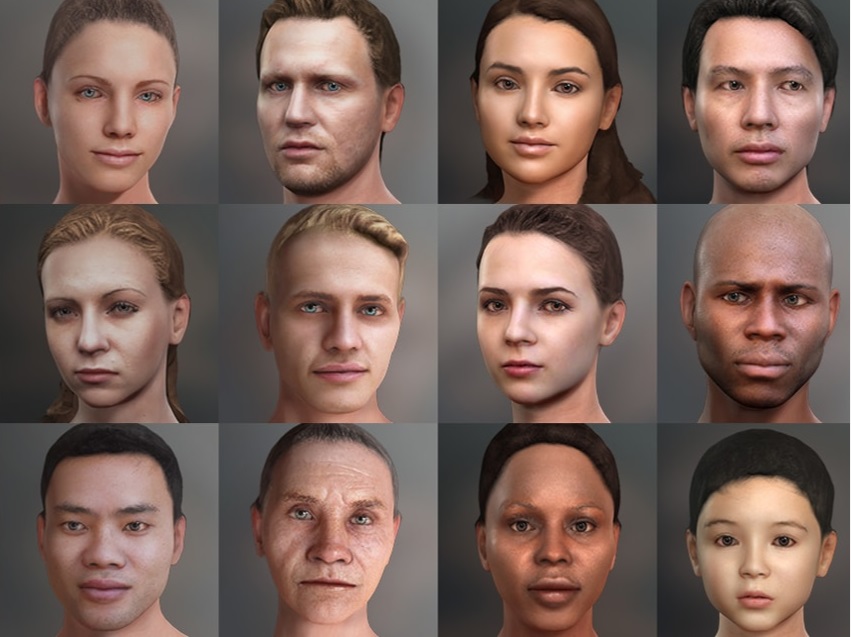
With Character Creator 3 and Headshot no two characters should ever look the same. If your characters all look the same then that is more likely down to a lack of creativity than the fault of the software. There is a well known saying that "a bad workman always blames his tools" and that is often so true.
|
|
By Peter (RL) - 4 Years Ago
|
harris.josephd (1/27/2022)
AutoDidact (1/27/2022)
Those women all look like they are from the same family.If you think so, you think so... I don't. But thank you for your reply.
I also don't agree and think the characters you have created are diverse and outstanding in quality. I think you should be applauded for the work you have done.
|
|
By AutoDidact - 4 Years Ago
|
I use a hybrid pipeline
Mixing both CC3 characters and Daz characters in Blender.
Headshot is great tool for variety just as the face transfer tech in Daz studio.
But one must first use them as they've been used in your example images.
|
|
By Wacky-Wabbit - 4 Years Ago
|
|
Nice!
|
|
By ultimativity - 4 Years Ago
|
|
Okay, here's a tip. Your four samples look great, but do you notice they are all the same weight and and the same age, roughly? The sizes and shapes of the heads even appear similar. If you want variety in your characters, consider using the basic tools to adjust weight, face and head shape. Also, you might consider introducing some asymmetries, which can be achieved with even the basic tools. A third method for varying your characters is to vary their normal expressions and posture. Check any crowd and you will find scowlers, grinners, and people who look out of it, as well as those who are in a state of vigilance. Body type and height offer even more opportunity to vary your characters.
|
|
By bellabypaul - 4 Years Ago
|
|
yepkoo (2/9/2022)
I will need a few different Child characters for my future game project.
I tried headshot, but without much success.
I need a training video where I can produce realistic children's characters that are fully compatible with the face and body.
Can anyone suggest any advice or video tutorials on this?
get normal base then save out the skin. open photoshop and smooth out the entire skin. remove all blemishes and some wrinkles. once you done that, alter the shape and size to your liking and you will have a much better looking child like character.
|
|
By planetstardragon - 4 Years Ago
|
it's really about how much work you put into it, if you stick to default settings, you get default results. Only thing that can change that is if RL added a random seed generator.

|
|
By PIO C - 4 Years Ago
|
Please stop making scary images like this. An Alien prostitute is just not right! Good idea but wrong.
As for CC3 not being as good as Daz is just hating. CC3 is the jewel in RL's crown. The only issue I have with RL is the upgrade path for people who bought into there insane pricing model. But then again they did allow me to progress in my projects at a faster rate. Basically I'm conflicted, but not about the quality I get from CC3 plus add-ons. I have everything to do with manipulating a standard avatar, but never into an Alien Hocker LMAO.
|
|
By yepkoo - 4 Years Ago
|
|
bellabypaul (2/19/2022)
get normal base then save out the skin. open photoshop and smooth out the entire skin. remove all blemishes and some wrinkles. once you done that, alter the shape and size to your liking and you will have a much better looking child like character.
Thanks bellabypaul I will try that.
|