|
By Majella - 3 Years Ago
|
Howdy,
This may seem terribly basic, but we've accidentally built a stage/set/environment and realised that the keyframe wasn't at 1. Actually, somehow, this construction happened over quite a number of keyframes... Anyway, we've chosen a point at which we'd like to delete everything to the left of a particular keyframe... and when we use the 'delete frame' option, everything in the set gets pulled together as if someone went 'align centre'. We can use the 'delete frame' option after a point (once the set construction had finished)... but that doesn't delete the location of everything before the keyframe we've selected (sorry - am not sure if this makes sense... but basically, when you hit play (or use the scrubber).. the scene that plays is an animation of the hospital ward that is being built.
We've tried to break the project at the point... but I can't get break to work... and other than throwing that out and starting all over again with the set/stage build, we don't know how to fix this issue.
Hope this makes sense... Hope someone can help??
Cheers,
"Clueless" :)
|
|
By animagic - 3 Years Ago
|
If your aim is to have no animation at all (which is what I think you mean) then the solution is quite simple.
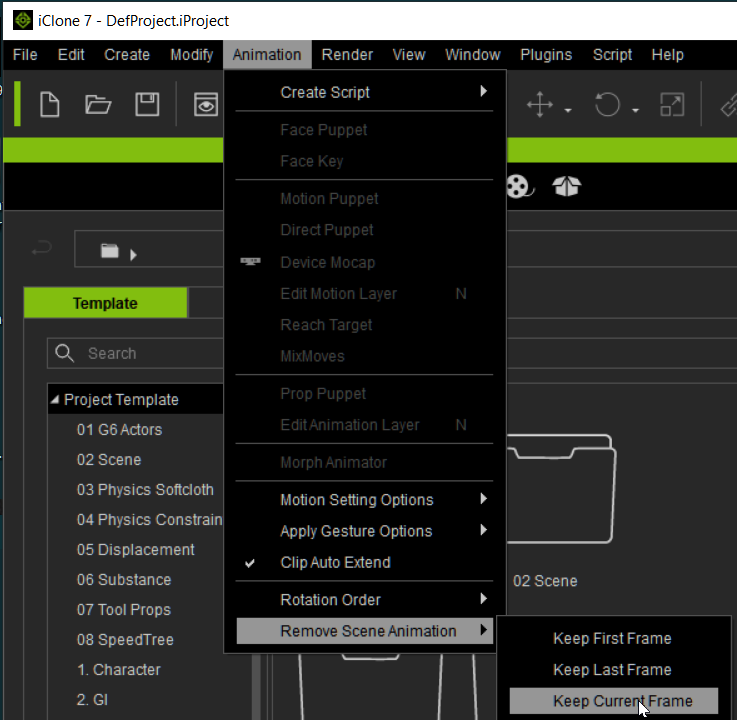
Go to the point were everything is built and then select Animation > Remove Scene Animation > Keep Current Frame.
|
|