|
By Victor.Soupday - 5 Years Ago
|
CC/iC Blender Pipeline Plugin 2.1.11
Changelog:
2.1.11- Fix to motion exports not using project FPS.
- Fix to datalink not detecting MD Props on send.
- Default datalink path changed to user documents folder.
2.1.10- Support for exporting MDProps.
- Update materials through the datalink will use exact name matching and will no longer update materials on partial name matches.
2.1.9- Some UI Restructure.
- Fix to exporting Lite Avatars.
2.1.7
- Normal map fix for imported characters.
- Sync lights includes scene IBL from visual settings.
2.1.6
- Export supports selection of multiple objects.
- When exporting multiple objects, the exporter will create a folder and export each individual object to that folder.
- When importing into Blender, all the FBX objects should be selected and imported all at once.
2.1.5
- Go-B Morph will use existing connection if there is one.
- Re-importing GameBase/ActorCore/AccuRig morph crash fix.
- GameBase and AccuRig characters will always export from CC4 with facial expression profile and data.
2.1.4- Send Update / Replace function, for sending additions or replacements to selected meshes or whole characters.
- Settings detect and find button.
- Scrollable datalink window.
2.1.3
- Expression rotation corrections check for existence of expression, as sometimes (ActorCore) they aren't really there.
2.1.2- Replace mesh searches sub-object names as well as mesh names for object / mesh name matching.
- Note: Replace mesh does not currently work for conformed facial hair meshes (Beard / Brows).
2.1.0- Motion set prefix and use fake user option for datalink animation transfer.
- Datalink pose/sequence twist bone translation fix.
Original Post
I think I have hung on to this for long enough. There's only so much I can test myself, so here goes.
Something I have wanted to try and achieve since the very first auto-setup, was to get the character back into CC3 from Blender with all of it's textures intact, and without having to put it all together by hand. And, for the most part, I think it's almost there:
Version 1.3.8 of the Blender auto-setup: https://github.com/soupday/cc3_blender_tools
Version 1.0.5 of the Python Plugin for CC3: https://github.com/soupday/CC3-Blender-Tools-Plugin
Version 1.0.10 of the Python Plugin for CC4: https://github.com/soupday/CC4-Blender-Tools-Plugin
1st Demo Video:
(Mesh editing and material parameters)
2nd Demo Video: (Using material nodes to modify textures during export)
CC4 Pipeline Test:

Installation- Clone or download the CC3 Blender Tools Plugin GitHub.
- Create the folder OpenPlugin in the Character Creator 3 install directory \Bin64\OpenPlugin
- e.g: C:\Program Files\Reallusion\Character Creator 3\Bin64\OpenPlugin
- Load the script into the project from the Plugins > Blender Auto-setup > Import From Blender menu.
Alternatively the main.py script can run as a standalone script from the Script > Load Python menu. Known IssuesBy default the FBX export settings have embed textures switched on, but this makes the export incompatible with re-importing the character back into CC3 as the textures are hidden in the original fbx and are not accessible to the file system. *Always turn off embed textures*Information lost on re-importing- Hidden faces information for clothing and accessories is lost upon re-importing into CC3.
- Currently Subsurface scattering settings (Falloff color and Scattering Radius) for skin, eyes teeth and tongue cannot be re-applied as there is no Python interface to do so, so these settings will be reset to their defaults.
- Likewise Displacement map tessellation settings also cannot be re-applied and are reset to defaults.
- The PhysX weight map texture and physics settings information is also lost on re-import. The weightmap textures are in the texture files exported from CC3 so they can be restored by hand in PhysX material settings.
Possible Issues- Some older characters import with the upper and lower teeth at odd angles. Replacing the teeth in CC3 will fix the issue. Alternatively there is an export option to reset the bone roll to zero on the upper and lower teeth bones. This appears to fix the problem but it is unknown if these changes to the teeth bones will cause further problems later.
- There is a very strange problem where if the object has a very small number of vertices and faces (< 100) then the import into CC3 becomes very unstable and can cause a crash to desktop, even if that object was originally exported with the character from CC3.
This represents a whole lot of time and effort. Not just by me, but all the people at Reallusion, who have put in a huge effort to bring forward code and features and investigating ways to improve the process, so that I could make this work in CC3. They deserve much of the credit.
This is very much in it's early stages and there is still a lot of work to do. It is my hope that eventually we will be able to edit and reconstruct the character fully, in a round trip or as many round trips as it takes, with no missing data. I don't know if we'll get everything working for CC3, it may take until CC4, but I think it's more than possible to get there.
|
|
By rosuckmedia - 5 Years Ago
|
|
Great thanks Victor and RL team.👍 Unfortunately I can't get it into the main menu. I did it via Script- Load Python and it has worked quite well. Greetings rosuckmedia 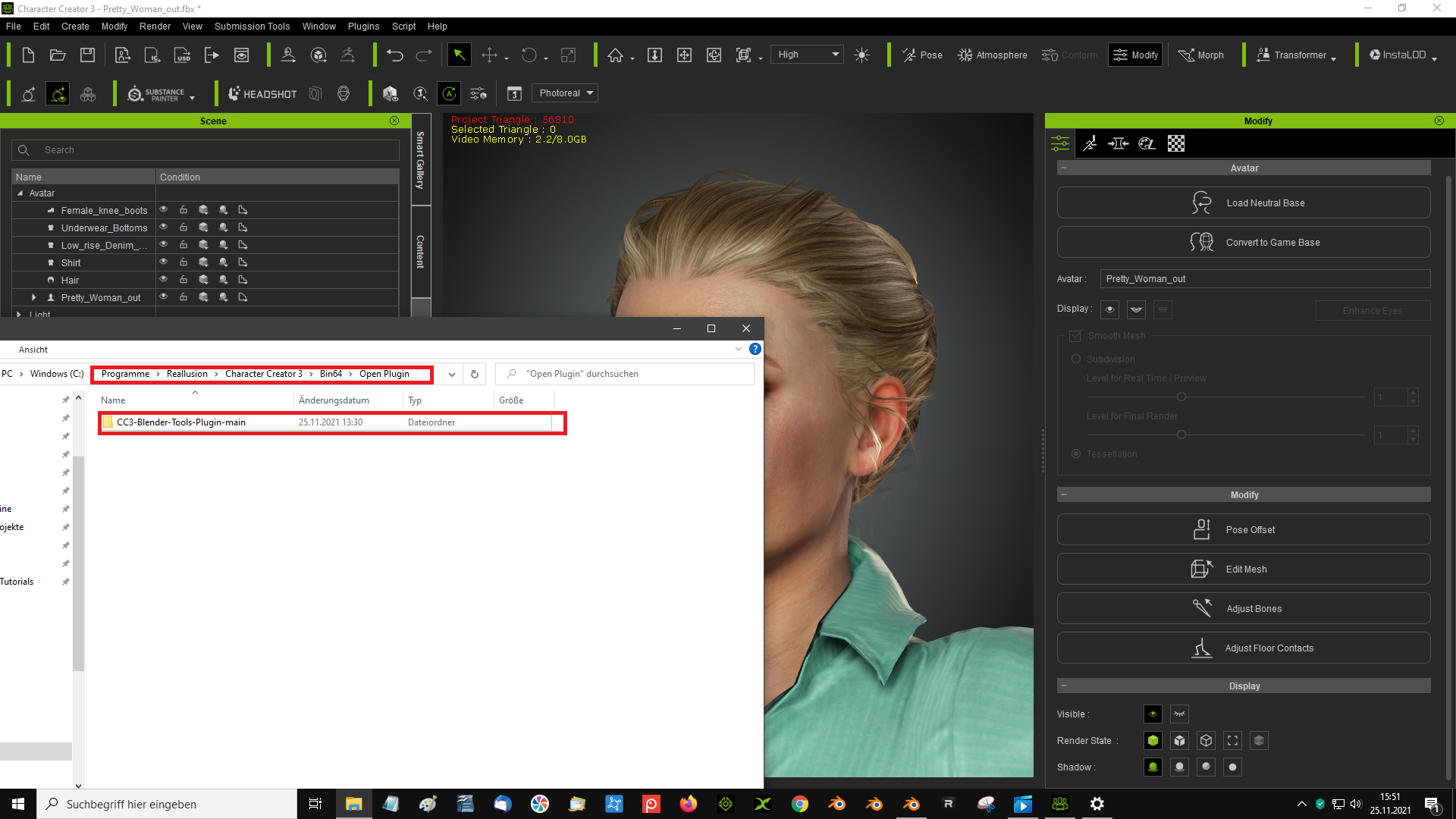 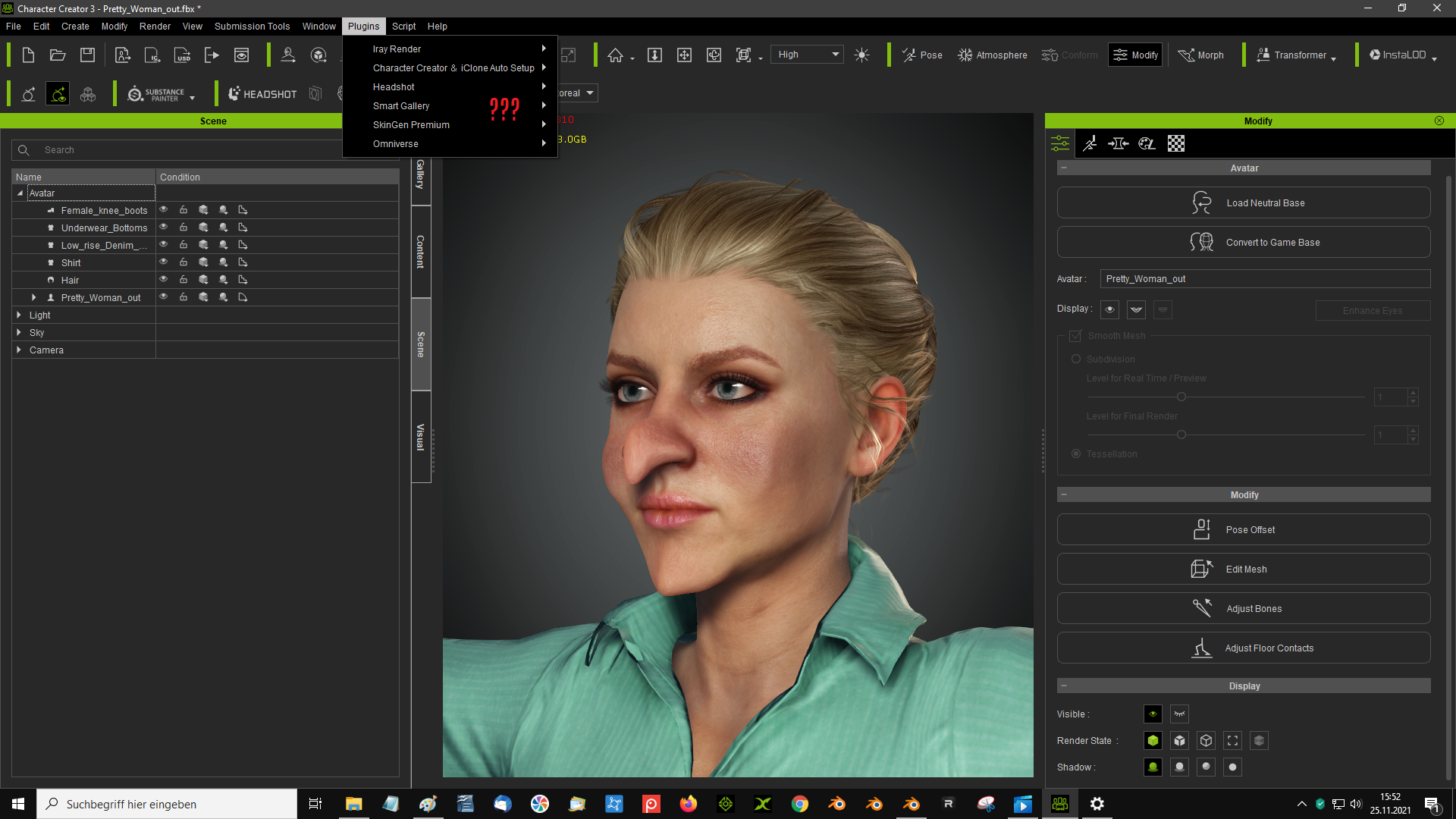 |
|
By Victor.Soupday - 5 Years Ago
|
There should be no space in the folder name: OpenPlugin
|
|
By rosuckmedia - 5 Years Ago
|
Okay thanks it worked👍
Greetings rosuckmedia
|
|
By rosuckmedia - 5 Years Ago
|
|
When I export the character from Blender back to the Character Creator 3 (works very well) If I want to send the character to Iclone then I have big problems. see gif Greetings rosuckmedia 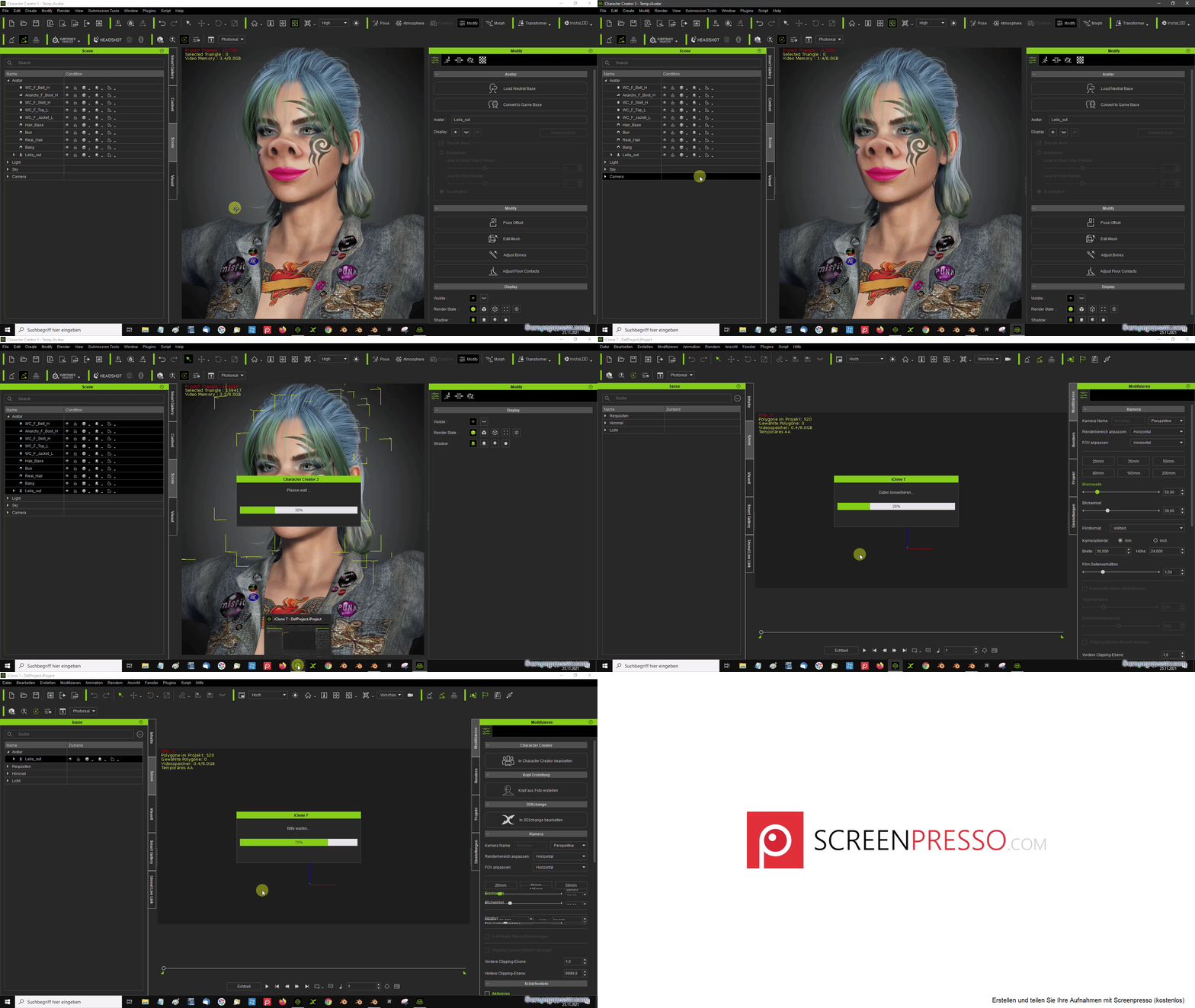 |
|
By Victor.Soupday - 5 Years Ago
|
This may be a strange one, can you try deleting the eyebrows object and see if it then exports to iClone?
The test characters I've been using didn't have Eyebrow objects (Just textured), I did some tests, and found some characters that crashed iClone, it was the eyebrows every time.
They all load fine into Character Creator, but iClone really doesn't like them. Even saving the character as iAvatar and loading it into iClone causes the same crash.
|
|
By Victor.Soupday - 5 Years Ago
|
If deleting the eye brows works,
Try re-assigning them as eyebrows:
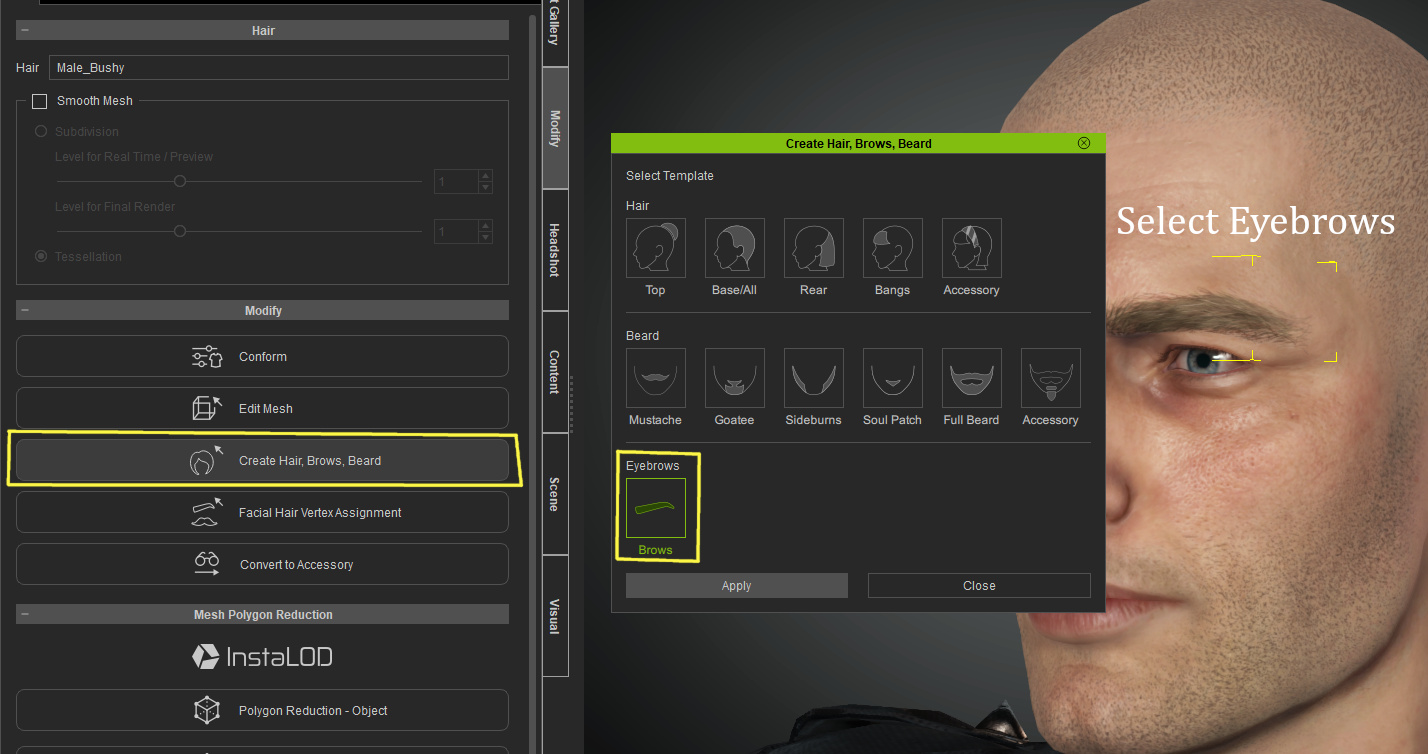
After doing this, iClone stopped crashing for this character.
|
|
By rosuckmedia - 5 Years Ago
|
|
Okay, that worked out very well. Now I can send to Iclone without any problems.😊
Greetings rosuckmedia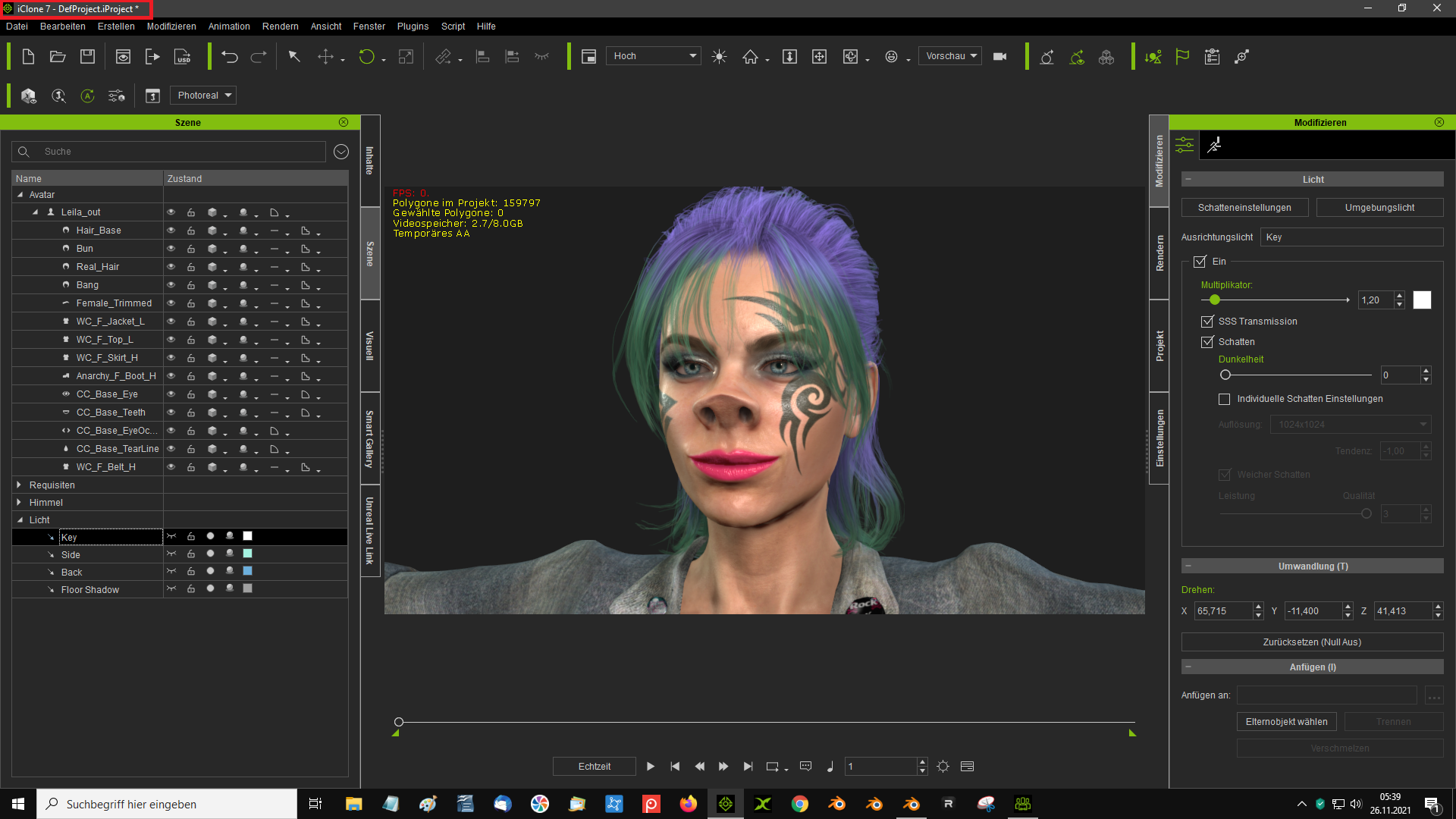 PS: Another thing I noticed is that the weight map(Hair) is lost when I export the character from Blender back to Character Creator 3. PS: Another thing I noticed is that the weight map(Hair) is lost when I export the character from Blender back to Character Creator 3.
|
|
By vadim+2 - 5 Years Ago
|
Victor.Soupday do you think it is possible to export a subdivided model out of the CC3 using Python?
I think this feature will be quite popular
|
|
By 4u2ges - 5 Years Ago
|
Big thank you to Victor and RL team for pulling this through!
I started testing it this morning. Unfortunately I could not get to the CC3 import part.
I got stuck with exporting it out of Blender.
She imports normally. But when exporting, I got an error and this plane is created on the ground randomly from some asset material (hair, panties...etc)
On the shader section for plane some nods are all the way at the bottom which are hard to reach. And also a texture image dumped into the main folder.
This might give you some clue of what is happening:
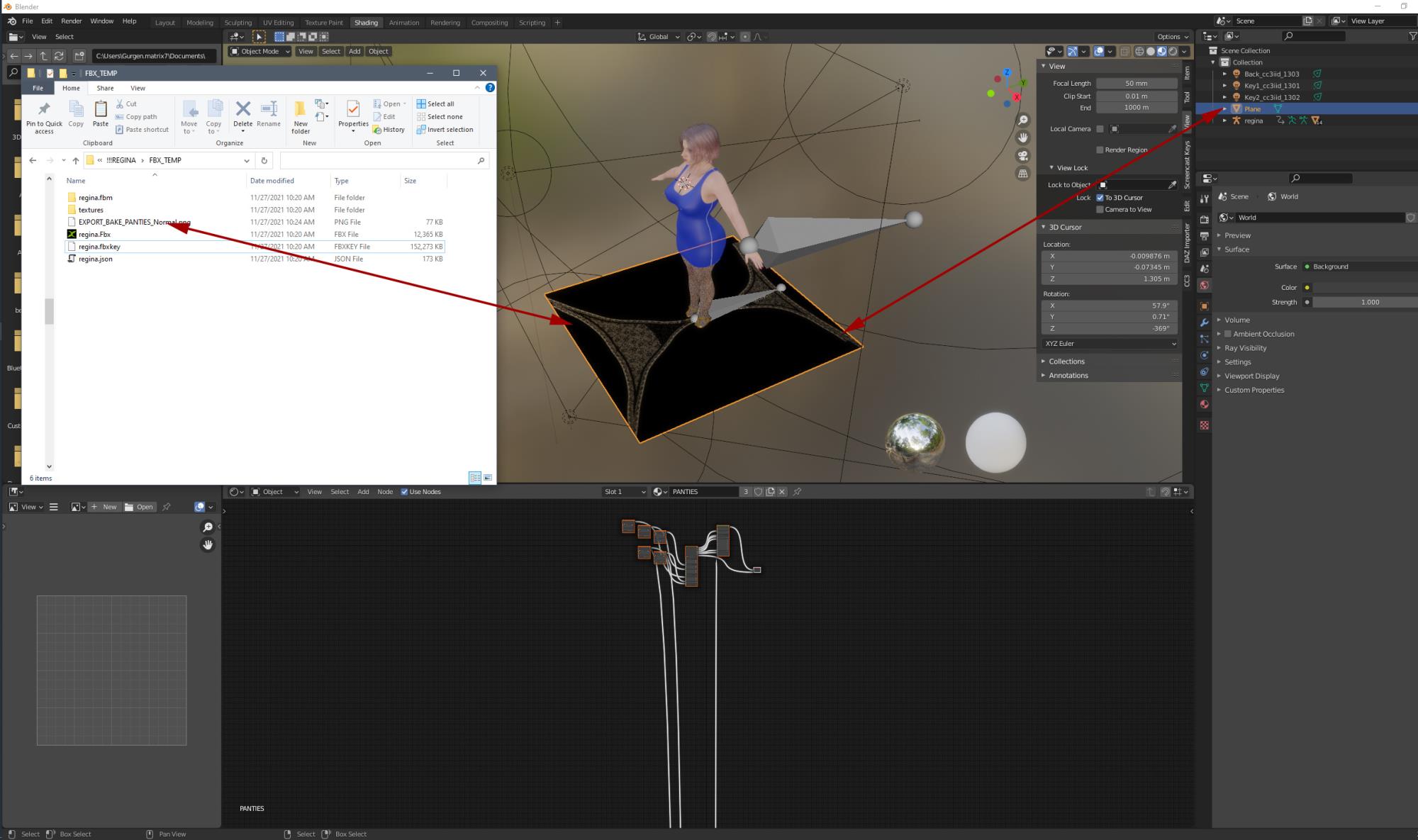
(If you need, I can send her to you for error tracing).
|
|
By Victor.Soupday - 5 Years Ago
|
What does the traceback say in the system console window?
Also what version of Blender is it?
|
|
By 4u2ges - 5 Years Ago
|
Blender 2.91 (do I need to upgrade?)
This is it:

|
|
By Victor.Soupday - 5 Years Ago
|
I'm trying to set something that doesn't exist in versions earlier than 2.92. Simple enough to fix, there's a couple of things could do with a fix there too.
Github appears to be broken at the moment. I'll update the version when it comes back online.
|
|
By Victor.Soupday - 5 Years Ago
|
Ok, this should fix it:
(v1.1.3)
https://github.com/soupday/cc3_blender_tools/releases
|
|
By 4u2ges - 5 Years Ago
|
Thank you much for the update! All is good.
|
|
By rosuckmedia - 5 Years Ago
|
|
Unfortunately I can not follow the 2 tutorial for textures....
This is just too fast for me.(I am not a Blender professional)😢
Greetings rosuckmedia
|
|
By oonabe - 5 Years Ago
|
I had a similar issue yesterday, but I found out it was due to one of the free pieces of cloth that comes with CC3, concretely the biker vest, when I removed it from mz character everzthing worked fine, not sure if that helps somehow
|
|
By rosuckmedia - 5 Years Ago
|
|
Now I have managed it after all, I also bought the plugin Bpainter 2.0. A Black Friday offer. My result is not special, but now I know the procedure. Greetings rosuckmedia.   |
|
By 4u2ges - 5 Years Ago
|
Just wanted to say thank you again. After more testing in production, the pipeline works perfectly for what I am doing.
Saves a lot of time!
|
|
By oberdoofus - 4 Years Ago
|
Thanks for this. Very cool!
When you alter the mesh in Blender (to export back to CC3) are we still restricted to using non-destructive brushes like grab, deform and snake hook or can we use other brushes?
|
|
By animagic - 4 Years Ago
|
|
oberdoofus (1/2/2022)
Thanks for this. Very cool!
When you alter the mesh in Blender (to export back to CC3) are we still restricted to using non-destructive brushes like grab, deform and snake hook or can we use other brushes?
Anything that changes vertex count or order cannot be used.
|
|
By Victor.Soupday - 4 Years Ago
|
|
oberdoofus (1/2/2022)
Thanks for this. Very cool!
When you alter the mesh in Blender (to export back to CC3) are we still restricted to using non-destructive brushes like grab, deform and snake hook or can we use other brushes?
For any of the CC_Base_ Objects you can't mess with the topology, so non-destructive only. Everything else you can do what you like to.
|
|
By stephane.grade - 4 Years Ago
|
Hi,
Really looking forward to using the plugin !
However I can't get it to work on CC 3.44.
Anyone else have this problem? I've tried both the plugin option and the load script option
but once I click ok to import everything nothing happens.
Thanks,
Iwan
|
|
By Victor.Soupday - 4 Years Ago
|
|
stephane.grade (1/11/2022)
Hi,
Really looking forward to using the plugin !
However I can't get it to work on CC 3.44.
Anyone else have this problem? I've tried both the plugin option and the load script option
but once I click ok to import everything nothing happens.
Thanks,
Iwan
Does the character file you're trying to bring back in have an FbxKey file?
Does the Script > Console Log window show any errors?
|
|
By stephane.grade - 4 Years Ago
|
Good questions :)
There is an fbxkey, and the log shows no json data!

|
|
By stephane.grade - 4 Years Ago
|
Ok, so I got it working now.! :)
I think the problem was that I originally did the testexports in CC 3.41 and
because I couldn't get the script Menu item or the plugin to show up, I upgraded
to CC 3.44.midway my testing. So the moral of the story is make sure to export and
import your character fbx file using the same version of CC.
Thanks a lot for your help !
Iwan
|
|
By stephane.grade - 4 Years Ago
|
So that's working really well and reliably so, saving a lot of time and headaches.
I just had one more question for you. Is it possible to change the uv layout of
the body for exampel using this back and forth method? I haven't gotten that to
work but maybe I'm doing something wrong.
** Update I can get send blender UV changes back to blender on items of clothing
and accessories, but not on the main body.
Thanks again,
Iwan
|
|
By Victor.Soupday - 4 Years Ago
|
Version 1.0.4:
Github Page, Release Page- Fixed AO Maps causing Bump maps to import with zero strength.
- Added Fbx Key check and warning message box.
- Added JSON data check and warning message box.
Installer Download
Blender Tools add-on Post: https://forum.reallusion.com/FindPost509141.aspx
New Demo Video:
|
|
By graphicsanimationer - 4 Years Ago
|
hi,
can you tell procedure of installing openplugin through script
|
|
By Victor.Soupday - 4 Years Ago
|
There's instructions on the Git hub repository:
https://github.com/soupday/CC3-Blender-Tools-Plugin#installation
Though can be quite difficult to follow the manual install. This is a video by Russell Midfield that covers installing the plug-in starting at 8:20:
Or there's an installer I made that you can download on the release page: https://github.com/soupday/CC3-Blender-Tools-Plugin/releases
|
|
By 4u2ges - 4 Years Ago
|
Thanks for the latest update.
I have noticed something strange though.
For any accessory when it comes back to CC, it is not possible to manipulate UV Settings anymore.
Simple way to replicate:
Convert Underwear Bottom to accessory on default project.
Export FBX, import/export to/from Blender with CC3 plugin and Import back to CC with Blender AutoSetup plugin.
Now try to change anything within UV settings for Underwear Bottom. Nothing you click here would take an effect.
Even Tiling is not possible to change, it defaults back to 1.000
At the same time there is no problem to change UV Settings for Bra (which is still a cloth).
|
|
By Victor.Soupday - 4 Years Ago
|
Seems to be something done internally when importing back into CC3.
As far as Blender is concerned, there is no difference between an Accessory or Cloth. And in fact there is nothing to indicate which is which. Only CC3 understands it's the difference in how it conforms to the topology and must be something held in the FBX key.
|
|
By 4u2ges - 4 Years Ago
|
You are right. It's a general CC3 bug.
I put a ticket in: https://www.reallusion.com/FeedBackTracker/Issue/Accessories-imported-along-with-Create-Cloth-Hair-Acc-with-FBXKey-loosing-UV-Settings-control
|
|
By kzinnia - 4 Years Ago
|
|
(My English is not so fluent. Please understand it.)
Victor, thank you very mush for all your posts.
Is there any way to add Extended bone to CC4 Clothes?
I need to make a cc4 pants that have some spring bones like tail. (with blender 3.1) Tried to add some bones to armature, and I export it to CC4, but failed.
Is it possible for CC4 Clothes have extended bones? or not?
|
|
By Necka - 4 Years Ago
|
|
*can't find a way to delete my post - I had an issue but I found the solution*
|
|
By 4u2ges - 4 Years Ago
|
|
Is it possible for CC4 Clothes have extended bones? or not?
No, CC cloth cannot have bones, nor you can extend character armature with addition bones.
If you add bones and link it to character armature, that would invalidate character and you could only import it as non-standard character.
If you need a tail of some sort, create it separately import as an Accessory and attach to character Pelvice bone.
Then you can enable spring for bones.

|
|
By kzinnia - 4 Years Ago
|
Great Thanks!
I'm going to try the way you told me. Thank you.
|
|
By misuta.nout - 4 Years Ago
|
Hi there,
on a recent boy model (created entirely in CC4) i'm getting some issues with the pipeline. For starters, I'm getting a weird armature bone around the head in Blender.
While re-importing to CC4, when it's time for CC to set up the eyelash textures, the import just stops / freezes, and i'm left with a clay render.
Also while importing, the "asset status report "lists items incorrectly, but it's not possible to change any entry (dropdown menu etc).
When I convert my character to "Neutral Base" (which practically resets my boy to a standart male character), the pipeline works, albeit with that weird head bone in Blender.
When I start fresh with a CC preset character (with basic clothes), the roundtrip works just perfectly, no weird bones or anything.
Any tipps what i'm doing wrong here?
Thanks a bunch!

 
|
|
By kzinnia - 4 Years Ago
|
4u2ges (5/27/2022)
Is it possible for CC4 Clothes have extended bones? or not?
No, CC cloth cannot have bones, nor you can extend character armature with addition bones.
If you add bones and link it to character armature, that would invalidate character and you could only import it as non-standard character.
If you need a tail of some sort, create it separately import as an Accessory and attach to character Pelvice bone.
Then you can enable spring for bones.
hello, 4u2ges.
I tried various methods to try to import using the way you told me, but failed. I understand how it works, but I don't know how to export specifically from Blender. So, I tried making a very simple cylinder object like the attached picture for testing, but it failed. I would be very grateful if you could explain a little more in detail. Thank you. (My English is not so fluent. Please understand it.)  |
|
By 4u2ges - 4 Years Ago
|
Could be my fault. I told you to import it as an Accessory. Apparently that does not work, bones are lost on import.
Import it as a Prop and attach to character. Then it would work. See this complete tutorial for details: https://forum.reallusion.com/FindPost516661.aspx
|
|
By kzinnia - 4 Years Ago
|
4u2ges (5/31/2022)
Could be my fault. I told you to import it as an Accessory. Apparently that does not work, bones are lost on import. Import it as a Prop and attach to character. Then it would work. See this complete tutorial for details: https://forum.reallusion.com/FindPost516661.aspx
Thank you so much! I'll try it by referring to your video.
|
|
By arthurmobi - 4 Years Ago
|
I found that the extra bones created by ARP according to ""Add Limb .. Chain Bendy Bones" can't be imported as Humanoid to CC4 via CC/IC Pipeline Add-ons for Blender. The bones disappear in CC4.
Any suggestion?
By the way, CC/IC Pipeline Add-ons for Blender / Blender Pipeline are extreme wonderful add-ons for Blender with ARP. It helps a lot.
Thank you for your effort, great man!
|
|
By Victor.Soupday - 4 Years Ago
|
I get the add-on to call the ARP export operator with Unity/Humanoid settings when exporting. Is this cutting out any extra bones? There's a 'Universal' option in the ARP exporter which might not do that.
|
|
By Victor.Soupday - 4 Years Ago
|
CC4 Plugin Update 1.0.9
https://github.com/soupday/CC4-Blender-Tools-Plugin
CC4 Plugin Release Page: CC4 Plugin Releases
Changelog:
1.0.9
- Physics data reconstruction now includes hair meshes.
- Added export menu option to export with current pose. (For replace mesh and/or accessory editing)
1.0.8
- Support for importing props.
- Fix for empty texture paths.
1.0.7
- Unlocked import for non-standard characters (Humanoid, Creature, Prop), no longer requires an FBX key.
But do still require JSON data from the CC/iC Blender Tools add-on export. - Fixed Diffuse maps with Alpha channels not applying Opacity channel on import.
So, for standard character creator characters, all the physics data is now reconstructed when re-importing characters. The only thing not possible to reconstruct is the hidden face data.
I have added a menu function to export the character to Blender in the current pose, which is useful for making quick mesh adjustments using Replace Mesh or creating clothing / accessories.
|
|
By Nelanju - 4 Years Ago
|
Hi Victor,
thanks a lot for the addon update.
However, I have almost always problems with the CC4-Blender pipeline. As soon as I do not touch the character in Blender, I can export it back to CC4. But as soon as I try to sculpt (I only use grab, smooth and inflate brushes) I always get the message "Failed to load file" after ca. 15% of loading. I really try not to harm the vertex structure in Blender, but somehow it almost never works out for me.
Could you help me with this, please?
Thanks a lot
Kind regards,
Marco
|
|
By Victor.Soupday - 4 Years Ago
|
@marco.mukrasch
marco.mukrasch (8/5/2022)
Hi Victor,
thanks a lot for the addon update.
However, I have almost always problems with the CC4-Blender pipeline. As soon as I do not touch the character in Blender, I can export it back to CC4. But as soon as I try to sculpt (I only use grab, smooth and inflate brushes) I always get the message "Failed to load file" after ca. 15% of loading. I really try not to harm the vertex structure in Blender, but somehow it almost never works out for me.
Could you help me with this, please?
Thanks a lot
Kind regards,
Marco
What happens if you try to use the pipeline with a standard character without making any mesh changes?
i.e. does this work?
|
|
By surveyyair - 4 Years Ago
|
Hello Victor and thank you for this awesome contribution to the Reallusion and Blender community.
I'm having a problem with the plugin not showing in CC3.4. I have followed various instructions that say exactly the same but no success. I even changed the name to Open Plugin, opened CC, closed it and renamed to OpenPlugin to see if anything would happen but no luck. I did this because rosuckmedia had this issue at page 1 of this thread; so I tested it out to see and nothig.
Heck, I've even used the installer and nothing.


I have even used the CC4 Version of the plugin in CC3 just for the kicks but, of course, no luck as well.
As you can see I don't have the "script" option on my version. Weird.
I'm seeking help fom one Victor to another.
Thank you in advance. Greetings from Venezuela.
|
|
By Victor.Soupday - 4 Years Ago
|
surveyyair (8/8/2022)
Hello Victor and thank you for this awesome contribution to the Reallusion and Blender community. I'm having a problem with the plugin not showing in CC3.4. I have followed various instructions that say exactly the same but no success. I even changed the name to Open Plugin, opened CC, closed it and renamed to OpenPlugin to see if anything would happen but no luck. I did this because rosuckmedia had this issue at page 1 of this thread; so I tested it out to see and nothig. Heck, I've even used the installer and nothing. I have even used the CC4 Version of the plugin in CC3 just for the kicks but, of course, no luck as well. As you can see I don't have the "script" option on my version. Weird. I'm seeking help fom one Victor to another. Thank you in advance. Greetings from Venezuela.
If there's no script menu, then the API that the plugin needs is not installed correctly and it won't work.
Usually this means you haven't got CC3.44. But for some people the python API part just doesn't install correctly and you would need to re-install CC3.
|
|
By rosuckmedia - 4 Years Ago
|
@surveyyair
You could also try.
After Installing the Blender Plugin. Start the Character Creator as Admin.
Greetings rosuckmedia
|
|
By Nelanju - 4 Years Ago
|
Hi Victor,
yes, this works quite well. As I wrote you in the email, also mesh modifications could be transferred to CC4. I do not know, if this had any influence, but I first moved the character into iClone and then from there to Blender.
The problem with this error message was, that there was not more info, what exactly went wrong.
Thanks and kind regards,
Marco
|
|
By surveyyair - 4 Years Ago
|
Victor.Soupday (8/8/2022)
surveyyair (8/8/2022)
Hello Victor and thank you for this awesome contribution to the Reallusion and Blender community. I'm having a problem with the plugin not showing in CC3.4. I have followed various instructions that say exactly the same but no success. I even changed the name to Open Plugin, opened CC, closed it and renamed to OpenPlugin to see if anything would happen but no luck. I did this because rosuckmedia had this issue at page 1 of this thread; so I tested it out to see and nothig. Heck, I've even used the installer and nothing. I have even used the CC4 Version of the plugin in CC3 just for the kicks but, of course, no luck as well. As you can see I don't have the "script" option on my version. Weird. I'm seeking help fom one Victor to another. Thank you in advance. Greetings from Venezuela. If there's no script menu, then the API that the plugin needs is not installed correctly and it won't work. Usually this means you haven't got CC3.44. But for some people the python API part just doesn't install correctly and you would need to re-install CC3.
Thank you Victor for the quick response. I have reinstalled CC3 two times now and the Python API doesn't seem to like my laptop. Should I install Python? I know that shouldn't matter because CC uses an API, but I just wanted to know.
On the other hand CC4 has the "script" menu but the plugin doesn't show, but using the "script" option works like a charm.
_Thank you Victor.
|
|
By surveyyair - 4 Years Ago
|
rosuckmedia (8/8/2022)
@ surveyyair
You could also try.
After Installing the Blender Plugin. Start the Character Creator as Admin.
Greetings rosuckmedia
Thank you very much @rosuckmedia for the feedback. I did what you suggested and unfortunately I had no success.
Greetings.
|
|
By Nelanju - 4 Years Ago
|
Hi Victor,
I sent you a mail with a link to the files and also 2 screenshots, when I had the problem of loading the file back into CC4 again.
Thanks and kind regards,
Marco
|
|
By Victor.Soupday - 4 Years Ago
|
|
marco.mukrasch (8/9/2022)
Hi Victor,
I sent you a mail with a link to the files and also 2 screenshots, when I had the problem of loading the file back into CC4 again.
Thanks and kind regards,
Marco
Well that's interesting. The problem is the tearline and eye occlusion meshes are missing. In CC3 this didn't matter, it would import the character back without them, but CC4 won't. If you take any character and delete the tearline and eye occlusion meshes, they will not re-import back into CC4. So it looks like it's a bug in CC4.
You can fix it by adding the eye elements back before exporting to Blender:

Then it works.
|
|
By Nelanju - 4 Years Ago
|
|
Great. Thanks for the quick help. 😉😊
|
|
By Nelanju - 4 Years Ago
|
Hi Victor,
this time the transfer back from Blender into CC4 worked concerning the workflow of the addon itself quite well, I only had a problem with the distortion of the character. I really do not think this has to do with your addon/plugin, as I already got problems in Blender during sculpting with symmetrization, which also led to some deformations. However, upon transfer back to CC4 it got even worse. Did you encounter something like this before? My aim was to generate a humanoid animal character (supposed to be a horse ;-)). How would you tackle this? I started from a human character in CC4 and morphed it as far as possible and then tried to sculpt it in Blender. I also blocked all vertex groups in the hope that this would reduce problems in CC4 later on. Or do you think it is better to start from scratch in Blender, rig it, transfer it into CC4 and then process the character as you showed it in your video some days before?
I sent you the link to the files via mail.
Thanks already in advance.
Kind regards,
Marco

|
|
By Victor.Soupday - 4 Years Ago
|
|
marco.mukrasch (8/15/2022)
Hi Victor,
this time the transfer back from Blender into CC4 worked concerning the workflow of the addon itself quite well, I only had a problem with the distortion of the character. I really do not think this has to do with your addon/plugin, as I already got problems in Blender during sculpting with symmetrization, which also led to some deformations. However, upon transfer back to CC4 it got even worse. Did you encounter something like this before? My aim was to generate a humanoid animal character (supposed to be a horse ;-)). How would you tackle this? I started from a human character in CC4 and morphed it as far as possible and then tried to sculpt it in Blender. I also blocked all vertex groups in the hope that this would reduce problems in CC4 later on. Or do you think it is better to start from scratch in Blender, rig it, transfer it into CC4 and then process the character as you showed it in your video some days before?
I sent you the link to the files via mail.
Thanks already in advance.
Kind regards,
Marco
Your problem is that you've sculpted the mesh around a pose, but you've gone completely off the bones:
i.e:

So when it returns to bind pose it... mutates.
You need to apply the armature modifier to fix the sculpted pose in place (delete the shapekeys first), then rearrange the bind pose of the bones, in EDIT mode, to the mesh. Then you'll probably need to re-skin it or at least fix the skin weights.
Basically you need to completely rebuild the bind pose / rest armature.
I'd be very surprised if it comes back into CC4 as a standard human after all that.
You may be better off just making a non humanoid from it with it's own set of bones.
|
|
By Nelanju - 4 Years Ago
|
Hi Victor,
thanks a lot for quick and helpful answer. Yes, I really forgot completely about the bones. ;-).
One other thing concerning the mesh: Do you know how one can get rid off the circular topology of the chest, especially the nipples? The faces are modelled in a special fashion, but far an animal character I would rather like to do without them.
Thanks a lot :-)
Regards,
Marco
|
|
By Nelanju - 4 Years Ago
|
Ah, one thing I forgot: Would working with obj-files and creating morphs be another option for creating animal characters in CC4?
Thanks :-)
|
|
By Da_Drood - 4 Years Ago
|
|
Hi Victor, thanks once again for this awesome tools you provide freely for the community. Does "replace mesh" work with hair base too? Cause i just tried it on a hair base mesh from the stylized character included in CC4 and unfortunately nothing changed. I also noticed that on the plugin menu for CC4 ther's only one export option which is "mesh only", so no "current pose" option as shown in the video. This makes the character being imported in Blender in T-pose, which makes it hard for me to create clothing like trousers for example. There might be an alternative way to get the charater imported with open legs but then i fear there would be problem in reimporting it back into CC4 from Blender. Any suggestion?
|
|
By rosuckmedia - 4 Years Ago
|
@Da_Drood.
Hello, I just tried Hair Replace Mesh. It works perfectly.  Do you have the latest CC4 Plugin exe installed? Here is the link to the last Plugin (1.0.10) Plugin LinkGreetings rosuckmedia |
|
By Da_Drood - 4 Years Ago
|
I see, i don't know why it didn't work with me then. And yes, i downloaded the latest version before writing the post cause i was curious to try it for myself. I might try and see if it works in a new project, but then i still wouldn't understand why it's not working in this one haha:hehe:
EDIT: i tried with a new project and it didn't work either. Could it be depending on that specific model? Or it might be me really dumb keeping on missing something crucial :satisfied: anyway anybody with 5 spared minutes could try and replicate the issue.
Using this guy here, then try to resizing the hair base and replacing the original mesh using the plugin. I also noticed now some strange texture/meshes issues upon importing the character from CC4 into Blender which usually don't appear. 
|
|
By rosuckmedia - 4 Years Ago
|
@ Da_Drood

With this character you can only use Hair Front. (Replace Mesh) Hair Base doesn't work because it seems to be connected to a bone. You have to wait for Victor to answer you. Greetings rosuckmedia😀
|
|
By Victor.Soupday - 4 Years Ago
|
I'm not having any problems replacing either:

Make sure you don't add or remove any vertices or faces. The replacement mesh must have the same topology.
And make sure you have the right mesh selected too.
|
|
By Da_Drood - 4 Years Ago
|
I don't know...i only resized it just for testing, nothing fancy. I tried many times and it's not working with me :(
|
|
By mcpskinner84 - 4 Years Ago
|
I've installed the folder in the correct directory but I cant get it to work, any help would be appreciated

It doesn't work manually either
there simply is no option within the plugin drop down menu within CC4
|
|
By Victor.Soupday - 4 Years Ago
|
mcpskinner84 (8/30/2022)
I've installed the folder in the correct directory but I cant get it to work, any help would be appreciated It doesn't work manually either there simply is no option within the plugin drop down menu within CC4
Wrong plugin for CC4: https://github.com/soupday/CC4-Blender-Tools-Plugin
|
|
By blacksrida - 3 Years Ago
|
hi, I have a problem with Blender and CC3, when I remove the marked in Blender and then import the character back to CC3, this message appears (Failed to load file)
 
|
|
By Victor.Soupday - 3 Years Ago
|
It's part of the body topology and you can't remove it if you want to get it back into CC3/4 (as a standard character)
|
|
By yongchang27 - 3 Years Ago
|
|
I want to make a kid character ,So I modify character scale at body panel in CC3 ,after that,I use CC3 plug-in export FBX to Blender, after I import the FBX in blender,I found that FBX pivot is not at zero point.I try to bake modifier,it seems didn't work.
|
|
By ivan_070974 - 3 Years Ago
|
Hi all,
I have a few questions ,
-First an issue with importing back to CC3 from blender. I use the blender auto setup import option in CC3 and my meshes(that are subd) are all decimated as you can see in screenshot , is there an option I have not found?.
-Next question when importing back to CC3 I get warning saying mesh(s) is bound to wrong bones. How to solve this?
-I want to make corrective shapes as morphs for my poses and import them back to CC3 but obj export in current pose can not be imported back to CC3 . Is there a pipeline for it?
Blender addon version in 1.6.0 and importer in cc3 is 1.05.
Thanks in advance.
 
|
|
By rogemilla13 - 3 Years Ago
|
|
how to activate it to stay in the blender menu?
|
|
By kanchanpathak4 - 2 Years Ago
|
|
This is for Victor Soupday Sir. I first made an animation with character in iClone and then export to blender for finishing touch up through CC Blender Pipeline addon. But after converted to rigify and made some changes, how could I bring back Blender character motion data into iClone ? I tried your export motion option with T pose but could not correctly replicate it into iClone. Can you please make a tutorial video on this?
|
|
By tokyozyouhou - 2 Years Ago
|
|
I did this using the latest CC4, following the tutorial and the instruction form here, but the pipeline did not show up on CC4! What could be the cause?   |
|
By amomuitojessus - 2 Years Ago
|
I exported my character from cc4 to Blender, made some changes but nothing too surprising, and now I'm having trouble getting it back to cc4. I save my character as fbx, open cc4, and in plugin I try to import, and I end up with the message "error loading scene". I tried to import normally without using the plugin and I managed to do it, but the character came out completelyblank, without its materials.  
|
|
By PJ218 - 2 Years Ago
|
|
Hello there,for a while now when importing a CC character to Blender 4.2 with the import function of the addon I get a notification telling me, that there is "No objects in import!". I´ve already searched a few hours but it seems like nobody having the issue I have.As far as I know I´ve got the latest version, I tried to deinstall and reinstall the addon, Exported from CC via FBX export with Blender settings and via pipeline Blender export. When importing through standard fbx import the model and textures with bones and shape keys are there. Any idea or solution?
|
|
By Victor.Soupday - 2 Years Ago
|
|
mail_986521 (8/29/2024)
Hello there,for a while now when importing a CC character to Blender 4.2 with the import function of the addon I get a notification telling me, that there is "No objects in import!". I´ve already searched a few hours but it seems like nobody having the issue I have.As far as I know I´ve got the latest version, I tried to deinstall and reinstall the addon, Exported from CC via FBX export with Blender settings and via pipeline Blender export. When importing through standard fbx import the model and textures with bones and shape keys are there. Any idea or solution?
I have a feeling something (another add-on maybe) is tagging the objects as they are being imported before this add-on can check the tags to see what was imported, causing this add-on to think nothing was imported.
I've changed the way that works in 2.1.8, see if that solves your problem.
|
|
By PJ218 - 2 Years Ago
|
Thank you. It seems like it doesn´t work in either 4.1 and 4.2. Still same "no object" issue.
Using 4.0 with Version 2.1.7 the link seems to work fine though.
|