|
By DeepcutAdventure - 5 Years Ago
|
So I have a great PC and graphics card, one that runs unreal engine really smoothly! But the same locations / 3d sets that work in unreal cause iclone to slow down to a crawl. For certain projects I would like to work entirely in iclone but is there a way to know how big an object iclone can handle before it becomes unusable? Basically the set I want costs 200 dollars, but i dont want to spend 200 dollars and then find out that the set will just make iclone crash.
|
|
By FallenNInja - 5 Years Ago
|
It is mostly a question of how much vram do you have? And typically you don't want to exceed over half of the vram available as the program slows down significantly after that point.
iClone is not ideal for large scenery in the same way you would do one in unreal engine. iClone is no game engine and its not designed to perform like one, so for larger scenes you typically want to use clever tricks and such as background layers that give the illusion of depth. iClone does not even support proper LOD settings or scatter/grass tools so that's another thing to consider.
You can however use iClone in conjuction with Unreal Engine, with iClone driving the animations for the characters in Unreal Engine via the live-link plugin which is free to indies. https://www.youtube.com/watch?v=5AFvbtLSVMY
|
|
By DeepcutAdventure - 5 Years Ago
|
I find it so buggy. Where I use livelink or fbx, it always imports the characters with ridiculously bright textures and just doesn't look right.
My VRAM found with directxdiagnostics for my GeForce RTX 3090 is 16,329 MB. How do I know if I am exceeding this?
|
|
By Kelleytoons - 5 Years Ago
|
In addition to that excellent information, let me add/correct a few things:
1) iClone indeed is governed mostly by your GPU. You want the fastest possible, but also the most memory possible. And you can subtract 4GB out of that GPU's ram for basic iClone operating (so it's not "half" as the above says - but if you have 8GB then it is indeed "half". If you have 12, then you will be left with 8GB. Etc.)
2) It's not polys that are a problem - I routinely have scenes of 6-8 million polys without issues even before I upgraded my GPU. It boils down to two things: the material map sizes and the number of objects.
3) Material maps that routinely run 4K are a Bad Idea - using 1K is usually the best (there are exceptions depending on the map).
4) Objects is a problem in terms of handling inside of iClone. You can have an 7GB scene with two objects that works just fine, but a 4GB scene with a few hundred won't be workable inside of iClone. There are ways to combine objects to bring it down, but it's always a consideration.
If you're talking about some sort of Daz scene (unlikely, given the cost you quoted) I can always tell and show you how well it will work inside of iClone. But if it's made for other software it's pretty much a crapshoot. But on that topic - you should always see if Daz can offer what you want first. It's cheaper, and often extremely well made (but ask me before you buy anything).
|
|
By DeepcutAdventure - 5 Years Ago
|
so this is the one I want:
https://www.turbosquid.com/3d-models/3d-old-classic-library-8k-pbr-textures-1767057
but it sounds like even with its 86 objects the textures would be too much, and the thousands of books as objects would surely make it crash. That being said, is it not possible for me to use the existing objects and export some of the bookshelves as their own independent object, so it remains at 86 basic objects?
That being said, you mentioned Daz being an easier option that you could confirm for me.
https://www.daz3d.com/fg-bluson-library
This seems to be pretty much what I want that i can recolor / redecorate for that more old fashioned look, and only 1/10th the price. Would it work in iclone just fine?
|
|
By DeepcutAdventure - 5 Years Ago
|
perhaps this one would be better?
https://www.daz3d.com/oxford-library
|
|
By Kelleytoons - 5 Years Ago
|
|
I'll tell you about both of those but I'm tied up in a meeting for an hour or two. I promise I'll get back to you before the end of the day.
|
|
By DeepcutAdventure - 5 Years Ago
|
|
Thanks so much! I'll check back tonight.
|
|
By michaelrbarton - 5 Years Ago
|
Here is a library from CGTrader 3D model Classic Library for Blender Eevee and Cycles VR / AR / low-poly | CGTrader
This one has over 2 million polygons. Maybe you can use it as a test file. It cost only $12, reg $24.
|
|
By Kelleytoons - 5 Years Ago
|
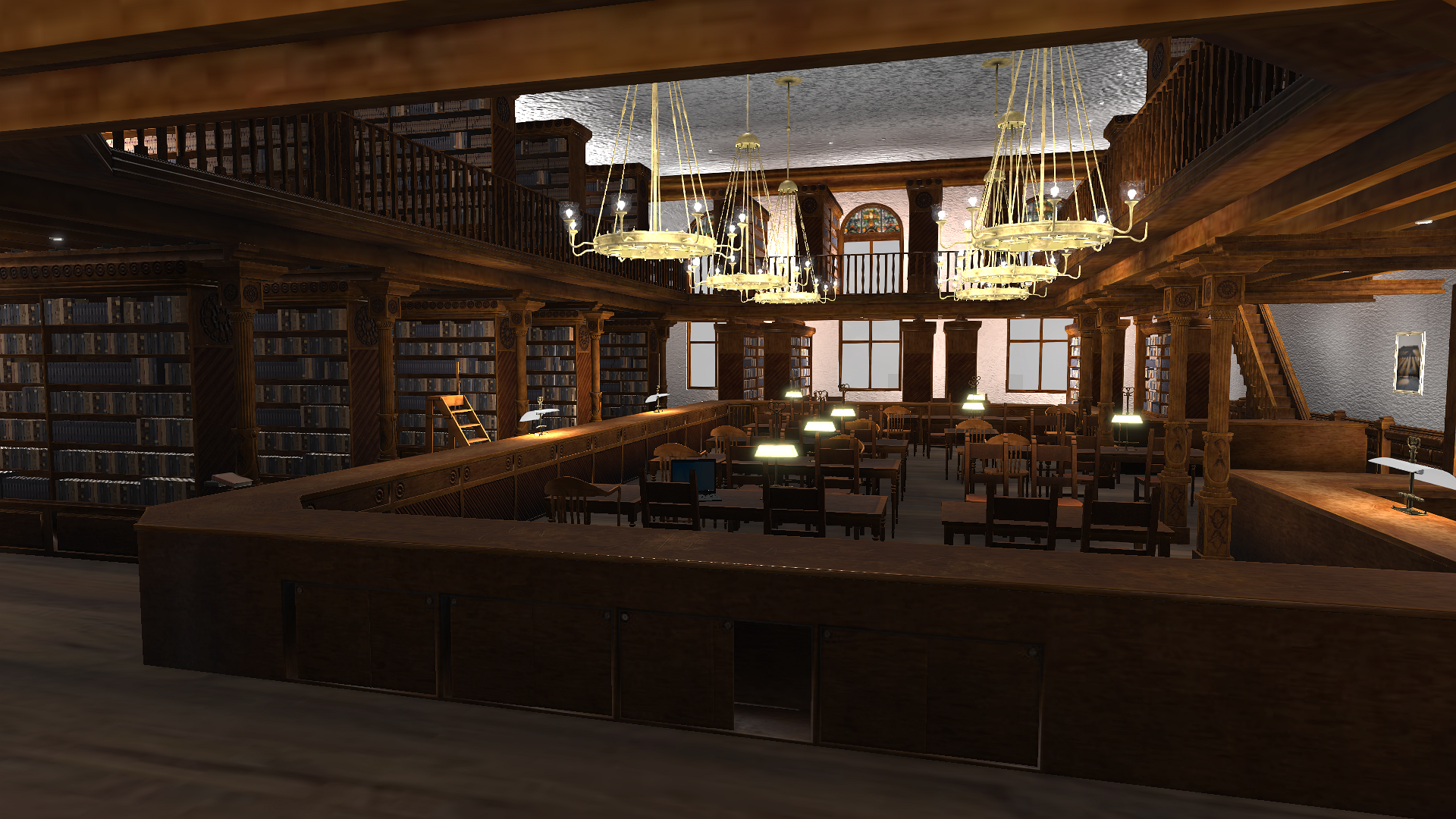
Okay, here is the Bluson Library, first. After you use my Python script to grab all the textures, and adjust the GI settings for the lights AND link all that can be linked together materials wise, you end up with a scene of 3.8GB. It works quite well in iClone (all the chairs and even the bookstacks and bookshelves are separate and movable - if you end up with working issues you can always merge some or all of them):
The Oxford library would also work well in iClone. It comes in at 4GB with a bit of linking. It's a bit darker overall than the other library, and of course has a British feel, but the chairs AND tables are separate and all works well.
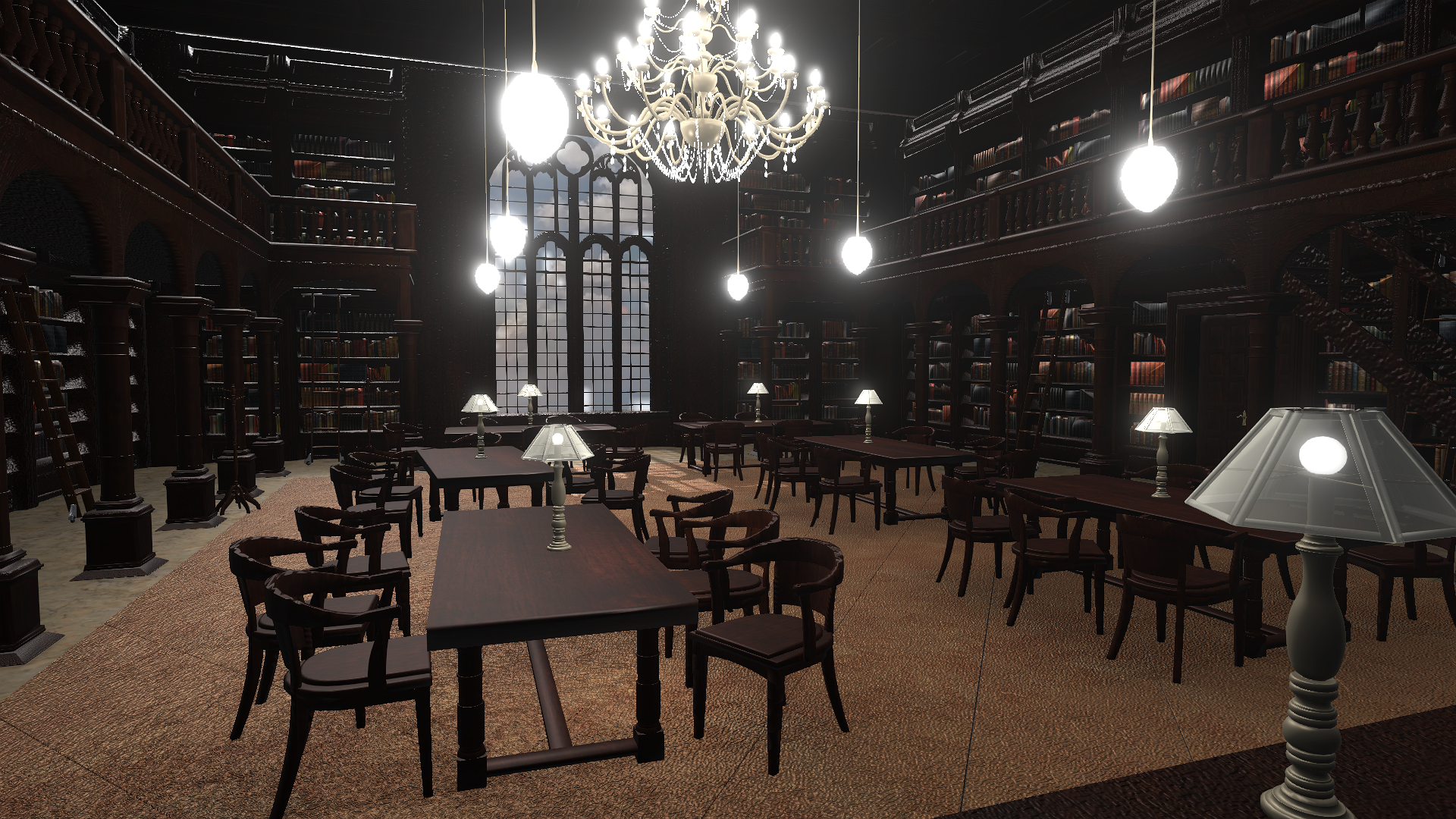
I did have to add a bit of HDR effect to try and brighten it up, but overall it's just much darker (all that dark wood). Remember, there are no lights in either scene -- just GI illumination caused by the objects I enabled as GI. You can improve both scenes quite a bit by putting your own lights in, but it's a lot more work (as a rule I tend to stay away from work :>).
I like both libraries and it really would depend (to me) on what I wanted - American or British.
|
|
By FallenNInja - 5 Years Ago
|
|
Where can I find your script?
|
|
By DeepcutAdventure - 5 Years Ago
|
|
Kelleytoons (8/31/2021)
Okay, here is the Bluson Library, first. After you use my Python script to grab all the textures, and adjust the GI settings for the lights AND link all that can be linked together materials wise, you end up with a scene of 3.8GB. It works quite well in iClone (all the chairs and even the bookstacks and bookshelves are separate and movable - if you end up with working issues you can always merge some or all of them):
The Oxford library would also work well in iClone. It comes in at 4GB with a bit of linking. It's a bit darker overall than the other library, and of course has a British feel, but the chairs AND tables are separate and all works well.
I did have to add a bit of HDR effect to try and brighten it up, but overall it's just much darker (all that dark wood). Remember, there are no lights in either scene -- just GI illumination caused by the objects I enabled as GI. You can improve both scenes quite a bit by putting your own lights in, but it's a lot more work (as a rule I tend to stay away from work :>).
I like both libraries and it really would depend (to me) on what I wanted - American or British.
Thanks so much for doing this. The brittish one looks like my best option, and it runs fine enough? I like that it is dark, it's supposed to be an old abandoned library I'm using it for. I too would enjoy the script for linking textures, that would be extremely helpful.
|
|
By Kelleytoons - 5 Years Ago
|
I can provide a link but you really need to see the videos, so the best thing is to go to my channel and see how to use it (the link to the script is there).
https://www.youtube.com/user/MikeDKelley
(Under my iClone tutorials you'll see all my videos for the script).
|
|
By DeepcutAdventure - 5 Years Ago
|
|
Thanks so much! I can't wait to try it out.
|
|
By DeepcutAdventure - 5 Years Ago
|
I'm sorrry, I've been following this six minute video for hours, but i can't figure out what im doing wrong. I can't install the script from command prompt, no matter what i do it just says its invalid at a certain point

|
|
By Kelleytoons - 5 Years Ago
|
You're sort of close.
Get-pip.py is a Python script provided by RL to enable you to install Python libraries. So you must navigate to that scripts folder, which you did. But to run it you need to invoke the iClone python, which is iClonepy. So the proper syntax is:
iClonepy get-pip.py
when you are in that scripts directory. After that you can install various libraries with that command:
iClonepy -m install <library>
However, neither of those commands will work unless you have added the path to iClonepy.exe to your system, as Administrator. The full instructions for doing that are in the video but also RL has provided that page as well (I think I reference it but if you need me to I'll look it up and post it here). As long as you are pathed to iClonepy then it will operate in any directory (you can tell this by just executing iclonepy at any command prompt. If you are pathed to it correctly it will enter Python, at which point you can press ctrl-z to exit).
|
|
By DeepcutAdventure - 5 Years Ago
|
Thank you! I managed to get all of this installed, the only thing I was hoping to run by you is the daz config file that I put in my documents folder. Do I change this every single line?
[default] dazcontent = C:/Daz Content start_dir = C:/Daz Content/Props/BBQ Grill Collection compress = True outdir = D:/
This is what was previously saved, bnut i changed the Gs to Cs as that is my main hard drive. Not sure about changing D". not sure abotu the props / bbq grill collection
|
|
By DeepcutAdventure - 5 Years Ago
|
|
I'm so confused, what does this script do? I pulled the fbx into my iclone and it worked just fine, all the colors and such, im sorry if im missing something here
|
|
By Kelleytoons - 5 Years Ago
|
As a rule putting an FBX file into iClone will not bring in things like the Normals, Roughness, Metallic and Opacity maps (there are exceptions to this rule but in particular Daz files are usually missing all or most of these).
You get the diffuse and diffuse only (again, with some exceptions). Running my script corrects this and it looks MUCH better. But if you are satisfied with the file the way it is you don't need my script (look at the tutorial where I show the Oasis and the huge difference when running my script. Or, actually, any of the tuts like the Terminator. Just diffuse maps don't bring the full power of the Daz products).
|
|
By DeepcutAdventure - 5 Years Ago
|
|
It all makes a lot more sense now, thanks for all the help on this.
|
|
By Kelleytoons - 5 Years Ago
|
There's one additional thing my script does which relates directly to this topic - all maps are resampled down to 1K.
Nearly all Daz maps are 4K and loaded into iClone are overkill for nearly all projects. It's what's bloats things and makes it impossible to work with. If you look at all my tutorials on the script you'll see the file sizes go down tremendously, so a project that needed 11GB of GPU memory (and most folks don't have more than 8GB) is now only 2 or 3.
That's another consideration for about every project you use.
|