Failed to connect to Faceware Realtime


https://forum.reallusion.com/Topic490754.aspx
Print Topic | Close Window

By klaus.jahn - 4 Years Ago
Hi,
I bought Faceware Realtime to hopefully scan face movements from a recorded video of my face. I also own Motion Live.

Unfortunately, after having all installed and checking that Faceware Realtime is listed within IClone 7's Motion Live dialog in the column "Gears", clicking on the green dot always produces always the error message "Failed to connect to Faceware Realtime". I already checked the forum and others seem to solve that problem. I already saw that video showing the connection that can be found here in the forum. Does not work for me. Perhaps you may have an idea what I could be done wrong... Thanks in advance for any help.
https://forum.reallusion.com/uploads/images/7dae41a7-c5cd-472c-ba43-cbbb.png
By Peter (RL) - 4 Years Ago
Hi...

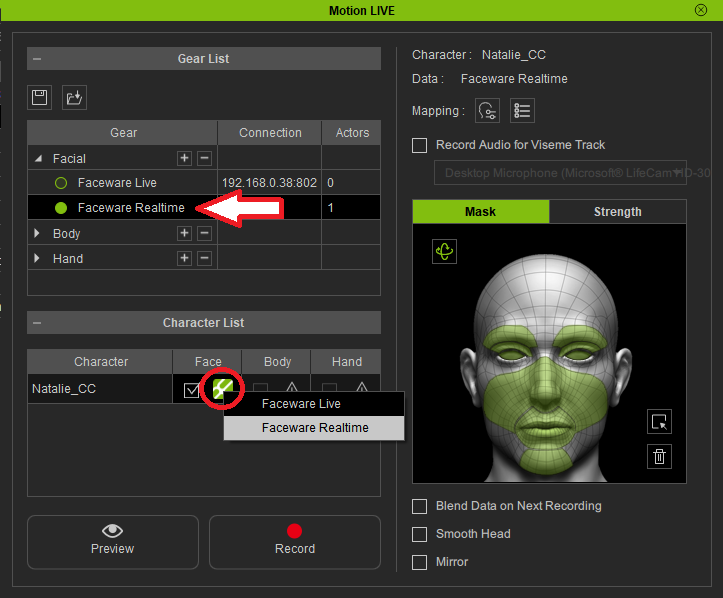
You need to ensure that "Faceware Realtime" is selected in the Gear List first. Click the green circle so it becomes solid green as shown below. 

Then with Faceware Realtime selected in the Gear List, go to the Character List and select the Face option (circled in red below) and it should show a dropdown. Just select Faceware Realtime and it should connect.
https://forum.reallusion.com/uploads/images/149c89db-d4a6-4719-8384-374b.png
By Peter (RL) - 4 Years Ago
Just to add, do make sure you are running the actual Faceware Realtime software first and the status in the top right is correct (all green except connected). Then once you connect in Motion Live the connection status will change to Connected.

https://forum.reallusion.com/uploads/images/843879bd-510d-4f96-86f7-5134.png
By klaus.jahn - 4 Years Ago
Hello Peter (RL),
thanks for your replies, these definitely helped to get it work properly and really fantastic. My problem was not that I did not check the green circle, as you thankfully add in your second reply was the issue that I did not install the Faceware Realtime program on my PC. Now it's all working fine. Thank you!
By Peter (RL) - 4 Years Ago
Thanks for letting us know you have resolved the problem. That is good news. :)
By jeffman1 - 2 Years Ago
I wanted to say that this part was why I could not get it working. The rest I had just fine then realized I need to right click the part at the bottom by the head. Thanks for keeping this post here in the forum.
Peter (RL) (7/27/2021)
Hi...

You need to ensure that "Faceware Realtime" is selected in the Gear List first. Click the green circle so it becomes solid green as shown below. 

Then with Faceware Realtime selected in the Gear List, go to the Character List and select the Face option (circled in red below) and it should show a dropdown. Just select Faceware Realtime and it should connect.

https://forum.reallusion.com/uploads/images/149c89db-d4a6-4719-8384-374b.png


By Peter (RL) - 2 Years Ago
jeffman1 (1/10/2023)
I wanted to say that this part was why I could not get it working. The rest I had just fine then realized I need to right click the part at the bottom by the head. Thanks for keeping this post here in the forum.


Thanks for letting us know you found the post helpful. :)