|
By JasonWynngard - 5 Years Ago
|
First, I hope I can properly articulate what I'm asking. In an iClone scene, I have two avatars. I used animation only to get them posed the way i wanted. I want one avatar grasping the wrist of the other one, that's all. I have tried the following to no avail:
--After saving both custom avatars (created in CC3) in the custom folder, I tried loading first one then the other. My hope was to make one "primary" to get the effect I wanted.
--The hand gestures (both still and animated) affect only the left hand on one avatar and only the right hand of the other, instead of letting me decide for myself. Doesn't matter as I still can't get either to grasp the other's wrist.
-- I looked on the forum and the WWW for a means of making one avatar the primary one so I could spoof the hand grasping the wrist. No luck. Anybody knows of a solution?
|
|
By michaelrbarton - 5 Years Ago
|
At the top where it says animation, there is a gesture panel. With that, you can apply hand gestures to your character. Left hand, Right hand and Both hands.
I used Motion Layer to move arms and hands. And I used gestures from the hold folder. I also used face and expression (angry). I hope this helps you.
The motions I used were iClone 7 motions, Idle for each character.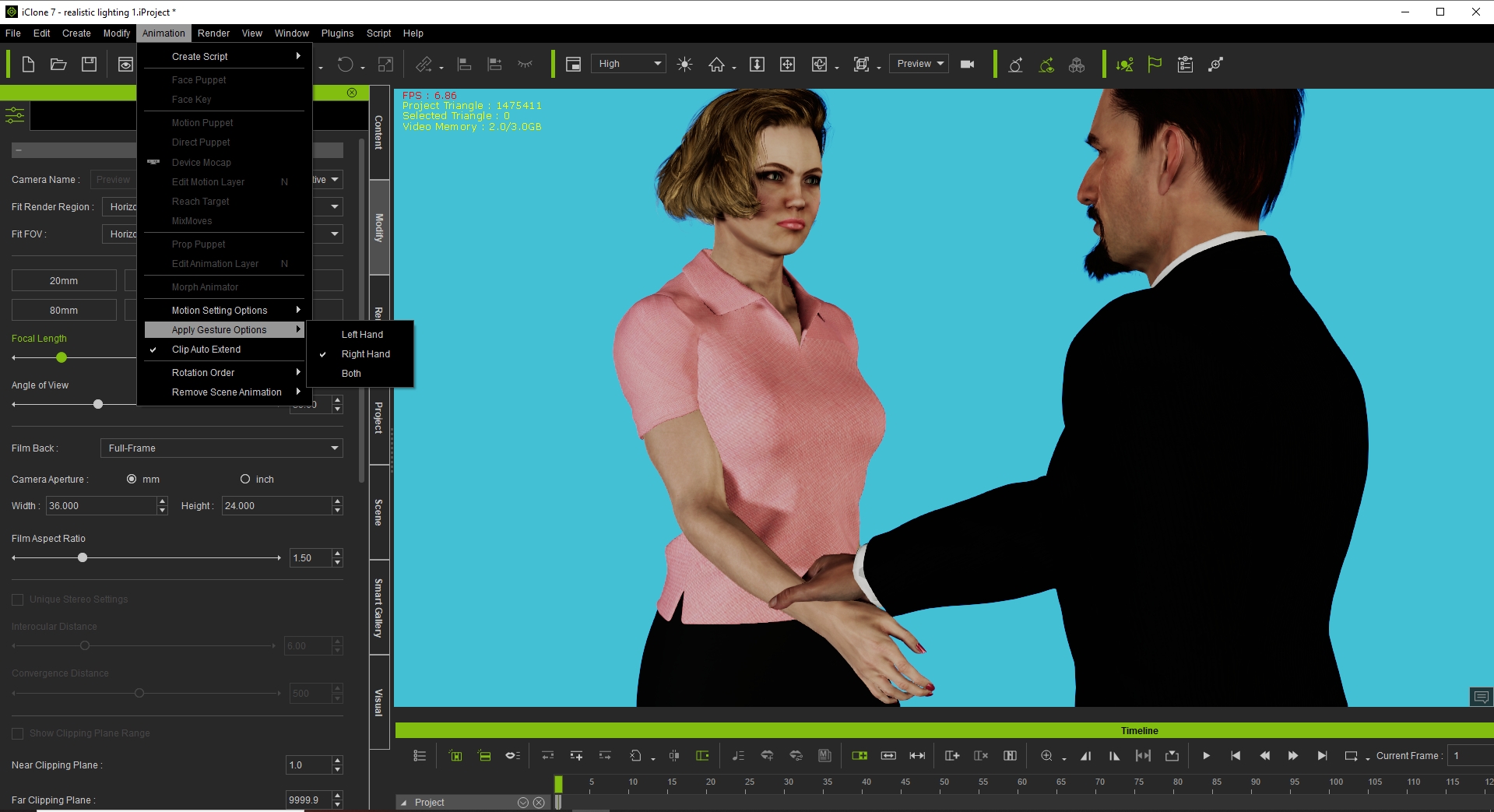
|
|
By 4u2ges - 5 Years Ago
|
|
Doesn't matter as I still can't get either to grasp the other's wrist.
Still not clear what you are trying to do.
Are you just posing characters? (then Michael has already shown).
Or are you trying to have primary grab the hand of secondary and have secondary to follow indefinitely, while you are animating primary?
If latter, then you have to create a special link/lock.. Let me know and I'll show one way to make it.
|
|
By morandevon04 - 5 Years Ago
|
|
Thank you. It was really helpful at least for me.
|
|
By JasonWynngard - 5 Years Ago
|
Thank you Michael, your solution works. Really appreciate you taking the time to explain.
|
|
By michaelrbarton - 5 Years Ago
|
Thank you. I am no expert in 3D. Iclone is by far the easiest 3D program, and offers the most satisfying results. I am here to
help with the best of my knowledge and ability.
|
|
By JasonWynngard - 5 Years Ago
|
It appears the solution offered here works. BUT, it also appears it depends on which character you place on the workplace first. Otherwise, the one doing the holding just stays in the background and the gesture is behind the receipt character.
|