|
By Motivated - 5 Years Ago
|
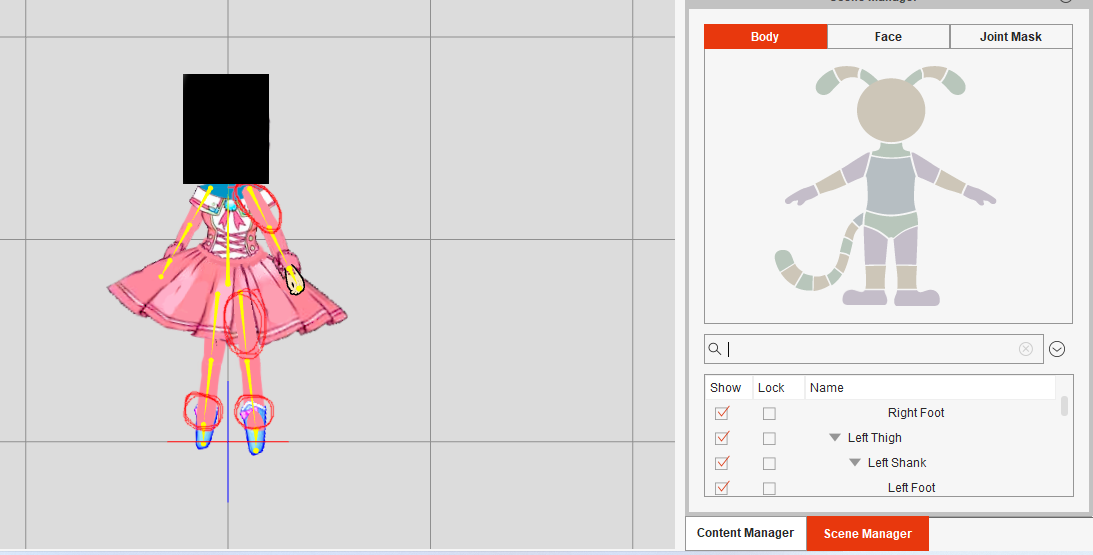
I've recently been creating a G2 character. This is my first time creating a G2 Character. I usually create my characters with a G3 template. This time I wanted a 3D character so I decided to do a G2. My problem is that my character's sprites are not in the correct places as you can see in the screenshot. I've looked for a tutorial on how to fix this, but I have not found one. If any of you would be so kind as to tell me the secret to this it would be much appreciated. Her face is covered because I have not finished her face yet. She looks to creepy right now lol.
|
|
By jlittle - 5 Years Ago
|
That looks to be a layering issue.
You can adjust the layers using the "Layer Editor"  in Stage Mode or use the layer buttons in Stage Mode or use the layer buttons (top middle) in Composer Mode. (top middle) in Composer Mode.
Jeff
|
|
By Motivated - 5 Years Ago
|
|
I've tried that and it has no effect. When I click on this it does nothing. Also thank you for the videos but which one is related to my problem? I don't see any video talking about layering. thank you for your advice and help.
|
|
By jlittle - 5 Years Ago
|
Hmm, not sure what you did but here is a quick example of correcting layers on a G2 character.
Jeff
|
|
By Motivated - 5 Years Ago
|
|
Thank you for the video. However I am still stuck. This method works for some bones but not the rest. I have uploaded a video to show you.
|
|
By jlittle - 5 Years Ago
|
That is strange.
Can you send me the file so that I can see what's going on?
Jeff
|
|
By Motivated - 5 Years Ago
|
|
The character file? The sprites aren't finished yet. I am refining them. If you were to move them and fix them for me it would be a waste of time. Reason being is because I will be replacing them again with the better sprites. If this is a problem with the program, and not something to do with my lack of knowledge I can go to the other thread and post my problem there.
|
|
By jlittle - 5 Years Ago
|
Not a problem if it is not finished.
Send what you have (actor file) so that I can look and see if I can find the problem.
Jeff
|
|
By etourist - 5 Years Ago
|
G2 characters have Joint Masks placed over their joints (basically a circular mask that controls how the layers are displayed at the joint). If you have not placed your joint masks (or they've become unaligned from the joint) then the layer button may appear not to work. Select the Joint mask tab in the scene manager to adjust the joint masks.
If you're missing a joint mask, select the joint mask you want to add and, in the edit menu select 'Add Joint Mask'.
|