|
By Miranda (RL) - 5 Years Ago
|
Dear CTA users,
We are happy to introduce our latest version Cartoon Animator (CTA) 4.5 to you. In this version, CTA lets users freely group animated elements into transparent footage (.MOV), allowing video makers to easily add visual effects to animated items, along with compositing 2D animation with video on all major video editors. Check HERE for details.
*This feature is FREE for CTA Pipeline/Pro purchase users, you can check Reallusion Hub, and update to the latest version.
Along with this release, AE scripts is updated to the official version to enhance the functionality and usability such as transparent video export, audio clip by object, camera settings, background image, and more. All these updates make a better post-production workflow from Cartoon Animator to After Effects. You can download the official version from HERE.
Transparent Footages for Video Compositing
Cartoon Animator 4 (CTA4) offers a world of creative opportunities for video editing community. Cartoon Animator supports both transparent video (MOV) and image sequence (PNG) export, while providing useful features such as exporting selected items for fast video compositing, Fit-to-Object-Size output for optimized video editing, and much more.
Specification of MOV Video and Image Sequence
- MOV Video (ProRes 4444)
- The most popular transparent video format
- Fast preview speed and easy management for video editing
- Image Sequence (PNG)
- Lossless quality with clean transparency for perfect video immersion
- Smaller data size and faster export from CTA
Smart Export
Exported items will automatically be placed into their corresponding folders in accordance to their types: - Animated items:
- MOV video in Video folder
- PNG sequence in Sequence Image folder
- Static elements like Backgrounds and Props will be placed in Single Image folder.
This update offers a world of creative opportunities for video editing community. Users can easily mix 2D animated characters with live action footage, place a real character into a imaginative 2D world, or even bring 2D characters into 3D scenes with popVideo format. You can check the webpage to explore more.

Other Enhancements & Bug Fix in v4.5
Cartoon Animator v4.5 improves usability and fixes some defects. Here are some enhancements, please check the Release Note for full list.- Isolate Selection to exclude unwanted elements, which will be convenient for exporting selected ones. >> Know More
- A new render setting UI is optimized for better usability. >> Know More
- Users can now set projects by per second rather than per frame. >> Know More
- Users can now determine a specific project as a default project, so when users launch Cartoon Animator the default project and its setting will automatically open in the working area. >> Know More
- Refinement of default mouth for Auto-lipsync. >> Know More
Known Issue
There are some known issues in this version, please check details HERE.
AE Script
AE script (Beta) was introduced last September to seamlessly combine animation work from CTA to AE. We saw a lot of great animation since then, and this firmed up our decision to update AE script, and even support transparent video format for all video editors. In CTA version 4.5, we enhance the functionality of Export to After Effects, including exporting audio clip by object(.wav), camera settings, project sounds, background image, and transparent Video (.mov). Users can download the free AE script from the webpage. Please check the announcement for details.
Reallusion Team
|
|
By Miranda (RL) - 5 Years Ago
|
Isolate Selection
A new feature icon is added in Cartoon Animator. The "Isolate selection" is a button that quickly shows selected layers and hides unselected layers. In the past, you needed to repeatedly click on "show/hide" to check the layers, making it troublesome when you had many layers. The button helps you display multiple selected layers in one-click, to facilitate the editing process. Moreover, it helps you conveniently export in groups.
|
|
By Miranda (RL) - 5 Years Ago
|
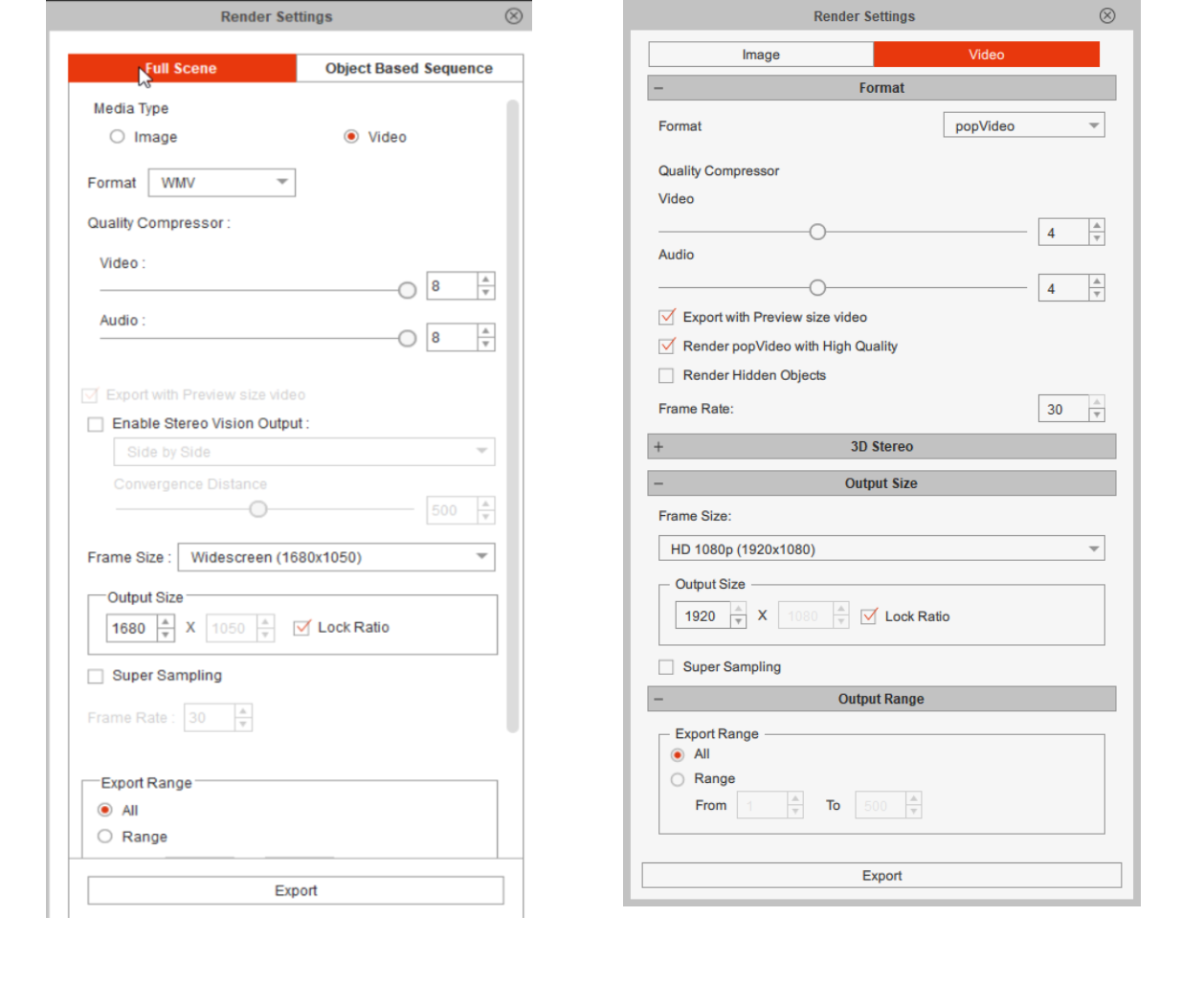
Render Setting UI Optimization
A new render setting UI is optimized for better usability.
|
|
By Miranda (RL) - 5 Years Ago
|
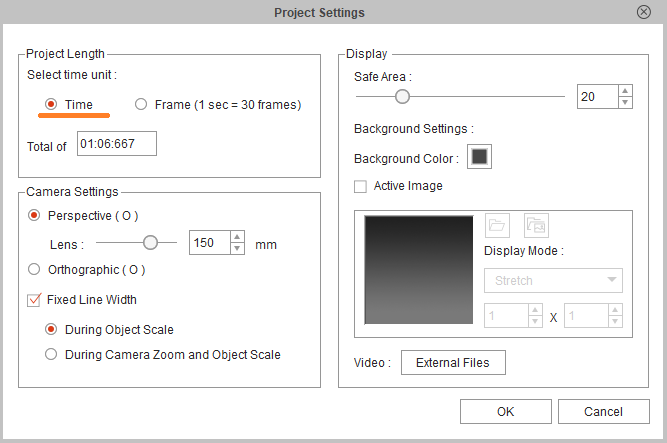
Per Sec Settings
Users can now set projects by per second rather than per frame.
|
|
By Miranda (RL) - 5 Years Ago
|
|
Set as Default Project
Users can now determine a specific project as a default project, so when users launch Cartoon Animator the default project and its setting will automatically open in the working area.
To set the specific project as a default project you can go to the Content Manager, right-click on the project and click on "Set Default Project". If you wish to initialize default project settings, then you can go to the preference interface to click on the "Restore" button. 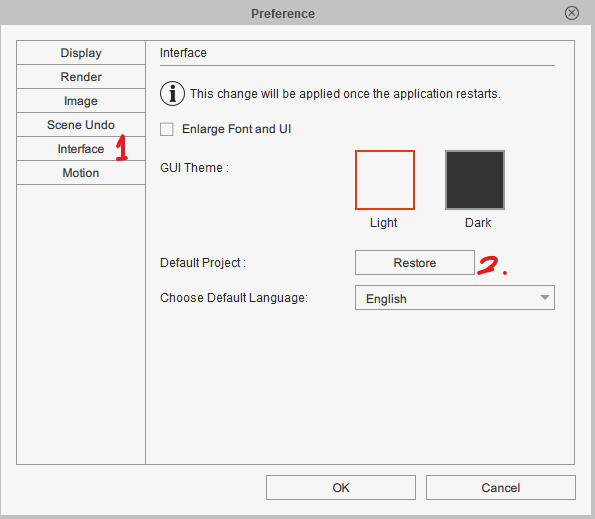 |
|
By Miranda (RL) - 5 Years Ago
|
Refinement of Default Mouth for Auto-lipsync
In CTA v4.5, Reallusion refines default mouth shapes for the embedded characters, with smoother and better auto-lipync performance. For users who have their own characters and want to create their own mouths, Reallusion updates the guidelines to follow. For details, please check the page 61~68 of CTA_G3_WhitePaper_Character_Creation_2021.pdf. (which also comes with program installation)
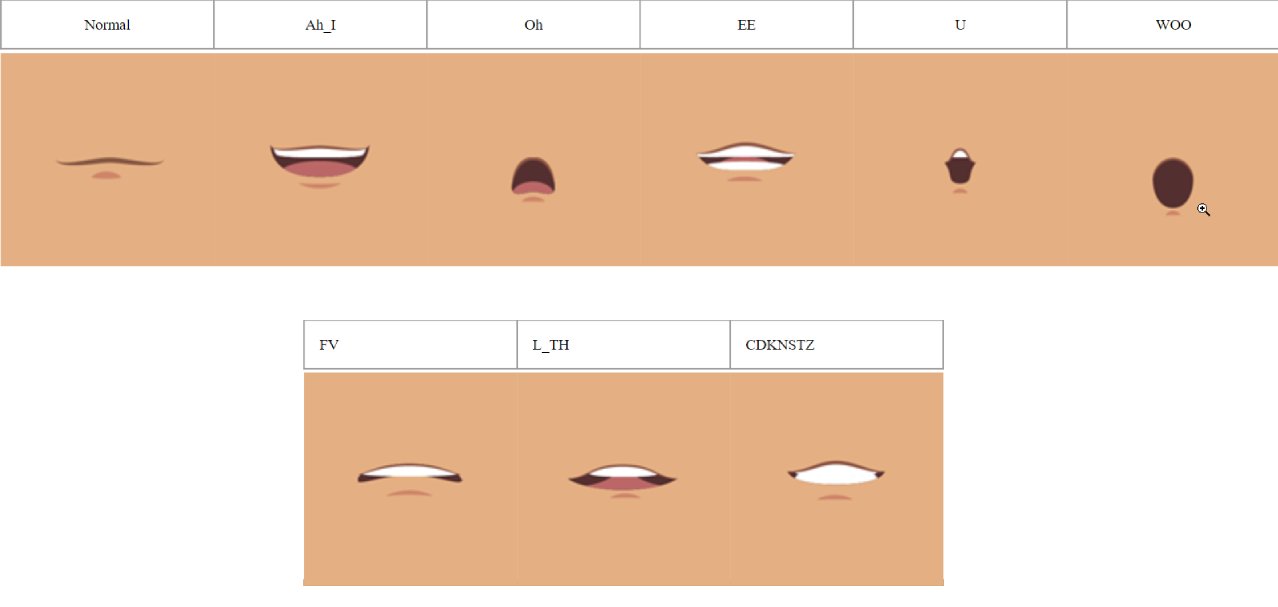
Alignment Guidelines:
- Draw a horizontal reference line for the alignment of the mouth position.
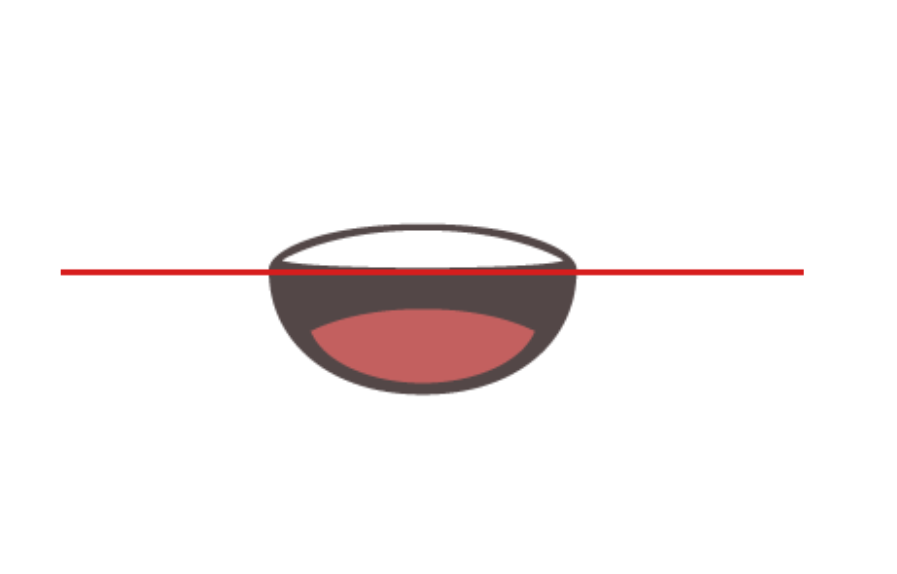
- For all the mouth shapes that show teeth, align the lower limb of the upper teeth with the reference line.
- For the other mouth shapes that do not show the teeth, align the upper limb of the upper lip with the reference line.

|
|
By Miranda (RL) - 5 Years Ago
|
Known Issue
1. How to play MOV videos in Windows Media Player 12? Windows Media Player 12 cannot play Cartoon Animator MOV videos without installing K-lite Codec Pack. 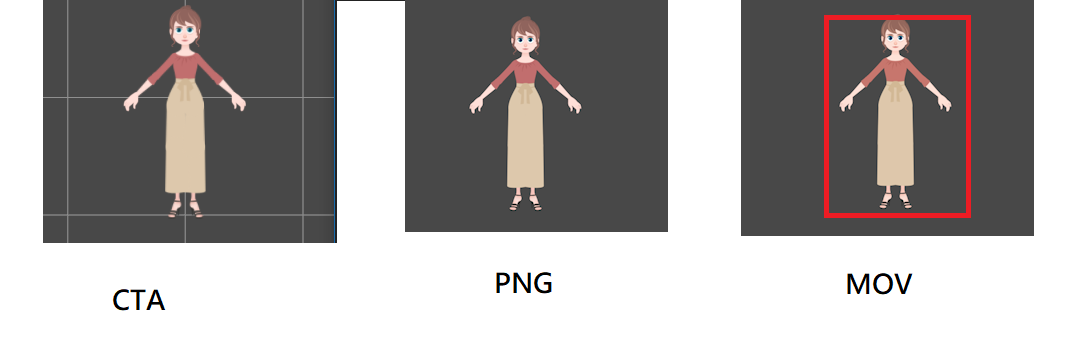 3. When applying 3D motion on some characters, character's forearm layer will be behind the upper arm. 3. When applying 3D motion on some characters, character's forearm layer will be behind the upper arm.Workaround: We recommend separating the forearms and upper arm as different images. 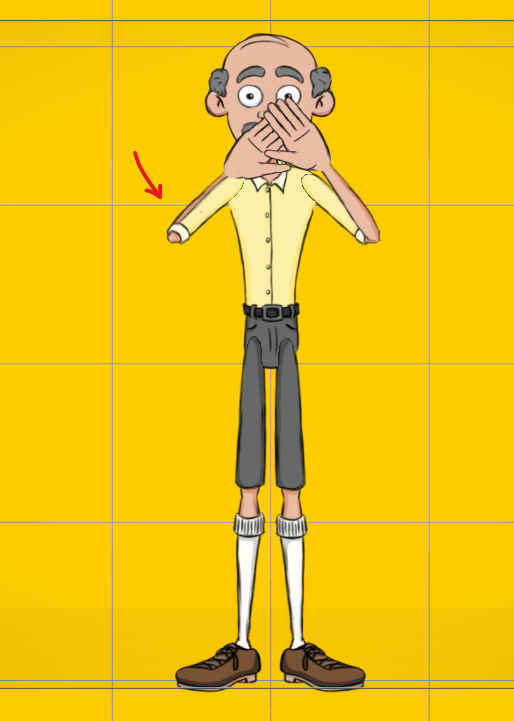 4. MOV videos rendered with Cartoon Animation Mac version cannot be loaded into Sony Vegas, as Sony Vegas supports Windows PC only.
5. Cartoon Animator does not support importing transparent background MOV video. Users must convert MOV as popVideo if users would like to import transparent video.
|
|
By rogdodge - 5 Years Ago
|
Two-part question. I am on a budget. From what I have read it would appear the software you are using as examples are expensive or a subscription, neither of which I can afford. I would be grateful if you could tell me whether HitFilm Express or Adobe Premiere Elements, which are cheaper but do not have all the bells and whistles, would be possible options with similar results? I have tried DaVinci Resolve 17, which is free but it is a steep learning curve (it is also difficult to read the icons). But, I will persevere with it. 😁
My second query is .mov video. It doesn't play on my Win10 PC. I did try saving a character as a transparent .mov but I could not import it into APE. I thought to download a codec but it was flagged as Trojan. That is as far as I have got.
|
|
By vepop - 5 Years Ago
|
I am using HitFilm Express. It works fine.
Using Win10 PC also and have installed the K-Lite Codec.
|
|
By rogdodge - 5 Years Ago
|
|
Thankyou, @ vepop. I have downloaded the Codecs. Not sure why it flagged up a Trojan earlier. I will try HitFilm Express later today. Cheers. 😀
|
|
By Miranda (RL) - 5 Years Ago
|
Thanks vepop for helping to answer!
Hi rogdodge, I'd like to help, but every video editing tool has its own strength and weakness, it might be proper for us to suggest. :P
rogdodge (6/12/2021)
Thankyou, @ vepop. I have downloaded the Codecs. Not sure why it flagged up a Trojan earlier. I will try HitFilm Express later today. Cheers. 😀
|
|
By Miranda (RL) - 5 Years Ago
|
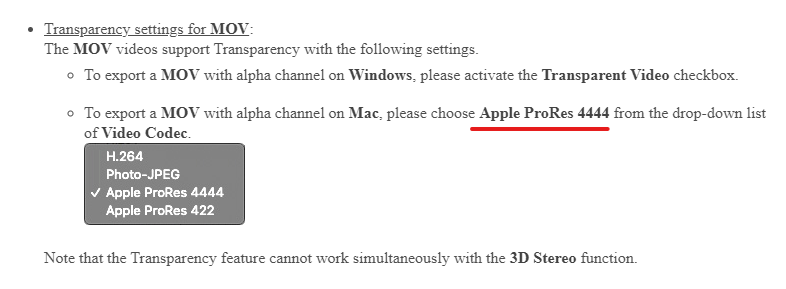
Some Mac users contacted Support for not capable of exporting MOV file with transparent background.
If you have the same question, please manually change the codec to ProRes 4444.
Refer to Online Manual > Media Type - Video > Format
|
|
By muslimashumi - 5 Years Ago
|
Hello CTA 4 folk. i have just installed AE script in my after effect. but it is giving an error message like below screen shoot. where as i have all update software. i use after effect 2020 and CTA 4.5
could any body help in this regard. thank you // M Shumi

|
|
By muslimashumi - 5 Years Ago
|
|
hi! i got my solution myself, thank you :)
|