|
By Walvince - 5 Years Ago
|
Hi,
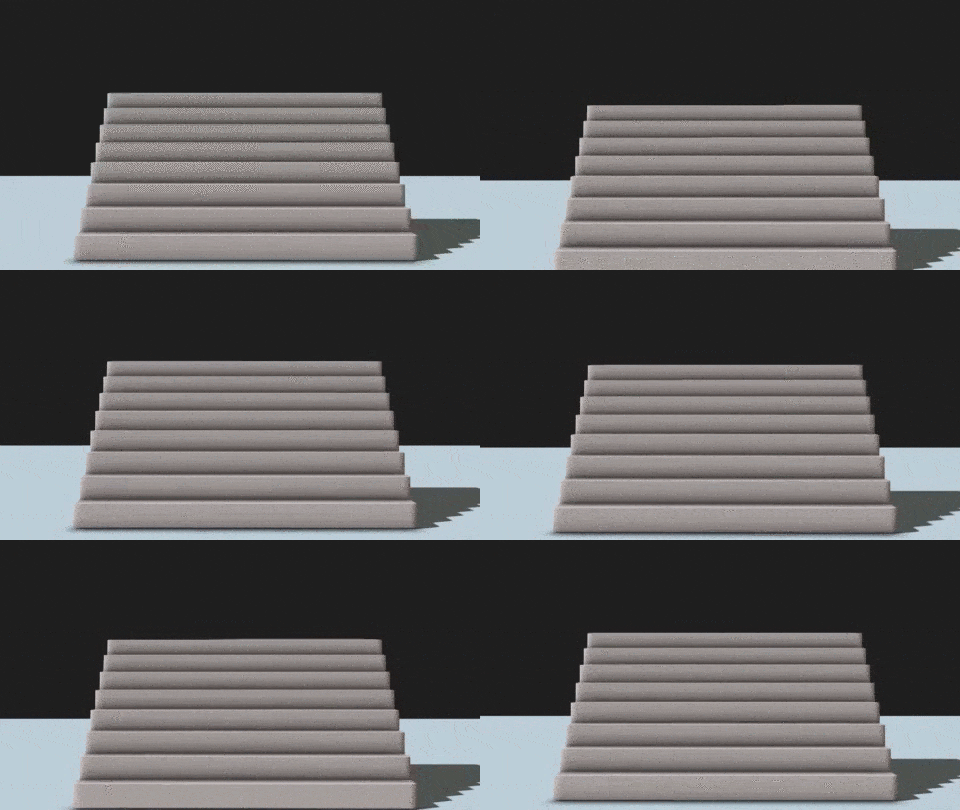
I noticed the below problem, it occurs when an object is about to leave or enter the camera range.
You can see here what happens near the floor, and it's doing the same thing for each step of the stair if the camera keeps going up. :crazy:
Do you have the same problem ? I tried to change some ambient occlusion and other visuals parameters but in vain.
|
|
By 3DChick - 5 Years Ago
|
|
That's very odd. Could it be a shadow flicker issue?
|
|
By Walvince - 5 Years Ago
|
I don't think so, I tried to switch it on/off and change the resolution but it wasn't better.
It's not only happening since 7.9, I already had this problem on previous versions, but that was fine as long as I hadn't a camera shot filming stairs :P
|
|
By 3DChick - 5 Years Ago
|
|
Sadly that was my only idea. I'll try to replicate it when I get home this afternoon... It's not something I've encountered...
|
|
By Walvince - 5 Years Ago
|
|
Thanks ;)
|
|
By 4u2ges - 5 Years Ago
|
Wow, quite repeatable. I seams like camera clips vertical AO planes at the bottom regardless of lights/shadows? (I do not know how it works)
You should definitely submit an FT issue. For now I suppose only AO maps are safe to use.
|
|
By 3DChick - 5 Years Ago
|
|
4u2ges got to it before I did--and wow, so interesting! I'll still try when I get back to my Windows machine...
|
|
By 3DChick - 5 Years Ago
|
Ok, so I got it too, almost made my eyes bug out in the preview, but it's way less noticeable in the final render. Here's that:
I can't upload a screen cap of the preview because my laptop bit the dust last week, and I don't have screen capture stuff reinstalled yet. But yes, it was absolutely there no matter what settings I changed, tho.
Very odd.
|
|
By animagic - 5 Years Ago
|
I have no luck posting; this is the third time...:crazy: And, I'm getting tired...:doze:
Anyway, the reason that you see what you see is that one of the surfaces that is responsible for generating the AO moves out of view when the camera moves up.
What should happen is for the AO algorithm to consider an area outside the current view as well so that a surface that has moved out of view still "counts" in the calculation.
You can see the effect of this idea when you add an image layer that creates a border around the visible area. The invisible surface still "counts" in this case which improves the visual effect.
|
|
By Walvince - 5 Years Ago
|
Thank you for your feedbacks ! I just submitted an FT.
I never used AO maps but it's a good idea, I'll test that and see if it can do some magic :)
|