|
By wazeeer18 - 5 Years Ago
|
I started to face this weird problem after the last update. So the first time everything worked fine, but after that the problem started. Files transfer properly but when I activate the link it says activated and unreal live link says that it receiving but neither characters nor cameras move.
I also get this warning "Upgrade your code. Curve elements count has changed from the previous frame. That will clear the previous frames of that subject."
Everything is up to date. I re-installed everything. Don't know what to do?
|
|
By oisilener1982 - 5 Years Ago
|
|
Try to create a new Blank project and test if the problem still exist
|
|
By wazeeer18 - 5 Years Ago
|
|
Thank you for your suggestion, I already did that, and yes it still exist.
|
|
By oisilener1982 - 5 Years Ago
|
|
Livelink is working fine in my PC. Have you tried the default character?
|
|
By charly Rama - 5 Years Ago
|
|
One thing, wait that guru Bassline pass by here, he will save your life :) . That's unreal, one little thing and you stuck there for hours and days. Good luck man
|
|
By oisilener1982 - 5 Years Ago
|
|
do you have CC_Shaders in your content?
|
|
By wazeeer18 - 5 Years Ago
|
|
Yes, I do, and I also tried the default character, nothing works.
|
|
By wazeeer18 - 5 Years Ago
|
|
charly Rama (4/21/2021)
One thing, wait that guru Bassline pass by here, he will save your life :) . That's unreal, one little thing and you stuck there for hours and days. Good luck man
Thank you, I hope he can help with this.
|
|
By StyleMarshal - 5 Years Ago
|
haha , Charly , you know now a lot about the Unreal Engine , guess you could help here too ... are you lazy or do you have headache again? :D
@wazeeer ,
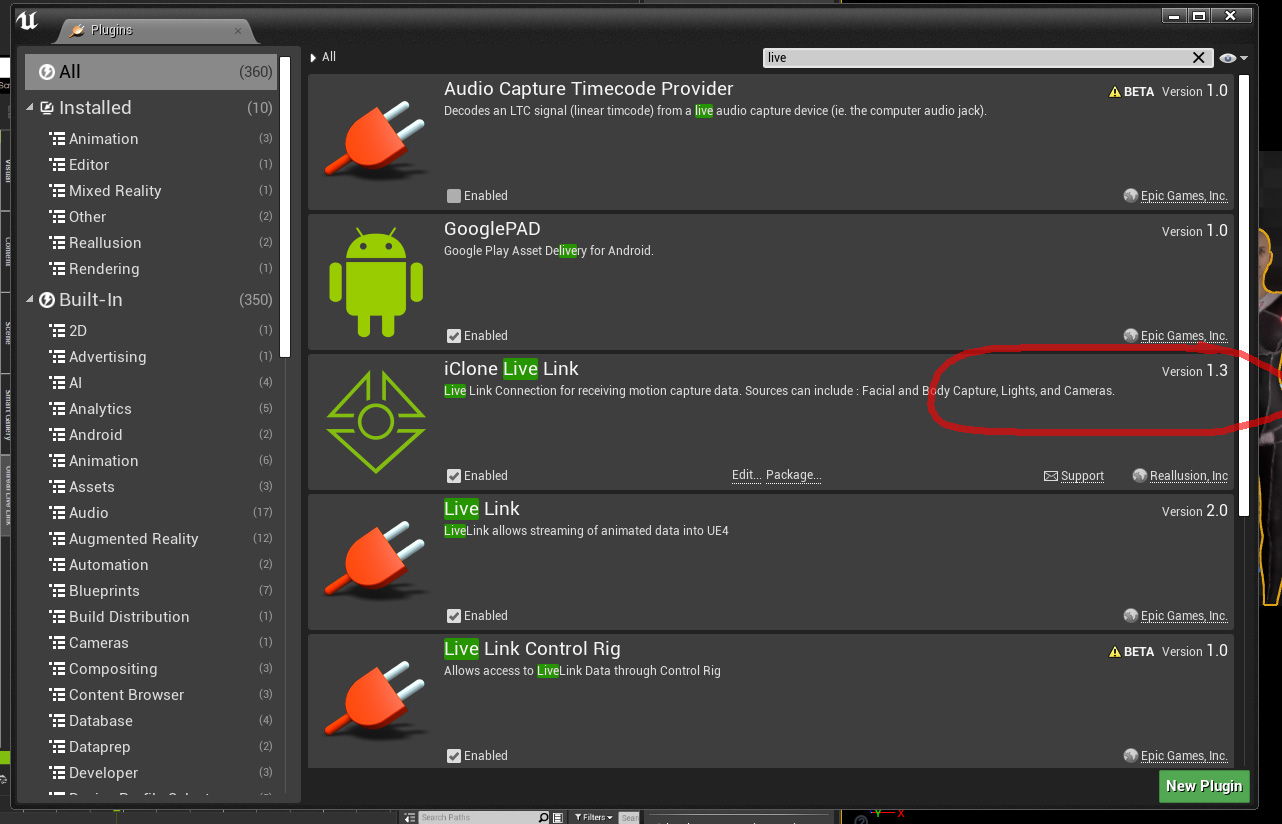
1. check if you have green lights under the Live Link Tab in UE4 when Link is activated in IClone.

2. Be sure you use the exact same name in IClone and in UE4.

Be sure that you have Live Link 1.3 installed :
|
|
By charly Rama - 5 Years Ago
|
|
And the MASTER has spoken. No, with my little head (who has pain all the time) and my little VRAM and little GPU :D I let the place to the masters, I'm staying student :hehe::D
|
|
By kungphu - 5 Years Ago
|
|
I’m about to post in the Tips n Tricks section with some learnings I had over the weekend while trying to make a 48Hr film. Go check that thread out. I talk about this problems and also the FACT the the active Editor Camera stops transferring. Give me a sec to make a few screen shots. I’ll post in about 5 mins.
|
|
By kungphu - 5 Years Ago
|
FIRST make sure everything is working as BL indicates above. those are the definite first steps you should take. I did all of what BL suggests above and still it wouldn't work. What happened to me over the weekend was while using multiple characters and several different sets, I'd lose the link with the characters and also couldn't use the active editor camera, it wouldn't transfer or wouldn't link. I just posted the workaround that worked for me in the UNreal Tips n Tricks section. It involves simply renaming the character in iclone and in the details section of unreal. For the Active Editor Camera, I had to insert a new Unreal Cam, apply the LL blueprint and then rename it in the details section to ActiveEditorCamera. By the time I figured that all out I missed the deadline like a chump for my 48Hr film. Was super depressed about it. Hadn't missed a deadline in ages.
|
|
By StyleMarshal - 5 Years Ago
|
|
That is hard ....
|
|
By kungphu - 5 Years Ago
|
|
Bassline303 (4/22/2021)
That is hard ....
I felt like I just shot Santa Claus when I told the folks that I co-wrote the script with and voice acted on the film, I didn’t even get to turn anything in. Sucked... even my mocap suit didn’t work. Well the suit didn’t but the gloves, the fingers were all bent back 90degs. So yeah woulda taken more time to fix everything or add hand animation later so I just used BVHs I had and tweaked the key frames. Ugh...
|
|
By louiggii - 5 Years Ago
|
|
I am having the same problem. I was able to link to it last night and then the program froze while using take recorder. This morning it doesn't work. I have 1.3, the light is green and I am using the same name. Iclone is not controlling character in Unreal. This is the way Unreal works for me. One day Daz bridge to unreal works fine the next day it's broken. Now Iclone is a problem. Incredibly frustrating and I am starting to wonder if Unreal it it worth all the aggravation.
|
|
By wazeeer18 - 5 Years Ago
|
Thank you all for those informative replies.
I managed to solve half of the problem but there is a stange issue that I still can't explain.
So what I did while I was trying to solve the issue is something similar to what you guys suggested which is writing the name manually in the CC_live_link and sometimes the character starts moving immediately as in Iclone. However, sometimes it starts to move just in the editor but not in the veiwport.
I also noticed that when I recompile the CC live link or the blueprint, the character takes the fame at that point and freezes, it's like doing an update to its pose in the viewport.
I also found that sometimes if the live link is active but character not moving in the viewport when I click on the show FPS it suddenly starts moving, which is something I can't explain. I believe the problem is that unreal is not updating properly from the LL but I don't know what's going on.
I just want to add that in order to solve the problem I had to rewatch reallusion tutorials on LL and I noticed that when they open the blueprint they can actually see that unreal is being fed by the LL but when I open my blueprint even if the character is moving
, the nodes in my blueprint are just static not as what I saw in the tutorials. I hope those extra details can help reallusion or someone here to diagnose the problem.
Thank you all again.
|
|
By kungphu - 5 Years Ago
|
All great info. For me it wasn’t matching the names in Unreal that solved it, but instead I had to change the names in iclone and unreal to match and solve it. It’s been a mess. What I think the issue is, is that Unreal churns our new engine revs every few months. A smaller company like RL has to try and keep up. So the chances of this thing running smoothly aren’t that great.
It’s why the Daz bridge isn’t working. It was working with 4.25 only. Then they deleted that versions and it works with 4.26, but... not 4.25. Now with the 4.26 update it doesn’t work at all (insert facepalm). It’s all a bit overwhelming!
|
|
By louiggii - 5 Years Ago
|
I uninstalled iclone and live link and then reinstalled the programs and I was able to link up Unreal and Iclone but was having problems with take recorder where I couldn't play back my takes. Unreal would freeze while using take recorder so I felt my problem was with take recorder.
My solution was to open up a new project using game mode instead of film mode and Unreal links up with Iclone and I can use take recorder and play back my takes and record it all in sequencer.
What was happening while trying to use take recorder is I would go to file or any of the menu bars scroll down and it would appear for a split second and then go black. Yet I was still able to move my characters around in the viewport. So it wasn't freezing completely but I still had to hit shift control to get out of the program. Is take recorder new as I have only been using Unreal for about a month. What happened to the Sequence recorder?
I found the latest version of Unreal to completely mess up my Daz bridge and now I am wondering if I should use the Iclone render or go back to Daz to start a short film I am planning. When it is working Unreal engine is an incredible piece of software but I don't trust it. I can use Daz and have made a short film with it a few years ago but I hate the long render times and I hate lighting in Daz especially compared to Unreal. And everytime I open Iclone I love the animation tools and Character creator but not enamored with the render.
|
|
By StyleMarshal - 5 Years Ago
|
@louiggii
1. Sequence Recorder will not be updated anymore and it will be go away in UE5.
Why doing recordings? The best workflow is to import your IClone animations via FBX , but you have to tick "Use Default Sample Rate" in the FBX import settings , so it takes only seconds. (Animations)
If you are used to IClone , do all your animations , but Camera work I would do in UE4.
Maybe you should wait for UE5 to start your first full movie , in the meantime better use IClone or Daz.
|
|
By louiggii - 5 Years Ago
|
|
Thanks Bassline. The FBX seems to be a more elegant workflow and it works great. I will give myself a few more days to experiment with the Unreal Engine. I have imported some metahumans and will experiment with those to see if I can go that route.
|
|
By charly Rama - 5 Years Ago
|
|
sorry, wrong post at wrong place
|