|
By jessicalcrichton - 5 Years Ago
|
So, I'm SURE someone out there can help with my... unique... issue. See, I need to attach a spiderbot to helicopter blades via a chain to make it fly. I've linked them all together, but when I try to make it work, all the links go flying everywhere. Also, trying to look at any of it with the viewpoint dropdown ("face", "top", etc) results in seeing gray everywhere and nothing else. I have to work tonight (and worked on THIS all night last night), so I'm going to bed now, and hope that someone has been able to help me by the time I get home from work tomorrow morning. Thank you all for your continued help. I really appreciate you all!
Here are some screen shots to help explain:

This is what it looks like right now, before I hit "play". The end of the chain and the box on it are both supposed to be 3-D, not flat. The blade, which should be attached at the other end, is under the spiderbot.

This is what it does when I hit "play". The shadow near the back is the box. I have no idea where it goes when it flies off. or why.

Here is the constraint list:

Thank you again!
|
|
By planetstardragon - 5 Years Ago
|
maybe try posting a video of it so we can see what's happening ? I do know that sometimes when running in realtime preview, the physics doesn't look like what it will render, it usually rounds off the math to make the load lighter on the pc to render everything else, resulting in stuff going all over the place .... which is why we have an option to playback in realtime, or by frame - the "by frame" play option was added to help minimize the chaotic real time physics math ( you only see the best results by either simulating or rendering )
|
|
By JCL1 - 5 Years Ago
|
I'm not entirely sure I understand the topology of your model from the pictures, but I'll take a stab at it. Are you taking some spinning helicopter blades, and underneath it's spin "axis" there is a chain attached, that is then attached to the spiderbot. So when the helicopter blades fly up, it lifts the bot with it via the chain?
If I had to do this, I don't think I would use the wallet chain. Or any physically modeled chain in fact. In my limited experience with iClone physics, constraints between objects like ropes and chains seem to easily break. It almost feels like they are held by magnets rather than metal, so when it's yanked too hard and hits it's kinematic threshold, so to speak, it breaks and everything flies off all over the place. And I haven't figured out if there's a way to make that link stronger.
I would instead model a bunch of chain links in something like Blender (there are a ton of tutorials on making a chain) so it is a rigid object like a bar, and import it as an OBJ. Then I'd "Attach" the blades to this chain bar then to the spiderbot. That's assuming that your animation will have the chain in perfect tension at all times. If you're trying to model the chain to look like it has slack in it at some point, I honestly don't know what I'd do. My initial thought would be to animate a chain as an image layer or billboard and trick things that way, which would be hard, but still easier than modeling chain physics in iClone to me.
|
|
By jessicalcrichton - 5 Years Ago
|
|
planetstardragon (4/10/2021)
maybe try posting a video of it so we can see what's happening ? I do know that sometimes when running in realtime preview, the physics doesn't look like what it will render, it usually rounds off the math to make the load lighter on the pc to render everything else, resulting in stuff going all over the place .... which is why we have an option to playback in realtime, or by frame - the "by frame" play option was added to help minimize the chaotic real time physics math ( you only see the best results by either simulating or rendering )
THANK YOU!
(I'm at work and couldn't wait. LOL!)
Wouldn't I have to render a video of it happening in order to post it? It's so fast, and I don't know if you can render in slow-mo. Sorry... I'm still new to so much of this. :-/
That said, I'll look at it in frame-by-frame in the morning, but I'm not sure it'll tell me anything more than I know. I'll try though!
|
|
By jessicalcrichton - 5 Years Ago
|
|
JCL1 (4/11/2021)
I'm not entirely sure I understand the topology of your model from the pictures, but I'll take a stab at it. Are you taking some spinning helicopter blades, and underneath it's spin "axis" there is a chain attached, that is then attached to the spiderbot. So when the helicopter blades fly up, it lifts the bot with it via the chain?
If I had to do this, I don't think I would use the wallet chain. Or any physically modeled chain in fact. In my limited experience with iClone physics, constraints between objects like ropes and chains seem to easily break. It almost feels like they are held by magnets rather than metal, so when it's yanked too hard and hits it's kinematic threshold, so to speak, it breaks and everything flies off all over the place. And I haven't figured out if there's a way to make that link stronger.
I would instead model a bunch of chain links in something like Blender (there are a ton of tutorials on making a chain) so it is a rigid object like a bar, and import it as an OBJ. Then I'd "Attach" the blades to this chain bar then to the spiderbot. That's assuming that your animation will have the chain in perfect tension at all times. If you're trying to model the chain to look like it has slack in it at some point, I honestly don't know what I'd do. My initial thought would be to animate a chain as an image layer or billboard and trick things that way, which would be hard, but still easier than modeling chain physics in iClone to me.
I can totally do that, considering the spiderbot is the creation of a character of mine so I can make it work however I want it to. I just thought a chain would be the coolest (it's post-apocalyptic). Though... I've never used Blender, and while I can figure it out (like I have CC and iClone so far) by looking things up and trying them myself, I haven't been able to find ANYTHING on how to export from iClone to Blender, only the other way around. Please tell me I don't have to make everything AGAIN in Blender? (I know I can make the chain in Blender and export it to iClone, but I have seen that Blender is also good for smoothing animations, so I was hoping I could use it for that too, since I had to download it and all.)
Thank you SO much!!!!
|
|
By animagic - 5 Years Ago
|
There has been a discussions about this in the past (I think it was for a rope), but the search function of this forum is so bad that you can't search for ROPE without getting pROPErty..:crazy:
Someone like Rampa or 4u2ges may be able to help out, if they see this. I know for the rope they had to go into Blender to create something.
For some reason chains are problematic: I have had dangling earrings flying around. It may be that the old Bullet physics engine is better suited (it is still there in iClone 7).
I'm no expert at all, so I can't contribute much more...:unsure:
|
|
By JCL1 - 5 Years Ago
|
I think a chain would definitely be cool for a post-apocalyptic scene, I totally get you on that!
I would highly recommend learning Blender if you're using iClone. I am definitely not an expert on all the ins and outs of it, but know enough to essentially kitbash or modify my entire library of props and clothes. Learning how to do that will infinitely expand your model collection. I've used it to add parts to vehicles, modify clothing like turning pants into shorts or adding wrinkles. The methods to import and export models between iClone and Blender are pretty easy once you get the hang of it.
If you go down that route, I'd start with something really simple. Like create a cylindrical bar in Blender, export it over to iClone and connect your helicopter blades with the spiderbot. You'll organically learn all sorts of techniques in Blender to create more complex parts, like chains. You don't have to export your stuff from iClone to Blender for now. Just create this chain part in Blender for now, and bring it into iClone and connect it to everything else in that environment.
|
|
By planetstardragon - 5 Years Ago
|
I was asking for the video mainly to get a better view of what exactly you are trying to achieve.
as for the thing flying off on it's own, just right click the moving prop and "remove animation" - if that doesn't work, then make sure it's not attached to something else that's moving and make sure you didn't give the prop zero gravity by accident in the physics section. also be aware that there are 2 modes of physics in iclone, you can find those physx vs bullet option in the "project preferences" panel. - you can only use one at a time though..
For your fluid chain motion, there are a variety of ways you could possibly achieve that, the one "I think" you chose is probably the least efficient - being all the math put into calculating the collision of each link. also a reason I wanted to see an animation - to see how your computer was reacting to the approach you took.
try not to be literal in what you are trying to achieve - it's the difference between making a hot scene that tells your story vs it becoming a science project to make the chain look as realistic as possible ....I found myself in that trap in the past....where the challenge of making a detail look convincing in a specific way took precedent over telling a story. So i looked for other ways to achieve any given shot - As a result I learned many new different techniques ...some in fact that look better than what I was originally aiming for.
Now I said that to cross-over into the next point, there's more than one way to achieve a goal.....maybe try to treat an entire chain like one prop, such as grab a tube and give it a png chain texture - then try using a softcloth approach so it functions as a rope - but looks like a chain. There are other approaches such as putting bones on the single prop chain ...and either adding a spring effect ....or animating it manually - it's all an illusion ....and there are more than one way to pull off illusions - even with post production in a video editor.... Point being before this shot becomes a science project, take a moment to consider a variety of approaches - it will help you become more familiar with the software's capabilities, and help you discover new techniques in the process as well.
watching George lucas, star wars behind the scenes youtube video and alfred hitchcock who also did a lot of revolutionary unorthodox techniques, inspired me to think this way - they created many unusual techniques to compensate for what computers couldn't do at the time.
|
|
By Rampa - 5 Years Ago
|
|
I'll have a chain tutorial up soon. It is actually much easier than you would think! ;)
|
|
By Rampa - 5 Years Ago
|
Here is good way to make a chain.
|
|
By 4u2ges - 5 Years Ago
|
@Rampa
That's great, would come very handy for users!
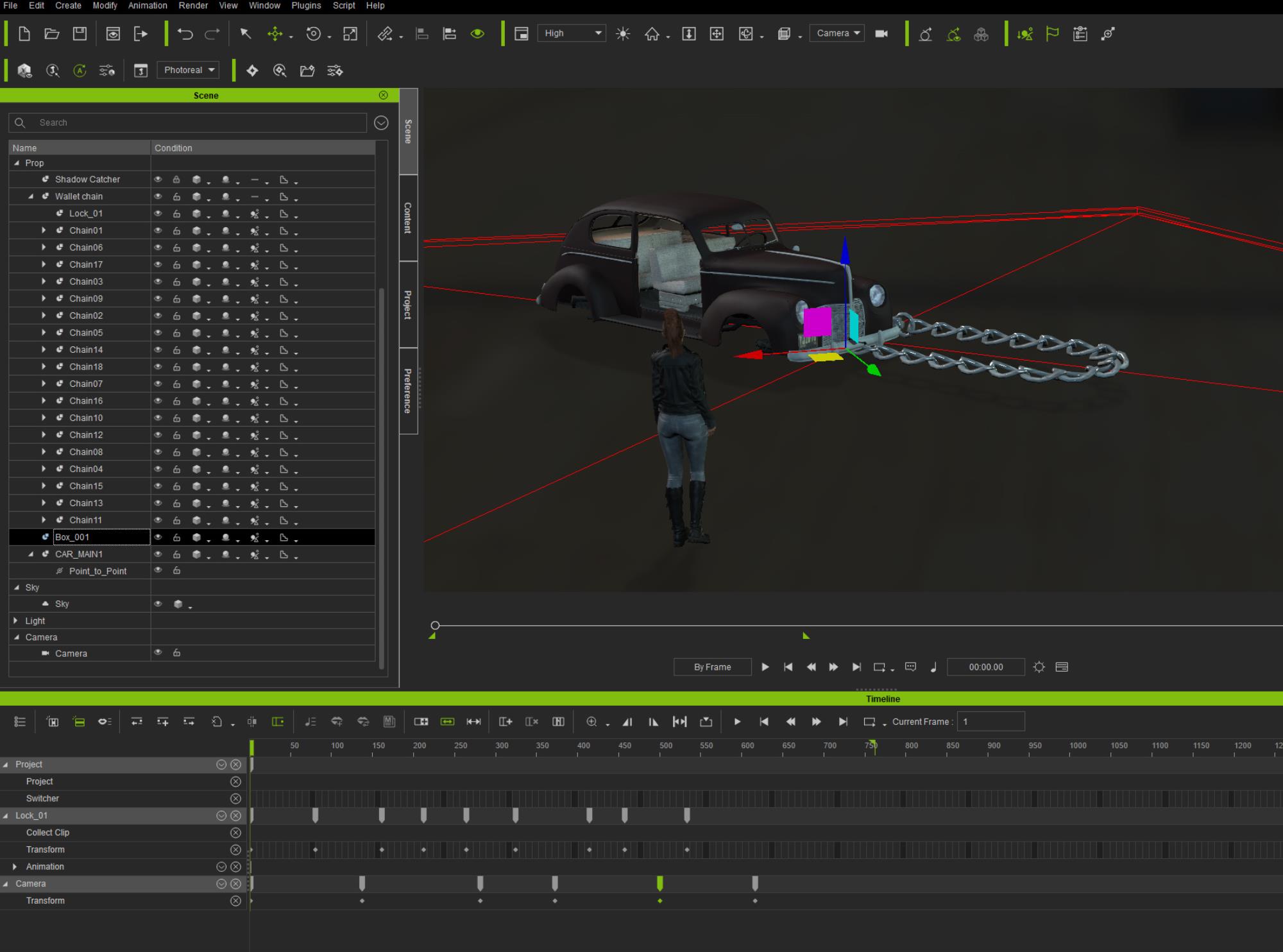
Meantime, although I do not fully understand Jessica's intentions there, I made this one from Wallet Chain accessory (I think it comes with iClone by default).
Made rigid floor
Scaled the chain
Deleted Lock_02 from it
Important! Set the SAME Mass (20) and Damping (100) for all chains (those 2 values can be played with)
Attached car to the last chain with P2P. Damping 10 for the car.
Animated Lock_01. Set Smooth in Curve Editor for all keys (can be done in Transition Curve Presets as well) except for the first two (first 2 keys are at the same position to idle and let chain to settle).
|
|
By animagic - 5 Years Ago
|
|
Ha! Rampa and 4u2ges don't disappoint! :w00t:
|
|
By 4u2ges - 5 Years Ago
|
@animagic
Funny you guessed :)
To the subject of physix earnings. They are very easy to make. The reason they would always fly away by default is, that they interact and bounce off of head collision shape.
Collision shape for the head has to scaled down as much as possible and collision margin set to 0.01 for both - the earrings and head collision shape.
|
|
By jessicalcrichton - 5 Years Ago
|
|
Rampa (4/11/2021)
Here is good way to make a chain.
OMG! THANK YOU!
This is EXACTLY what I needed. You even answered my question about attaching it at both ends. THANK YOU!
|
|
By jessicalcrichton - 5 Years Ago
|
This, plus Rampa's will do EXZACTLY what I need, as yours also includes the pull effect.
YAYYY!
Though one thing I noticed on both is the "physics floor". How do you do that?
Thank you again!
4u2ges (4/11/2021)
@Rampa That's great, would come very handy for users! Meantime, although I do not fully understand Jessica's intentions there, I made this one from Wallet Chain accessory (I think it comes with iClone by default). Made rigid floor Scaled the chain Deleted Lock_02 from it Important! Set the SAME Mass (20) and Damping (100) for all chains (those 2 values can be played with) Attached car to the last chain with P2P. Damping 10 for the car. Animated Lock_01. Set Smooth in Curve Editor for all keys (can be done in Transition Curve Presets as well) except for the first two (first 2 keys are at the same position to idle and let chain to settle).
|
|
By jessicalcrichton - 5 Years Ago
|
"Set Smooth in Curve Editor for all keys "
I feel like an idjut, but... how do you do that, exactly? Heh...
|
|
By jessicalcrichton - 5 Years Ago
|
|
Once I have the animation done, I'll post it here so y'all can see what I'm trying to achieve. :)
|
|
By wires - 5 Years Ago
|
|
jessicalcrichton (4/12/2021)
"Set Smooth in Curve Editor for all keys "
I feel like an idjut, but... how do you do that, exactly? Heh...
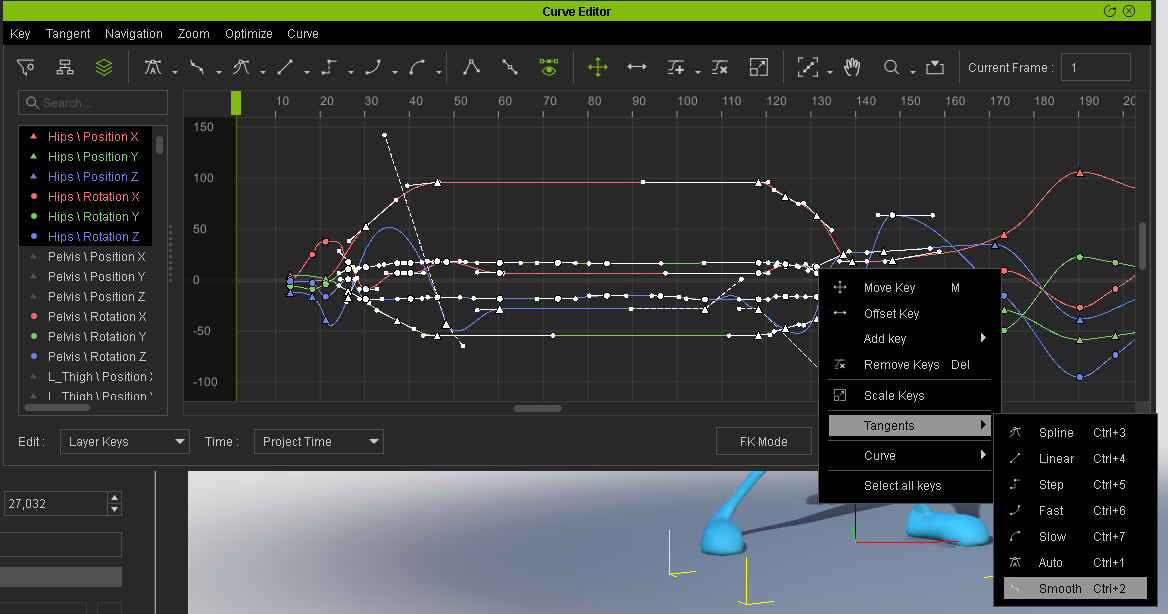
Select the keys, right click and from the menu select Tangents>Smooth:
|
|
By 4u2ges - 5 Years Ago
|
And if you do not have a Curve Editor (it is a plug-in), you can do very well with Transition Curve Presets to smooth animation.
Anyway, live sample to play with is better than 1000 words. Here is a sample project: https://www.dropbox.com/s/p2qyw3ss1b4rco7/Chain.zip?dl=0
Tips: to change physix properties for multiple objects (like chains) to the same value, select them with Shift.
There are also global Physix settings in Project configurations. You can play with Gravity and World scale to see how they affect physix simulation.
|
|
By jessicalcrichton - 5 Years Ago
|
|
Thank you! I'm going to try everything now that I'm off work. :)
|
|
By Rampa - 5 Years Ago
|
Of course I must confess that my chain is actually exactly the same method as the wallet chain! Just broken down into an efficient way to build it! ;)
Because it is actually just using the constraints to be "chain-like", the actual physics collision is not terribly important for its functioning. But external physics objects will push on it and make it deform properly. The constraint on the top link can target your lift vehicle. But you need to set the lift vehicle to have physics to target it. Set it to "Kinematic" (like I did with the top chain link) so you can animate it.
The physics floor can be found in the "Create>Physics" menu.
|
|
By jessicalcrichton - 5 Years Ago
|
Okay, I got really far, but the top link's constraint won't accept the bottom of the blades as a target. Here's a screenshot:

So you can see the block above it is the part I want to connect the constraint to, but when I try it doesn't do anything, and stays on "world". I'm going to keep trying things...
|
|
By 4u2ges - 5 Years Ago
|
Activate Physics for blade first and make it kinematic (if the blade would be animated to drag something through the chain).
Then pick it as P2P target.
|
|
By jessicalcrichton - 5 Years Ago
|
Okay, I figured that one out. Aaaaand, it WORKS! Here's the little video I promised. I still have to make the chain and such look prettier, but that'll be easy. And of course I need to smooth the animation which I'll also do soon. THANK YOU ALL SO MUCH! You've helped me so much. <3
|
|
By jessicalcrichton - 5 Years Ago
|
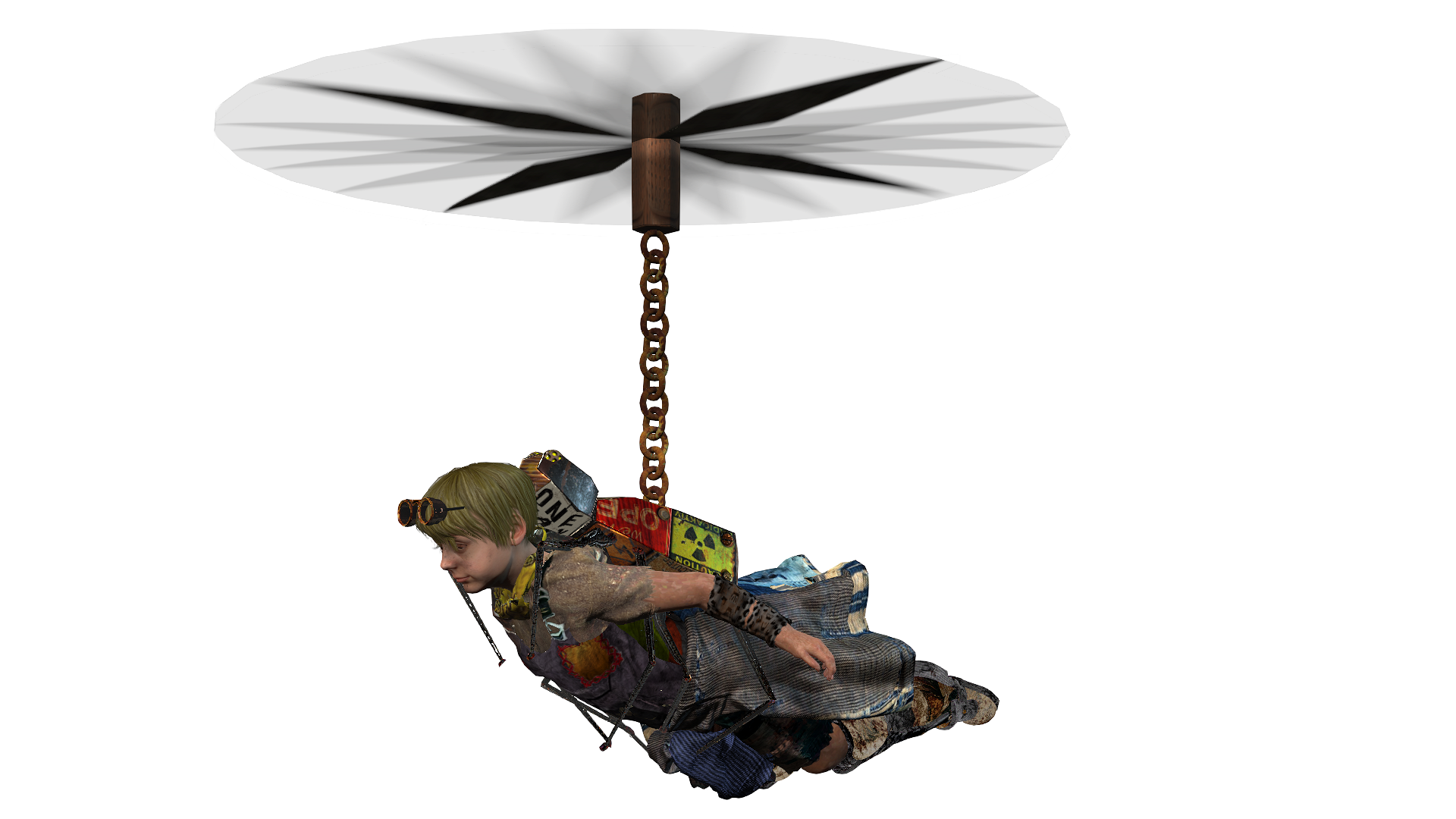
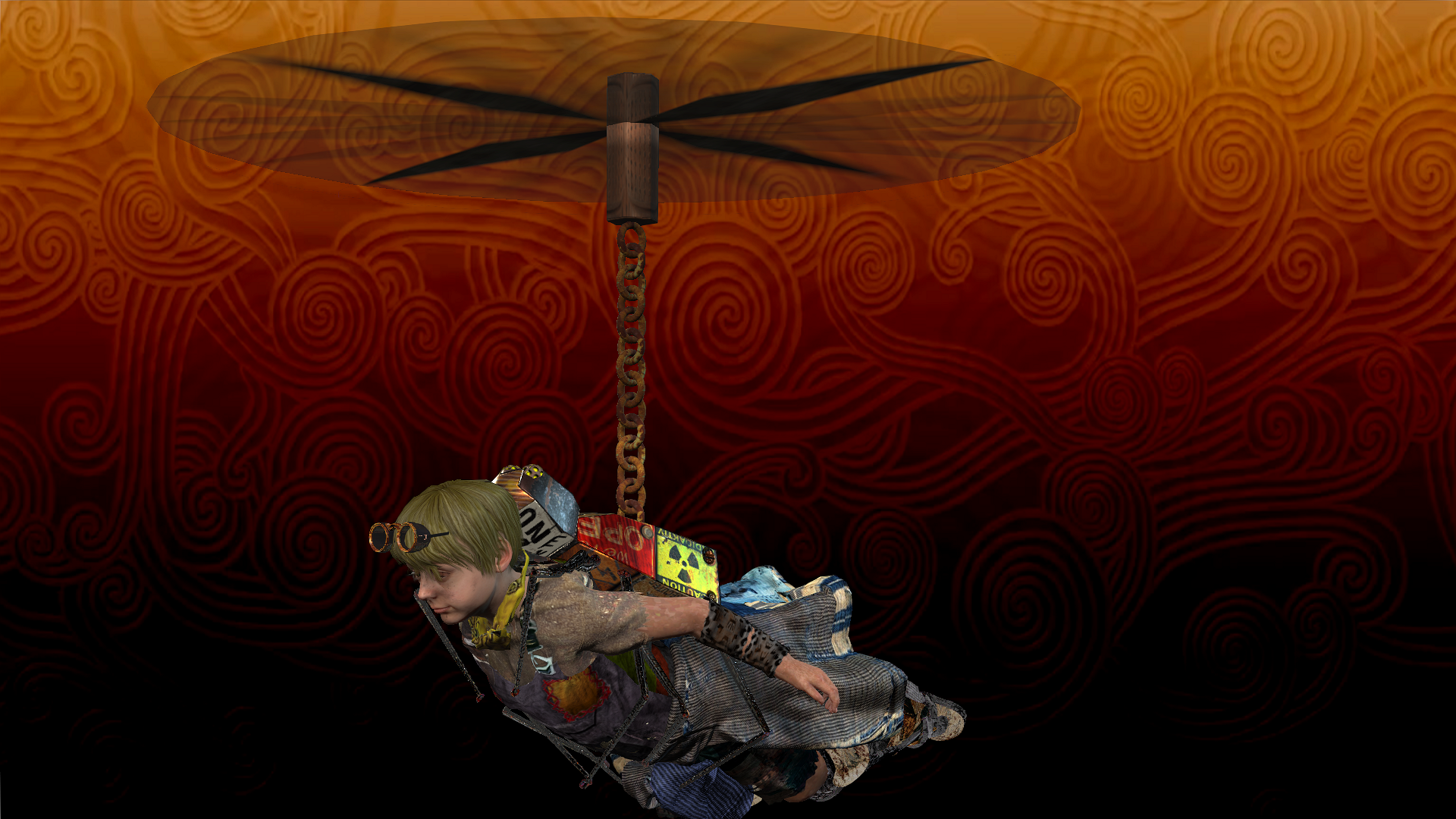
Here is the final look I'm going for. One with no background and the other with the clouds that will be in the final video.
One more issue I've run into, though, is that I can't attach the spiderbot to the character because there is no option to attach for him, and the spiderbot is already attached from the top top the chain. I tried link, but he fell off almost immediately. Any idea how to do that?
Thank you all again. You've been AMAZING!
|
|
By animagic - 5 Years Ago
|
|
jessicalcrichton (4/12/2021)
Okay, I figured that one out. Aaaaand, it WORKS! Here's the little video I promised. I still have to make the chain and such look prettier, but that'll be easy. And of course I need to smooth the animation which I'll also do soon. THANK YOU ALL SO MUCH! You've helped me so much. <3
You need to set your video to Unlisted to make it visible to others with the link. It look like you have to set to Private.
|
|
By jessicalcrichton - 5 Years Ago
|
|
I did because I don’t want everyone to see it, since it’s unfinished and I’m debuting the video when it’s fully finished. I didn’t think about unlisted. LoL I’ll do that.
|
|
By jessicalcrichton - 5 Years Ago
|
Welp, it was great... up until I linked the character.
At first, I linked him to the spiderbot, and this happened (both videos are by-frame):
https://www.youtube.com/watch?v=CjUD7LBEPxY
So I thought maybe if I linked the chain to the character directly, it would be better, so I linked him to the chain via a long box on his back (so the chain wouldn't be too short), then attached the spiderbot to him. This happened:
https://www.youtube.com/watch?v=7yRotUpciVo
Sooo... what am I doing horribly wrong? Eep! I've thought about animating the two parallel to each-other in order to give the illusion that they're attached, but that will be a lot of work. I'm willing, but before I try, is there a better way?
|
|
By planetstardragon - 5 Years Ago
|
yeah, math! - I'll let them help on the physics some more because they've got great knowledge of the software and this is an opportunity to go deeper in understanding the science behind the physics. After that I'll teach you how to cheat! :w00t: #yolo
|
|
By jessicalcrichton - 5 Years Ago
|
LOL! Thanks! I look forward to it!
I figured out, by leaving the character behind so I could see better, that the issue may be that the spiderbot isn't stable and straight. That makes sense with true physics -- that would be the case in reality too with a loose chain -- but I need to make him stable for this. In other words, I need to make this unrealistically loose-chainy but also straight. LOL Ahhh animation!
Here's what I mean:
https://www.youtube.com/watch?v=zwBr-mR2rjA
|
|
By planetstardragon - 5 Years Ago
|
quick cheat - make the spider prop a "dummy object" render the scene with helicopter and chain as is because they came out nice ....then load that video back into iclone as the background, then animate the spider to follow along as smoothly as you imagined on the chain. - basically compositing.
"but that's cheating!!" :Whistling:
|
|
By 4u2ges - 5 Years Ago
|
Turn the collision OFF for a character

Then Link Character to a Spider. You can time it on a Timeline.
|
|
By jessicalcrichton - 5 Years Ago
|
Okay, if it's seriously that simple I'm going to throw something. XD I'll try after work; I'm off at 7. Thank you!
4u2ges (4/13/2021)
Turn the collision OFF for a character Then Link Character to a Spider. You can time it on a Timeline.
|
|
By jessicalcrichton - 5 Years Ago
|
|
planetstardragon (4/13/2021)
quick cheat - make the spider prop a "dummy object" render the scene with helicopter and chain as is because they came out nice ....then load that video back into iclone as the background, then animate the spider to follow along as smoothly as you imagined on the chain. - basically compositing.
"but that's cheating!!" :Whistling:
Great idea... but I have to get this animation into another scene with other animations to finalize it. Any idea how I do that with these cheats? I'm ALL about cheating! XD
|
|
By jessicalcrichton - 5 Years Ago
|
AHHHHHHH!!!!! IT WORKS!
*Dies*
Okay... moving on.
You guys are AWESOME!
4u2ges (4/13/2021)
Turn the collision OFF for a character Then Link Character to a Spider. You can time it on a Timeline.
|
|
By 4u2ges - 5 Years Ago
|

|