|
By midix - 5 Years Ago
|
So, I got the new update and also bought the hair&beard pack. Got excited at first... but then got stuck.
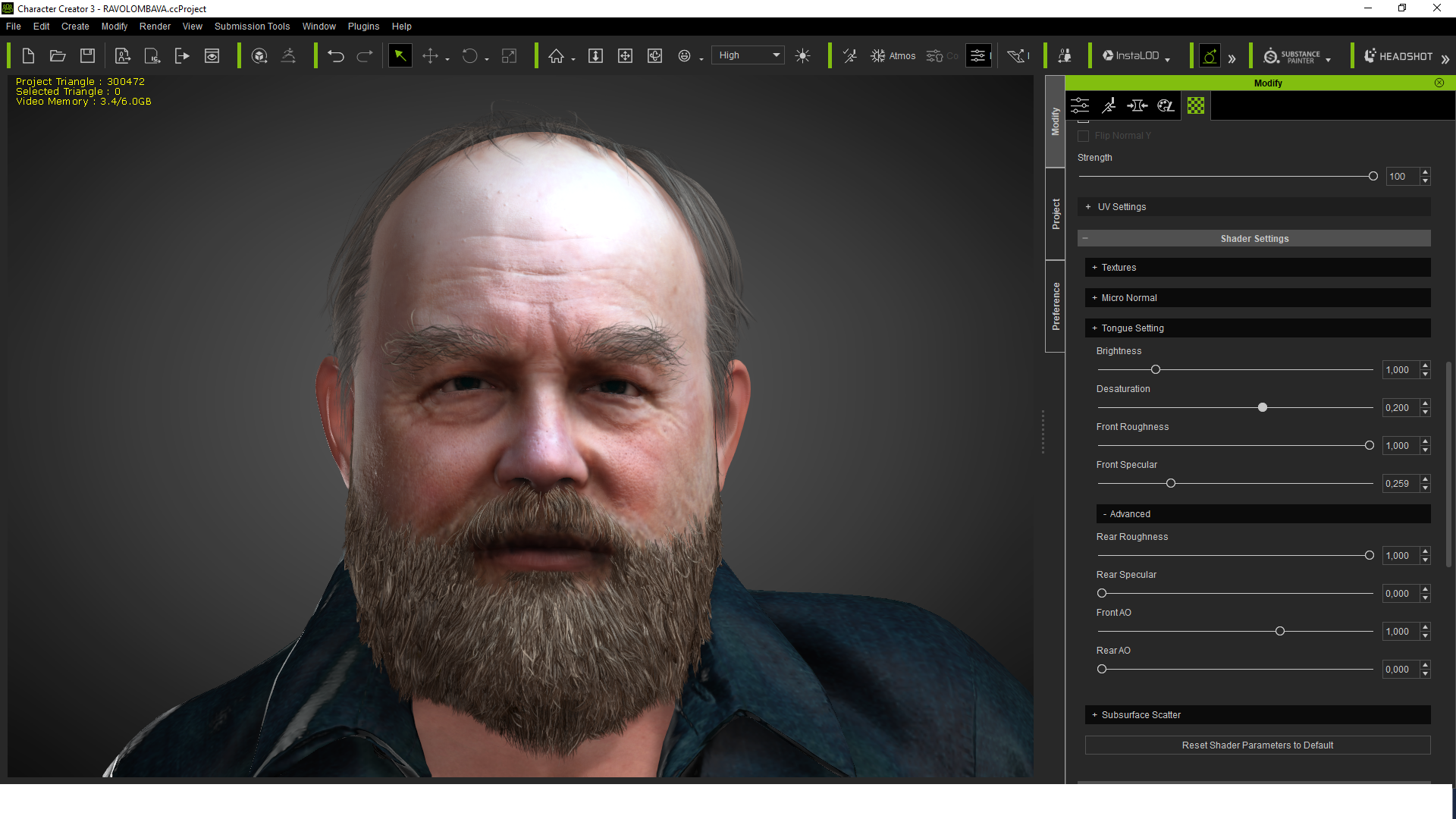
I'd like to create a character similar to the one below (by the way the fake photo was generated using StyleGAN neural network. It is very finicky and features are very entangled, but you can play with sliders and get something usable for Headshot and then for normal maps in SkinGen).
For the mustache, I took VanDyke style and edited the mesh to make the ends shorter - it worked pretty well. But none of the premade beards fit. The Hollywood is too short, the Curtain Long is too long. So, I took the long one and tried to edit the mesh to make it shorter and also to cover more area under the mouth and at the sides.
It did not work as expected. The beard mesh seems to have some hidden parts that start sticking out and causing visible sharp seams, especially where the beard touches the face.
To get rid of the seams, I started adjusting Conform settings, but it got even worse - every time I hit Calculate Collision button, the beard gets more and more broken.
I expected more adjustability from an almost 100$ package.
Another thing is that even the default hair and beard still sometimes seem to intersect the skin with too sharp seams. Maybe CC is not using the approach that is being used by Unreal Engine (see Using Pixel Depth Offset with the Hair Shader at https://docs.unrealengine.com/en-US/Resources/Showcases/PhotorealisticCharacter/index.html). So, I'm not sure if the CC beard will look the best when imported into Unreal or I'll have to recreate it from scratch, which kinda kills the idea of having CC as the all-in-one tool.
If someone has managed to get custom beards working and conforming to face when using lipsync, I'll really appreciate any advice.

|
|
By charly Rama - 5 Years Ago
|
Hi
I don't know much what exactly you want more than that I could get quickly with headshot and the new beards and hairs but for my part, I'm really satisfied with this kind of result, I could show you a quick video of this avatar where beards match so well with facial animation. I didn't anything special more than showed at RL tuto for beards.
It's a result I didn't worked on for getting exactly the photo's result but with some adjustments, you can get a really good results
|
|
By Kelleytoons - 5 Years Ago
|
Good job, Charly.
I thought about doing the same thing but, honestly, you can't do everyone's work for them. If people can't find something at least CLOSE to what they want with the new facial hair system they really aren't trying (and remember -- it still works with any older hair or even hair you create yourself. IOW, you can use Daz beards, you can make your own beards, all the way hair has always been is still possible to use AND it will conform properly assuming you use the tools to do it).
|
|
By charly Rama - 5 Years Ago
|
Exactly Mike.
But for this one, if you want Midix, I can give you by PM the CC3 project and you could work on it for getting what you want
This is a quick video animation with your guy, don't pay attention of the language, I just took a dialogue with one of my movie which is not in english. See just the beards matching well with the facial animation
|
|
By midix - 5 Years Ago
|
Thank you, Rama, your video seems very close to what I need; I would really appreciate it if you could share your CC3 project.
Yeah, maybe I'm doing something wrong.
At first I did Headshot, then tweaked the face a bit using Headshot morph sliders. Then I temporarily switched the skin to Soft skin and painted the mask to all black - to have a clean face without wrinkles and beard texture parts while I work with the beard mesh. Later I'll clean up the Headshot generated texture or maybe I'll get rid of it at all if I can achieve the same wrinkles with SkinGen presets (which should be way better than anything I can get out of my 1k photo).
And then I added the Chin Curtain Long Full beard. It kinda looks ok at a distance, but when getting a bit closer, I see some kind of a hidden layer beneath the strands, and this layer has a sharp edge. I underlined it with red.

Now, when I attempt to edit the mesh of the beard, it is tricky to prevent this deeper layer from poking through the strands. Also, in edit mode, it's difficult to understand when strands are being dragged and when I'm actually dragging this deeper layer instead. So, after attempting to drag the strands higher to mouth corners I ended up with something not quite what I intended:

As you can see, the beard around the mouth corners has a too sharp line. I'd like it more fuzzy, with strands. Clearly, something is intersecting the mesh in the wrong way. Can it be fixed by mesh editing alone?
Another issue is conforming. When he opens his mouth, the beard at the mouth corners does not follow the mouth shape as closely as I'd like:

Can I fix it with mesh editing or should I use the Conform or Vertex assignment tools?
|
|
By charly Rama - 5 Years Ago
|
|
wait, these last pictures are from Iclone or unreal ?
|
|
By midix - 5 Years Ago
|
These are from Character Creator. Yes, the skin looks weird but it's intentional - I picked soft skin, so it looks baby-clean :D
Most likely, those beard issues will get masked away when I import the real skin with the beard on it. However, I wanted to get the beard mesh right before importing the texture. With texture, it would be even more difficult to adjust the beard because then I would not know which glitches are caused by the beard mesh and which ones by the beard on the photo itself. The baby skin helps to clearly see all the issues I have with the beard alone, even when I add the default full long beard without touching any settings.
Also, Conform -> Calculate collision button works differently on beard and on hair.
On hair, clicking "Calculate collision" button works very nicely - it brings some hair strands over ears to make an impression of a somewhat unperfect haircut, and there are no any hair mesh issues, no matter how often I click the button.
However, if I click "Calculate collision" for the full beard mesh, it gets uglier and uglier - the sharp edge starts sticking up more and more. See this image I got after using "Calculate collision" more than once. Yikes.

|
|
By charly Rama - 5 Years Ago
|
see at the omniverse section your avatar rendered, very promising
https://forum.reallusion.com/479292/RE-Reallusion-and-Omniverse-Connector?PageIndex=4#bm479492
|
|
By midix - 5 Years Ago
|
Yes, it looks very nice, at least from a distance. Although the beard might need to get a bit closer to the mouth at the corners.
Can you please share your CC3 project with me through PM?
|
|
By midix - 5 Years Ago
|
To understand what's going on with that beard, I exported it to FBX and imported into Blender. Deleted everything except the beard. And I see something weird:

As I understand, hair and beards should be made of cards. But for the beard, I see not only the card meshes, but some strange solid object, as if something else has been covered with cards. This unknown object seems to be the source of the issues I'm having when editing the beard mesh in CC.
When I look at head hair mesh in Blender, there is no such unknown object inside. Hair consists purely of cards, and thus it works very nicely when resizing and conforming.
I'm wondering, what is that strange object Reallusion are using inside the beard? Should it really be there?
I opened the default CC Digital Human example project and added the long beard as is, without any modifications. The edges of that unknown inner mesh are still visible (but barely - because skin is darker and it masks them).

However, when I start changing Conform settings, the unknown mesh gets out of control again. Just hitting "Calculate collision" a few times, and here you go, what happens:

Could it be a bug with the beard mesh?
|
|
By midix - 5 Years Ago
|
This weird object is even better visible inside CC itself, when I switch to Render state: Smooth:
 I guess, I can now mark the faces of that object and use Hide tool - this should get rid of the strange collisions and sharp edges. Still wondering, why Reallusion created this object in the first place. Maybe it was supposed to be some kind of deeper cover with hair to prevent skin from peeking through, but then why it has such sharp edges instead of soft blended roll-off mask? |
|
By midix - 5 Years Ago
|
Yay, I did it!
I selected one face of that weird object and then clicked Grow selection for like 100 times to ensure entire surface is selected.
Then I clicked Hide button.
The strange borders are gone and now I can press "Calculate collision" as many times as I want - it gets only better, not worse.
|
|
By Kelleytoons - 5 Years Ago
|
Report it on the FT so the devs can fix it.
(Good detective work).
|
|
By midix - 5 Years Ago
|
Good idea, Kelleytoons.
I don't see Beard & Brows Builder on the FT yet, but I'll report it under CC3.4 category.
|
|
By animagic - 5 Years Ago
|
For the beard to be able to move with the face you need some sort of bone I presume, so that is perhaps what you see in Blender. A mesh by itself doesn't move.
BTW, Confirm for hair may or may not work and was actually discouraged in one post.
|
|
By midix - 5 Years Ago
|
Beard & Brows plugin fully supports mouth blendshapes. Quoting:
CONFORM WITH FACIAL MOVEMENTS The Smart Hair Beard and Brows can perfectly follow animated facial surfaces for real-time performances.Real-time conform to model morphs, facial mocap, and intensive expression changes made through voice lipsyncing or Face Puppet. Fine-tune mesh shape and position using the Mesh Editor.
Also, when I investigated the beard in Blender, I saw that it had all the mouth blendshapes attached and it also reacted to the shapes even without that weird inner object.
It's just that it would require learning to use the new weight tools.
I found the weight assignment function in CC settings for the beard and am trying to figure it out to be able to customize it to follow the mouth more closely (because my avatar has his beard more tight around his mouth). We'll see how it turns out. That's the part where it would be nice to have an official tutorial.
I found tools and tutorials for roundtripping the body and face to Blender and back to CC, but unfortunately, there is no such simple workflow for separate beards. When I select a beard and choose Export menu for selected content, it saves only in CC-specific format. I wish we could save out OBJ files for any selected item and then import it back without losing painted weights and morphs. Mesh editing in CC is not as convenient as in Blender or Sculptris.
I see Reallusion have updated their CC documentation with Smart Hair chapters. It seems, the official way to export to other tools is to export the entire character:
https://manual.reallusion.com/Character_Creator_3/ENU/3/Content/Character_Creator_3/3.4/17_Export/Exporting-Smart-Hair-to-3D-Tools.htm
Not sure how to get it back though. We'll see.
|
|
By midix - 5 Years Ago
|
Oh, editing in Blender is so much more convenient.
Essentially, I import the character FBX (with CC lights and materials using this tool https://github.com/soupday/cc3_blender_tools ), then scale the beard out on X and Y axis to ensure it does not penetrate the face (Conform tool will deal with this in CC), then use sculpting grab tools, paying attention to move as large pieces as possible to avoid nasty stretching (hair strands look bad if stretched horizontally). Also, I remove those strange buggy faces inside the beard.
When done, I hide everything except the beard, export FBX and import back into CC as an accessory. It loses all the materials, but I can save them out from the existing beard and then load them back into my customized beard.
Finally, all that's left is to assign the morph weights using the new presets and testing with mouth shapes.
Works pretty good, although I miss a tool to export the beard alone and then import it back into the same object to avoid that material save/load step.
The Reallusion beard has some really large cards (maybe for performance reasons), which makes it less forgiving to sculpting. I might want to try the Blender Hair addon (not free) - I saw Kelleytoons has some good tutorials on that, and also the author of the addon has recently updated his video for CC3 hair.
|
|