|
By Kelleytoons - 5 Years Ago
|
So if you take some hair (it might also work with clothing but I'm working on hair right now) that is super dense (let's say 100K or more) and poly reduce it and THEN consolidate textures it will crash CC3.4. Always.
To do this you might need some Daz hair to test, because most supplied hair either isn't dense enough or doesn't have multiple textures (I'm consolidating all like textures -- so a texture that uses the exact same maps needs to be consolidated with the built-in tool to do so). Anyone with Transformer and some Daz hair can probably test (most Daz hair needs poly reduction and most has multiple textures that need consolidating).
As a bonus, when you bring back up CC (after the crash) no matter what you did previously it will NOT ask to restore (restore is mostly broken in this version - I've only had it ask to restore once, and even then it couldn't do it and crashed again).
I'll report this but I wanted to be sure it's not just my system.
|
|
By 3DChick - 5 Years Ago
|
Mike,
Ok I used Shavonne hair which started at 212k, reduced it to 100k, then consolidated the textures, using that little trident-looking icon in Modify>Textures. Took the like 6 textures down to just scalp and hair, and It didn't crash on me. Is that what you meant by consolidate or were you using some other command? Or reduciing it more?
Nicole
|
|
By Kelleytoons - 5 Years Ago
|
I've just been using the "Recommended Settings" (which reduce polys comes up with). And reducing the entire hair, not element.
But I'll try it with that hair and see what happens for me.
|
|
By Kelleytoons - 5 Years Ago
|
Okay, here's what happened to me.
I brought Shavonne hair in via Transformer (using 3.4 latest) on a Gen 3 female. I brought it in as an accessory (note you need to do this or it won't be weighted properly. You bring in all long hair this way and then convert to hair in order for it to weight correctly). As an accessory, still, I used Poly reduction (first selection, whole thing) and just used the recommended settings. Then I immediately went to material and selected strands2 and strands3 (they use the same maps) and consolidated them to strands2, at which point CC crashed without even finishing.
This happens consistently on ANY hair I use this method on. I can work around it -- if I save the hair after poly reduction and reload it it works. But if you're saying you don't crash then there's something odd going on as my machine is stable otherwise. (Maybe our GPUs? I'm using a Titan but NOT the latest drivers, as I don't believe in fixing what isn't broken. Unless, of course, it is :>).
|
|
By 3DChick - 5 Years Ago
|
Ok, so I tried it on Shavonne hair with poly reduce object and "recommended settings" then consolidated materials in the textures tab and no crash. I tried it with baking textures then reducing and no crash.
And, lastly, I tried it on the Sleek Pony you helped me get in when I first started, (starts at 240k) with recommended settings, and no crash. We may still be using a slightly different workflow but I'm shocked that my worn out 1070 doesn't crash when your system does....
Nicole
|
|
By 3DChick - 5 Years Ago
|
I don't use the latest driver, but it's probably updated within the last six months, and it's the Studio version. The only difference might be that I used it on hair I'd brought in before the update (I always keep an original version).
I'll try bringing Shavonne in again, because maybe it's the transformer function and not poly reduce at all.
|
|
By Kelleytoons - 5 Years Ago
|
Try bringing it in as an accessory (you'll find it weights MUCH better -- thanks to Mr. G who helped me with this).
After you bring it in as an accessory you can convert it to hair and it will be weighted properly. But first do the poly reduce and consolidate if you will just to test.
I'm finding out with a lot of these Daz hairs that reducing the textures isn't a good idea even if they use the same maps (most likely they have different UVs). And it's a royal PITA to deal with the new hair shader on more than a few textures, so I'm less inclined to use those with dozens.
|
|
By 3DChick - 5 Years Ago
|
I had a great theory that didn't work out at all which had to do with + version, but I brought Shavonne in on G3F twice, once as Transformer CC3 and once as CC3+, did the recommended reduce poly on it as an accessory and merged strand2 and 3, and no crash either way.
Here's my driver info--maybe it'll help?
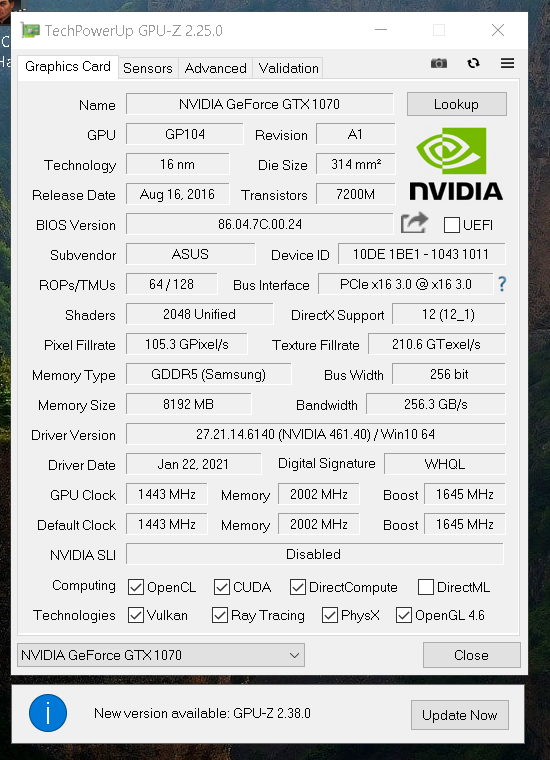
And I didn't know that about how to bring in long hair--that explains soooo much! Thank you!
Nicole
|
|
By 3DChick - 5 Years Ago
|
|
One thought, are you deleting the "invisible" version after poly reduction but before you change any maps? I do that first.
|
|
By Kelleytoons - 5 Years Ago
|
|
Okay, now the master becomes the student -- what "invisible version" are you talking about? After I do poly I just exit the dialog and continue. Is there something I don't know about? (Quite possible -- one thing that's for sure: Reallusion Programs are INCREDIBLY deep. My hat's off to anyone who really knows all there is to know about them).
|
|
By Amper Sand - 5 Years Ago
|
@Kelleytoons
You could try to do a hair "conform" operation before anything else. I haven't tried lately, but in the previous versions of CC almost constantly I had systematic crashes on high-poly imported hair and props if I didn't conform them first.
|
|
By 4u2ges - 5 Years Ago
|
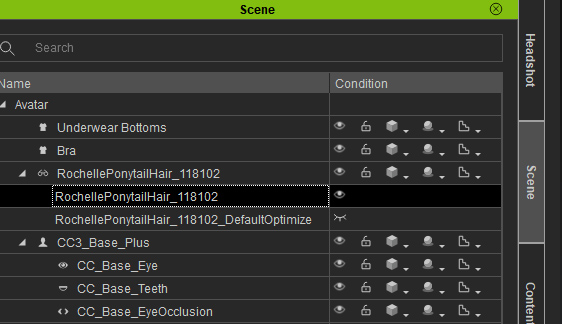
Yep, as Nicole said, you have to delete the original copy. It is invisible (visible). Kind of backward. Otherwise it is indeed crashes. But, it does prompt me for restore after I restart CC.
Delete Highlighted one (this is Rochelle hair):
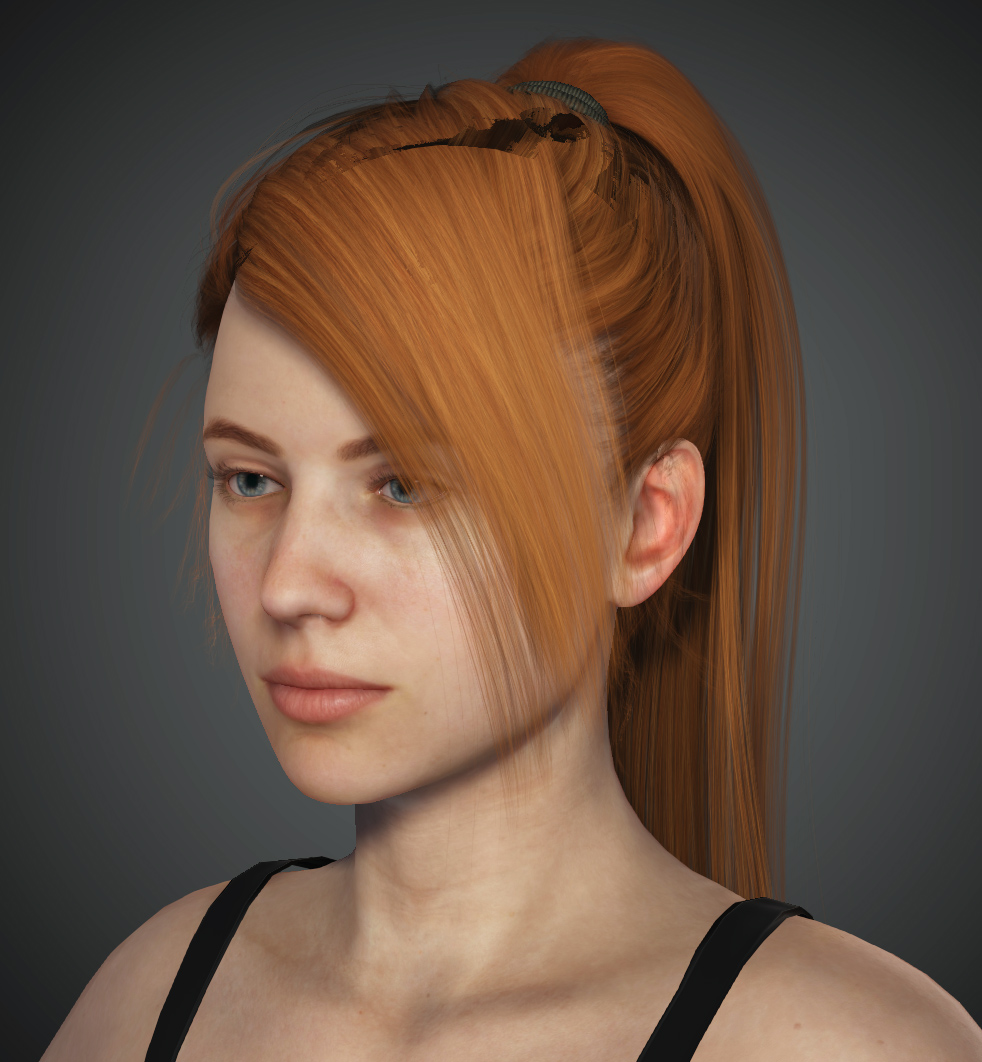
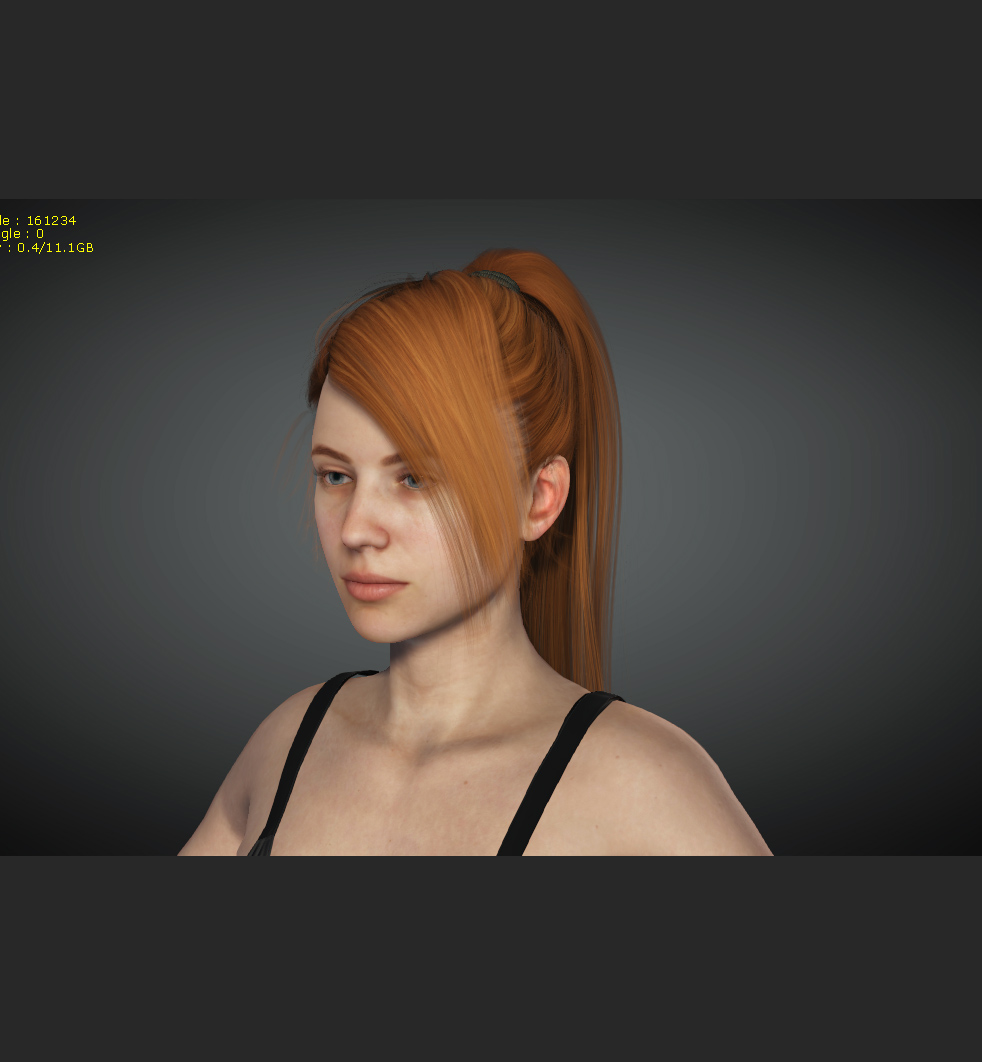
On a side note. They have to fix an ROV issue in CC (the same way they did in iClone). This hair looks like crap in CC.
Same hair in iClone:
|
|
By 3DChick - 5 Years Ago
|
I'm actually surprised it didn't crash before, if you weren't deleting that "invisible version" first.
I think it's the original, so if you don't like the reduced version you just turn that back on. Glad 4u2ges posted a screenshot. I tend to reduce in increments, and that way I can go back to the version I like.
And, yeah! I don't know what ROV means but that hair looks truly awful. Bizarre.
Nicole
|
|
By 4u2ges - 5 Years Ago
|
|
And, yeah! I don't know what ROV means but that hair looks truly awful. Bizarre.
I do not remember what it means either (I do not even remember if I ever knew :)) But I fixed it...
If you guys have an issue with opacity artifacts for some hair in CC, go ahead and change the value of EnableROV to 1 in registry (it was 0 in my case), then restart CC.
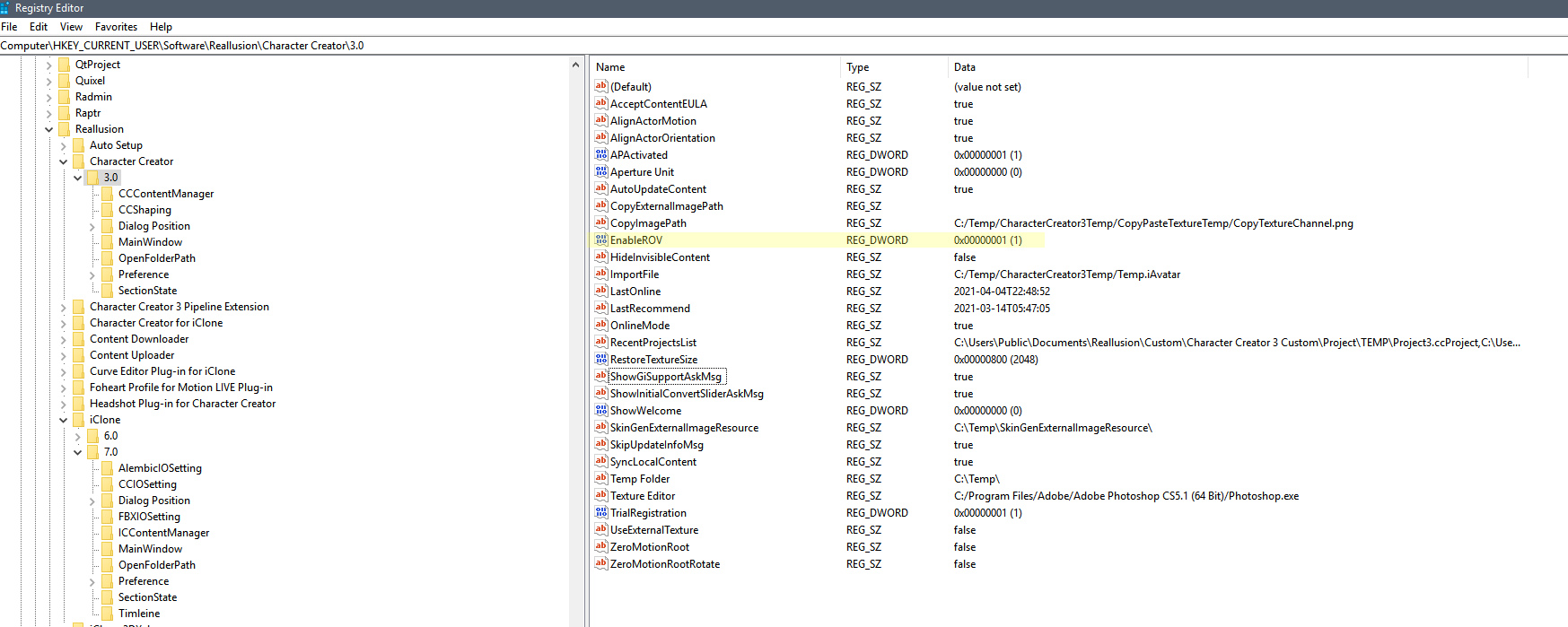
Looks good now in CC as well:
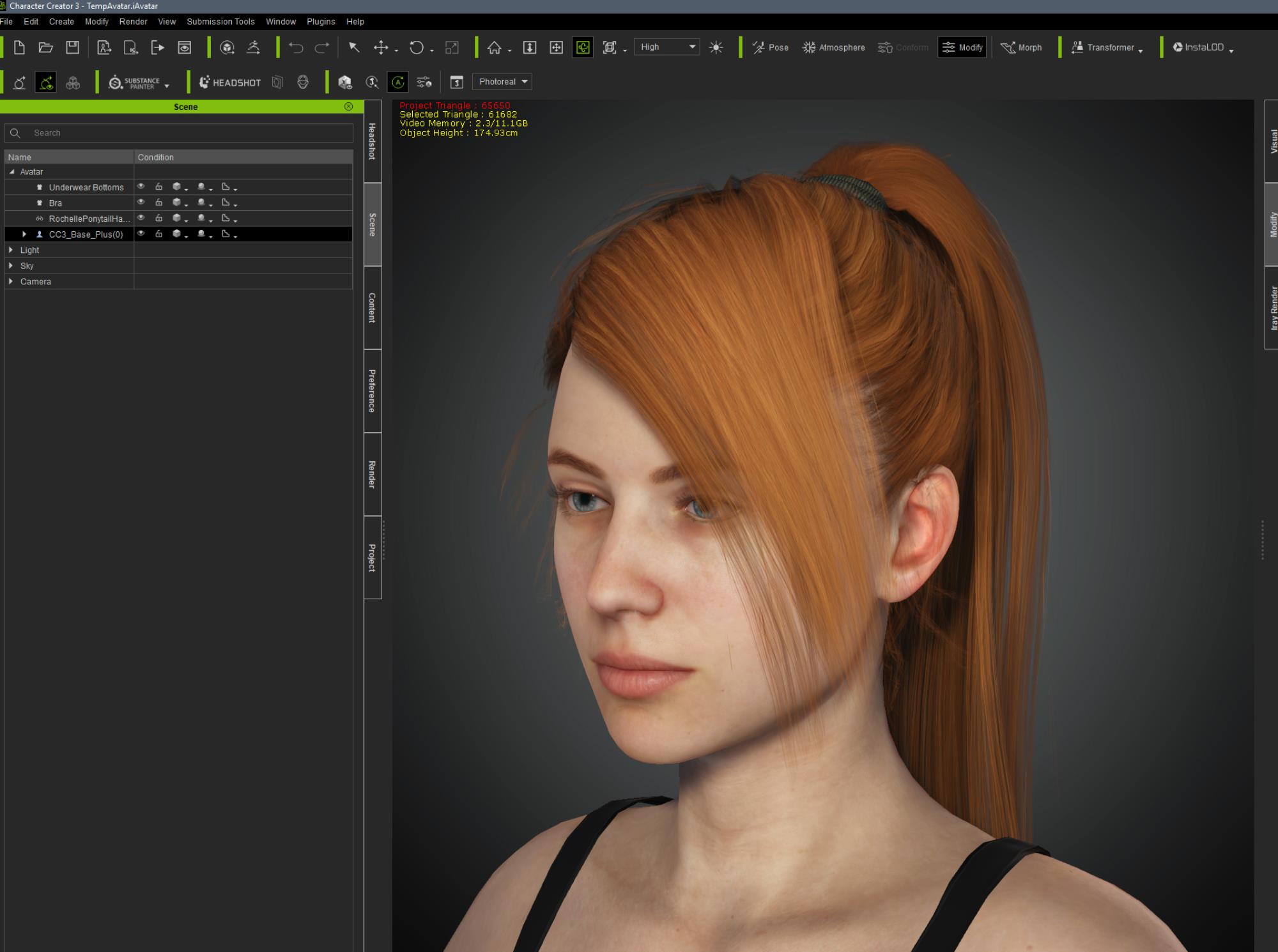
|
|
By Amper Sand - 5 Years Ago
|
|
4u2ges (4/4/2021)I do not remember what it means either (I do not even remember if I ever knew :)) But I fixed it...
If you guys have an issue with opacity artifacts for some hair in CC, go ahead and change the value of EnableROV to 1 in registry (it was 0 in my case), then restart CC.
https://forum.reallusion.com/FindPost436535.aspx
|
|
By 4u2ges - 5 Years Ago
|
Thanks ampertox, exactly! And Now I remember what ROV means: Rasterized Order View (not Remotely Operated Vehicle) :)
|
|
By Kelleytoons - 5 Years Ago
|
See -- this is why I love this forum. I learned two things I didn't know (and really NEEDED to know).
As to the invisible original - I guess I can plead that, by and large, I never really used poly reduction until this week when I started going through all my Daz hair (several hundred) to convert to the new system. So I probably should have read the manual. But it isn't very intuitive that there is an extra thingee there.
And, yes Mr. G, I've been having all kinds of opacity issues with hair in CC so I need to try that ROV fix and see if that will help. Honestly, I was just scratching my head and thought something was very, very weird but since I have so many different Daz hairs I'd just move on to the next one and not worry about it (I'll never use all the hair I have. Not in my lifetime). So this is a huge help, assuming after I make that change it fixes those issues I was having. But why I missed that discussion in the first place I don't know and don't have any excuse for (as a very general rule I tend to at least remember discussions about things, even if I don't remember the details. Maybe that happened during my surgery last year).
|
|
By Kelleytoons - 5 Years Ago
|
So I looked and there isn't even an EnableROV keyword in my version of CC3. So, not even set to 0 or 1.
I went ahead and added one. Don't know what that will do just yet, but just thought I'd mention it to others who might be looking for it.
|
|
By 4u2ges - 5 Years Ago
|
Oh no entry? That's weird. Sometimes HKCU (HKEY_CURRENT USER) registry hive needs to be refreshed for the desired app.
I usually back it up and then delete respective app key with all subkeys under it and then restart the app.
In most cases it defaults back to the factory settings (Preferences section in CC and iClone).
Not recommended though if someone does not have experience with registry (very easy to screw up) :w00t::Whistling:
|
|
By Kelleytoons - 5 Years Ago
|
Yeah, I don't think it's a case of refreshing or anything - this was on a clean boot. That key just isn't there (which begs the question whether it's there anymore at all -- perhaps others can check their own system to see).
I assume you looked again after installing the latest, Mr. G, to be sure you still had that key? Now -- I did try (very briefly) a hair I *thought* I had had an opacity issue with before and it seemed... better. But it was the briefest of tests. I'm off now to try one I KNOW didn't work before (that is, when I consolidated some materials suddenly holes started to appear). We'll see if this makes any difference or not.
Also -- I can still crash the system consistently and so for others to try -- after you consolidate one ore more materials (in the modify textures) then go to Physics weight maps. This ALWAYS crashes CC3 for me (only way around is to first save and then reload the hair -- it's as if the weight maps for physics are screwed up after a material consolidation and don't "get it").
|
|
By 3DChick - 5 Years Ago
|
The code stuff you guys are talking about scares me,:-) but the crash after consolidating then doing weightmaps? Mine's always done that and I just assumed the software couldn't do that or my system couldn't handle it. I tend to use very simple hair if it needs physics for that reason.
Nicole
|
|
By 4u2ges - 5 Years Ago
|
I got to see about physics...
But I noticed from day one after I have upgraded, the default "chic bun medium" hair was giving me a problem, which I disregarded at the time.
So now anyone can check before pocking into registry:
Apply a new default "chic bun medium" hair to the base female and close up camera. If you see an ugly black opacity stain, then ROV is OFF - needs fixing.
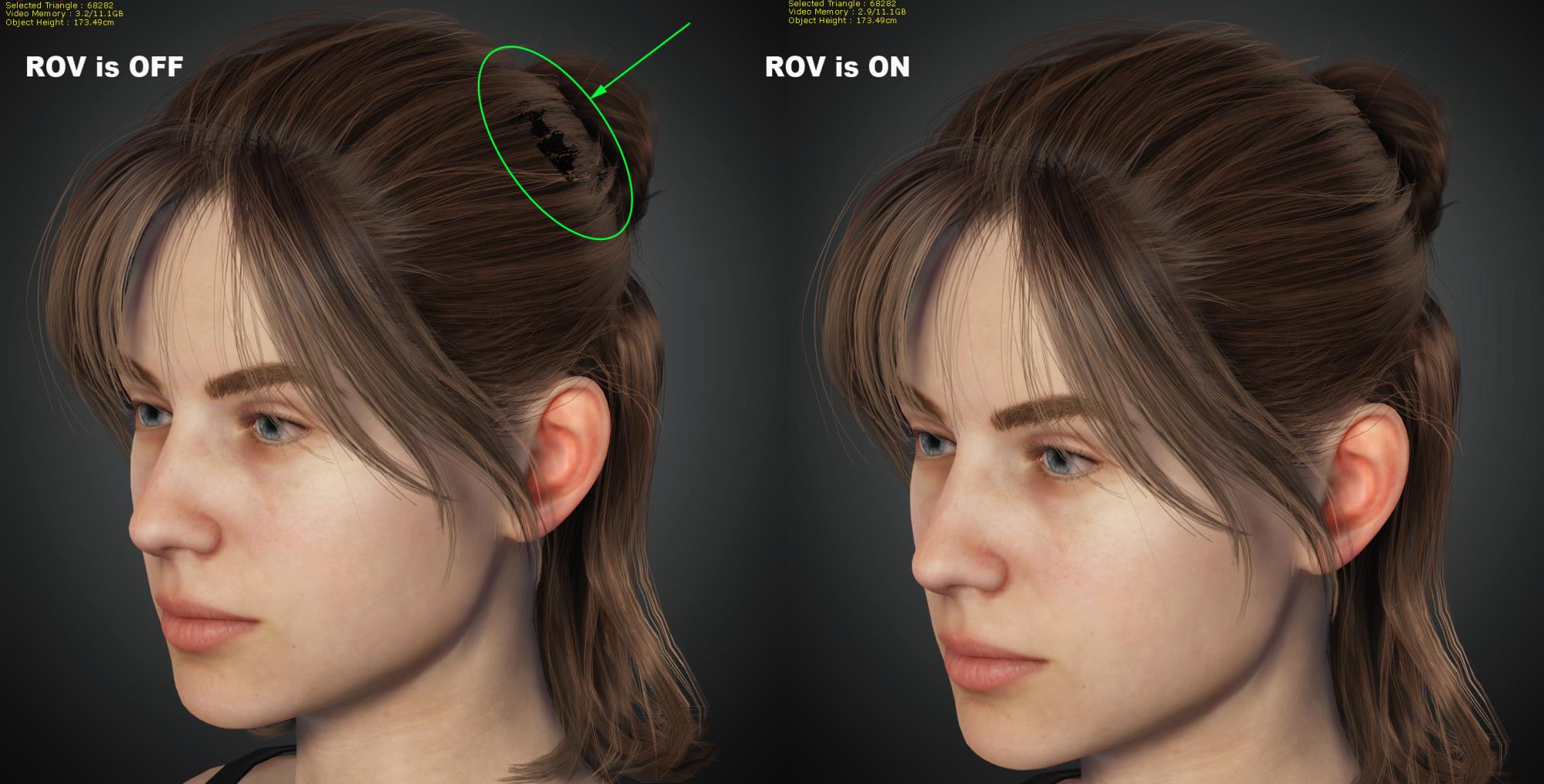
|
|
By 3DChick - 5 Years Ago
|
|
OMG, I thought that was a mesh poking issue! Still scared of registry edits--I deleted my OS that way once and have been scared to touch it ever since, sigh.
|
|
By 4u2ges - 5 Years Ago
|
I just submitted a ticket into FT: https://www.reallusion.com/FeedBackTracker/Issue/Please-fix-an-ROV-issue-in-the-next-update-or-post-the-reg-fix
|
|
By Amper Sand - 5 Years Ago
|
|
nelm2010 (4/5/2021)
Still scared of registry edits--I deleted my OS that way once and have been scared to touch it ever since, sigh.
In this case, you don't have to be scared - the tool provided by Miranda (RL) has two .reg files (recognized by the Windows OS) which, if you check with a text editor, you'll easily figure out they don't alter/touch any other part of the OS except Reallusion. And the fact the key wasn't previously there doesn't have too much significance - because the application, if doesn't find it, use a default value, almost sure OFF.
|
|
By Amper Sand - 5 Years Ago
|
@4u2ges
Beat me, but on my CC the chick bum medium is looking like a charm. I didn't add the "EnableROV=1" in CC (is not there at all), but it was already present in IClone 7.0; I set it there to 0, exited the CC, started again, tried again the chick bum medium, again looking nice. I haven't applied Miranda's patch :alien:
|
|
By 4u2ges - 5 Years Ago
|
@ampertox
Oh, I think that makes it even more clearer lol... or totally mystifies it.
I recently tested that RL patch in iClone and it made no difference at all, so it is absolute (aside from the fact it references ROV2 (?).
After you told me about missing ROV entry in CC section, I went ahead and deleted ALL references to ROV in CC and iClone sections of registry.
All looks just fine :)
Maybe that is all that needs to be done... Not sure then how Mike has seen an improvement :)
Maybe it also relates to the NVIDIA driver version as well. I have the latest Studio drivers.
But regardless.... RL should chime in (here, or at FT) and clarify the issue and a fix for those who are still experiencing it. Like this user in iClone: https://forum.reallusion.com/FindPost476685.aspx
|
|
By WayN - 5 Years Ago
|
Hi 4u2ges,
"Raster Ordered View" was .reg(s) before, but in CC3.4, IC7.9, it is an UI in the Preference section,
the "Unlimited layers" option is ROV turned on.
when ROV is off, the number of layers still can be increase if the VRAM is big enough.

|
|
By 4u2ges - 5 Years Ago
|
@WayN
Thanks! That's awesome, saves a lot of trouble of guessing! :)
|
|
By Amper Sand - 5 Years Ago
|
@WayN
Thanks a lot!
P.S What are those "None/8/16/100" selectors under "Max texture size" ? :alien:
|
|
By WayN - 5 Years Ago
|
@ampertox
the selectors were old testing UIs and removed. I updated the screenshot to the correct one. Thanks.
|
|
By Amper Sand - 5 Years Ago
|
@WayN
As an additional positive feedback: it seems this new "unlimited layer" setting in 7.9 is also fixing an old ugly transparency "conflict" between PopcornFX particles' transparency and props/hair opacity.
Prior IC 7.9, in the clip below at about 3:29, when PopcornFX flame starts, Heidi's hair became black, with those stripes/meshes visible, like its opacity map being ignored; when looking from front, her eyes also were totally black. PopcornFX' global scale, quota, had absolutely no effect in removing this "artefact". The only way to get rid of it was to reduce the flux and move the flame a bit away from her head.
https://www.youtube.com/watch?v=ugHTOUTQx7I
Now, after you mentioned this new setting, I just re-ran the project in IC7.9 and played again with that sequence and I'm no longer able to reproduce the issue. I will try find an old project where I had the same issue but between some ivy props and smoke particles, to see if still happen in IC7.9 and let you know. Regardless, great work, thanks again!
|
|
By WayN - 5 Years Ago
|
@ampertox
thank you for the additional feedback, feel good to know that things are working for you :)
|