|
By 4u2ges - 5 Years Ago
|
There... a while ago I had a disagreement with one forum user, who said it's not technically possible to import 60 fps simulation into iClone from Marvelous Designer and have a decent result.
Well, he was partially right.
Being fairly new to MD, I've done lots of testing recently and posted some of my work: https://forum.reallusion.com/FindPost476819.aspx
Today I am saying that you CAN import 60fps simulation into iClone and even have it rendered with 60fps without mismatch between pose and garment (I still wish to hear what others with more experience say).
But at the same time, I strongly discourage doing so and recommend only simulate/render @30fps. Here is why:
All this time I was wondering why my simulations are coming a bit stiff and do not look as *natural* as they supposed to given selected materials and simulation settings.
Apparently, that is because I was kept pushing those 60 fps simulations - WRONG!
MD would give you a lousy simulation if you try to force it to simulate @60fps.
Here is a compassion test. I pulled my old project and simulated the skirt in MD with the SAME material and simulation property settings - 60 and 30 fps.
I specifically selected a material (cotton-stretched-velvet), which should bare an extremely dynamic simulation.
This is 60 FPS simulation in MD and 60 FPS render in iClone
I mean it looks OK, but that's about it.
And now 30 FPS simulation in MD and 30 FPS render in iClone
Totally different story. That is how stretched velvet should probably behave in real live given animation dynamics.
Does that mean MD is not ready for prime time 60 FPS simulation? Apparently so.
Next time I'd share share some tips for someone new to MD, Alembic import/export and simulating non-native MD garments (those are your ordinary CC cloths, which you'd like to simulated in MD)
|
|
By StyleMarshal - 5 Years Ago
|
Also 60fps takes longer to simulate...right?
Here are my 30fps CC3.4 tests , rendered in UE4 :
|
|
By 4u2ges - 5 Years Ago
|
Yes, absolutely. It takes twice as long and totally useless. Even when 30 fps simulations do not look right in iClone view-port, they always render perfectly.
I like how you arranged those beauties simulations/animation :w00t:;):cool:
|
|
By StyleMarshal - 5 Years Ago
|
Thank you 4u2ges :) , I like the new MD function to swap the cloth between different Characters.
30sec animations took about 20-30min to simulate with 10-20 particle sizes , thats really cool!
|
|
By 4u2ges - 5 Years Ago
|
Oh, you can *hot* swap it between different characters? How?
|
|
By StyleMarshal - 5 Years Ago
|
|
|
|
By 4u2ges - 5 Years Ago
|
That is so cool! Thanks for sharing :)
|
|
By Dorothy Jean - 5 Years Ago
|
|
Bassline303 (3/28/2021)
Also 60fps takes longer to simulate...right?
Here are my 30fps CC3.4 tests , rendered in UE4 :
Was the simulation done in MD and imported into UE4?? Or was it all simulated in UE4?
|
|
By StyleMarshal - 5 Years Ago
|
|
Simulation is done in MD and imported as Alembic :)
|
|
By 4u2ges - 5 Years Ago
|
OK, I promised some tips and then forgot about it. dummyyzz99 in this thread https://forum.reallusion.com/479990/Alembic-Cloth-Physics-test-in-Iclone?PageIndex=1 reminded me :)
Feel free to add, or correct me if I am wrong.
* Thoroughly inspect your animation before exporting out of iClone. Make sure hands do NOT penetrate body at any point in time.
If simulated mesh gets caught between hands and a body, it would likely be ripped or behave abnormally.
* Even if there is no penetration occur, but hand are getting in contact with simulated garment, abnormal deformation might still occur,
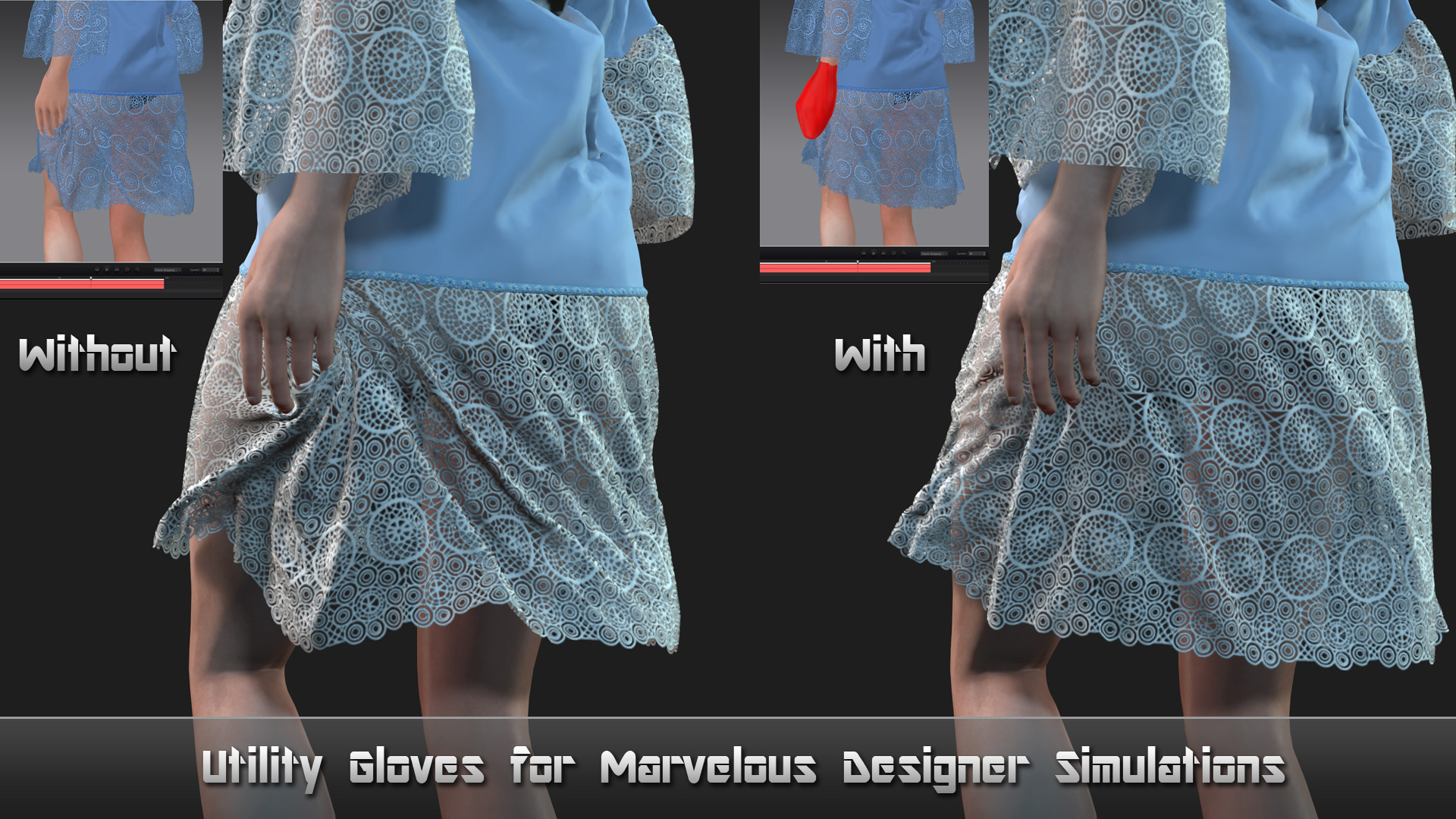
specially if character has long nails. Fingers act like a razor when getting in contact with mesh. For this I came up with an idea to make special gloves.
They look like pot holders and should smooth down the contact with mesh.
Note: they would not help, if body penetration occur (see my first point).
Gloves are available for free at my store (there are 2 types - with and without fingers deformation).
Apply them to your character before exporting for MD simulation (hands mesh would be hidden), use smooth sculpting brush in CC to flatten sharp corners, spikes.
https://marketplace.reallusion.com/utility-gloves-for-marvelous-designer-simulations
-----------------------------------------------------------------------------------------------------------------------------
For a while I was willing to experiment with rigid objects simulation in MD.
Since MD is mainly intended for cloth design and simulations, setting up hardware simulations is almost impossible.
Everything is stretched and bent to some degree depending on material settings, mesh density...etc. If I miss something, I am willing to listen.
I mainly wanted to see if I can simulate collars/necklaces. Setting that up in iClone is a real pain.
So I pulled my old project, brushed it a little bit (to CC3+ standards) and tried to simulate this very old collar with heart (I think it's from IC5).
First, any hardware you try to simulated must be a solid object otherwise pieces would fly apart as soon as sim is started (weld collar in Blender)
Next, or well, is to find optimal material settings to at least bring stretching to minimum. This is the best I could come up with:
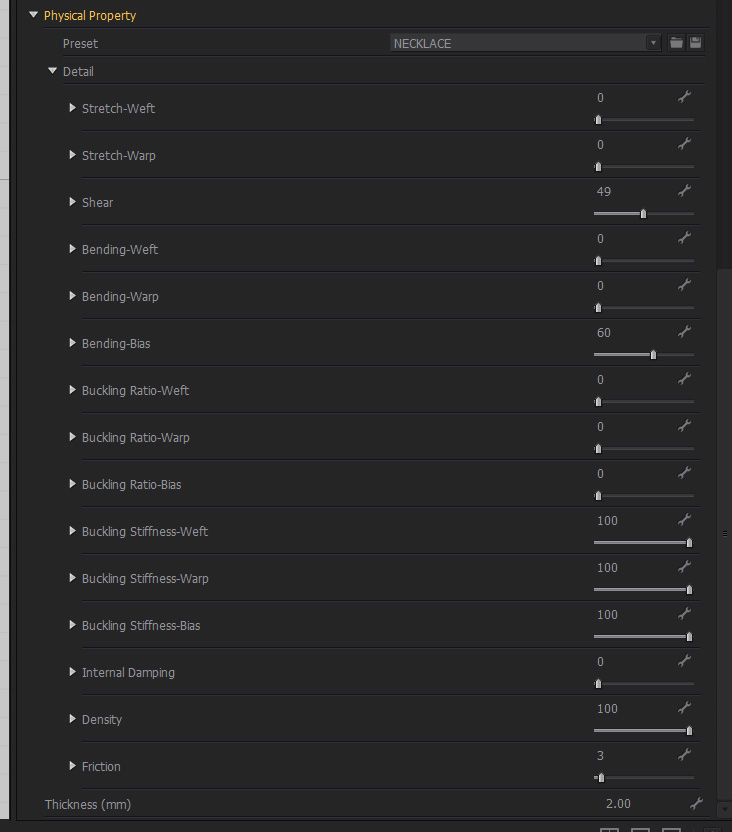
The rigid collar is actually got transformed into a necklace. Heart stayed more or less rigid, but collar ring became a flexible lace, which stretches and acts like a spring.
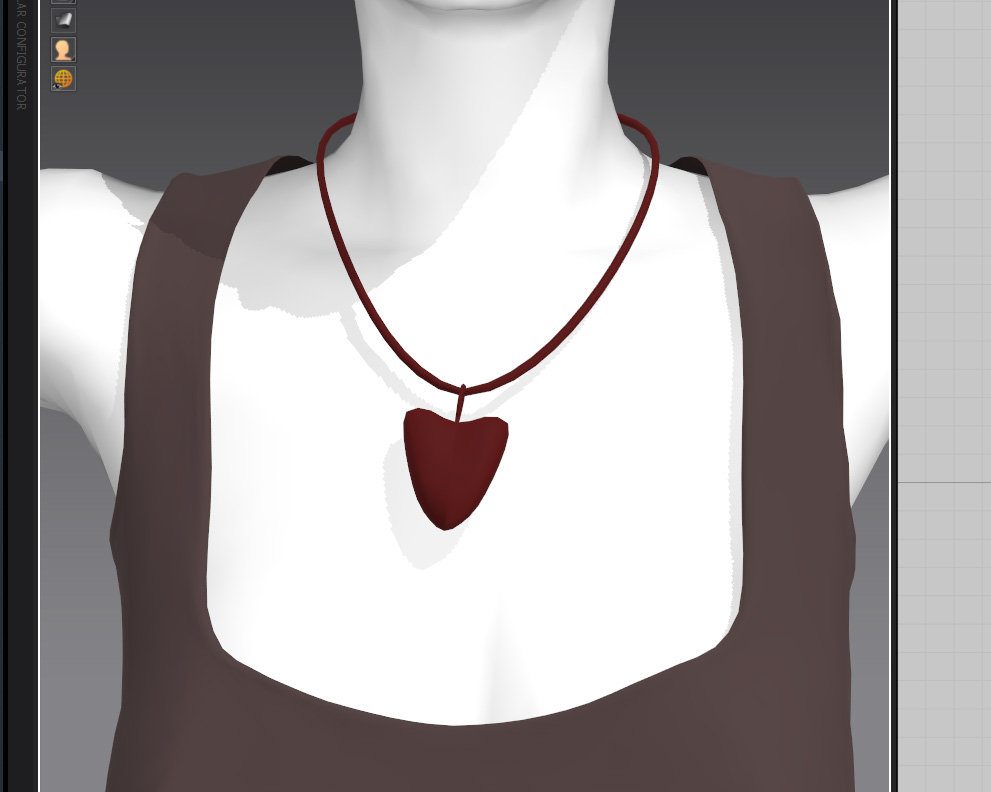
I did simulate camisole and necklace simultaneously. There was a little problem exporting alembic out of MD.
Apparently you can only export alembic as a whole. So there was no way to separate camisole and necklace simulations.
So again, I had to take alembic file to Blender, recreate materials (luckily UVs were intact), extract OBJ and import it to iClone, so that I can apply combined alembic file.
Simulation came out fairly well, except at the end the lace kind of jammed.
I almost fell of the chair during simulation when the heart fell through the camisole at her back and then came right out...
Had to setup another camera and mirror billboard just to show that :w00t::D
So this is it...
|
|
By helielfilmz - 5 Years Ago
|
4u2ges (4/15/2021)
OK, I promised some tips and then forgot about it. dummyyzz99 in this thread https://forum.reallusion.com/479990/Alembic-Cloth-Physics-test-in-Iclone?PageIndex=1 reminded me :)Feel free to add, or correct me if I am wrong. * Thoroughly inspect your animation before exporting out of iClone. Make sure hands do NOT penetrate body at any point in time. If simulated mesh gets caught between hands and a body, it would likely be ripped or behave abnormally. * Even if there is no penetration occur, but hand are getting in contact with simulated garment, abnormal deformation might still occur, specially if character has long nails. Fingers act like a razor when getting in contact with mesh. For this I came up with an idea to make special gloves. They look like pot holders and should smooth down the contact with mesh. Note: they would not help, if body penetration occur (see my first point). Gloves are available for free at my store (there are 2 types - with and without fingers deformation). Apply them to your character before exporting for MD simulation (hands mesh would be hidden), use smooth sculpting brush in CC to flatten sharp corners, spikes. https://marketplace.reallusion.com/utility-gloves-for-marvelous-designer-simulations ----------------------------------------------------------------------------------------------------------------------------- For a while I was willing to experiment with rigid objects simulation in MD. Since MD is mainly intended for cloth design and simulations, setting up hardware simulations is almost impossible. Everything is stretched and bent to some degree depending on material settings, mesh density...etc. If I miss something, I am willing to listen. I mainly wanted to see if I can simulate collars/necklaces. Setting that up in iClone is a real pain. So I pulled my old project, brushed it a little bit (to CC3+ standards) and tried to simulate this very old collar with heart (I think it's from IC5). First, any hardware you try to simulated must be a solid object otherwise pieces would fly apart as soon as sim is started (weld collar in Blender) Next, or well, is to find optimal material settings to at least bring stretching to minimum. This is the best I could come up with: The rigid collar is actually got transformed into a necklace. Heart stayed more or less rigid, but collar ring became a flexible lace, which stretches and acts like a spring. I did simulate camisole and necklace simultaneously. There was a little problem exporting alembic out of MD. Apparently you can only export alembic as a whole. So there was no way to separate camisole and necklace simulations. So again, I had to take alembic file to Blender, recreate materials (luckily UVs were intact), extract OBJ and import it to iClone, so that I can apply combined alembic file. Simulation came out fairly well, except at the end the lace kind of jammed. I almost fell of the chair during simulation when the heart fell through the camisole at her back and then came right out... Had to setup another camera and mirror billboard just to show that :w00t::D
So this is it...
Could you do a video tutorial on how you got the earrings, and necklace to move. I am new to object simulation and wanted to add to making animations in iclone
|
|
By 4u2ges - 5 Years Ago
|
The earrings physics you see in the video is totally different from the necklace.
Earrings created in iClone with Point-to-Point constrain. You can grab a free pair (those on a slate girl in the video): https://marketplace.reallusion.com/physix-enabled-earrings_180296 Then look how it was made.
And also look at this thread related to iClone Physics: https://forum.reallusion.com/479505/Anyone-Want-a-Challenge?PageIndex=1
I posted a sample project there: https://forum.reallusion.com/FindPost479774.aspx
And Rampa, a fresh tut on P2P constrains:
This should get you started with earrings :)
==================================================================================
Now, necklace is totally different. You have to have a Marvelous Designer app to pull this through.
I have a base workflow.
It is a little outdated, because I did import alembic via script. Now that iClone supports direct alembic import, the script part can just be disregarded.
|
|
By helielfilmz - 5 Years Ago
|
4u2ges (4/16/2021)
The earrings physics you see in the video is totally different from the necklace. Earrings created in iClone with Point-to-Point constrain. You can grab a free pair (those on a slate girl in the video): https://marketplace.reallusion.com/physix-enabled-earrings_180296 Then look how it was made. And also look at this thread related to iClone Physics: https://forum.reallusion.com/479505/Anyone-Want-a-Challenge?PageIndex=1I posted a sample project there: https://forum.reallusion.com/FindPost479774.aspxAnd Rampa, a fresh tut on P2P constrains:
This should get you started with earrings :) ================================================================================== Now, necklace is totally different. You have to have a Marvelous Designer app to pull this through. I have a base workflow. It is a little outdated, because I did import alembic via script. Now that iClone supports direct alembic import, the script part can just be disregarded.
Thanx for sharing this
|
|
By 4u2ges - 5 Years Ago
|
I was asked on YT a few times for simulations tutorial.
So here is a complete workflow for simulating a *complex* cloth from DAZ to iClone (though garment/cloth can be anything designed with any app, not just from DAZ).
You need to have an access to Marvelous Designer app and... you guessed... Blender.
It is also possible to simulate cloth without leaving Blender and import as Alembic to iClone. Victor has a nice Blender tutorial on this matter and more: https://forum.reallusion.com/FindPost476225.aspx
I used famous DAZ Burqa in this workflow. Hope it would come handy for someone:
|
|
By 4u2ges - 5 Years Ago
|
Second version of DAZ Burqa simulation. A bit more dynamic and energetic. Tweaked the fabric and pinning.
(not sure if she was dancing there, or was trying to get rid of the Burqa, but she managed to scare some creatures around :w00t::)).
|
|
By StyleMarshal - 5 Years Ago
|
haha , I see you got your Camel :D
Thy cloth sim looks great & funny !
|
|
By 4u2ges - 5 Years Ago
|
Thanks Bassline :)
|
|
By krant - 5 Years Ago
|
|
I see that your just importing the Alembic File into IClone without Python. Anytime I try this, I get a message that says "there are no matching vertex animations for this object." Any ideas why this is?
|
|
By krant - 5 Years Ago
|
|
Maybe the better question to ask...Does anyone have a solid resource for understanding how to import my animations from MD into IClone? I am struggling to understand with the recent update.
|
|
By 4u2ges - 5 Years Ago
|
krant (5/16/2021)
I see that your just importing the Alembic File into IClone without Python. Anytime I try this, I get a message that says "there are no matching vertex animations for this object." Any ideas why this is?
The error message iClone popping up during the import is generally true. But there are different aspects which might cause your alembic import into iClone to fail.
So what do you import and how?
Is it straight alembic import, or you are trying to match the alembic animation with existing object in iClone?
In first case, there is NOTHING has to be selected in iClone scene. It is still might fail if alembic file has variable vertex count per animated frame - iClone does not support those.
Otherwise, you have to select a matching object in iClone scene manager before the import.
If you selected what you think is right object and it is sill failing, then..
1. If the object in iClone is MD garment, you have to make sure both OBJ and Alembic files were exported with the SAME export settings from MD (Single/Multiple, Weld/Unweld, Thin/Thick). Otherwise, vertex count would not math and import would fail.
2. If garment you imported into MD for simulation originated from iClone, DAZ or other apps, then it is even harder to identify the problem without more information.
So the question stands: What and how are you importing? The more details you provide about your workflow, the better (import/export steps/settings from various apps you use, screenshots, downloadable OBJ/Alembic/other related files)
|
|
By krant - 5 Years Ago
|
I am importing an obj. of the garment into Iclone. It is a prop in the scene. Next I select the prop and import the .abc file. I get what you are saying with the export options, it's easy to do but I don't think this is the problem. I'll share some screenshots.


Above, exporting out .obj and .abc
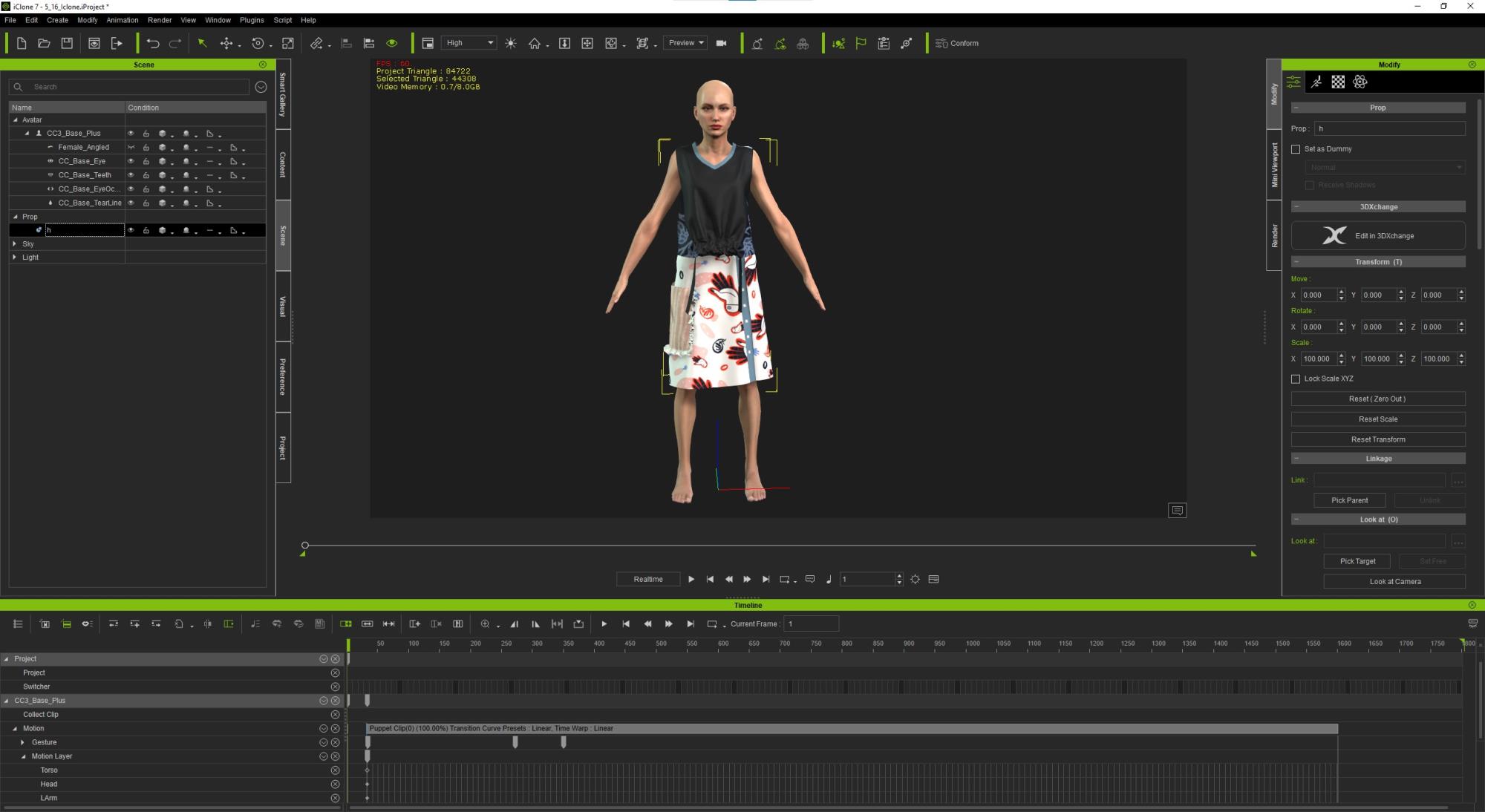

I am missing something?
|
|
By 4u2ges - 5 Years Ago
|
Can you share OBJ and ABC via google drive, or any other cloud? You can do it private via PM if you wish..
I'll take a look at it.
|
|
By krant - 5 Years Ago
|
|
I just tired with MD instead of CLO. Same message. I'll share the files now.
|
|
By krant - 5 Years Ago
|
|
I just tired with MD instead of CLO. Same message. I'll share the files now.
|
|
By 4u2ges - 5 Years Ago
|
OK Katie, here is a story...
Your MD export is perfectly fine (obviously). CLO is not so.
The easiest way to identify a problem, is to open all 4 in Blender, check vertex count and then try to see where the problem is.
The vertex count for each pair FBX/ABC MUST match.
Here is your MD export pair in Blender (I had to scale ABC object to 0.01 to have them side by side). Vertex count matches. No problem here.
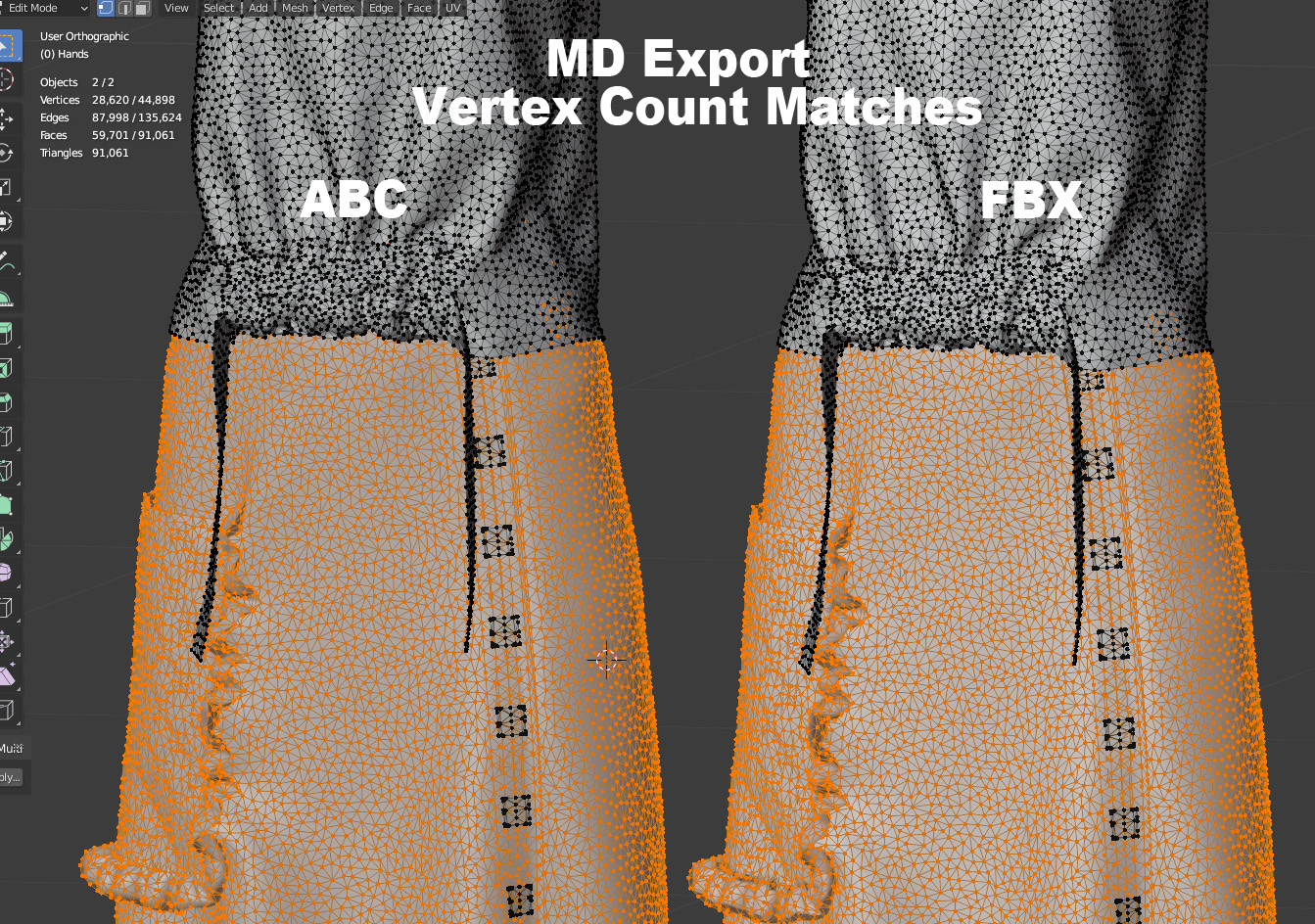
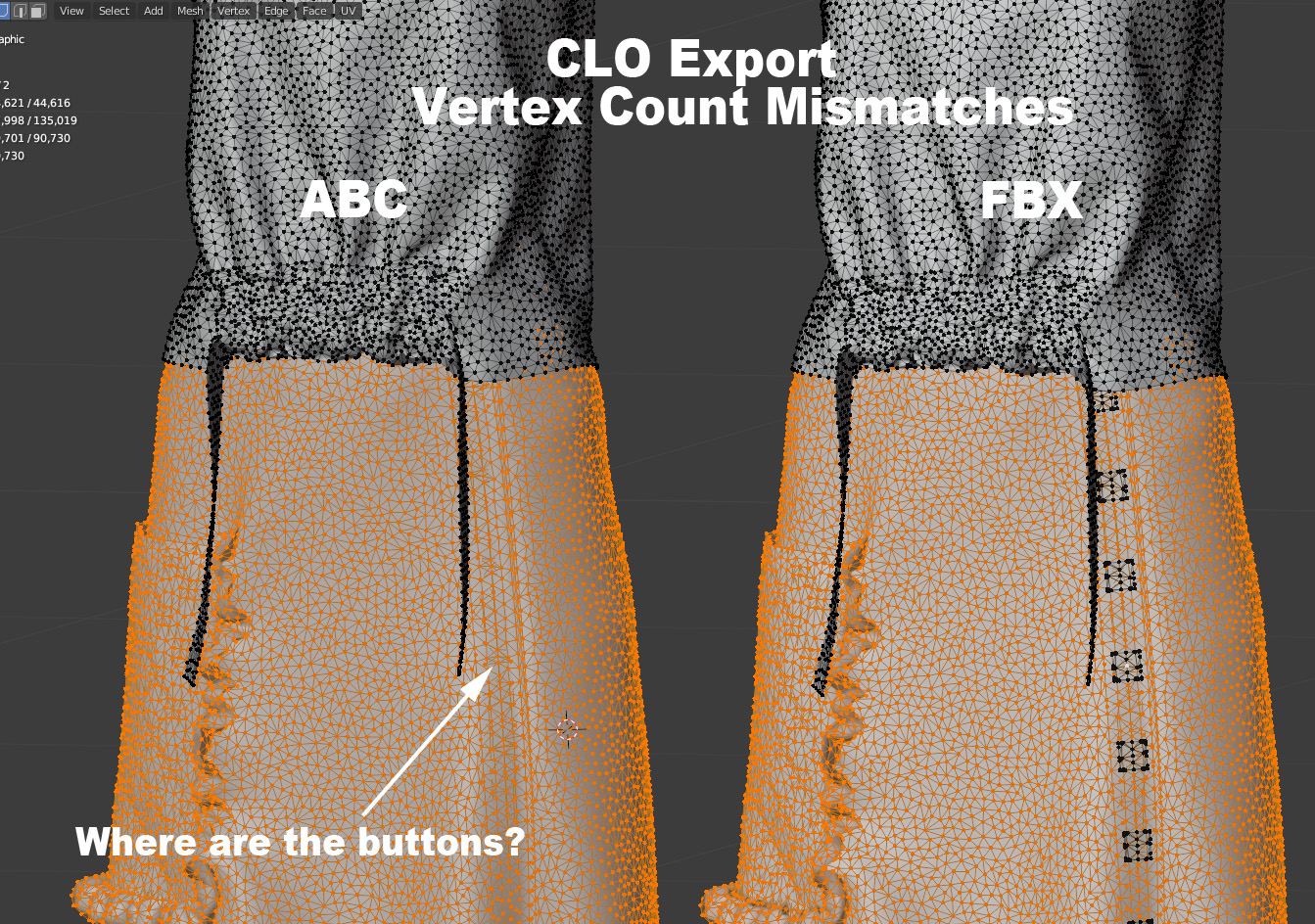
Now CLO, I checked and found that ABC export is short for a little over 200 vertices compare to FBX. This would never import to iClone.
So I start checking where the difference is coming from. And here it is.... ABC file is missing Buttons. I cannot tell you where they are :)
I do not even know what to tell you to check, but it is definitely a CLO problem and not the iClone issue.
If you do not know/have Blender at all, you can verify in iClone, but it is a little harder to identify where the problem is. This is how:
Import FBX, then select nothing in Scene Manager and import respective ABC. It would be imported separately as an object.
Select each and check poly count at the top left corner. If there is a mismatch, try visually check what is missing.
Then go back to your app and try to figure out what the problem might be with the export.
|
|
By krant - 5 Years Ago
|
|
Oh ok, strange. It's making geometry out of a texture file in CLO3d. Thank you so much for the help. :)
|
|
By 4u2ges - 5 Years Ago
|
You are welcome :)
|
|
By krant - 5 Years Ago
|
How have you handled animations not aligning in Unreal? I'm using the same character motion I recorded with. I noticed in project setting you can set a range and a limit for framerate. I've tried that. I guess at this point I'm going to try another around of animation. Do you have any experience with this?
Also what would you recommend for recording the animation...frame stepping or real time? I'm thinking that might be where my problem is.
|
|
By krant - 5 Years Ago
|
How have you handled animations not aligning in Unreal? I'm using the same character motion I recorded with. I noticed in project setting you can set a range and a limit for framerate. I've tried that. I guess at this point I'm going to try another around of animation. Do you have any experience with this?
Also what would you recommend for recording the animation...frame stepping or real time? I'm thinking that might be where my problem is.
|
|
By 4u2ges - 5 Years Ago
|
Sorry Katie, I do not do UE :)
You'd have a better chance getting response from UE guru Bassline in this thread: https://forum.reallusion.com/FindPost476661.aspx
As to recording, I always use Frame stepping. I tried Realtime once, but frankly could not see the difference. So I cannot tell why real-time is even there.
|
|
By mila_647012 - 4 Years Ago
|
|
Any tutorial on the workflow between MD11 and IC8?
|