Display Preferences?


https://forum.reallusion.com/Topic474809.aspx
Print Topic | Close Window

By dgrador - 4 Years Ago
Hi, just downloaded Crazytalk 8 trial version, controls are very tiny on laptop, 15.6 4k.
Any way to fix? cheerz https://forum.reallusion.com/uploads/images/e65e7409-1a59-4668-a36b-9b83.png
By Peter (RL) - 4 Years Ago
Hi...

By default CrazyTalk 8 doesn't support 4K or other Ultra HD screens. However, you may find the issue can be resolved using the workaround below (Windows version).

1. Right-click on the CrazyTalk 8 desktop icon and select Properties.

2. On the Properties dialog box, select the Compatibility tab. Now click "Change high DPI settings".

3. On the second dialog box, go to "High DPI scaling override".

4. Check "Override high DPI scaling behavior...", and from the drop-down select "System (Enhanced)".

5. Click OK, and then OK again.
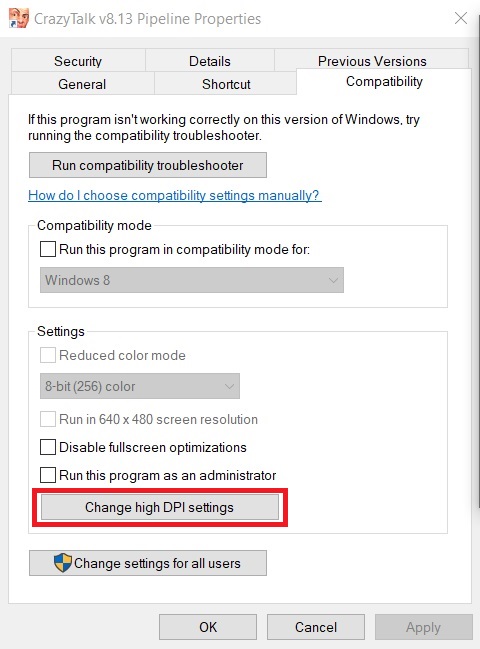
https://forum.reallusion.com/uploads/images/da277c1b-2a97-4d89-aca9-feba.jpg

https://forum.reallusion.com/uploads/images/056ffe2a-fd53-4e98-9475-7a02.png

By dgrador - 4 Years Ago
Thanks for the quick reply, it solved the issue almost perfectly.
I still have to pull the central control window manually from the lower right corner, but the controls window is a good size now so I can live with it.
Played with the program for about 3 hours making one 2-D and one 2-D to 3-D model fairly quickly.
Still have to figure out a few things but liked it enough to purchase the pipeline bundle.
Cheers