|
By woody173 - 4 Years Ago
|
Hi The subject matter says it all.
I added a really cool animation to my character (a sneaking move along a supposed wall) and it obviously just gives you a few steps.
I have tried to copy and paste the motion and aligned the second clip to the first clips root. which i would have thought would do the trick. but the root goes shooting off somewhere and so the motion doesnt follow it correctly. (the character disappears through the wall). I then tried to realign the character but it jumps all over the place.
Is there a way to realign the root to the character once I have done the first clip so when i copy and paste the second clip and align the roots it follows on as I would expect it.
I hope i explained it correctly
Many thanks
|
|
By mark - 4 Years Ago
|
It might help to know which Mixamo animation you are trying to use. ;)
|
|
By Rampa - 4 Years Ago
|
|
You can better diagnose what is going on if you select one of the gizmo (transform or rotate) and then scrub the timeline. That way you can see how the root is moving.
|
|
By woody173 - 4 Years Ago
|
The motion im using from mixamo is the sneak left and sneak right so the character looks like he is slowly sort of crouching and sneaking along a wall. but the character walks through the wall in the wrong direction. so i moved the transform gizmo so he walks along the wall (which also entails a rotation) but the root is now five or six spaces away from the character instead of at his feet. I then copied and p[asted the motion put it next to the first motion and aligned to root but then the character shot off in all directions. Because the root gizmo is so far away from the character its really difficult to manually align the character so he doesn't keep disappearing inside the wall..
I hope this is a better explanation of my problem. I once had a similar problem in iClone 6 and found a video on youtube from someone who said the code was wrong in some cases and i was just to change one line of code. Believe me im no coder and i cant find the video anywhere on my system or on youtube anymore.
The effect was that when the character moved the gizmo moved and rotated with it as you would expect.
It would really help if i could just keep the gizmo in the center of his stance like most other motions..
|
|
By woody173 - 4 Years Ago
|
i tried to show you what i mean by screen shooting my video
https://drive.google.com/file/d/1j2Rzh16NkQ2-1a9irffHDVVCHuUdu6LV/view?usp=sharing
This is just a demo and if you could imagine the character walking along a street for quite a while with a wall behind him then you can see why when i move him to stop going inside the wall it becomes problematic
|
|
By Rampa - 4 Years Ago
|
In your animation menu, motion settings options, there are 4 options for how the root is tracked. By default they should all be checked. In this case, where you have motions that are meant to flow together, the rotation tracking can be thrown off. So try un-checking the "Align To Actor Orientation", and then insert the second motion. So the second motion you added got rotated to the pelvis orientation of the last frame of the first clip, which is not what you wanted.
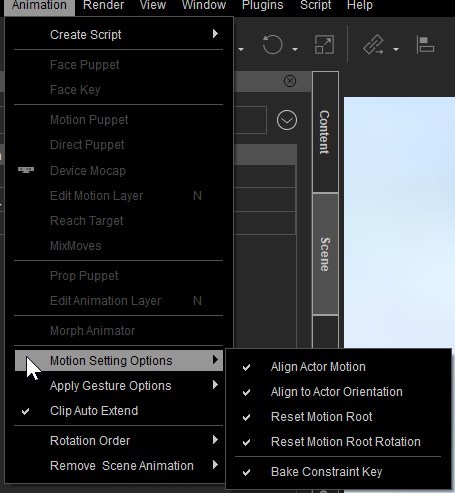
Think of your character as being in a box that you insert into your scene. You can move the box all around with the gizmo, move the character within the box using the motion layer, or move both.
The motion setting options track the character's pelvis, and align the box to the character. In a game engine, this is called "root motion".
New motions are always inserted at the position and orientation of the box.
You can move the character within the box so they are no longer at the root location. The right-click align on a motion clip in the timeline changes the bone locations, not the root of the box. That is why you see the offset.
|