|
By OokamiOokami - 5 Years Ago
|
Hi, I have locked the position of my character's feet with a reach effector in IClone, and in IClone, the feet are locked in position 100%. But, when I export an FBX, the feet float around and I can see that the root bone is animated. It appears that Iclone is forcing the root bone to be straight vertical, and then animating the root bone's horizontal position to accommodate hip movement, while animating the foot bones to compensate. The result of this method is jittery/floating foot movements in the FBX. Is there another method for exporting? Other animation packages do not force the root bone to be straight vertical, allowing it to move in all directions while its root is locked to 0,0,0.
Link to video of issue
I have tried 'Reset Pivot' on my motion clip and tried setting 'Reset Motion Root' to on and off in the FBX export advanced settings, all with the same result.
|
|
By 4u2ges - 5 Years Ago
|
Make sure Bake Constraint Key is checked while exporting.
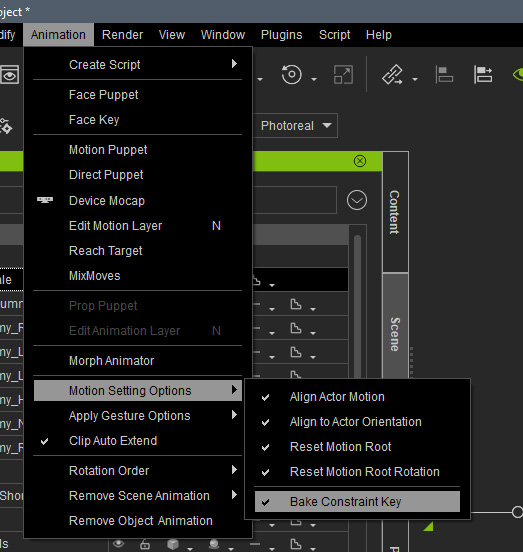
Difference with and without Bake checked...
|
|
By OokamiOokami - 5 Years Ago
|
Thank you so much 4u2ges. I'm very happy to see you have a solid result and that it is possible to do. Thing is, I do have that option checked. Are there any other important settings you can think of that I might be missing? I have tried all of the other options in that menu, still to no avail.
Also, can you tell me what the root bone looks like in your successful export test? Is it straight vertical with movement keys on the horizontal? Or is the base of the root bone locked to 0,0,0 and the tip locked to hip movement? I am wondering if somehow the "Reset Motion Root" switch on the FBX advanced export is not working (always exporting as ON?) Because it is doing what the manual says that switch does "Set the root node to follow the hip instead of staying in place at the origin" no matter if I have it unchecked or checked. Just tried with a fresh project to see if it was a bugged file, but it is still exporting incorrectly.
|
|
By 4u2ges - 5 Years Ago
|
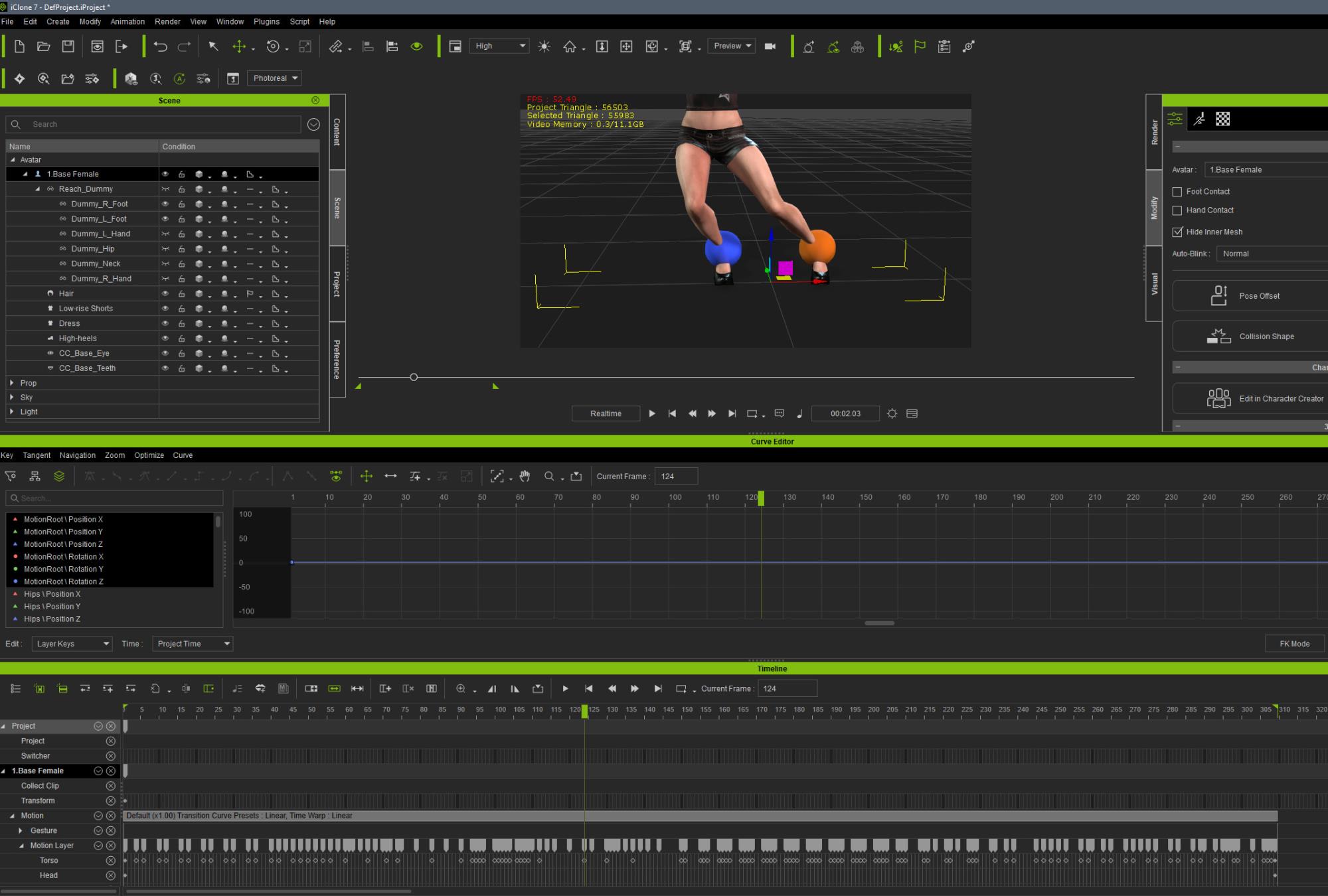
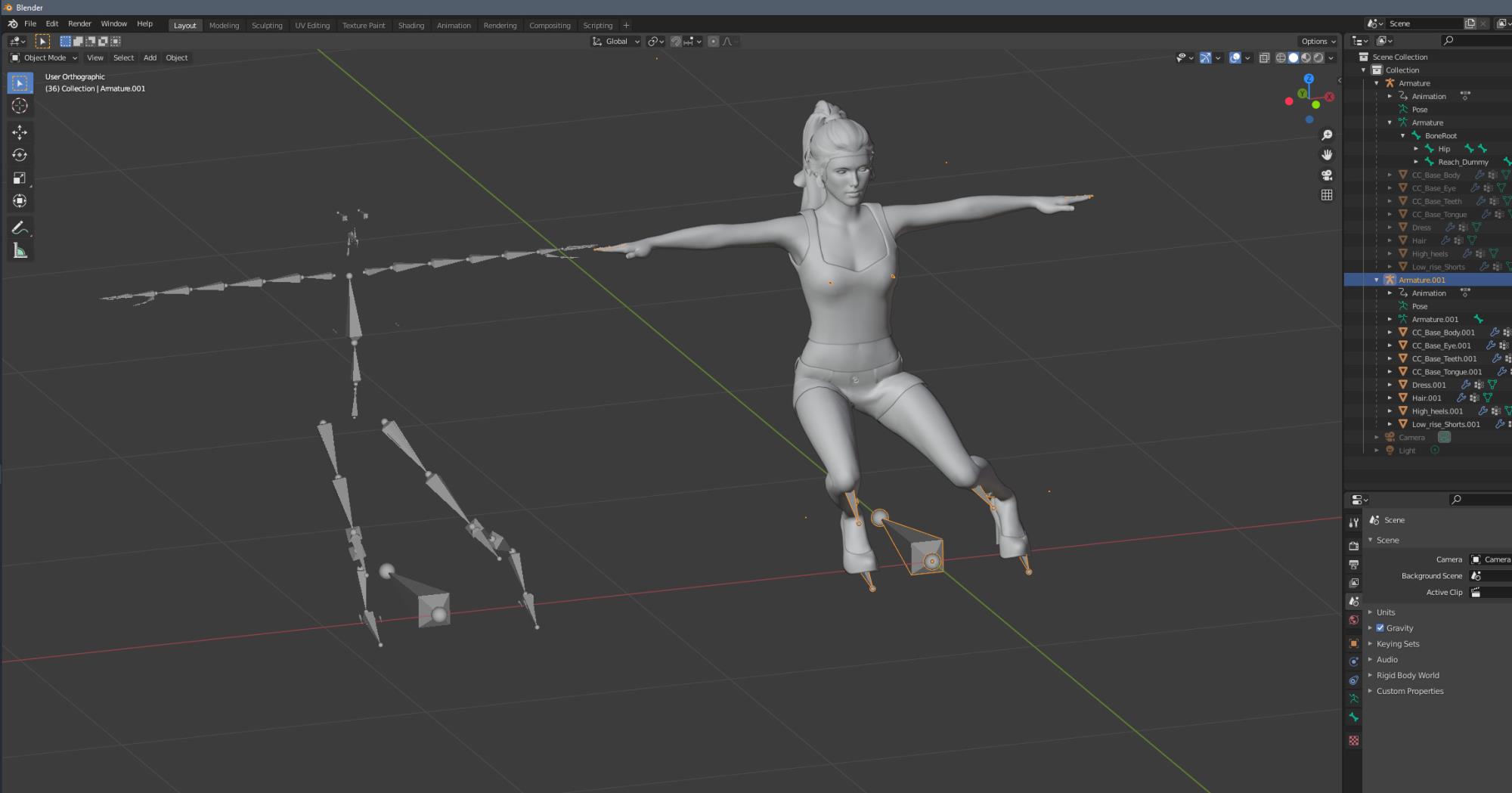
Root bone is steady in iClone and in Blender as well. You may not see Root Bone (Motion Root) in iClone, but it is editable in Curve editor (it is a premium plug-in).
Thought I do not know first thing about UE, this is how it looks in Blender:
Maybe someone who working with Live Link \ UE Export would shed the light to the problem you are having.
|
|
By OokamiOokami - 5 Years Ago
|
Ok, thanks a million. I can see from your Blender screenshot that the root bone appears to be at 0,0,0. Am I right to assume it remains locked in that location during any hip bone animation? I'm seeing the same problem in any program I bring the FBXs into. UE, C4D, etc. My root bone is floating around.
I am happy to see that it can work, but I have to say I'm confused as to what is going on for me. I don't own the curves plugin, but I can't imagine that not having that could be the issue. I have put in a support ticket. Think I'll do a reinstall and see if that gets me anywhere.
Also, on your FBX advanced export settings, did you uncheck "Reset Motion Root" to get your 'non-floaty' version?
|
|
By 4u2ges - 5 Years Ago
|
Nope, I do not have anything checked in advanced settings.
Maybe you can share the motion from UE as well as 3DX profile for it (so that we do not have to spend time mapping bones).
And someone would look at it.
|
|
By OokamiOokami - 5 Years Ago
|
|
Actually, after more testing - this is not UE-centric. I see same thing on any default Iclone Character too. I load in a basic preset character, make some animation that tests for the behaviour (locked feet and hip bone moving around) and export FBX. Open that in Blender etc and I see the problem. This has me deeply confused, doing a fresh install and will look again tomorrow.
|
|
By OokamiOokami - 5 Years Ago
|
No offense if you want to bail on this thread 4u2ges, but I thought I'd just update what I discovered. The issues appears associated with the UE FBX export preset.
Steps for me to reproduce:
1. Export any static/idle type animation that contains hip movement with the UE FBX preset.
2. Import FBX into any DCC and see what the root bone is doing.
3. Export the same animation the MAYA FBX preset and check what it does in your DCC.
I get two distinctly different results. UE export root bone base moves around, the Maya export root bone base is locked to 0,0,0.
|
|
By 4u2ges - 5 Years Ago
|
That is why I asked to have that motion shared. In iClone I could have confirmed jittery root in Curve Editor.
|
|
By OokamiOokami - 5 Years Ago
|
Unfortunately I can't post the particular animation that started this all as it is copyrighted (bought from 3rd party). But for me the animation is actually irrelevant, I can see this behavior on any animation.
What do you see if you export your test animation with the FBX UE preset and compare it to FBX Blender preset? For me it is night and day. With UE the base of the root bone floats around, with Blender the base of the root bone is locked to 0,0,0.
|
|
By 4u2ges - 5 Years Ago
|
Yes, that is how it *should* works I suppose. Again I do not have UE, but exporting with UE settings adds UE IK resulting root bone movement by X when importing back to 3DX > iClone and adding a lot of jitter by X in a way.
There are a lot of UE pros who should be able to help with importing UE motions and exporting it back. Anyone?

|
|
By OokamiOokami - 5 Years Ago
|
Ok, thank you so much for verifying. That really helps me.
I would say no, this is not a desired behavior - as it also creates the exact same jittery animation inside UE. It is possible I may have stumbled onto a bug. There are situations where you might want the root to follow the hip, but not in every case - and I suspect the 'turn if off' button under the advanced panel is not working and is always exporting as ON, locking the root to the hip no matter the setting. I'm chatting with support, hopefully they have a fix/solution. Again, thanks for helping me with this - knowing it is just not me is a relief.
As an aside, do you see any jitter in feet that have been locked by a reach effector and exported as FBX? I have tried baking the effectors in the Edit Motion Layers panel as well as not baking them - and while in IClone the feet are rock-solid, in any exported FBX (including Blender) there is still a very slight jitter to them. Nothing as bad as the first issue I was talking about, but definitely noticeable.
|
|
By 4u2ges - 5 Years Ago
|
|
As an aside, do you see anyany jitter in feet that have been locked by a reach effector and exported as FBX?
Definitely, Baking Constraints is not exactly a perfect routine either. This is true for exporting to FBX, or saving as Motion+. You only get almost 100% with Reach Effectors inside iClone.
|
|
By OokamiOokami - 5 Years Ago
|
|
Thanks again for verifying what I'm seeing. I really love working in IClone, so I hope they put some focus on cleaning up the exports as little. Anyhow, thanks for walking with me down this windy road, I def appreciate it.
|