|
By Nebula480 - 5 Years Ago
|
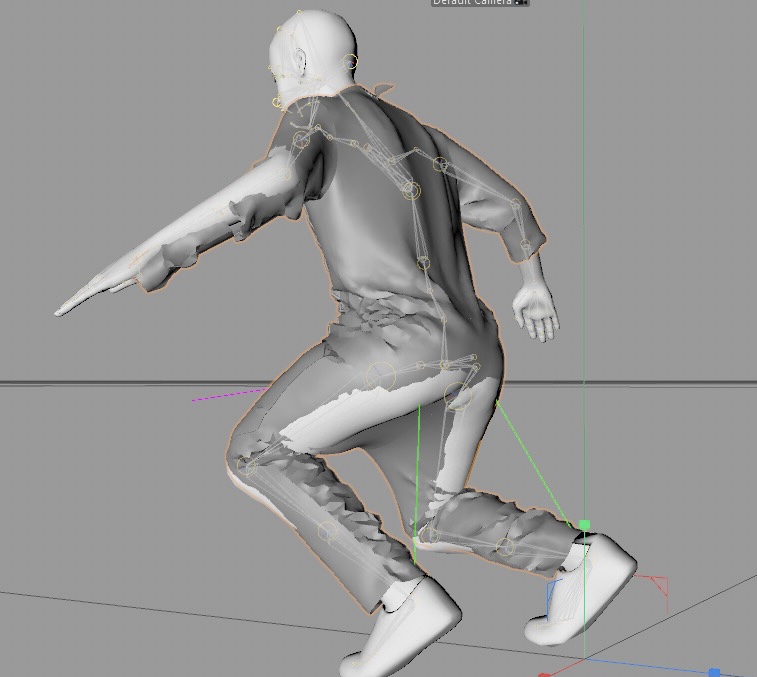
Good afternoon. I’m at a fork and I could really use some advice or help. I’ve been following this tutorial https://www.facebook.com/ReallusionSoftware/videos/837492336984397/ and have successfully animated/simulated the garment/jacket Ive created in marvelous designer —here’s a video of it looking great in MD https://youtu.be/ER_t-U00SnU
In the tutorial, once the garment is animated and exported as Alembic from MD, in the video he was successfully able to import that file back into iClone using what appears to be a plug-in call “alembic loader” - to which I’ve not been able to find anything about online., at which point it easily just fit the animated avatar in iclone which I imagine he was then able to export to whatever other 3-D program
and so because I was not able to import the Alembic garment animation from MD to Iclone, I tried to import that file directly into blender which is my final destinations before completing my scenes.
It’s successfully imported without textures which was the first issue, and the second issue from that point was that while the animation was rendered at 24 frames per second in MD, and blender settings are at 24tfps as well, The garment at first fits perfectly without any overlapping but after a few frames the clothing starts to detach from the character and looks delayed. I’m also uploading a screenshot from somebody else I found online having the similar problem.
And so if I knew how to import that Alembic file into Iclone so that I can put it on my avatar, I would imagine that the entire process and issue of having to import it into blender where I’m countering the frames per second issue would dissipate as being able to import the Alembic into Iclone would solve the problem or so Id imagine. Any help with the situation would be greatly appreciated. Thank you
|
|
By animagic - 5 Years Ago
|
What people have been using is an experimental Python script. iClone supports Python scripts to extend its capabilities. I don't know much about this specific script, so perhaps someone else can help here.
If you want to import back into iClone I would work with iClone's internal framerate of 60 fps (or perhaps 30 fps) otherwise you will most likely see drift, since 60 fps is not divisible by 24.
Alembic does not support materials, so you would need to add those later. This is a limitation unrelated to iClone or Blender.
If you can wait a little bit, I believe that Alembic import has been announced for the upcoming iClone 7.9.
|
|
By Rampa - 5 Years Ago
|
|
It will be in iClone 7.9.
|
|
By Nebula480 - 5 Years Ago
|
I’m not able to find that script anywhere. I take it that without it I’m not gonna be able to import it back in to iClone correct? How much longer until the new Iclone update with that supported feature comes out? I definitely look forward to it but if it’s weeks/months then it’s unrealistic to wait to be able to finish the project I’m on now, especially when I see that it’s already possible with such script .If I’m looking at this correctly once I get that script everything should be solved in less than about 10 minutes.
I would imagine when you said that I should use iclones 60 frames per second setting you’re referencing I should do that once I obtain the plug-in or the update to be able to import it into iCloud correct? because that’s the issue I’m having right now. I’m literally not able to import alembic into Iclone. Just into blender.
|
|
By Nebula480 - 5 Years Ago
|
|
Would you happen to know how much longer until that update is released? I am aiming to have this project finished by this weekend. So if the update is months from now then I definitely need to look for that script solution that is already being used like in the video
|
|
By Nebula480 - 5 Years Ago
|
So I think I found the code but I have no idea how to integrate it into Iclone to test it out as I’m not a coder. From what I’m seeing here, others are having success with it. Here’s a link to the other forum on reallusion where they’ve seemed to get it to work. How should I go about this? All of your help is greatly appreciate with all of this.
https://forum.reallusion.com/451005/iClone-v77-Alembic-Import


|
|
By Rampa - 5 Years Ago
|
|
It's a Python script. You edit it to match your content name, and load it from the iClone script menu. The video you linked shows how to do it. 4u2ges has also made some videos on it.
|
|
By DISfxs - 5 Years Ago
|
Hello,
I was able to successfully do this.
However, this is the YouTube video i followed. You will have to use Blender for the export to iclone. MD to Blender then to Iclone. he provides the script in the description.
https://www.youtube.com/watch?v=i1Wkxv6QytI
Hope that Helps,
@DISfxs
|
|
By DISfxs - 5 Years Ago
|
|
To create the python script. just open notepad and paste your script and edit accordingly. Then change the "save as type" to All Files. Then name your file and add the .py at the end of the name. Than you have a python script.
|
|
By Nebula480 - 5 Years Ago
|
|
Thank you. I will try to follow that when I get home today. On another note, would you happen to know when I clone 7.9 will come out? I’m guessing once that update comes out, this entire process with the script is no longer needed as a new update would have the ability to just import Alembic directly correct?
|
|
By wsessoms - 5 Years Ago
|
I am getting this error when I try to use this script to import Alembic file to iClone.7
Does anyone have any idea what could be causing this error when running this script?
Your help is appeciated.
import RLPy file_path = "C:/MD_to_iClone/Outfit.abc" object = RLPy.RScene.FindObject( RLPy.EObjectType_Prop, "Outfit" ) RLPy.RFileIO.LoadAlembicFile(object, file_path, RLPy.ECoordinateAxis_Y)
The ERROR is listed below

|
|
By Nebula480 - 5 Years Ago
|
|
That’s the same error I got and the way it was explained to me was that the OBJ file does not match the Alembic one. They told me that I would have to make sure that they both match. I wasn’t able to get much more information than that.
|
|
By 4u2ges - 5 Years Ago
|
This error could mean a couple of things.
But most of the time, it's due to dynamic topology in alembic file (when number of vertices/faces are changing during animation). Such alembic file cannot be imported at this time.
Number of vertices in OBJ and Alembic files must be the same on frame 1 and be se same throughout the entire alembic animation.
If alembic target prop has more than one material, then you must apply physix weight map for each material regardless whether soft cloth became active for this prop after applying map to the first material.
You can apply any dummy B/W image to each material slot in physix weight map property. Otherwise you'd get mentioned error on import.
|