|
By helielfilmz - 5 Years Ago
|
I need help in trying to fix this eyebrow problem, the originals are from being exported from Daz, and the new ones embedded underneath the original eyebrows on my character once i activated the skin editor in CC3. Here are some photos of how they look one is from Iclone and the other is from CC3, I have no idea why it does this, but i'm trying to fix this so i can continue on making a film can someone help me 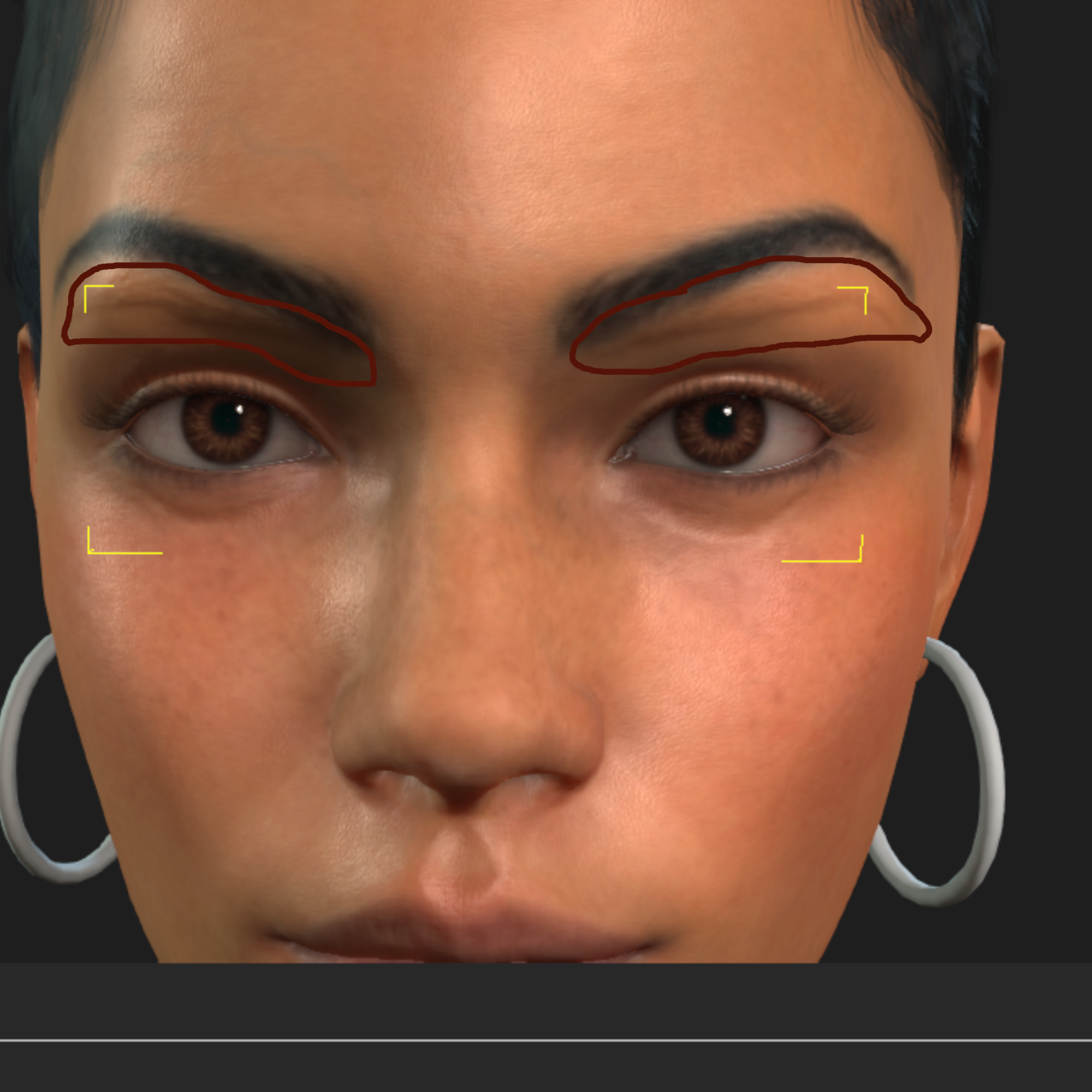 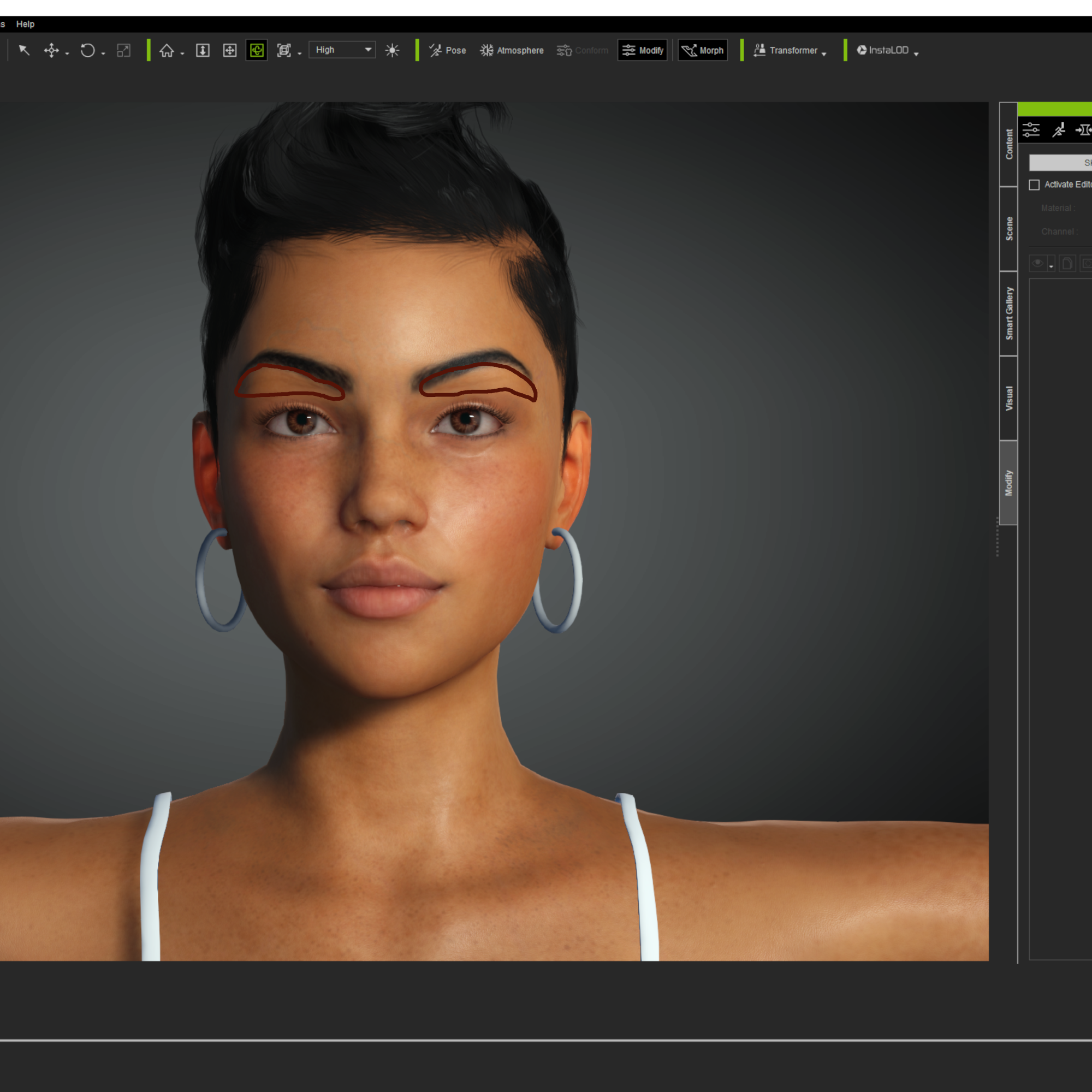
|
|
By Snarp Farkle - 5 Years Ago
|
I've come across this issue before also, I first tried to move the generated eyebrows to hide the DAZ ones but failed to get them to line up without distortion, also trying to paint them out on the original face pic didn't look so good either, I'm not so savoy of a painter.
DAZ has a "remove brows" script for sale that removes eyebrows on any DAZ character, it can be found here.
|
|
By helielfilmz - 5 Years Ago
|
|
It's not Daz's brows i want to keep them, but it's the CC3 brows that i want to get rid of how do i get rid of the CC3 brows like once import my character from daz using the transformer the CC3 version appears on my characters face. I have seen others use transformer on Youtube, and they never had nothing like this on their characters it gots to be something i'm doing wrong for it to happen
|
|
By vidi - 5 Years Ago
|
The Textur fits not with the normal map
|
|
By helielfilmz - 5 Years Ago
|
This is what i'm talking about the CC3 version eyebrows you can see the print in the previous photos i posted 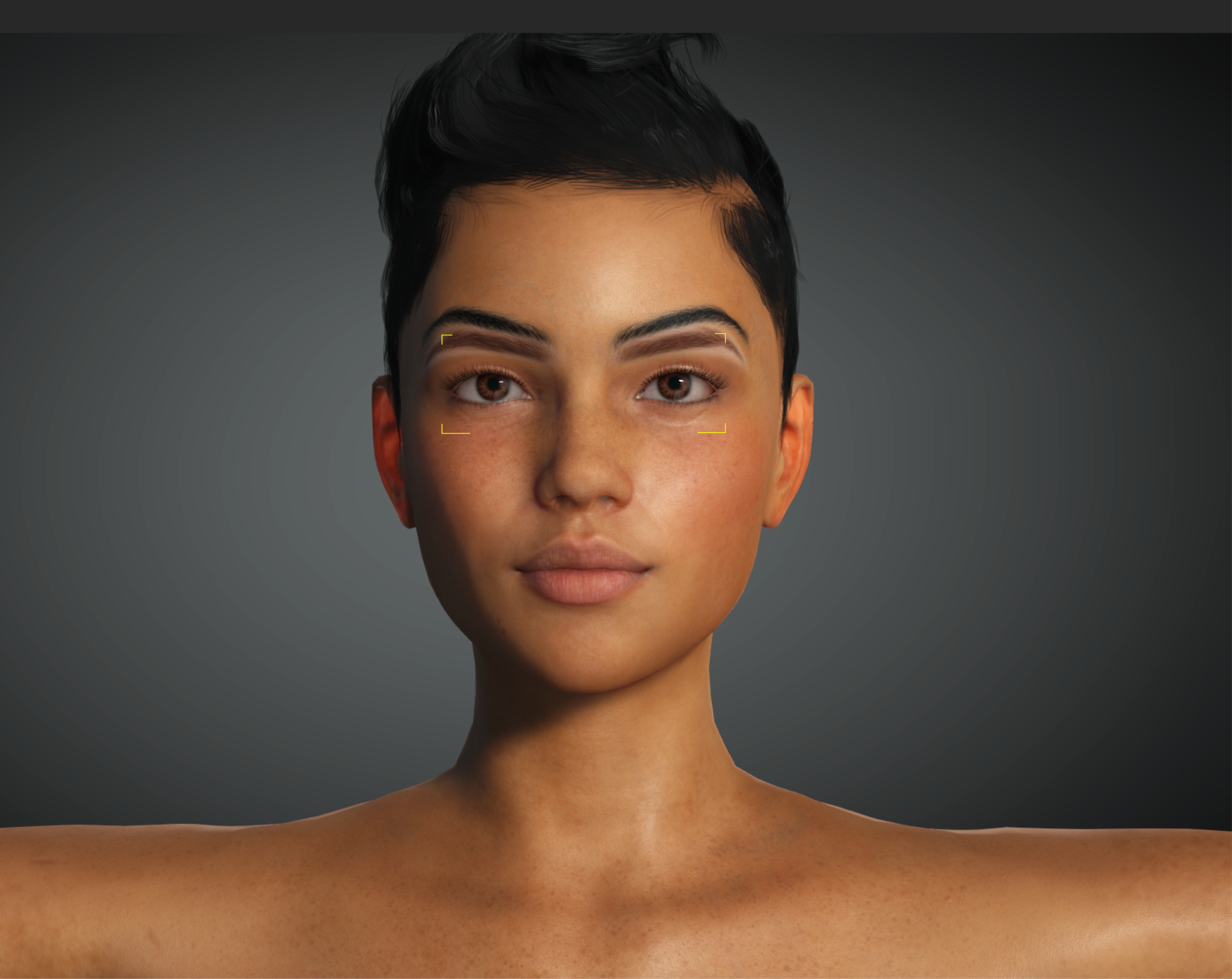
|
|
By helielfilmz - 5 Years Ago
|
|
It's something wrong, but how do i fix it i'm new to CC3 been watching tutorials and all so i came here to learn what i can't find on Youtube
|
|
By Snarp Farkle - 5 Years Ago
|
Sorry helielfilmz, I got confused but if it looks like that in iClone as well then, (if it were me) I'd try re-installing the SkinGen tools from the HUB to see if that would get rid of it.
It's really hard to know how to give good advice without being able to try things myself but since it's only happening when the SkinGen tools are activated uninstalling, re-installing them would be my first move, then re-importing the character with the transform tool to start with a fresh set of textures.
If it still persists to add the brows then maybe zip up the CC3 Project file and put it in DropBox, share the link here so others can test it to see if we get the same results.
|
|
By Rampa - 5 Years Ago
|
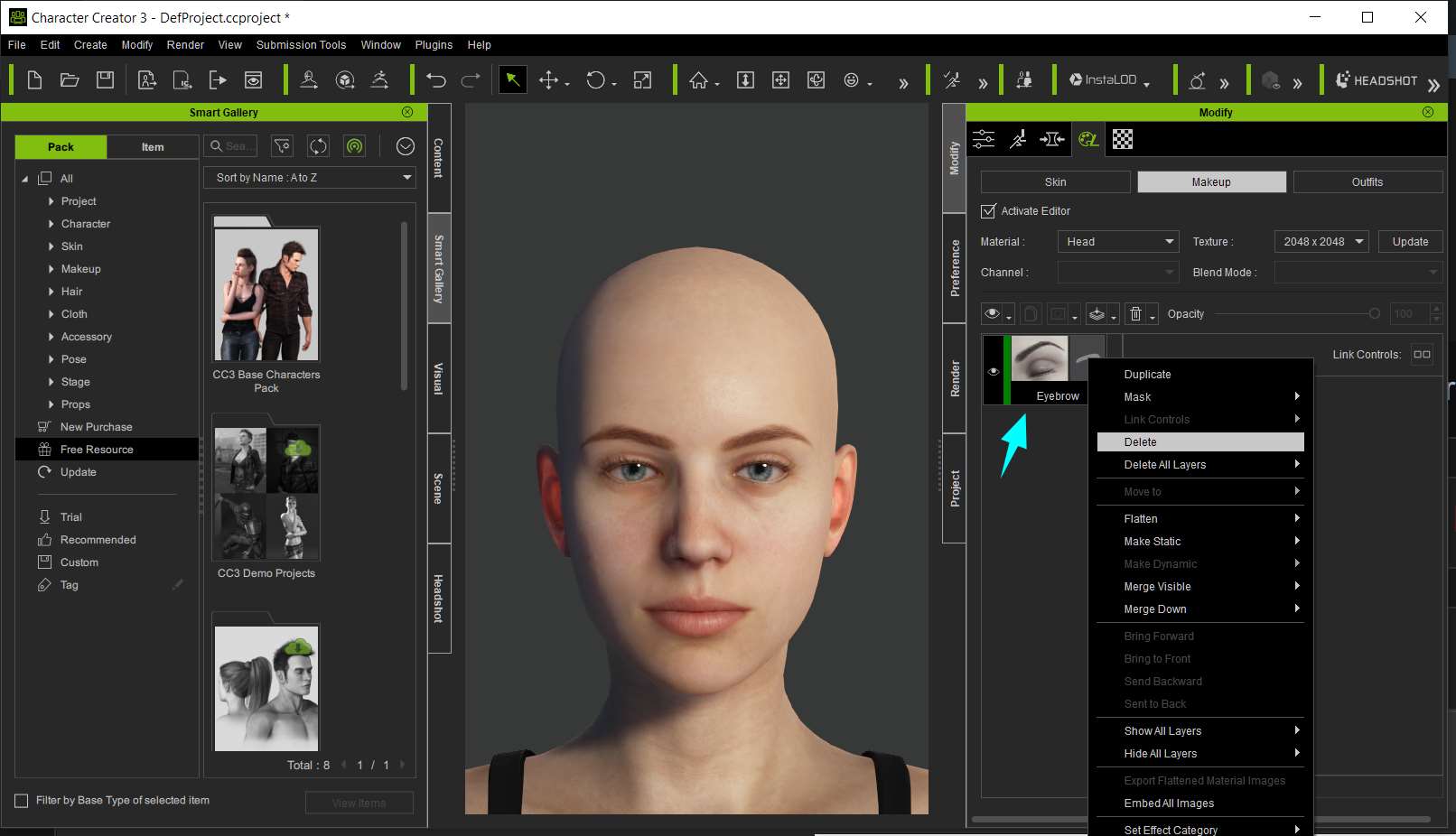
Go into the makeup section of Skingen, and delete the eyebrow layer from the pop-up menu when you right-click on it. That will delete the CC3 eyebrows, leaving only your baked in DAZ eyebrows.
|
|
By lianchiu - 5 Years Ago
|

make sure when you transform that your Character's Normal or Bump texture also correct, otherwise it will use default (CC base character's normal texture),
if you want to fix it, you can deleted it (@Rampa said) or edit that normal map (erased the eyebrow)
hope this will help.
|
|
By helielfilmz - 5 Years Ago
|
|
Do i need the SkinGen Premium plug-in cause it's not letting me click on the Texture Settings every time i click on it i get this pop up saying SkinGen Premium Plug-on provides full editing capability such as loading custom textures and etc. I have the money for it but at the same time trying to save up to upgrade my gpu and pc also so i'm on a budget til next pay
|
|
By lianchiu - 5 Years Ago
|
|
helielfilmz (1/12/2021)
Do i need the SkinGen Premium plug-in cause it's not letting me click on the Texture Settings every time i click on it i get this pop up saying SkinGen Premium Plug-on provides full editing capability such as loading custom textures and etc. I have the money for it but at the same time trying to save up to upgrade my gpu and pc also so i'm on a budget til next pay
Try this to see if it help.
by the way SkinGen is worth to buy :D save more money no hurry :cool::cool::cool:
|
|
By helielfilmz - 5 Years Ago
|
lianchiu (1/13/2021)
helielfilmz (1/12/2021)
Do i need the SkinGen Premium plug-in cause it's not letting me click on the Texture Settings every time i click on it i get this pop up saying SkinGen Premium Plug-on provides full editing capability such as loading custom textures and etc. I have the money for it but at the same time trying to save up to upgrade my gpu and pc also so i'm on a budget til next pay
Try this to see if it help. by the way SkinGen is worth to buy :D save more money no hurry :cool::cool::cool:
Ok i will look into and try this. I'll get skingen sometime after getting the 3080 or 3090 need those my pc been acting up lately so i'm trying to upgrade asap thanx for your help much appreciated
|
|
By helielfilmz - 5 Years Ago
|
helielfilmz (1/24/2021)
lianchiu (1/13/2021)
helielfilmz (1/12/2021)
Do i need the SkinGen Premium plug-in cause it's not letting me click on the Texture Settings every time i click on it i get this pop up saying SkinGen Premium Plug-on provides full editing capability such as loading custom textures and etc. I have the money for it but at the same time trying to save up to upgrade my gpu and pc also so i'm on a budget til next pay
Try this to see if it help. by the way SkinGen is worth to buy :D save more money no hurry :cool::cool::cool: Ok i will look into and try this. I'll get skingen sometime after getting the 3080 or 3090 need those my pc been acting up lately so i'm trying to upgrade asap thanx for your help much appreciated
I don't see it anymore when i activate skin editor i also used default texture instead of "Original" maybe that had a play in it as well but, thank you for responding 🙏🏾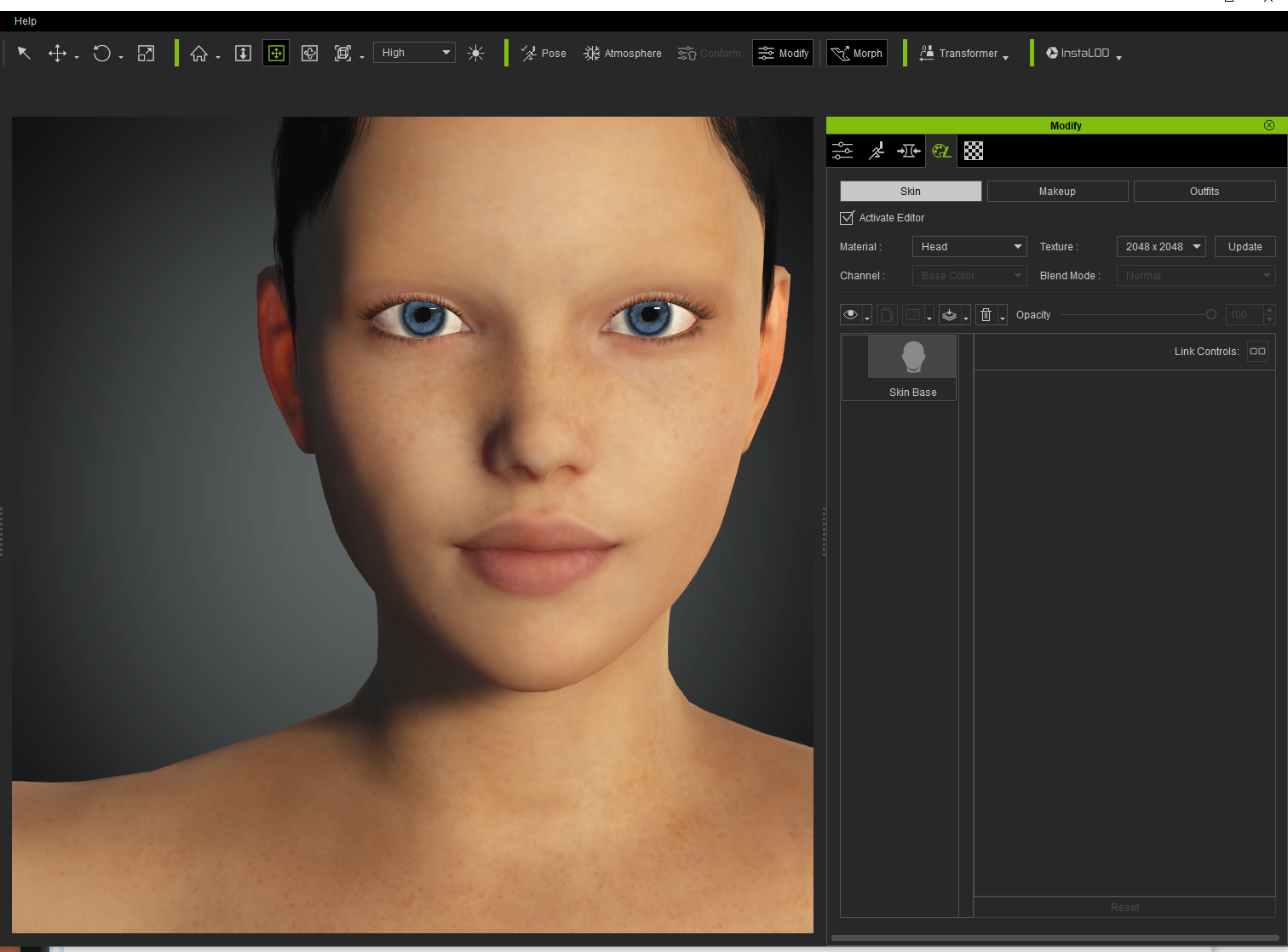
|