|
By JasonWynngard - 6 Years Ago
|
I'm striving to become serious about making book covers using CC3.3. I still have a good way to go with making more realistic characters. Especially with Headshot using DIY photos. What I'd like to see is for CC to have a feature whereby a photo shot can be used as a background. Right now, I change the default background color to a solid color. Save the result as either .png or .jpg and open it in Paintshop Pro. There, I transparency the background and place my character in a photo as a new layer. It works just fine but would love to see CC allowing book cover artists to do this inside CC itself.
|
|
By wires - 6 Years Ago
|
There are possibilities to add an image to a CC background.
Look in the Props folder for a suitable item to add your image to. In the screen shot below I added a Wall and then placed a photo in the Base Color slot.
This was a "quick and dirty" demo, but with a little work on the lighting and shadows you could get the "look" that you require.
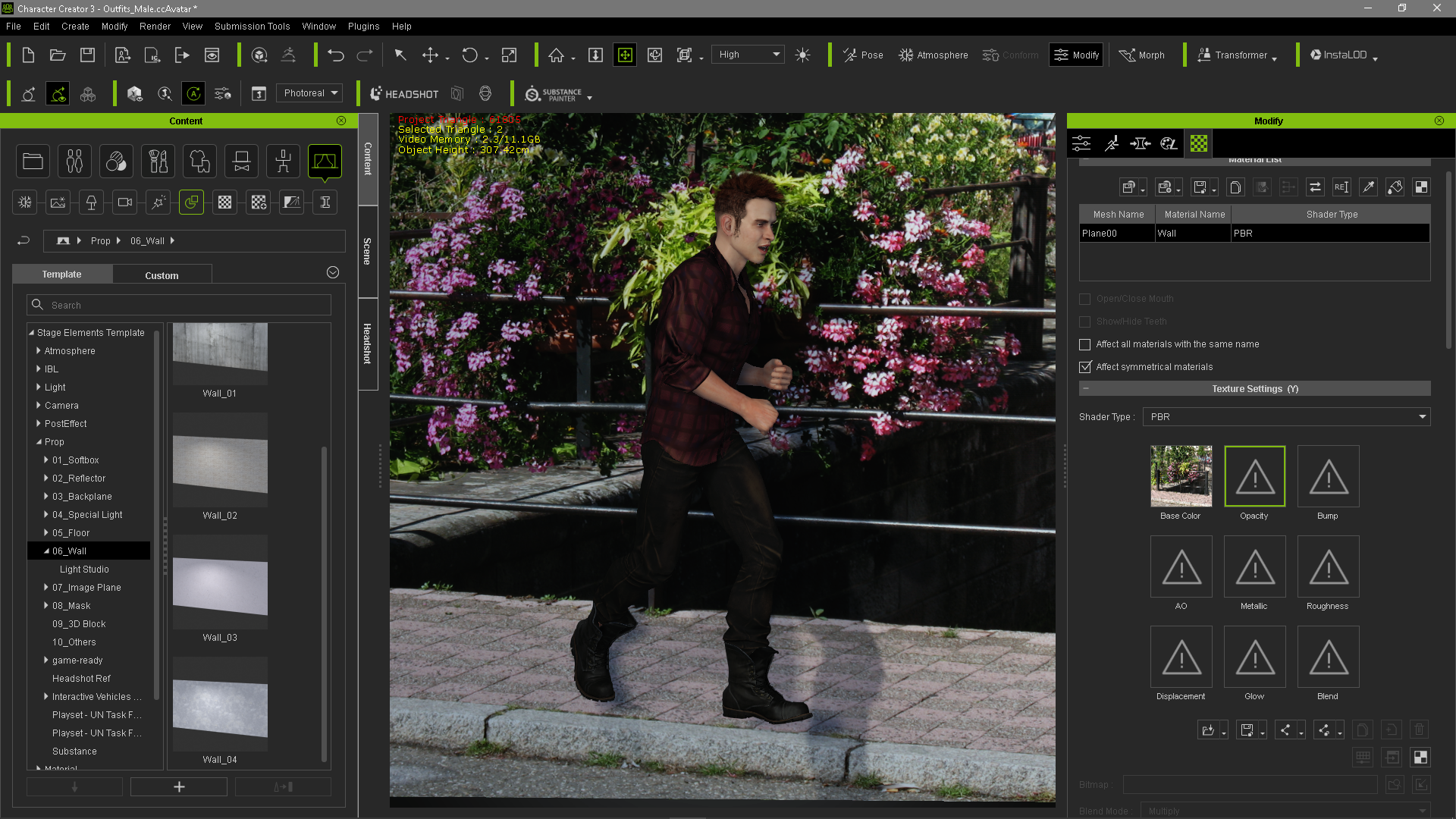
You can copy props from your iClone props folder to the CC Props folder giving you an almost endless choice.
|
|
By JasonWynngard - 6 Years Ago
|
THANK YOU, Gerry. I believe this will save me a lot of time so will be experimenting with your method today. Really appreciate this.
|