|
By barry_yenerall - 6 Years Ago
|
Forgive me if I have posted this question in the inappropriate thread.
Pipeline: Character Creator 3 / Unity / VRChat
I take a straight, virgin, unedited character, and export it from Character Creator 3, as an FBX intended for Unity, then, from within Unity, I use the Reallusion Character Creator & iClone Auto Setup utility from within Unity, and the character gets imported perfectly.
Thank you for this utility.
Next, once the character is fully imported into Unity, and being that avatars within VRChat require Blend Shapes for their Lip Syncing, I assign the type of Lip Sync, as Viseme Blend Shape, and I assign the Face Mesh, as CC_Base_Body (Skinned Mesh Renderer), as there is no, simply, FACE, or, HEAD to choose.
What Unity returns to me is the following:
First Image
And if I click on any of the Viseme slots, in an attempt to manually assign the Viseme, Unity gives me this list, which again, is of no use to me:
Second Image
Ultimately, the question is, is there any way to export the CC3 Visemes, along with the FBX, so that Unity will acknowledge them, and be able to use, and/or assign them to their respective Visemes:
Third Image
Or, perhaps there is a, “politically correct” procedure, that I am unaware of, to accomplish this exact task.
Thank you for your time.
|
|
By jasondalycan - 5 Years Ago
|
|
Is there an answer to this? I have the same question: how do you export visemes via CC3 pipeline?
|
|
By stephane.grade - 5 Years Ago
|
The answer is there isn't ! People have been asking for custom blendshape export for YEARS !
The only way is to recreate the blendshapes in unity using an addon like :
https://forum.unity.com/threads/morphmixer-create-new-blendshape-mixes-in-unity3d.504283/
|
|
By LynnSpyre - 4 Years Ago
|
This overlaps with something else I'm working on.
It would be really nice to have a blender script that just did it.
ALL of the visemes can be created with combinations of the arkit shapes, and probably also the default ones
|
|
By LynnSpyre - 4 Years Ago
|
I don't know if this is helpful, the way I settled on doing it was pretty straightforward.
Export your model to blender, load the cats plugin. Use the existing shape keys to make A O and CH visemes.
Then, load the CATS plugin, do no other optimizations, and select Visemes. It'll auto-generate the rest of them
|
|
By digitallywired - 3 Years Ago
|
|
Three years later is there a solution to this?
|
|
By Victor.Soupday - 3 Years Ago
|
Facial Profile Editor -> Edit Expressions: Change Visemes to "1:1 Direct"
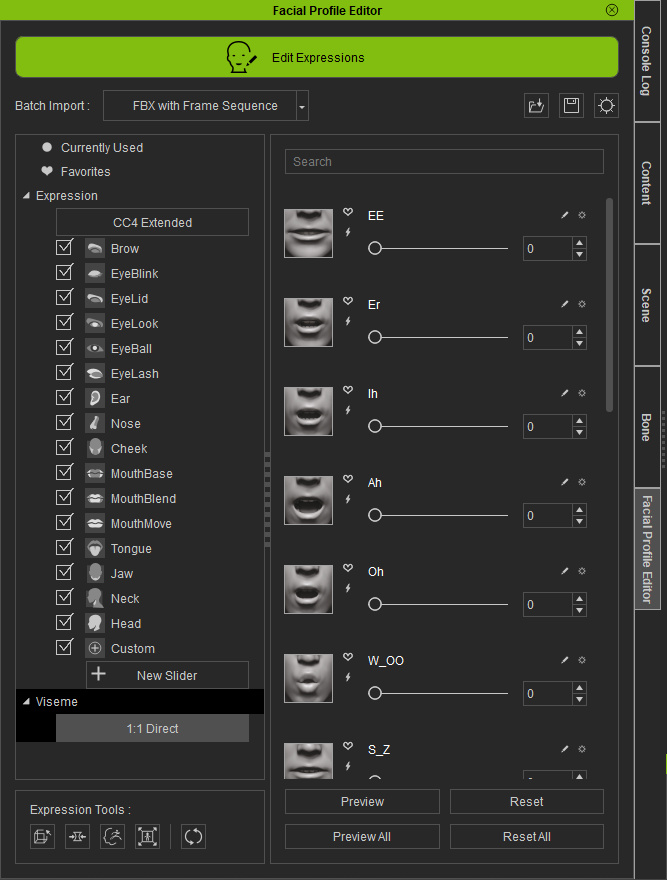
Is that what you need?
|
|