|
By shadybearbklyn - 6 Years Ago
|
|
I have a couple of characters that will not return to a flat foot position even after I delete the high heels that they were wearing. I have a few characters with the same shoes that are fine, but there are a couple that have an unnatural foot position, so I deleted the shoe thinking it would return the foot to the base setting as it usually does, but for some reason it doesn’t.
|
|
By animagic - 6 Years Ago
|
As I recall, this was a bug that SHOULD have been resolved. There may be a workaround, Rampa or 4u2ges might know.
I have had the same, so what I do now is to save a base version of the character first to keep as a reference and only work on a copy.
|
|
By shadybearbklyn - 6 Years Ago
|
|
I guess I have to create a new character because nothing seems yo fix it. That’s a pretty big issue they should address.
|
|
By Rampa - 6 Years Ago
|
Try this:
Add some shoes. Then adjust the feet to flat using the high heel tool. Then remove the shoes.

|
|
By 4u2ges - 6 Years Ago
|
There is no solution to this problem in CC, or iClone. Some characters behave that way for unknown reason.
The only way to restore the default pose is to fix it in modeling app.
I did post that video before and it shows a general way for fixing a default pose (routine is applicable for fixing any mismatch as a matter of fact), but it is fairly complicated.
|
|
By e1_scheer - 5 Years Ago
|
Hi 4u2ges,
Thanks for the video, that's a big help. :)
There's still a few key concepts I'm not getting though, like :
1.
When character creator characters are created are they skinned in A-Pose or T-Pose
From the video I'm guessing A-Pose
2.
If that's the case what is the T-Pose based on, when you click the "set T-Pose" button
Is it just arbitrary?
3.
If it isn't arbitrary why is the "set T-Pose button" TPose not the same as when you use the "T-Pose Animation" TPose clip
4.
I would like the "set T-Pose button" TPose to be the same as the T-Pose when I leave "the Set T-Pos" mode
Is there a way to save out the pose from the "set T-Pose button" TPose and load that onto the character
or the other way round.
Thanks !
|
|
By Peter (RL) - 5 Years Ago
|
You should be able to fix this issue within CC3 itself.
Please try the following to see if it helps (it does for me). This is using a CC3+ character.
1. Load the default CC3+ female character and put it into a T-Pose from Pose > Body.
2. Save the character with the name Reference T-Pose.
3. Load your character with the foot issue and put this into a T-Pose (foot issue will remain).
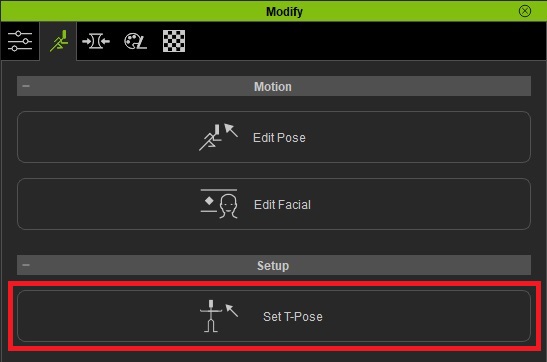
4. Select "Set T-Pose" from the Modify Panel > Motion Pose tab.
5. Now click "Load T-Pose" and load the Reference T-Pose character you saved previously.
6. Your faulty character should now adopt the correct T-Pose (foot issue fixed)
7. Now exit the "Set T-Pose" panel and save your character.
8. This should permanently correct the problem.

|
|
By 4u2ges - 5 Years Ago
|
Thanks Peter, worked perfectly!
|
|
By Amper Sand - 5 Years Ago
|
As a note - I just found (one) reason leading to the foot remaining stuck in high-heel position: any change in foot scale while wearing the high-heels.
Very simple to test: in CC load a CC3 or CC3+ character, give it some high-heels, then change the "Character scale", "Character height", "Foot Scale" and so on. That's it, das ist kaput now, remove the shoes and you'll see.
Now I've learn that's wiser to un-shoe the character before adjusting its proportions.
|