Eyelashes


https://forum.reallusion.com/Topic465638.aspx
Print Topic | Close Window

By lindsley60 - 6 Years Ago
How to delete the eyelashes from the model for export in .OBJ? 
By r78zj99 - 6 Years Ago
hi lindsley60


step 1. select here in the picture shown below

https://forum.reallusion.com/uploads/images/58399fa9-1020-4641-9045-626b.jpg


step 2.  see attach file to be played (no sound)


this should help you

just using the default with no extras


from Alan

p.s,. the attachment file is in zip format because the site doesn't allow video to be sent in their format

zip files are compression file that can be uncompressed by programmes like winzip


By lindsley60 - 6 Years Ago
I want to remove the eyelashes not only visually, but in the exported .OBJ mesh.
By r78zj99 - 6 Years Ago
hi again


deleting all leaves a horrible mess behind!


I only have learned the lesson a few days ago


just tested the default again


it does works but because the format you are sending it out in, has left markers round the head area

to iclone it is perfect.


from Alan


By animagic - 6 Years Ago
lindsley60 (12/10/2020)
I want to remove the eyelashes not only visually, but in the exported .OBJ mesh.

In CC you can hide the mesh of the eyelashes.
  1. Select your character, and then click Edit Mesh.
  2. In Edit Mesh, click the Element tab. 
  3. The eyelash meshes are separate elements. Select each and then click Hide.
  4. Close out of Edit Mesh. Your character will now be without eyelashes.
When exporting, check Remove Hidden Mesh:
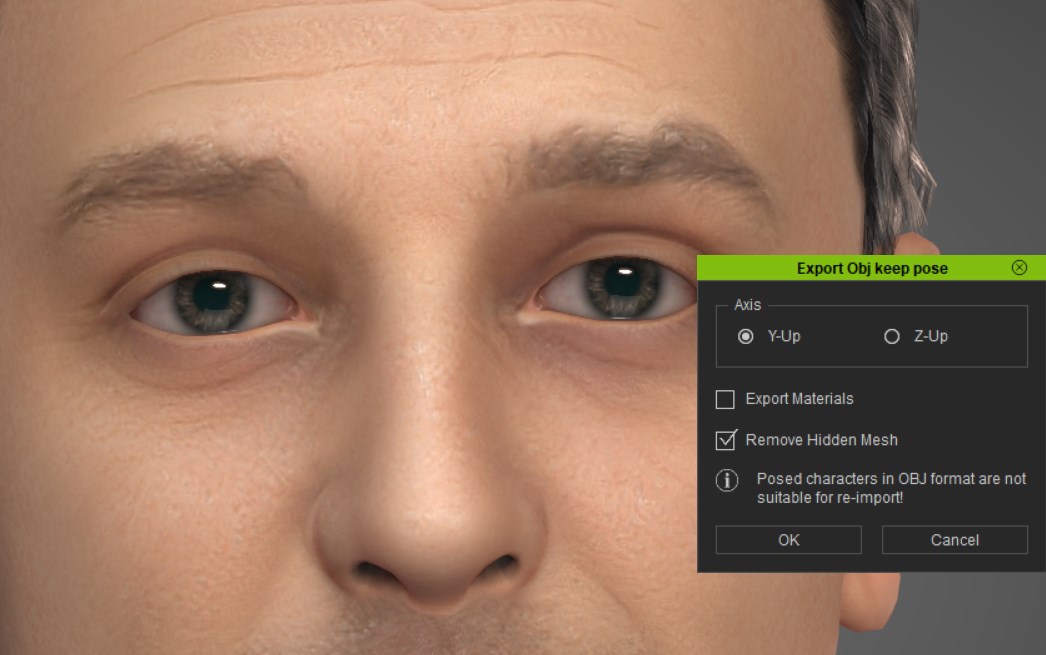
https://forum.reallusion.com/uploads/images/3aec2ce8-77f2-494b-8e80-d6b8.jpg

By r78zj99 - 6 Years Ago
hi animagic

I try to do what have just told us


I am doing this without any extras just the default as new when the programme starts up it defaults to the female character


I can see the  hide button in grey out see picture below, when editing the mesh

https://forum.reallusion.com/uploads/images/d103b9e0-bcd1-43a3-bb49-b914.jpg


I did not it select it because eyelashes are mapped based


here the other picture even when using remove mesh has been done see below


https://forum.reallusion.com/uploads/images/1c589547-3772-400b-a110-8a54.jpg 

the step 1 and 2 was an very helpful lesson from reallusion 

1. see picture on what to select

2. unzip the file to see video

surprising it was that easy

tip taking  part in Q & A

helps everybody in a lesson it also reallusion also on future development

to which, I am very proud of


from Alan

p.s. my lesson was from reallusion


By animagic - 6 Years Ago
@Alan: If you read my instructions carefully, it tells you to select Element first. After that you can select the eyelash meshes and hide them.

"Hide" is always disabled when you select Vertex. It only works for Face or Element.
By r78zj99 - 6 Years Ago
hi animagic


i do apologise for the misunderstanding, we are both right here are two ways of doing it in less than 2 minutes.

I had to test it, yes it does work as well.

the differences is your method requires more steps than my method.

the steps are 


1. left eye upper
2.left eye lower
3. right upper
4. right lower

then the tick box before outputting

we are both winners here
I am sorry, if I did not read what you had written.

from Alan

I am still learning maybe from too many mistakes that's how we all learn