|
By toystorylab - 6 Years Ago
|
I first tested Motion Link:
EZ Motions Walk - Walk to Stop & EZ Motions Walk - Walk backwards for Intro and Outro
Arguments Motion - Physical Confrontation (the whole set) for "fight"...
Quite happy with this feature...
And now I tested 3D Motion Converter:
VWS_step forward + Masculine Movement Vol1 - Waiting Annoyed
Also happy with this feature...
With Motion Link, when working on Timeline (break motion) the ML interface closes...
Is this intended? And if so, why? Would be cool if it remains open.
Some head stutter in both processes, but I guess that is unavoidable
and it can be smoothed out on timeline (head)... (Curve Editor planned?)
In both applications (3DMC & ML) I quickly felt the need for "Set as default" iClone functions:

Any chance this can be implemented? See no reason this would be very difficult...
As I use it very often in iClone, it would be very helpfull to blend motions!
And as we have better motions now, I hope we will see soon characters with a "back" view in stores...
Overall a real Booster for Cartoon Animator :kiss:
|
|
By kylelee - 6 Years Ago
|
Sorry about that "With Motion Link, when working on Timeline (break motion) the ML interface closes..." This is a limitation with our mechanism of dialog (panel), the reason is to make sure Cartoon Animator's every dialog will not influence by other features. |
|
By toystorylab - 6 Years Ago
|
Hm, I often get this:
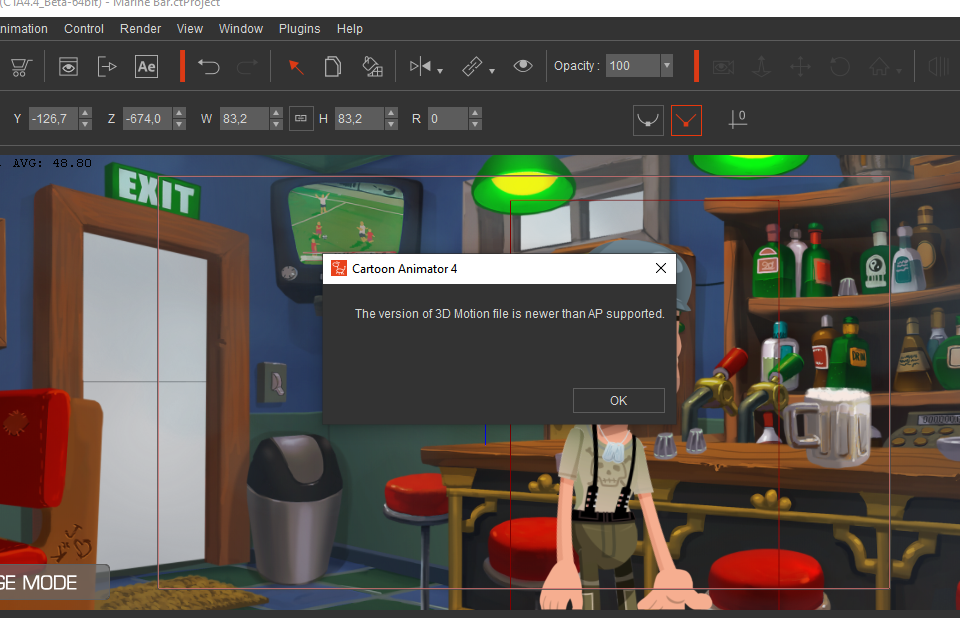
I guess the motions are not compatible... Workaround??
|
|
By Minnie (RL) - 6 Years Ago
|
@toystorylab
Did you save the motion as .iMotion format? Please try to export the motion again as .rlMotion format. It should be fine importing .rlMotion to CTA.
|
|
By toystorylab - 6 Years Ago
|
Thanx for quick reply...
Strangely some motions, even iMotions, from the same RL Pack work others don't.
Will have to try to resave those motions as rlMotion inside iClone (now I simply drop them from explorer)...
|
|
By Minnie (RL) - 6 Years Ago
|
@toystorylab
Would you kindly let me know which RL pack are you referring to? Thanks!
|
|
By toystorylab - 6 Years Ago
|
These are the ones I encountered:
https://marketplace.reallusion.com/g5-ez-motions-walks-vol-2
"Creep Cycle Start" works, "Creep Cycle End" does not work
https://marketplace.reallusion.com/g5-ez-motions-runs-vol-1
"JogSlow Turn L90 Cycle" works, "JogSlow Turn R90 Cycle" does not work
https://marketplace.reallusion.com/g5-ez-motions-runs-vol-2
"Run L45 Cycle End" works, "Run L45 Cycle Start" does not work
Will do some further research...
|
|
By toystorylab - 6 Years Ago
|
I have a folder called "MographMotion", can't find it in stores...
"StandTKI_to_Stand02" works, "StandTKI_to_Stand01" does not work
https://www.reallusion.com/ContentStore/csproduct.aspx?contentid=AIC430DLENU030120110526001
Adventure Movies - Jump
"Jump forward while being tied" works, "Jump sideways while being tied" does not work
https://www.reallusion.com/ContentStore/csproduct.aspx?contentid=AIC430DIENU030120101228001
Cartoon Motion Vol 1. - Idle and Move
"D065_Walk Energetically" works, "D065_Walk Energetically_End" does not work
If it is important to know which ones work,
maybe you find someone in Staff who drag and drops all RL motions into 3D Motion ;)
|
|
By toystorylab - 6 Years Ago
|
By the way, these were all iMotions...
|
|
By kylelee - 6 Years Ago
|
|
toystorylab (11/22/2020)
By the way, these were all iMotions...
Hi toystorylab,
Could you help me to try re-download all of the .imotions then install it to Cartoon Animator?
Because Cartoon Animator v4.4 just support imotion v6.x,it is not working with imotion v7.x, the imotion will rewrite data into imotion when you install it to iClone 7.
So that you cannot drag iClone 7 imotion directly into Cartoon Animator, that should reinstall/redownload the imotion into Cartoon Animator.
Or you can save as a rlmotion then try again that import to Cartoon Animator.
|
|
By toystorylab - 6 Years Ago
|
Hm, not sure why the same pack would have v6.x and v7.x versions...
Unfortunately the marketplace website is unable to show my inventory older than one year :pinch:
So, no way to re-download...:crazy:
one year: 217 items

all: 217 items (remains the same as "one year")

exact dates: website keeps searching

|
|
By toystorylab - 6 Years Ago
|
Same behaviour in Firefox and Edge...
|
|
By toystorylab - 6 Years Ago
|
By the way, "Member Special Campaign Notifications" only show up in Edge...
|
|
By toystorylab - 6 Years Ago
|
Besides Marketplace I have several Packs from Content Store...
Most worked but here it does not work:
This Pack does not offer CA4 version:
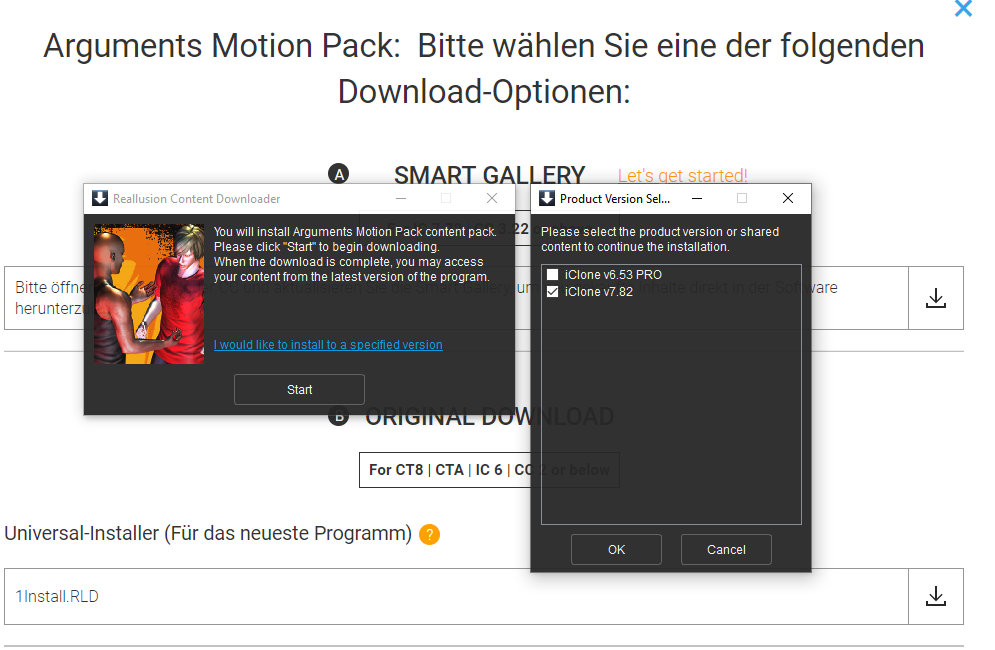
These Packs offer CA4 but do not work/install:


Same with the following packs:
https://www.reallusion.com/ContentStore/iClone/pack/iClone7-Motion-Rifle-Combat-Combo/default.html
https://www.reallusion.com/ContentStore/iClone/pack/Motion-City-Life/default.html
|
|
By toystorylab - 6 Years Ago
|
After downloading to CA4 instead of dragging from iClone Folder these all worked ;)
Unfortunately I still CAN'T download motions older than one year from Marketplace
as they don't show up in my inventory :pinch:
|
|
By toystorylab - 6 Years Ago
|
And another 2 packs won't install to CA4:


:pinch:
|
|
By toystorylab - 6 Years Ago
|
Hm, no comments on this??
Something else:
I noticed the cursor does not follow on the timeline as expected, never seen that before.
When i skip forward/back cursor only responds when I hoover timeline.
I work with dual monitors, but even on single issue occurs.
Hard to describe, watch...
AND, we desperately need a RESTORE after crashes like we have (works like a charm) in iClone.
And AGAIN, (got no answer to this so far) is this possible??
In both applications (3DMC & ML) I quickly felt the need for "Set as default" iClone functions:
Any chance this can be implemented? See no reason this would be very difficult...
As I use it very often in iClone, it would be very helpfull to blend motions!
And as we have better motions now, I hope we will see soon characters with a "back" view in stores...
|
|
By Minnie (RL) - 6 Years Ago
|
@toystorylab
Sorry to have kept you waiting. In fact, we are doing a thorough troubleshoot of the feedbacks you have reported to us. The product team has preliminary tried to install the aforementioned motion packs, and all successfully installed in CTA. We are on it, and closing investigating on the reason that causes the inability for you to use the content properly. Will get back to you ASAP with a more confirmed result.
And for the new issue, let me quickly notify the team, and we will let you know the answer soon!
Thank you very much for the feedback, we really appreciate it. Thanks again!
|
|
By toystorylab - 6 Years Ago
|
No problem...
So, it sounds like it will be possible to install the above mentioned packs too.
Thanx.
My other issue (download marketplace) seems to be solved too.
After trying several times today, marketplace finally gave access to my entire inventory.
I am downloading now...
|
|
By toystorylab - 6 Years Ago
|
After finally getting access to complete marketplace inventory
I downloaded/installed several packs to CA4
and the above mentioned motions now work ;)
|
|
By Minnie (RL) - 6 Years Ago
|
@toystorylab
That's great!
|
|
By toystorylab - 6 Years Ago
|
So, the remaining problems now, are all those packs mentioned above (and I found more) with this error:

and some packs not offering an install for CA4...
Thanx ;)
|
|
By toystorylab - 6 Years Ago
|
Another annoying thing (3DMC & ML):
Not sure why it is totally different as in iClone,
but when i cut a motion, the facial clip accompanied with that (3D) motion,
which likely only will have the head movement of that motion,
is not cut and even does not move along when moving the motion clip.
Which results in uncorrect head movement after doing so.
In this case here:

I cut the motion to only the first quarter, again cut this quarter
and copied the second half and moved on timeline...
Wondering why it behaved strange I noticed that the "facial" part was still there in its entirety.
Not good :pinch:
Is there a special reason to treat it as an "alone standing" part?
EDIT can we have a "merge clips" function??
|
|
By toystorylab - 6 Years Ago
|
Every time I drag a clip on character, the "Import 3D Motion" window
appears not where I dragged it (on my second monitor) (and saved my project) ...
Would be cool if it reopens where customer wants.
|
|
By kylelee - 6 Years Ago
|
toystorylab (11/23/2020)
Hm, not sure why the same pack would have v6.x and v7.x versions... Unfortunately the marketplace website is unable to show my inventory older than one year :pinch:
So, no way to re-download...:crazy:
one year: 217 items
all: 217 items (remains the same as "one year")
exact dates: website keeps searching
Hi toystorylab,
Could you help me to try one thing, click purchase date then select all.
After select all, You can get a view to see all of the purchased items and redownload the content.

Kyle
|
|
By kylelee - 6 Years Ago
|
toystorylab (11/24/2020)
Another annoying thing ( 3DMC & ML): Not sure why it is totally different as in iClone, but when i cut a motion, the facial clip accompanied with that (3D) motion, which likely only will have the head movement of that motion, is not cut and even does not move along when moving the motion clip. Which results in uncorrect head movement after doing so. In this case here: I cut the motion to only the first quarter, again cut this quarter and copied the second half and moved on timeline... Wondering why it behaved strange I noticed that the "facial" part was still there in its entirety. Not good :pinch:
Is there a special reason to treat it as an "alone standing" part?
EDIT can we have a "merge clips" function??
Thank you for your suggestion and question. Due to the motion clip does not sync with the facial clip when you break the clip, there are individual with the separate part. There is a defect of spec designing, we will consider your suggestion about the merge motion. But currently, you have to break the clip two times, motion clip and facial clip. Regarding the iClone set as a default features, could you tell us more detail, such as what kind of operation you need this feature, that's great if you can record a video and send to us.
|
|
By toystorylab - 6 Years Ago
|
kylelee (11/25/2020)
Could you help me to try one thing, click purchase date then select all. After select all, You can get a view to see all of the purchased items and redownload the content. Kyle
Thanx for reply, apparently you did not read the message you quoted carefully...;)
That's exactly what I did, but "default", "All" and "exact dates" showed the same result; 1 year, no older content.
In the meanwhile "All" worked yesterday afternoon, in the evening it did not work anymore
and when I just tried, it worked, so no clue why this happens.
But I have everything needed downloaded/installed to CA4 now.
EXCEPT several packs with this error:

and a few packs don't offer a download/install for CA4...
Regarding Set as Default", I will make an example in iClone.
|
|
By toystorylab - 6 Years Ago
|
"set as Default" in iClone helps a lot to blend motions...
It would be cool to have this feature in CA4 too ;)
|
|
By Minnie (RL) - 6 Years Ago
|
toystorylab (11/25/2020)
kylelee (11/25/2020)
Could you help me to try one thing, click purchase date then select all. After select all, You can get a view to see all of the purchased items and redownload the content. Kyle Thanx for reply, apparently you did not read the message you quoted carefully... ;)
That's exactly what I did, but "default", "All" and "exact dates" showed the same result; 1 year, no older content.
In the meanwhile "All" worked yesterday afternoon, in the evening it did not work anymore
and when I just tried, it worked, so no clue why this happens.
But I have everything needed downloaded/installed to CA4 now.
EXCEPT several packs with this error:
and a few packs don't offer a download/install for CA4...
Regarding Set as Default", I will make an example in iClone.
@toystorylab
Glad that the download problem is solved. Kyle and the team made some adjustments from the backend, so the motion is downloadable again. That's why he was asking you to try it again by selecting "All" :D (not until we found you are faster than us and have successfully downloaded all the content, oops :P)
For some of the rlMotions that are not able to be installed in CTA, It seems, preliminarily speaking, that due to the restriction of the beta version of CTA 4.4, our system automatically blocked the installation. One way to workaround is to export these motions in iClone as .rlMotion and import to CTA.
And.. saw your video explaining the scenario to use "set as default". It's very self-explanatory, thank you very much!
|
|
By toystorylab - 6 Years Ago
|
Thanx for reply...
So, the missing motion-packs will be able to install after release of CA 4.4?
I just had 2 crashes in a row while beeing in composer mode and using "edit psd".
After done editing in Photoshop and saving, while clicking "Back Stage" CA4 crashed...

So, we really need that "Restore" function ;)
And I also noticed that after saving in Photoshop, the image in CA4
only updates after hovering composer window (remind, I work on a dual monitor system).
Normally (regular CA4) it simply updates...
So a similar effect as described earlier with cursor update (see previous video "Cursor Timeline Issue")
And every time I relaunch CA4, my panels (content/scene/timeline) don't keep in place
after beeing well placed on both monitors and project beeing saved...
In iClone this works fine...
|
|
By toystorylab - 6 Years Ago
|
Hm, just did my adjustments with PSD editor again
and I had the same crash...
|
|
By toystorylab - 6 Years Ago
|
After having that crash again (4th time) I opened regular CA4
loaded the scene I used ('Bar' by Anton Bakhmat)
used edit PSD with the Martini Glas.
I noticed that going from Stage to Composer went way quicker,
though that might be as only scene, no characters, no motion, no pop-video...
And I noticed that update image in CA4 after editing and saving in photoshop
had same behaviour (update after hover CA4), so that might be normal.
Though I had no crash...
As it is not possible to open that project in regular version, see no way to test further.
You're welcome if you want to have that project to test yourself...
|
|
By toystorylab - 6 Years Ago
|
Just tried again twice and had 2 crashes.
So, I would say it is reproducible...
|
|
By Minnie (RL) - 6 Years Ago
|
@toystorylab
Thank you, could you kindly send this issue to the Feedback Tracker, and enclose the project. We will try to look into it.
Thanks a lot!
|
|
By kylelee - 6 Years Ago
|
Hi toystorylab,
Sorry for the crashing issue, we will investigate and solving before releasing this version.
If you could, I can provide you another version to let you continue your work.
|
|
By toystorylab - 6 Years Ago
|
Minnie (RL) (11/29/2020)
@ toystorylabThank you, could you kindly send this issue to the Feedback Tracker, and enclose the project. We will try to look into it.
Done:
https://www.reallusion.com/FeedBackTracker/Issue/Crash-after-PSD-edit
|
|
By toystorylab - 6 Years Ago
|
|
kylelee (11/29/2020)
If you could, I can provide you another version to let you continue your work.
That would be cool...
Thanx ;)
|
|
By toystorylab - 6 Years Ago
|
|
Minnie (RL) (11/25/2020)
For some of the rlMotions that are not able to be installed in CTA, It seems, preliminarily speaking,
that due to the restriction of the beta version of CTA 4.4, our system automatically blocked the installation.
One way to workaround is to export these motions in iClone as .rlMotion and import to CTA.
So, the missing motion-packs will be able to install after release of CA 4.4?
|
|
By toystorylab - 6 Years Ago
|
Dual Monitor Issue
Every time I drag a clip on character, the "Import 3D Motion" window
appears not where I dragged it (on my second monitor) (and saved my project) ...
Would be cool if it reopens where customer wants.
And every time I relaunch CA4, my panels (content/scene/timeline) don't keep in place
after beeing well placed on both monitors and project beeing saved...
In iClone this works fine...
|
|
By Minnie (RL) - 6 Years Ago
|
@toystorylab
the missing motion-packs will be able to install after release of CA 4.4?
>>Yes.
Dual Monitor Issue
>> Would you kindly record the issue, and send it to Feedback Tracker? Greatly Appreciated.
|
|
By toystorylab - 6 Years Ago
|
Minnie (RL) (11/30/2020)
Dual Monitor Issue
>> Would you kindly record the issue, and send it to Feedback Tracker? Greatly Appreciated.
Hm, not sure how to "record" this. Esp. as my screenrecorder only records one screen...
Fact is, the window placement on second monitor is not saved by CA...
|
|
By toystorylab - 6 Years Ago
|
|
kylelee (11/29/2020)
If you could, I can provide you another version to let you continue your work.
Would be cool...
|
|
By Minnie (RL) - 6 Years Ago
|
@toystorylab
Would it be possible to record the issue using your phone camera? If it's too troublesome, can you screenshot the window placement of both screens (separate screenshots are fine) before & after you drag a clip to the 3D motion converter/Saved the project?
Sorry for the inconvenience, but with the image or video, the development team can inspect the problem and find out the specific reason faster without any misunderstanding when we discuss it internally. (thank you in advance!)
|
|
By toystorylab - 6 Years Ago
|
Minnie (RL) (12/6/2020)
@ toystorylabWould it be possible to record the issue using your phone camera? If it's too troublesome, can you screenshot the window placement of both screens (separate screenshots are fine) before & after you drag a clip to the 3D motion converter/Saved the project? Sorry for the inconvenience, but with the image or video, the development team can inspect the problem and find out the specific reason faster without any misunderstanding when we discuss it internally. (thank you in advance!)
Hm, I have no idea why, but while making the video, all went fine... :blush:
If the issue reoccurs I will let you know...
|
|
By Minnie (RL) - 6 Years Ago
|
@toystorylab
Sure! :)
|
|
By toystorylab - 6 Years Ago
|
Tested with Regular 4.4, same crash...
|
|
By toystorylab - 6 Years Ago
|
All missing motion packs except one are installed in regular 4.4 now...
Thanx ;)
This Pack does not offer CA4 version:
|
|
By toystorylab - 5 Years Ago
|
toystorylab (12/10/2020)
Tested with Regular 4.4, same crash...
Was quite busy with other stuff, no CA4 for a while...
After updating to 4.41 (4.41.2431.1) and reading this under "fixed":
[User Reported, FeedbackTracker 7459] Possible program crash when updating character from the PSD editor.
I expected my problem to be solved (as FT 7459 was my entry)...
BUT nope, same problem occured :pinch:
|