|
By oonabe - 5 Years Ago
|
Hi,
I've been using Headshot for some time now and I think it's a great tool to make works faster but after seeing how many options Character Creator has and now that I'm thinking about purchasing the new add-ons Ultimate Morphs and Realistic Human Skin, I pretty much prefer the results of working directly on the model without importing external pictures as textures, because these often end up not looking as good and also they didn't work with other programs like Marvelous Designer, where my Headshot imported characters would show a transparent face and only the rest of the body would have a skin texture...
So, my question is, is there a way to just use the reference tools without applying the Headshot automatic calculation? Like having just the picture in the background and tweak transparency and color settings to model the head myself from scratch? Or even better, is there a way to actually use Headshot but then remove the external picture texture from the model so I can use the Realistic Human Skin and apply color and other values on the caharacter's face by myself instead?
|
|
By oonabe - 5 Years Ago
|
Ok, I think I found the answer to some of my questions here on this video:
I hope I can find a way to remove Headshots textures so I can make use of the plugin without having issues when exporting textures later on
|
|
By animagic - 5 Years Ago
|
Headshot textures are just Digital Human Shader textures, so there is nothing that makes them different from regular DHS textures (AFAIK).
I don't have Marvelous Designer, so it would take someone who does to verify/confirm why the head textures don't show up correctly.
Assuming you have the SkinGen tool, you could actually replace/edit the generated Headshot base texture of the head:
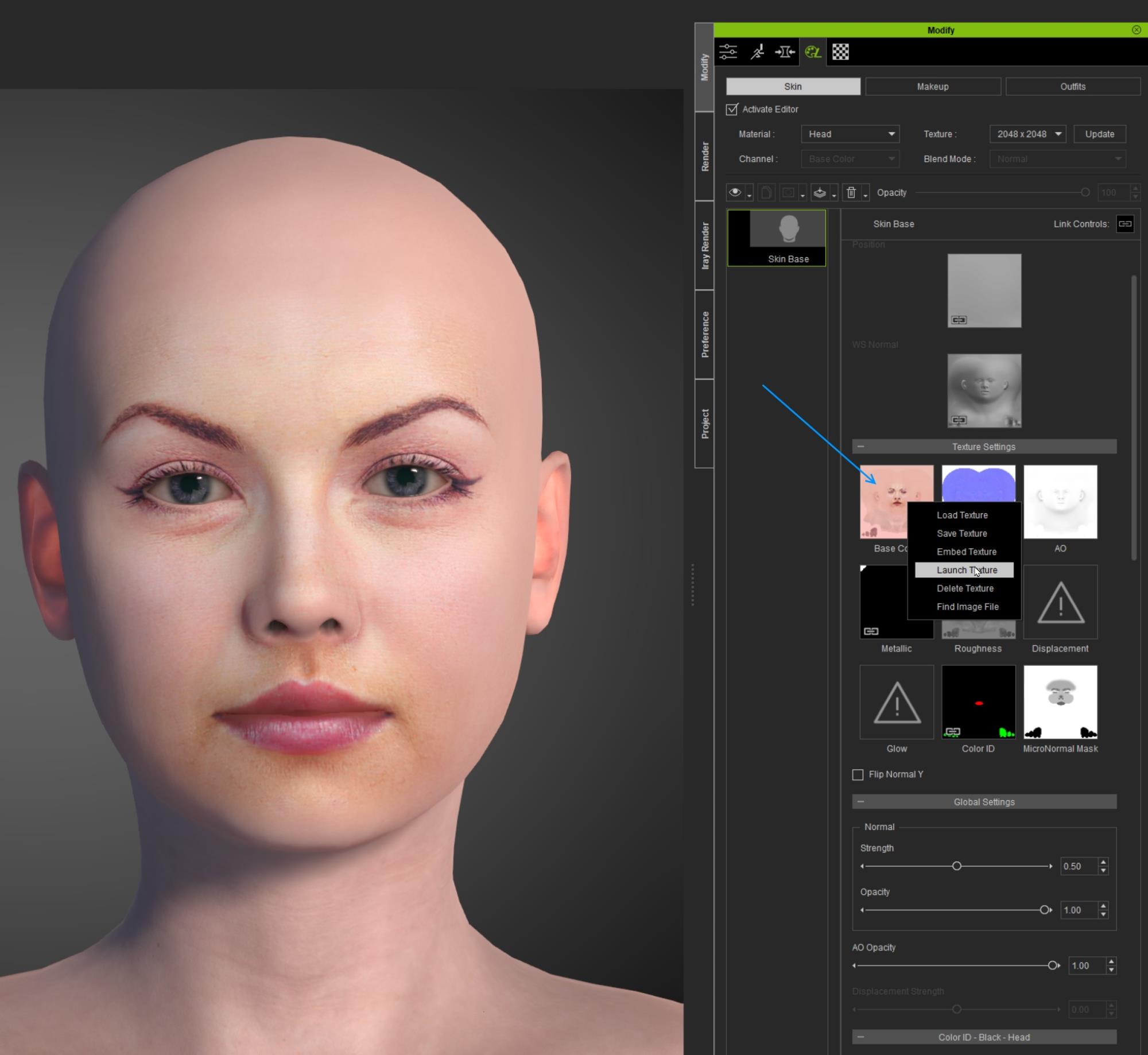
With Skin Gen tool open, select the Skin tab and then select Head/Skin Base. This will show the various textures that create the skin base material.
To change the Base Color, right-click, and then from the menu select Launch Texture to open the texture in your graphics editor. You can the edit it or replace it with your own.
One issue to be aware of is that the body, arm, and leg Base Colors also need to be changed in order to match with the modified head.
It would be a lot of work, but doable if you have the patience.
|
|
By oonabe - 5 Years Ago
|
Great, thanks for the answer, I still haven't Skin Gen but I was thinking about purchasing it and this was one of the questions that rised when trying to take a decision. I wasn't sure how good the new SkinGen add on would work on a model that has a facial texture which is partly taken from an external picture.
Sometimes I use pictures just as character references, HeadShot saves a lot of time on creating the face but when the original picture isn't that good and photoshop isn't enough to make that texture work completely smoothly I was afraid SkinGen would still carry the contamination of the original picture somehow, but having the possibility to completely replace that texture is very good news to me, so I guess I have one more reason to finally get SkinGen for my works.
Thanks again for the answer and the hints on how to do this
|
|
By animagic - 5 Years Ago
|
I use Headshot together with SkinGen and I find it working very well together. I am not so much into creating exact replicas, but SkinGen can certainly help enhance a created face in various ways. That and then of course all the morphs that are available.
I don't know if you have checked out the Digital Human Contest that is currently being held. It shows what talented artists are able to accomplish with the tools and also how they do it. So that might give you some further information.
|
|
By oonabe - 5 Years Ago
|
Yeah, I am doing some replicas first to learn the software and also to create own characters inspired by real people, that's when I would need to remove the original picture to start working more creative and free.
I had heard of the contest but just saw a couple of trailers, I'll check those works because the characters in the trailers look really amazing. I'll definitely get SkinGen, now I'm only thinking if some of the bundles could be a good idea for my goals. Thanks again for the answer and info
|
|
By Rampa - 5 Years Ago
|
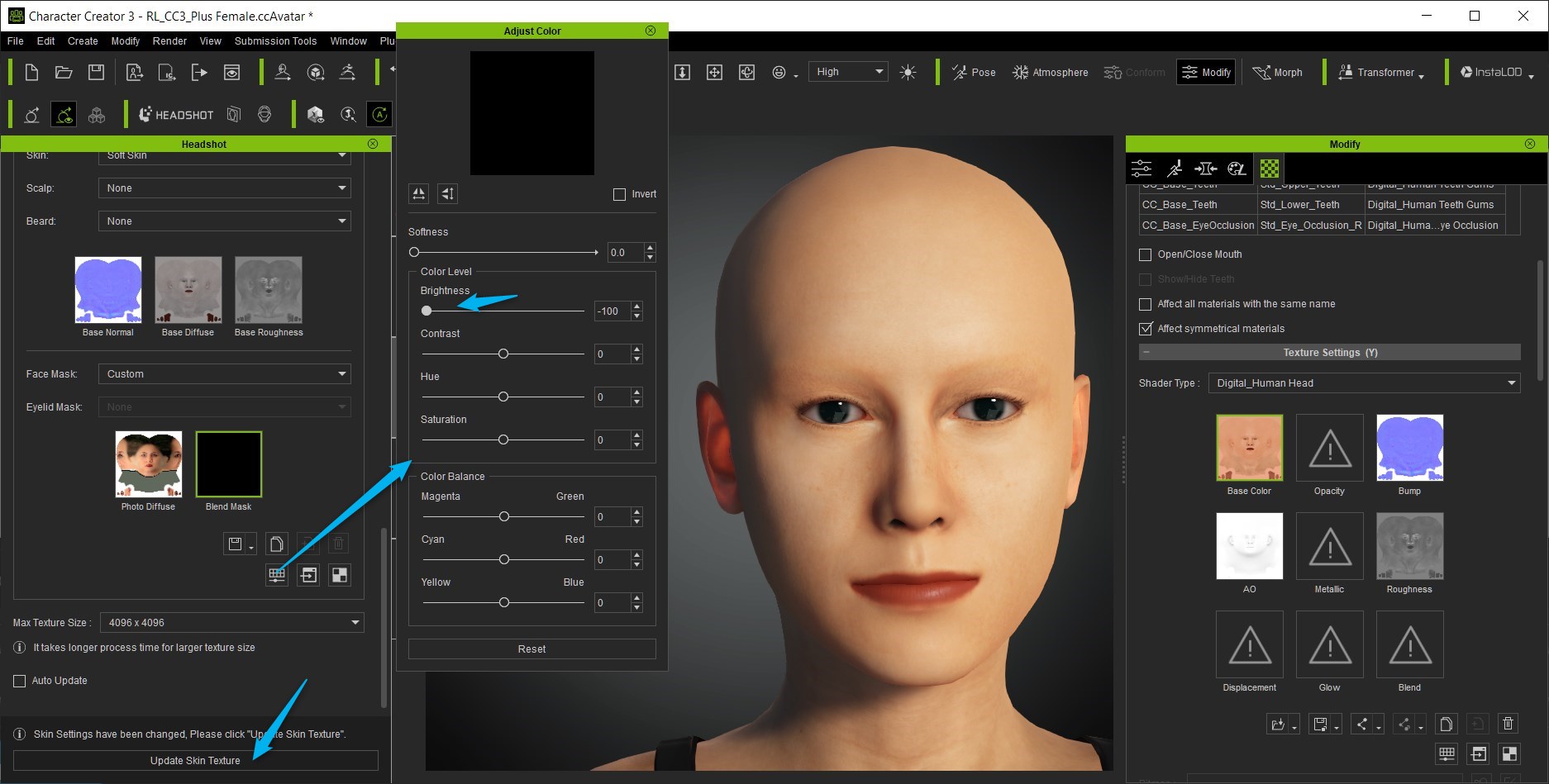
You can just apply a solid black mask to the material in Headshot.
|
|
By animagic - 5 Years Ago
|
|
Thanks, Rampa. That is even simpler.
|
|
By oonabe - 5 Years Ago
|
Thanks for the answer Rampa, I'll definitely try that out :)
|