|
By Mystic360VR - 6 Years Ago
|
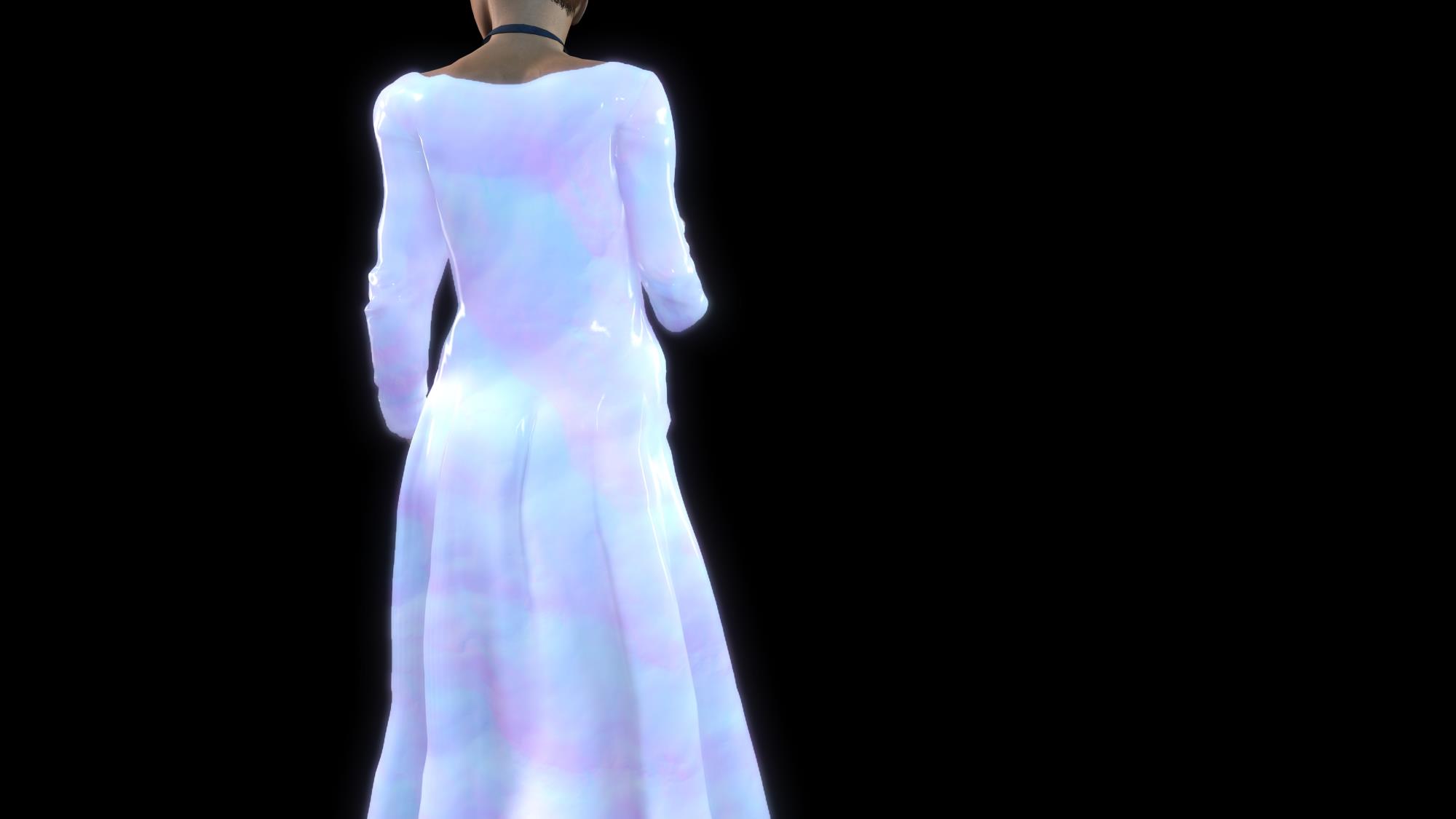
Can you help me shut off the poof that her dress causes whenever I apply a motion?
It looks like she's trying to smuggle a hula hoop under her dress
it happens on all the dresses.
Thanks
|
|
By 4u2ges - 6 Years Ago
|
That happens at the beginning of the clip to any object which has soft cloth physics applied.
You'd need to have an *idle* for about 60-100 frames at the beginning and then *cut* it out by checking "Discard Simulating Frames" and specifying number of idle frames at the Render tab.
|
|
By Mystic360VR - 6 Years Ago
|
|
Oh great ! I’ll try it after my nap ! Thank you so much
|
|
By Mystic360VR - 6 Years Ago
|
|
is there a auto breathing feature anywhere?
|
|
By Amper Sand - 6 Years Ago
|
|
ams707 (9/16/2020)
is there a auto breathing feature anywhere?
There's no "auto breathing" feature similar to "auto-blink" in iClone, you'll need animation.
One of the iClone's packs (don't remember which) "female idle" is breathing, but me I preferred to achieve this by morphing the abdomen and chest in CC then keyframing it in iClone - I preferred because morphs can be animated independently of motion animation, therefore you can achieve the "breathing" effect on any motion/pose, not only idling.
|
|
By Mystic360VR - 6 Years Ago
|
Ya I was afraid you'd say that ;)
Thanks
|
|
By Apollonius - 6 Years Ago
|
ampertox (9/16/2020)
ams707 (9/16/2020)
is there a auto breathing feature anywhere?There's no "auto breathing" feature similar to "auto-blink" in iClone, you'll need animation. One of the iClone's packs (don't remember which) "female idle" is breathing, but me I preferred to achieve this by morphing the abdomen and chest in CC then keyframing it in iClone - I preferred because morphs can be animated independently of motion animation, therefore you can achieve the "breathing" effect on any motion/pose, not only idling.
I have been screaming about this for years... it would be far superior to include breathing and its various parameters in the same way that blinking is currently handled. Because it isn't, we're forced to do it the hard way, with no tech support. If you have a problem, you're SOL.
Like I am, for instance. Since a simple directx error is keeping me from running 3DX on my computer, the demo period expired before I could solve the problem (I tried every single day), and customer support can neither give me more time to try and fix the demo, nor help me fix the demo in less than a month, I'm missing out on a lot of functionality. I can get around not having 3DX in some cases using CC3, but...
How can I use the morph sliders I've already made in CC3 to animate in iclone without 3DX?
Is there a way to move these sliders over manually?
If I succeed in that, can I still animate them in iclone without 3DX using the morph animator?
I have tried keyframing, but I need to animate in any pose.
I have spent hundreds on reallusion software, only to have problems like this simply because they have no tech support on some of the most tech-heavy software available.
ANY help would be greatly appreciated.
|
|
By 4u2ges - 6 Years Ago
|
|
Is there a way to move these sliders over manually?
If I succeed in that, can I still animate them in iclone without 3DX using the morph animator?
It is actually very easy. There is tutorial around from RL
But there is only a few steps:
From iClone send the character to Morph Creator and CC
In CC apply morphs and export as iAvatar.
In Morph Creator import iAvatar as a morph.
Delete some morphs which might not be appropriately applied to some closing/hair/shoes
Send character back to iClone from Morphs Creator.
Done!
Note: You can transfer almost any morph or combination of them, except where the slider is transforming bones.
Then the morph import into Morphs Creator might fail.
|
|
By Apollonius - 6 Years Ago
|
Yes, it is really easy if you have 3DX running on your computer, which I don't.
Thank you for your response, but you can't use morph creator without 3DX.
...Which is why I asked how to animate morphs without 3DX. :(
|
|
By Apollonius - 6 Years Ago
|
Please delete this double post.
|
|
By 4u2ges - 6 Years Ago
|
|
Thank you for your response, but you can't use morph creator without 3DX.
Really? Gee, I did not know that. I was away taking it for granted.
If that is the case, then it is big flaw. Users should be able to use Morphs Creator without 3DX by the mean of iAvatars alone. :ermm:
|
|
By Apollonius - 6 Years Ago
|
4u2ges (10/8/2020)
Thank you for your response, but you can't use morph creator without 3DX.
Really? Gee, I did not know that. I was away taking it for granted.
If that is the case, then it is big flaw. Users should be able to use Morphs Creator without 3DX by the mean of iAvatars alone. :ermm:
It is really easy to not be aware of what 3DX is doing once it's already installed - especially if you install both iclone and 3DX at the same time (which many people do), so don't worry about it. :)
And I agree, it is a big flaw.
I really hope there is a way to move CC3 morphs into iclone's morph animator without having to use 3DX!
|