|
By evidanse - 6 Years Ago
|
hello
I try to create my own terrain with earth sculptor.
I have a problem : if i use iclone's terrain and modify then with warlord's wery good tutorial indeed) method it works but you can not scale the terrain to x and y axes...
I need and 1024x1024 terrain...
So I created terrains with earth sculptor, import them via 3dx change. I convert then as terrain but in the modify panel, there is no texture panel, and no height map and mask...
Is the a way to make this panels appears or to modify iclone's terrains size ?
Thx
Michel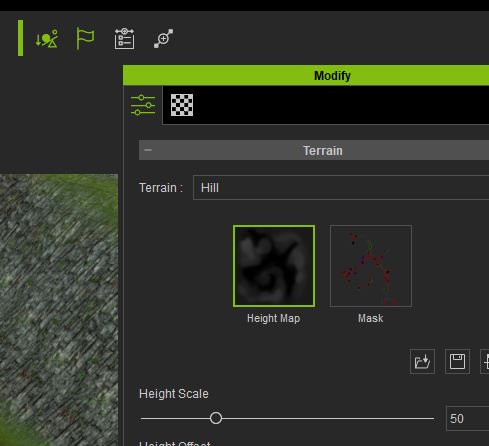 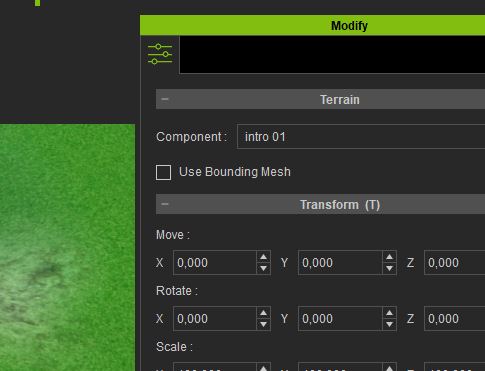
|
|
By animagic - 6 Years Ago
|
I'm a bit rusty on this, but the following should work.
To modify a terrain like you created and edit the textures, right-click the terrain and select "Convert to Prop" (something like that).
You can now edit the textures. Once done you can convert back to terrain.
|
|
By evidanse - 6 Years Ago
|
hi
I tried to convert iclone's terrain to prop but they are locked...
There is not the convert option with the right click...
|
|
By thebiz.movies - 6 Years Ago
|
|
Yea I don't think you can convert those large terrains with height/texture maps to props.
|
|
By evidanse - 6 Years Ago
|
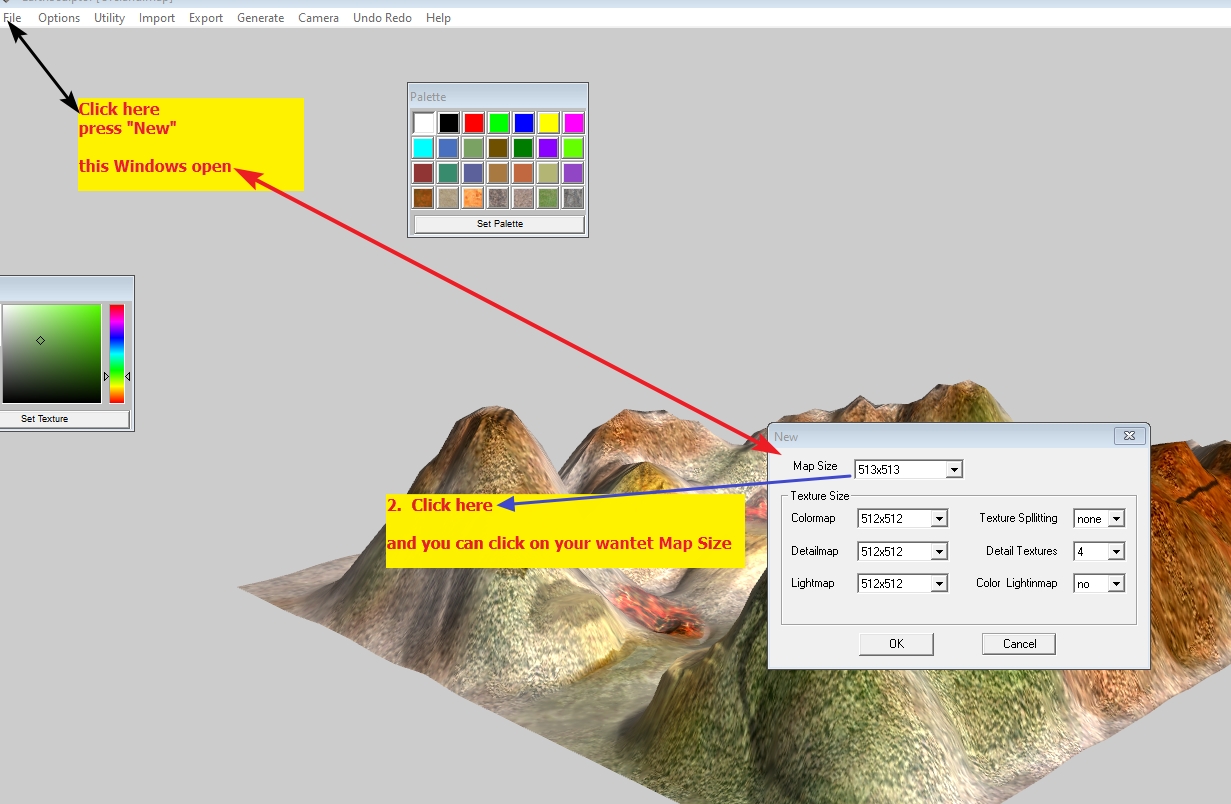
So is there a way to create any large terrain with height map and mask ?
|
|
By Postfrosch - 6 Years Ago
|
|
So is there a way to create any large terrain with height map and mask ?
look this picture
Greets Postfrosch
|
|
By evidanse - 6 Years Ago
|
Hello
use well earth creator.
But the created terrain does not keep the mask and height map to be modify in iclone like the native icone terrains and use iclone textures...
|
|
By Postfrosch - 6 Years Ago
|
It's Earth Sculptor
Click "Export"
Click "Highmap Image"
Click"Export" " Terrain Texture"
Load this Textures in IClone
Greets Postfrosch
|
|
By evidanse - 6 Years Ago
|
Yes I know but the material panel does not appears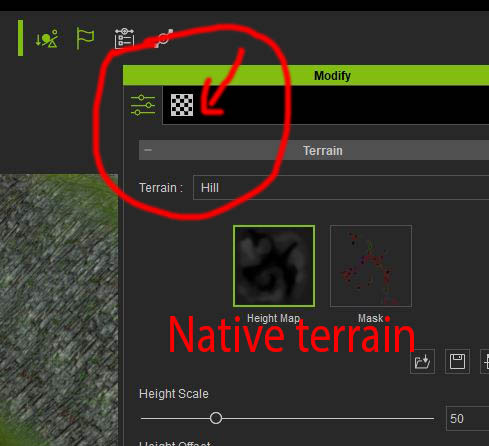 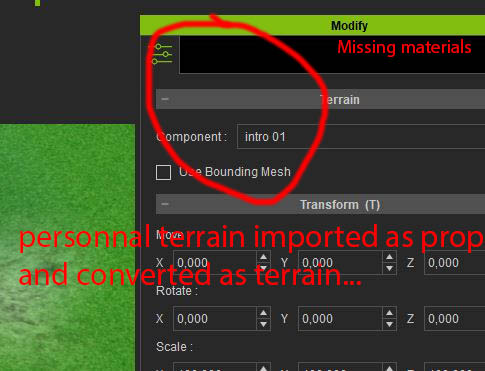
|
|
By thebiz.movies - 6 Years Ago
|
|
I think postfrosch is saying you generate the images in Earth Sculptor and then replace the images on your default large terrain that allows those images..
|
|
By evidanse - 6 Years Ago
|
Yes I did that but the textures are not as good as reallusion materials, especially in close view.
it's a pity we can not resize iclone's native terrains. That should be the best way to create real custom terrains.
Or reallusion should improve the prop to terrain conversion to have all the maps an matérials like the native terrains.
I also tried to texture the terrain using the RL_PBR_mixer but the result is not good due to the seams between matérials..
The only good way I found is to scale my characters and props to simulate a large terrain.
Anyway..I continue searching a good way to make terrains with nice textures and I thank you for your help.
If you find THE SOLUTION please think to me ! ;=)
|
|
By Pollux - 6 Years Ago
|
Hi guys,
I have always had problems with creating nice grounds for Iclone. I'm getting there but it takes a lot of your time and patience
I would love a plugin that could simplify the creation of terrains with roads, and platforms for houses
Heightmaps are good but still limited.
One of these days maybe.
|
|
By Rampa - 6 Years Ago
|
There are two types of terrain in iClone. Heighmap, like a game uses, or props, like an imported OBJ. Of the two, the heightmap can give better detail because there are 4 layers for tilable textures, and a map that blends them together. See these manual pages to better understand how heightmap terrain works.
https://manual.reallusion.com/iClone_7/ENU/Content/iClone_7/Pro_7.4/11_Set/Terrain/Replacing_Texture_to_Change_Landscape.htm
https://manual.reallusion.com/iClone_7/ENU/Content/iClone_7/Pro_7.4/11_Set/Terrain/Creating_Custom_Height_Map_Mask.htm
https://manual.reallusion.com/iClone_7/ENU/Content/iClone_7/Pro_7.4/11_Set/Terrain/Tiling_Vertical_Surfaces.htm
If you import an OBJ, which it looks like you did, you would need a crazy-high resolution image to cover the entire terrain with unique texture. Study Warlords tutorial more carefully as well. He is using the heightmap terrain.
|
|
By evidanse - 6 Years Ago
|
Hello
I don't import the terrain in obj file but in .vns file from earth sculptor.
the problem is not changing the terrain's texture (I know well how to do that) but to scale X and Y to increase the size and not the height. But we can not do it with iclone height map large terrain..
Thx for your help.
ps : sorry for my not perfect english
|
|
By mtakerkart - 6 Years Ago
|
@evidanse
No you can't scale the "HeightMap_Large" terrain. It's a fix size. By default it's a 256 meters square. But you can fake if you scale down all your
characters/props 25% of the original size and you get a 1km square terrain. Yes lot of job depending the complexity of your scene.
|
|
By Rampa - 6 Years Ago
|
The VNS file is equivalent to importing an OBJ as a prop. The heightmap works differently, in that you import a grayscale image to generate the height. In the case of the heightmap, you would only be exporting textures from ES, not a mesh.
You may also find it useful to duplicate your prop terrain, and rotate it and place it in different locations to make a larger landmass.
|
|
By evidanse - 6 Years Ago
|
Yes it could work but it would be fine if reallusion could unlock their height map terrains to be scaled X, Y
Anyway, to simulate a very large terrain I scale down my props and character for the large view of my movie.
Thx for your kindness
Michel
|