|
By greggoryaddison - 6 Years Ago
|
|
I have a pretty nice rig and iclone and the rest of reallusions product put so much strain on my hard ware! How can I improve performance on my end and also could you guys spend some time making the program run better and not just loading it with features!!
|
|
By wires - 6 Years Ago
|
|
It would help if you posted your PC specs, without those there is no way that any useful help can be provided.
|
|
By animagic - 6 Years Ago
|
|
If features are not added we get complaints too...:unsure:
|
|
By planetstardragon - 6 Years Ago
|
yeah but bloated and sluggish aren't exactly strong selling points. I agree with op - I actually got an out of gpu memory on iclone yesterday ..with only ic7 running. on an overclocked 1070 trying to do a still render. That's just absurd.
|
|
By thebiz.movies - 6 Years Ago
|
|
I recently upgraded my video card to an rtx 2070 (from 4gb to 8 gb upgrade) and it really made a world of difference for me. Just saying.
|
|
By planetstardragon - 6 Years Ago
|
My Msi GTX 1070 - is 8 gig ram and overclocks to 1900 mhz on msi software without breaking a sweat.
I was rendering 1 character when I got the out of memory error, that's not acceptable.
|
|
By StyleMarshal - 6 Years Ago
|
Overclocking doesn't matter here , GPU Ram is important.
How many triangles are in your scene ?
Sometimes I transformed a DAZ to CC3 Character with hair and cloth and get about 2.000.000 tris. Way too much for a realtime engine. (It is the hair or cloth)
4K textures need a lot of GPU Ram , too.
Also , do you have any other software open in the background that need GPU Ram ?
|
|
By planetstardragon - 6 Years Ago
|
it was a cc3 Plus character with some basic cloths I made in MD - no other softwares were running, no props, no particles, no images, just 1 cc3 plus character.
Iclone and CC3 are not handling memory efficiently. Even poser 11 runs fantastic for me, and poser use to be one of the most sluggish unstable CG softwares of all of them.
again 8 gigs ram gpu with a base of 1632, and I've overclocked it to around 2300 mhz with no problems.
sorry .... all counter claims denied, the program is running poorly and needs to be optimized.
|
|
By 4u2ges - 6 Years Ago
|
I agree with OP 100%.
Folks, you do not have to use 4K texture to get into complete mess with rendering.
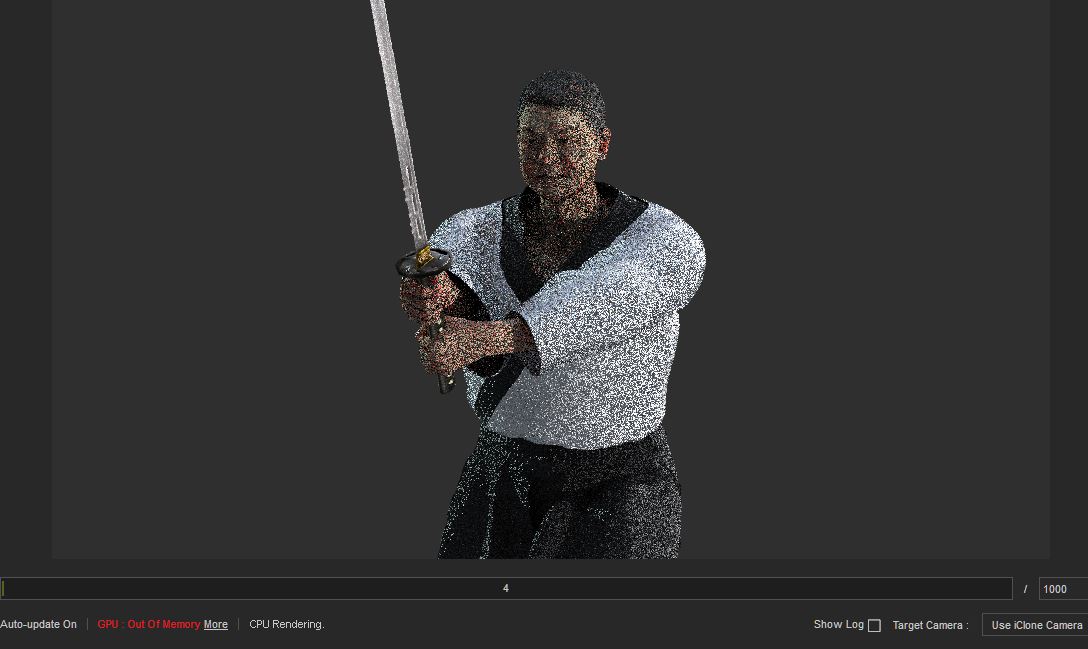
I have a 11Gb GPU RAM and my Iray engine is running out of memory and defaults to CPU once in a while now. That is in CC with a single character.
This never happened before!
Give yourself a favor. Export a default CC lady character to OBJ with current pose and texture.
And then look at the size of the texture folder. A whooping 270Mb! What?? :crazy:
This is all due to the fact that texture is not optimized for size. The balance is tilted heavily toward *quality* (where the texture size in not justified by any means).
Look here:
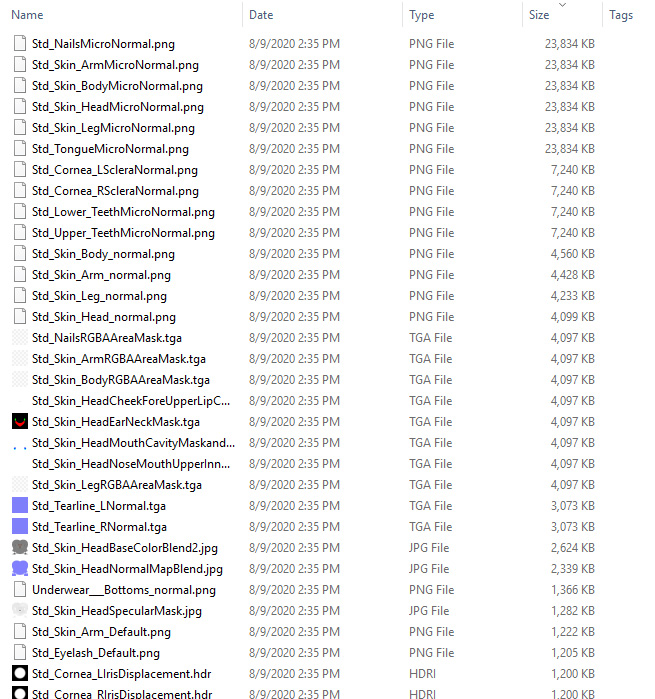
50% of the texture folder size make 6 64bit PNG micronormal maps. Why in the world we need 64 bit PNG here?
|
|
By planetstardragon - 6 Years Ago
|
and here's a screen cap as proof - note the red message at the bottom.
|
|
By StyleMarshal - 6 Years Ago
|
|
ohh , you are talking about Iray. Haven't used it yet.
|
|
By 4u2ges - 6 Years Ago
|
planetstardragon (8/9/2020)
and here's a screen cap as proof - note the red message at the bottom.
Exactly right!
And I have this FT ticket opened for almost a year now. And it's being disregarded. https://www.reallusion.com/FeedBackTracker/Issue/Please-optimise-digital-shaders-texture-and-embed-it-by-default
Embedding might be argued but the texture optimization is a must...
|
|
By planetstardragon - 6 Years Ago
|
|
Bassline303 (8/9/2020)
ohh , you are talking about Iray. Haven't used it yet.
yes, and if you haven't installed iray yet, don't, it affects the performance of iclone and cc3 which was already showing serious degradation in performance from everything @4u2ges pointed out.
|
|
By 4u2ges - 6 Years Ago
|
Bassline303, it is not only about Iray.
Here is a simple test.
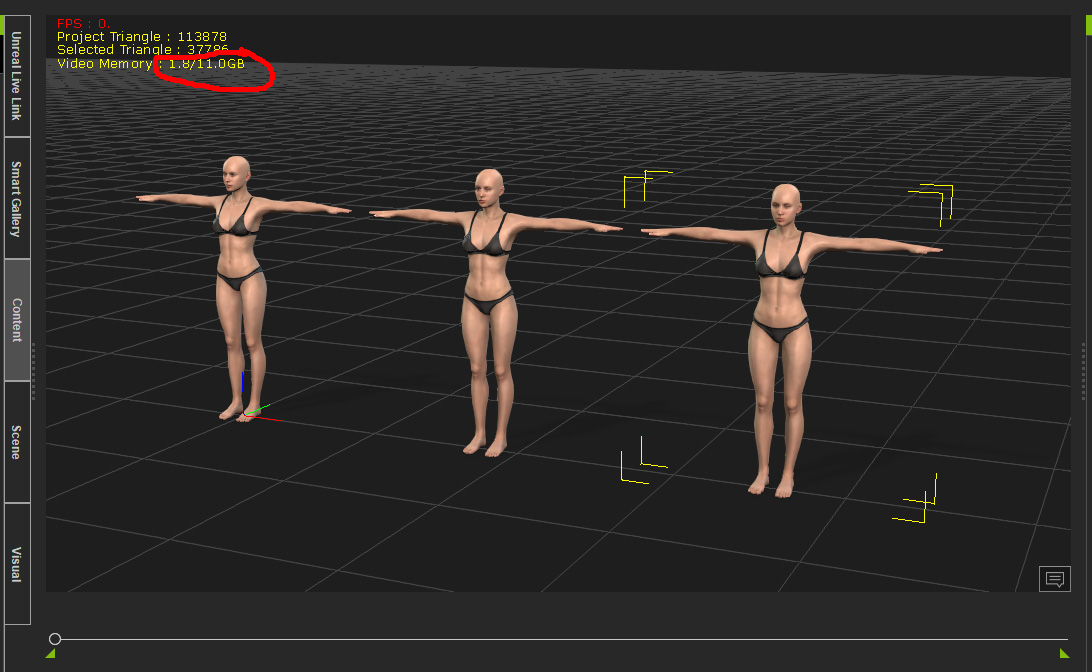
3 moderately clothed PBR characters take 1.7 GB of my GPU RAM
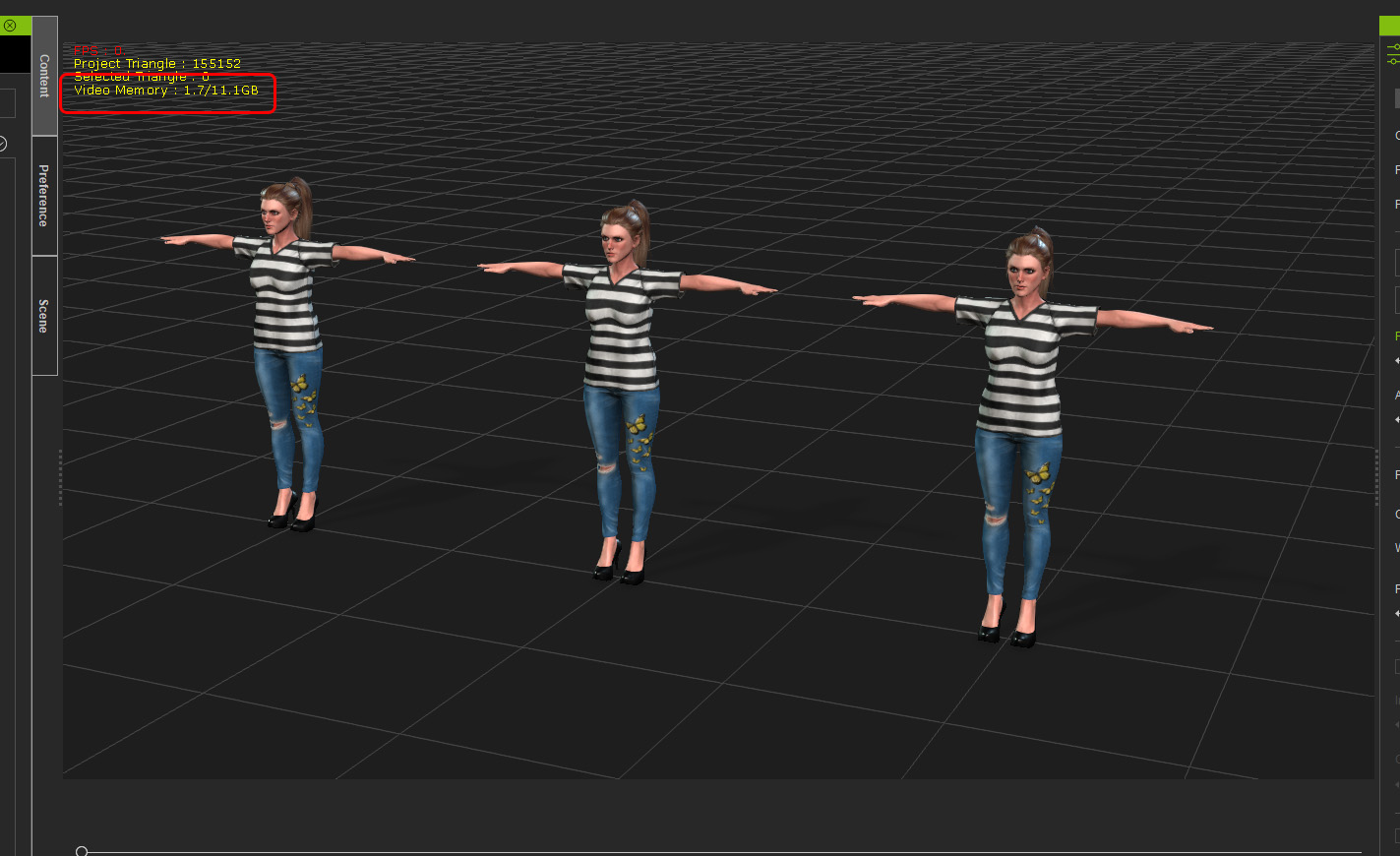
And now 3 almost naked CC3+ characters take 3.3 GB
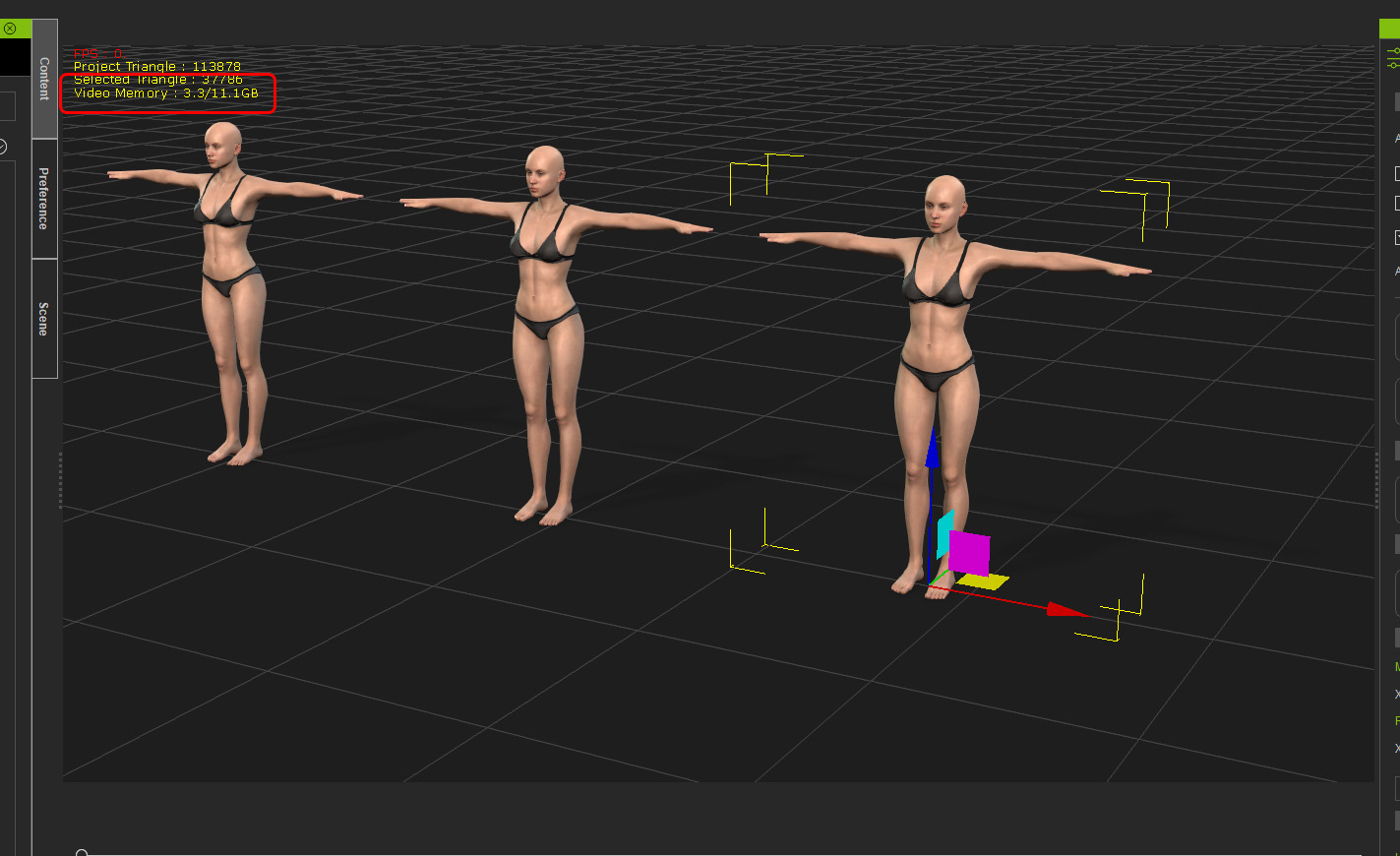
Both projects opened fresh.
I understand DH shader and all. But not tiwce as much...
|
|
By animagic - 6 Years Ago
|
|
I don't have major problems, so I will stay out of the discussion. I do some optimization when exporting to iClone; so not 4k textures for everything.
|
|
By planetstardragon - 6 Years Ago
|
@animagic, whats your optimization work flow ? usually when I go from cc3 to iclone ..i just "Send to iclone" I really don't need all the 4k layers for renders i like ...my biggest issue with many recent updates is all the time I'm spending undoing stuff I don't need ....I spend especially a ton of time removing all this new shiny 4k stuff - quality art is still subjective and not a standard. we need a basic starting point that isn't so resource hungry.
some people need that extra detail, i don't and only use sparingly when necessary, not by default.
|
|
By StyleMarshal - 6 Years Ago
|
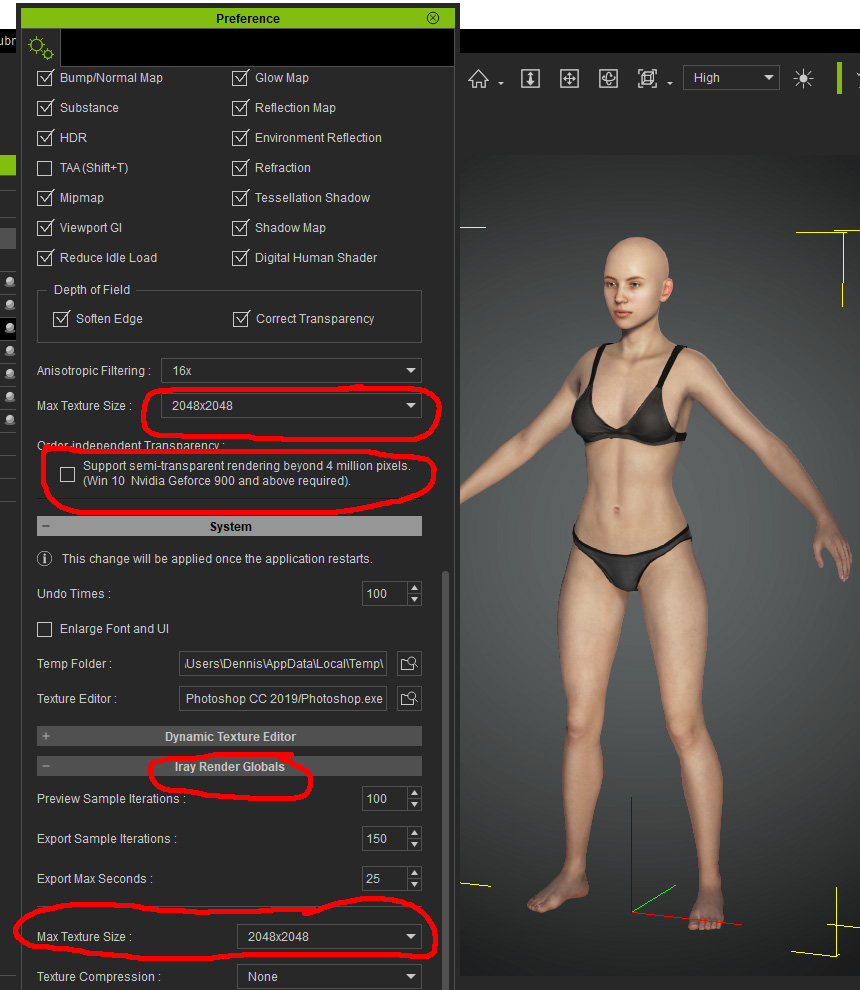
If you decrease the texture sizes in CC3.3 , you can save GPU Ram, also for Iray.
|
|
By planetstardragon - 6 Years Ago
|
@Bassline303 valid point, I'll mess around with those settings and see if i can find any imrpovement - thanks.
sucks that it's global tho, as I said, sometimes it's useful on one item. I've learned that the less you use something the more prominent and valuable it becomes ...so an option to keep everything lower rez values while keeping 1 item high res value is preferred for artistic purpose.
|
|
By StyleMarshal - 6 Years Ago
|
|
Also try Texture compression for Iray , I didn't activate it.
|
|
By planetstardragon - 6 Years Ago
|
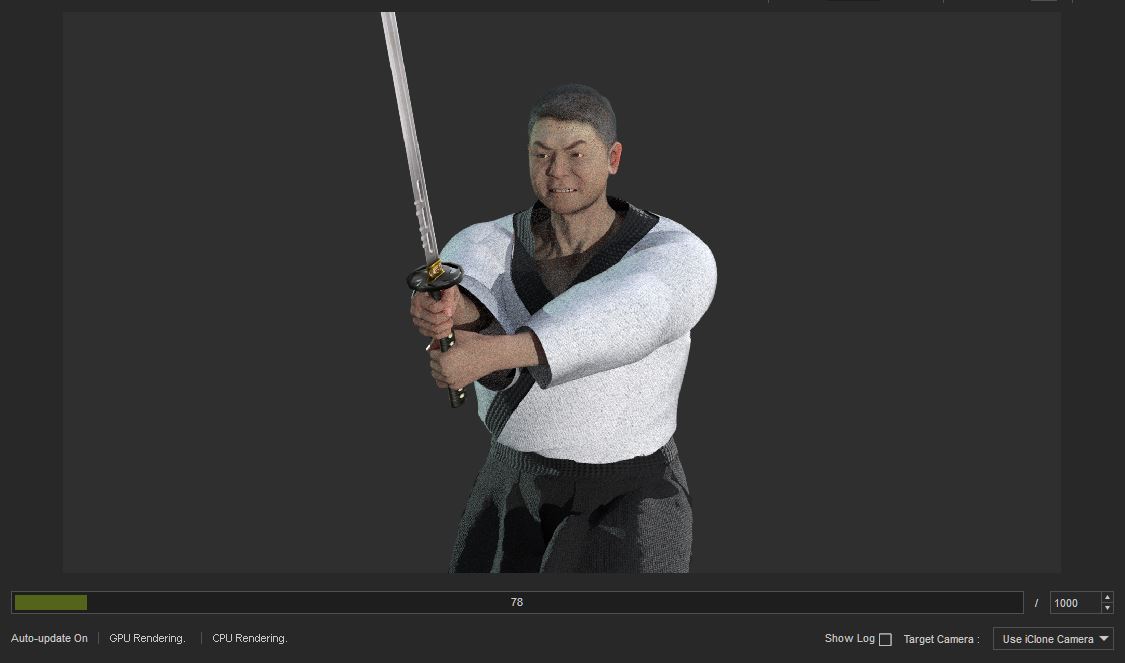
Tried new all time lowest settings as apparently I had already tweaked the panel once a while back - still out of memory,
Now I'm testing a theory, - simply restarting the program and trying a render again. If it doesn't give me the out of memory error, then it reinforces my original claim, the programs themselves need to be optimized for handling memory better in addition to not overtaking our ram with unreasonably high default settings that won't be seen on an mp4 streaming from youtube on a smartphone.
Simply starting iclone now takes unreasonably long, iclone and cc3 desperately need to be optimized to handle memory better.
and just as I expected, rebooting the program got rid of the low memory error, it should have given me the same error consistently if it was my computer. Iclone and cc3 need to be optimized, and 2 other people with quality pcs are experiencing the same thing.
|
|
By 4u2ges - 6 Years Ago
|
I am not sure how you got that low VRAM utilization (UNLESS you duplicated them, which is a totally different story),
but after switching to 2K limit and transparency settings in both CC and iClone, transferring her 3 times to iClone, saving that project and reopening I still got this:
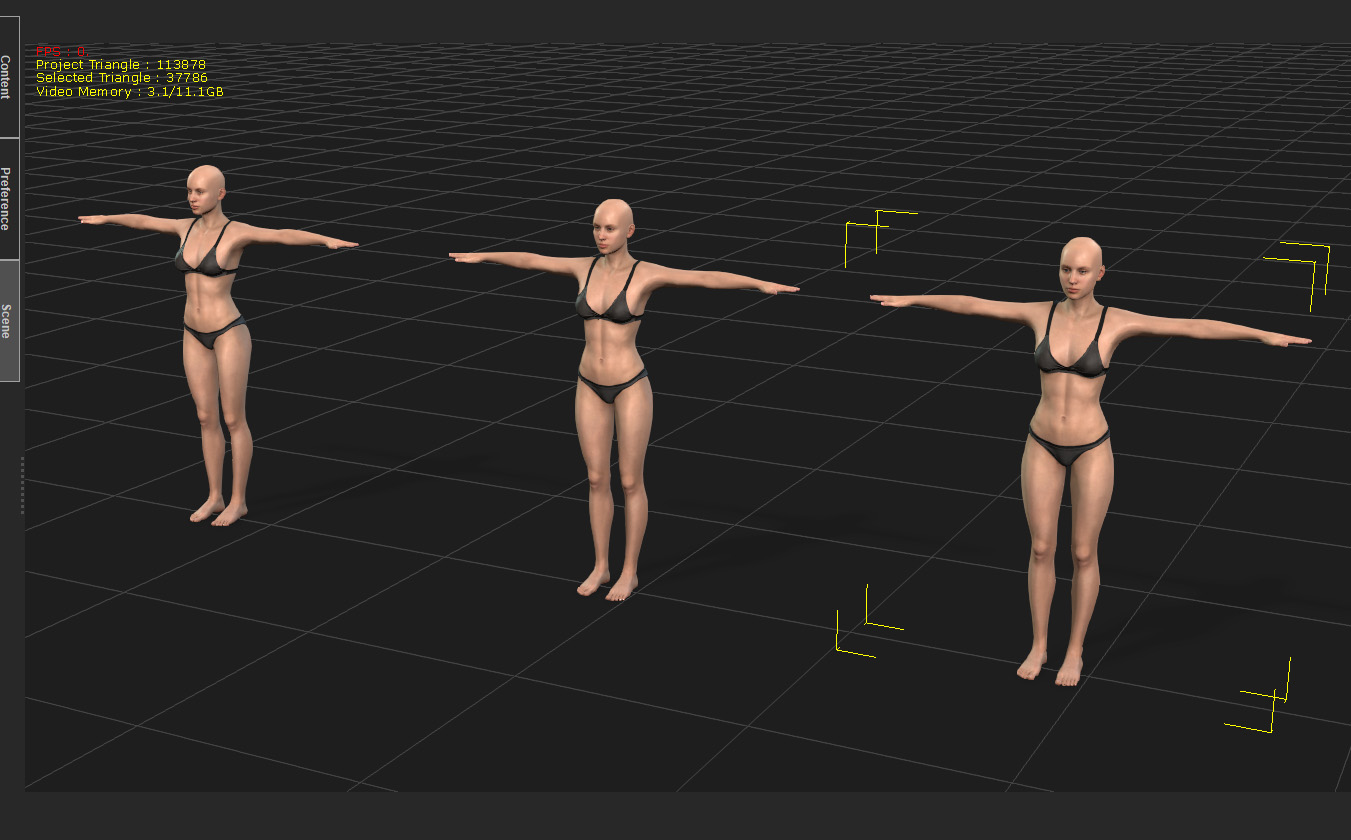
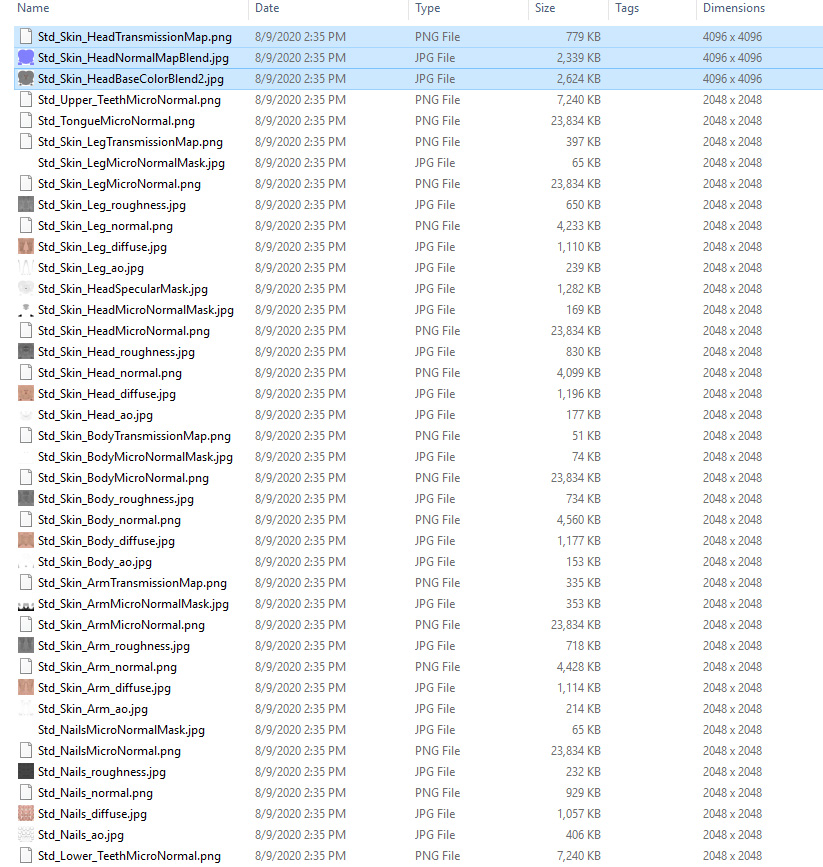
But how can that be otherwise? That character has 2K texture by default. There are only three 4K textures (out of 148) applied to her:
sorted by dimension
|
|
By planetstardragon - 6 Years Ago
|
I should also mention that the difference between my out of memory render vs the reboot is that in the first session, I was using skin tools to create my character ie trying different skin tools and settings / deleting them until i found the right one. ....the saved version also had the same final choice skin tools .....but was a fresh load ...also pointing directly at poor memory management being they should have been the same exact environments.
|
|
By StyleMarshal - 6 Years Ago
|
4u2ges (8/9/2020)
I am not sure how you got that low VRAM utilization (UNLESS you duplicated them, which is a totally different story), but after switching to 2K limit and transparency settings in both CC and iClone, transferring her 3 times to iClone, saving that project and reopening I still got this: But how can that be otherwise? That character has 2K texture by default. There are only three 4K textures (out of 148) applied to her: sorted by dimension
Yes , I have duplicated them , you are right , different story. Tongue & Nails.png - 24mb thats huge.
|
|
By animagic - 6 Years Ago
|
I use 2k for the face, 1k for the rest, which has helped me. In one scene, I used 10G out of 11 of VRAM, so I needed to so something.
WARNING: The following is mere speculation on my part. I'm not privy to RL's design.
I think that if we could bake (meaning we don't need all the adjustments in iClone anymore) we would end up with the usual texture set. At one point everything has to be flattened like that anyway in order to render.
The textures you see are used to generate the final texture set, unless I'm wrong and they are part of the DHS shader. Still, they are shared so their contribution shouldn't multiply proportionally.
I appreciate that people are struggling and their experiences will hopefully encourage RL to further optimize. On the other hand, I do like the new features and the visual improvements I achieve for my characters.
|
|
By planetstardragon - 6 Years Ago
|
I agree @animagic with the baking, that can at least help offset these super high settings
but aside from this, it's obvious from first going out of memory from my working file.....to a more stable render by simply restarting the program, that any edits I made in first project, then remove during the creation process, stays in ram - else reloading the program should have had same out of memory error. they need to flush their memory better when things are removed - it's like that memory leak thing I've been trying to say for years... but now the bloat has gotten to the point that it's hindering creativity.
I appreciate the stuff Iclone and CC3 do very much, else I wouldn't care about performance. You don't see me complaining about autodesk lol!! Someone at RL is taking shortcuts and overlooking serious issues that is trashing iclone and cc3 performance. it has to be addressed. Too many great features to be lost to poor coding.
|
|
By 4u2ges - 6 Years Ago
|
Job, I totally understand what you are saying. I was always advocating here on the forum for user responsibility, when someone was trying to through unimaginable stuff into iClone (like models from cgtrader or other sources with millions or polygons or crazy texture) and demanding it to behave.
Yes, we should be responsible for brushing up our models and characters, while building a scene. And I am willing to help to those who does not know how.
But there are 2 sides of a coin. RL should be responsible for delivering a product, which is at least optimized to the level where ordinary user like myself would not find some outrages stuff to complain about.
And that is a case now.
I am always trying to be fair and backup my statements/complains. And if someone proves otherwise with hard evidence, I'd be glad to take my hat off, admit I was wrong and shut up.
Again, here are facts.
PBR character with 2K texture for critical body parts exported out of CC.
The overall texture size is 39 MB - 83 files
Same PBR character converted to CC3+ with medium 2K quality and exported out of CC
The overall texture size is 234 MB - 124 files
I am not a developer and I do not know the way it internally works and what else might be causing high VRAM utilization. But I see that huge difference, plus some obvious texture size *abuse* and I start asking questions.
I can optimise both PBR and CC3+ character, but in the end the difference in VRAM utilization would be at the same level (when compared).
BTW it is a great idea to have everything baked in iClone including DHS (if that is even possible) for characters which are customized and ready for render.
|
|
By planetstardragon - 6 Years Ago
|
I'm using the word optimization, specifically from my gaming experience especially from beta's ....in the beta's everything ran clunky - because everything was being loaded to ram and not optimized ...over time they add culling, optimize image files and tweak processes / codecs to speed up performance. iclone realtime basically follows the same concept, and your evidence fantastically makes that apparent. It's not just the code to clear the ram, but optimizing images, optimizing compression algorithms, and well thought out logistics .... like with headshot...how could they possibly mix and match a unique facial texture with a generic neck skin texture and expect it to have any resemblence to what the artist wanted from the unique image ? that's just bad logistics and forcing an issue .....it's many little things that is actually making iclone and cc3 less pro and more "one algorithm fits all" - that's a techie making artistic decisions. no sorry. -draws lines-
|
|
By 4u2ges - 6 Years Ago
|
I hear you... :)
|
|
By planetstardragon - 6 Years Ago
|
we willl help get this right, when I tell people I use iclone and cc3, i want them to fear me and look at us with respect and awe, not snicker! we have great tools here, they just need some guidance and love. <3
|
|
By greggoryaddison - 6 Years Ago
|
|
wires (8/9/2020)
It would help if you posted your PC specs, without those there is no way that any useful help can be provided.
Win 10
Nvidia 1080 8gb
32 gb ram
256 ssd with 1tb hybrid hdd
I’m working on minimal and still shit frames and load times
|
|
By Data Juggler - 6 Years Ago
|
I only have a 1080 TI with 11 gigs of memory, and upgrading in 2020 had been on my to do plan, but no income put a stop to that thinking.
I am working on a large scene and IClone performance is so slow it affects how much work I can get done.
I thought maybe it was the fact my poker table has a chip rack with hundreds of chip props, but even if I hide the poker table and do something as simple as rename a prop in Scene Manager, and IClone takes 15 seconds to recover.
I realize my project has 539,000 triangles, but Reallusion needs to take lessons from Microsoft Flight Simulator. They can draw entire cities on the fly and my poker room with 1 table and no cards or chairs, and I spend 55 minutes out of an hour waiting and 5 minutes working.
A 3080TI and super fast pc would help some, but I think some rethinking on when IClone needs to redraw is needed. The view port updates fast when I move around the scene, but then 15 seconds go by before I can touch it again.
It seems to be worse in the latest updates, but maybe I just use IClone more and notice it.
|
|
By Kelleytoons - 6 Years Ago
|
Sorry, folks, if I'm late to the dance.
I think the OP as well as Mr. G and others who complain/worry about performance in iClone are definitely right, but I also don't think it's anything new. I have always had a top (or near top) machine to work with iClone and yet I can remember struggling even two or three years ago to get more than a character or two in a scene. As a matter of fact, it's when iClone is the most vulnerable -- I've gotten sets themselves with millions of polys and textures that are no problem whatsoever inside of iClone, but the minute you get to three or more avatars you can bring even my 12GB Titan GPU to its knees.
I've taken to using dummy avatars as placeholders for scenes where there are more than two characters, delaying until the very end (after all animation has been laid down) putting the real ones in, and this has been workable to me (although it often results in scenes that then can't be saved/reloaded -- if anyone here has seen my "Cowboys" video, where I have around 8 avatars in the scene at any one time, the minute I would do all replacements I needed to render because the *slightest* thing -- even moving a low-poly rock -- would crash the system). I had hoped there would be ways to export lo-poly standins (that was one of the features touted by iClone) but even these aren't very workable (so there must be something about the avatar itself that just has too much baggage with it).
I'm guessing most of the RL devs use, for testing at least, only one or two avatars. Perhaps if they worked routinely with four or five in a scene they would understand the issues. I can't even send them one of my scenes for testing because it won't save (it just crashes).
For others -- if you want to work with iClone for now I would highly recommend sticking to two avatars at the most in any scene OR use the dummy ones for standins until the very last moment. This is as close to a workaround as I have come up with, although if others have one I'd love to hear about it (the real workaround that RL could implement would be multi-res avatars -- you load in the lo-poly/lo-res one to work with but it will then auto-substitute the higher res one at render time. This is, indeed, what software like Max does, it allows you to have stand-in objects that are placeholders but otherwise work and look pretty much like your higher res ones that swap in for renders -- I'm too sleepy right now to remember the term but you get the idea).
|
|
By Peter (RL) - 6 Years Ago
|
Thank you all for the feedback and for sharing your sometimes frustrating experiences.
This feedback has been passed to the 3D team for review and consideration.
|
|
By Kelleytoons - 6 Years Ago
|
That would be great, Peter.
In 3D Max there is a replace modifier that allows replacement of the object at render time. Even a VERY low res avatar that could replace with a much higher one would make working in iClone a ton better (so just have it linked in the modify tab to this higher model).
|
|
By planetstardragon - 6 Years Ago
|
Thank you Peter!! Your attention to this is sincerely appreciated, RL products are really great and innovative, and while I can't speak for everyone, I know I'd be happy to pay for an upgrade that focuses on stability and efficiency, we are aware that the time to fix these things is not free..but all the same quality and stability are important and the foundation of all your new innovations. I can appreciate trying to keep up the momentum with new items...but the new stuff gets devalued when the software itself runs sluggish and unstable. We shouldn't be scared to use them because everything takes forever and then crashes.
iclone and cc3 are great products, and worth complaining about - ironically enough! :w00t:
Cheers!
|
|
By justaviking - 6 Years Ago
|
I have long claimed there is a lot of room for "optimization" in iClone, especially for the native renderer (and for the realtime editing environment too).
I do not have access to the source code, so I admit my claim is speculation, but is also supported observation, reading between the lines, and by years of experience on the development side of numerous software applications. Over time you gradually collect more and more inefficient routines that run but have room for improvement, so memory usage and minor slowdowns add up and become serious issues. You also get "spaghetti code" that is convoluted and difficult to maintain. The simple term is "technical debt."
Cleaning up technical debt is not as sexy as promoting new features, but eventually it is such a drain on the system for both the users and the developers that you really need to address it before your customers abandon you for greener pastures.
Some of the examples given in this thread are excellent:
- One or two avatars work great, but four or five or more kill your system. In 2014 a 2-character scene might have been reasonable, but customers expect more now.
- Previous CC3 characters are okay, but the new CC3+ characters have a massive impact on memory usage. Some increase is understandable, but what was described in this thread sounds excessive, especially for a "real time" application like iClone.
|
|
By Data Juggler - 6 Years Ago
|
I just want to post an update that I found out why my scene was so slow when I complained the other day.
I created this prop called Wall with Lights because I liked the look of it.
After going crazy with 15 seconds in between every time I touched IClone, I saved my project and as a test I started deleting the floor lights:

I first tried deleting the spot light or point light associated with the floor lights and the wall lights at the top. That still took forever, and I noticed each set of floor lights was 3,300 triangles and each Wall light was 2,700, so it was 6,000 per wall segment with 17 segments created the 100,000 triangles.
The triangles aren't the problem, it is something weird with these lights, so I started deleting floor lights and wall lights.
Each time I deleted a few sets of floor lights, IClone started speeding up.
By the time the wall and floor lights were gone, the 15 seconds is down to .1 seconds. I can now move around IClone without any lag with just the 17 interior walls, 3 exterior walls, a floor, roof and two planes that are glass walls.

The scene looks boring now, so I have to create my own lights or something, but I wanted to report my criticism for IClone being unusable was due to those two particular props, the light tools cause IClone to slow down too much. I have used other big scenes and not had a problem like this.
At least now I am 12 x more productive, so my advice to the original poster is you might take a look at your scene and try deleting stuff till you find the culprit(s).
|
|
By argus1000 - 6 Years Ago
|
|
justaviking (8/10/2020)
Cleaning up technical debt is not as sexy as promoting new features, but eventually it is such a drain on the system for both the users and the developers that you really need to address it before your customers abandon you for greener pastures.
I agree with Justaviking. The more new plugins I buy, the slower my system gets. After Headshot and SkinGen updates, operations in iClone take considerably longer. Even loading a scene often takes minutes. I have no problems personally with four or five characters (after all I have a nVidia Titan RTX with 24 GB of VRAM), but every operation in iClone takes more time than it should. For example, in Character creator, if I want to upgrade my character to CC3+, I have to wait minutes.
I’m happy to own iClone and Character creator. It has priceless features. It’s just getting a bit slow.
|
|
By james_muia - 6 Years Ago
|
I agree that IClone's performance needs to be better. A lot better! It's one of the major setbacks that this software has for making films. There's a reason why a lot of the films that are made with IClone have such a small scale. When you start adding numerous characters, and getting creative with your sets (even decimated, low poly characters are 0.4 gigs of memory each!) the program bogs down to a crawl. Add 8 characters, and you've already maxed out your graphics card. 4K Character? Forget it, 2.8-3.4gb of memory each.
Sure with enough headaches, and breaking scenes in parts; you can scoot around any scene you want to make. However, that comes at a price, making sacrifices to certain things along the way.
There's a lot of us that want to make films in IClone alone - not in Unreal/Unity/Blender, but in IClone. It has all the functionality we need (and you guys do a great job at adding more features) but get that performance better, and you're going to start seeing some really creative films being made; which ultimately helps promote the software even more.
|
|
By 3DChick - 6 Years Ago
|
I agree with this whole thing, particularly what James said. I want to make films--in iClone--not games or still images. And I want to do it in iClone, even though I could do it in Unreal, that's not the software I like. I like iClone.
I bought the full early bird upgrade package, but I held off on installing it--any of it--and these problems/issues are why. I won't install them until I can either afford a bigger hard drive, get a better computer overall, or ideally, the file size and performance issues are fixed. I can't--my system won't handle the kind of problems being described here. And, sadly, my budget isn't going to allow for a better system for some time.
I spend a great deal of time now attaching props and things to characters, sending to them to CC3 reducing their polys and merging their textures, etc.. I'm thrilled I can (much, much harder to do something like that in Daz, although I have the plugins to at least lower the map sizes). And I have managed to get 8 characters in one scene, using LOD functions (thank you for those! They are a godsend) for the background ones. But I, too, have had scenes with only two characters and one tiny prop (using only an HDRI for background, zero other anything), become so large and unwieldy the support team had to fix it for me. If that can happen with no props and no effects and only 30 seconds of dialogue, and they were CC3, not CC3 Plus.
It makes me sad not to play with these new features--they look so cool--but I don't dare, so hopefully the Reallusion team will find some solutions.
Pretty, pretty please?
--Nicole
|
|
By AutoDidact - 6 Years Ago
|
|
From what I am reading and seeing with the New CC3+ figures, it seems obvious to me that sadly Reallusion is falling victim to "Daz Genesis Syndrome" By this I mean Character resource bloat from stuffing so many layers of Data into each individual Avatar ,in the pursuit of up close still portrait microrealism, that such avatars become only viable for ..well...up close ,still portraits and not much else. This is the current state of the the Daz Genesis figures and content over in Daz studio. I have read numerous horror stories of situations such as ONE bikini Consuming 4GB of Video RAM in Daz studio. Kellytoons talks about "a couple of Iclone Avatars" choking his 12GB titan. LOL!! I know of a detailed SUV vehicle prop for Daz studio with a detailed undercarriage and ridiculous 4K TEXTURES on every brake pad,lug nut,Axle & Differential section ,that will Stop your 12 GB titan dead in its tracks before you even get to load a single figure And as Iclone native Avatars begin to finally approach the hyper detailed realism of Daz content you see more& more performance issues. I get it... really.... no one wants to go back to the bad old days of IClone 5.5 with "creepy" Chuck& Gwen. And the new CC3+ Avatars with Skingen look great But there has to be a rational balance. Now if people want 4K hyperrealism in a real time render engine it is not impossible..just Have a look at the latest Microsoft Flight simulator. But you need to upgrade your Core Application architecture to accomodate such resource intensive content or employ render tricks such instancing etc. because telling users to just "buy a bigger graphics card" is not really a solution when the problem is systemic just as it is with Daz studio an their Bloatware content.
|
|
By Shoob - 6 Years Ago
|
|
I agree with all of this. My processor and 128GB ram and two GTX 1080 ti’s can’t make SkinGen to update the materials to 4K, I can’t do it one by one either, it crashes, if you hit flatten, it crashes, I only have 8 layers, when I merge them in 4K it crashes. I just don’t know how to fix this and I have a deadline. Can anyone help me?
|
|
By Lamias - 6 Years Ago
|
Guys I fully agree with everything said here. It happens to me as well. But sadly I don't know if RL will fix these performance issues.
I mean, both the implementation of iRay (which is used for stills) and the Unreal Live Link show that RL might have chosen another path: To appeal more to the game making audience. They keep adding features that are amazing, but sadly cannot be used inside iClone besides stills due to the performance issues. So they probably steer anyone who wants to create films towards Unreal, which has the horsepower and the tools to support these features. After all they have a deal with Unreal, don't they? They are partners.
That's the only explanation I can find. I mean, why else would they add features that make a SINGLE character consume 4 GB of VRAM? A simple conversation of 3 characters kills an Nvidia Titan. :unsure:
|
|
By Kelleytoons - 6 Years Ago
|
|
I think one feature RL could implement that would be fairly easy is a proxy system inside of CC3. When you press "Send Avatar to iClone" it doesn't send the full res version, but a very low-res standin that is only swapped at render time. You'd most likely have to generate this first via the various lower res and material options we have, but then you could save both the high res and low res versions on disk so that when you do press "Send" it sends only the lower with a link to the higher res. At render time it looks to see if there is a proxy link to a higher res and, if so, subs it in at that first render pass (where it also gathers up all the other info about the scene). At the very least this would make working with dozens of high res avatars in iClone a very easy and real possibility.
|
|
By animagic - 6 Years Ago
|
Except for the face sometimes, you don't need 4k textures for everything. I use 2k for the face and 1k for the rest and do the animation mostly in quick mode.
Kelley's idea of a proxy system would be great as this is the way this is often done in professional productions. It takes 10,000 or more computers to render a PIxar movie so obviously they need to do something during development. The answer is proxies.
And, I make movies, in iClone...:P
|
|
By ultimativity - 6 Years Ago
|
|
I am running a Ryzen 9 3900x on an x570 mobo. Previously had a GTX 1080 with only 8 gb Ram. Purchased a Radeon VII with 16 gb ram and saw immediate improvement. Simply waiting for September 1 now - nvidia with 20 - 24 gb vram.
|
|
By greggoryaddison - 6 Years Ago
|
|
A program should be optimized to scale to current and next gen cards. The software already expensive as hell now in order to get a good experience I need a graphic card that’s the same price as a whole new computer. Not acceptable! Happy for you though but my 1080 won’t get upgraded for at least a year maybe less but worst case a year.
|
|
By Lamias - 6 Years Ago
|
By the way, if I remember correctly (can't search it now), RL says in their online manual that a GTX 970 is recommended.
My only guess is that they have forgotten to update this, but people who buy the product for the first time are in for a big surprise.
|
|
By abcliu - 6 Years Ago
|
|
I had bought Iray render plugin last month and returned and got a refund after a few days usages, it is really slow to my computer that makes it useless to me.
|
|
By planetstardragon - 6 Years Ago
|
I'm trying to fix a weightmap for an item i made, it's literally taking me 5+ minutes "PER CLICK" - when I adjust the weight map, not exaggerating, I just timed it I've been monitoring my video card - CC3 is taking up less than 3gigs ( of my 8 gigs ) - and my gpu is barely under 3% processing clocking in at 1632 mhz, - but my internet is taking a beating because apparently the software is using my internet data channels to burst data to my video card resulting in a bottleneck in my system. I was expecting my vram to be maxed out from how poorly the software was performing,
Not trying to bash iclone or cc3, but I want this software to run better so I can spend more time being an artist and not some frustrated techie trying to figure out yet another work around.
Now Imagine trying to fix this at 5 minutes per click, and while we are here, the weight maps transfer needs to be fixed too and please stop trashing my internet connection, I'm not the first to bring that up either. My Video card is not the problem, cc3 is barely using it!

|
|
By Postfrosch - 6 Years Ago
|
CC 3.3 does NOT delete the Skingen Temp files from the Temp folder after exiting the program.
Large amounts of files are left behind and have to be removed by hand (or CC Cleaner). Operating system Win 10 (up to date)
Greets from Germany
Postfrosch
|
|
By Terry Miller - 6 Years Ago
|
Let me weigh in here as well. I have been a faithful iClone user for about 5 years now. The program boasts more features than ever.... and is more unstable than ever. A typical day of trying to animate with iClone results in repeated crashes and unexplained slow-downs. Today, I am working on a scene that has 180,000 tris and is 144 MBs (so far, only one character in it). Everything was lovely, until iClone suddenly decided to stop working. When I hit play now, it plays five frames and crashes. I am currently in the process of deleting each asset one-by-one to see why iClone has decided to bail on me. Since I have been writing this post, it has crashed three times.
Reallusion: Please, for Heaven's sake, before you release any more features, fix the program so that it will run the ones you have now! I have wasted the last three hours today trying to get this program to work the way a normal person would expect a program they had shelled out literally thousands of dollars on to work!
OK, rant over. We now return you to your regularly scheduled complaints.
Thanks,
Terry
Intel Xeon CPU E3-1505M-v6 @3.0 GHz
64 GB RAM
nVidia Quadro P5000, 16 GB vRAM
|
|
By animagic - 6 Years Ago
|
@Terry: I see you have a Quadro. Unfortunately that is not an optimum/recommended GPU for iClone.
System requirements are a bit hard to find, but are at the bottom of this page: https://www.reallusion.com/iclone/download.html. You want the recommended specifications or better.
I'm have a system with an Nvidia GTX 1080i and it works pretty well for me. I could use more VRAM, so I'm hoping for the RTX 3000 series.
|
|
By Terry Miller - 6 Years Ago
|
Yes, I know the Quadro isn't the best for iClone. Unfortunately, this is a work computer, so I have to use what they bought for me. That would not have been my choice, but they didn't ask me... ;-(
On my home computer, I run a 1070, and yes, it does give me pretty good performance. However, iClone still crashes far more often than it should. It just occurred to me that I was running the Smooth Camera Follow Pythin script today, and it made me wonder if that is what has been giving me problems...
|
|
By planetstardragon - 6 Years Ago
|
I did a little testing yesterday , after considering the impact that I was getting on my internet...I updated my Network Drivers - my performance actually improved ...the software is still sluggish, and painfully slow but it doesnt feel like its going to crash after every click anymore.
if your system uses the "Killer Network" software drivers, try updating to the latest release - the killer network software is known to be unstable - unfortunately they are a staple in some MSI motherboards. ( msi motherboards are amazing, but their software is really bad )
|
|
By planetstardragon - 6 Years Ago
|
after running a few benchmarks, and monitoring my system performance -
It seems the bottleneck is happening somewhere in the CPU path - Im using a I7 4770k - that auto overclocks and when Iclone / CC3 are running their processes is the one spec I constantly see running in the Red - even though I still see lots of headroom - the monitor still light's it up as red
The i7 has 4 cores but normally treats it as 8 - I only see iclone using 4 - so I imagine they are not using the virtual tech of the CPU to go all 8 cores - as 4 cores remained dormant during the process.
overall my whole system gets spiked ....especially the drives when I first fire up a process in CC3 - but it's a short spike and the only one taking a constant heavy load is the CPU - my video card hardly budges and remains unstressed ...I was using "Kombuster 3" to monitor my card, and in benchmarks I'm actually performing very close to the RTX series - Kombuster is tied to an online ratings list with AMD showing as the most powerful video cards on the market. AMD had ratings in the 90k and the fastest RTX was under 40k ...with my 1070 coming in at 36-37k
Most taxed in this order
1 - CPU
2 - Hard Drive
3 - Ram
video card not taxed at all, normal function.
The bottleneck in my system is happening before the data reaches my video card. - with my video card processing all data almost instantly according to Kombuster 3.
If anyone else is monitoring or benchmarking their systems to track down the bottlenecks - please post so we can compare results ....
I was using the basic Task Manager to monitor CPU, Ram and Disc
I was also using the Intell Extreme Tuning Utility to monitor my CPU performing at 3.9 mhz
and Kombuster 3 to monitor my video card performance.- which avgs 1632 mhz, 1832 mhz factory overclock, and can oc to 2.3 mhz with 8g vram.
( the 2.3 mhz is a danger zone where I can risk burning out my card if used at that speed for too long, but i can go there and goes to show more the headroom I have available instead of actual usage, the system also underclocks my video card to 187 mhz when not in use )
|
|
By StyleMarshal - 6 Years Ago
|
Try to work in "Quick Mode , Minimal Mode , or Custom Mode" , especially when you are working with a lot of Characters at once and your GPU is not the fastest , don't use Subdivisions , better use Tessellation if needed.
|
|
By planetstardragon - 6 Years Ago
|
I tried that yesterday actually - no difference in performance, but I do agree it helps with slower video cards - where the bottleneck is in the card itself.
I'm trying to think of all drivers that might impede RL software ....seems part of the issue is that RL software bursts so much data in 1 shot , that any other drivers or softwares running get slammed in the process.....
I'm thinking the Developers are using unrealistic set ups - maxed out ram, top of the line video cards and running nothing else - unlike normal users that use computers for other things as well.....that's what my benchmarks have been showing so far from the blast of data I'm getting from CC3 and Iclone.
Basically RL software runs like trump when he shoved everyone else out the way at the convention lol
|
|
By planetstardragon - 6 Years Ago
|
I'm benching Iclone 7 today, - 7 is apparently using all 8 cores of my cpu
CC3 was only using 4 - and there is a performance difference
Can anyone else confirm on a similar system ?
|
|
By planetstardragon - 6 Years Ago
|
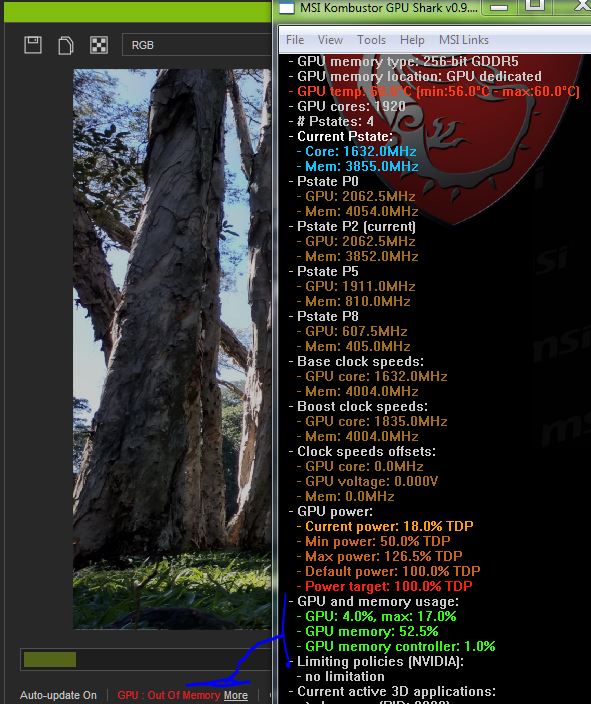
another fun discovery, I just got the out of memory error again on Iray - but my benchmark says only half my vram is being used ! :w00t:
|
|
By Khalid Abusaud - 6 Years Ago
|
|
yeah , you're quite right about iClone , although it's easy to use for animations and creating animated movies , but it's too slow , even Unreal Engine 4 is much faster and unity , it's too slow on my ryzen 3900x 64GB DDR4 and 2080ti GPU and fast PCIE 4 nvme SSD , even when there's nothing in the viewport it's about 30fps !! , it needs some serious performance improvements and optimization because at it's current stage i have to admit although it's great tool for making animations , it's poorly optimized
|
|
By animagic - 6 Years Ago
|
|
The 30 fps with nothing in the view port is a bug discovered during testing, although I don't think ii's in FT.
|