|
By Khalid Abusaud - 6 Years Ago
|
Hello
I'm 3D Designer and Modeller
I've noticed that when i use iClone , even the latest version
It's very slow and sluggish even when the scene is totally empty! when it's empty it's about 20-30fps
and it's extremely slow when using Character Creator or daz3d characters even with reduced textures and polygons
while in other software like Unreal Engine 4 and Unity and DAZ3D Viewport are much faster
My specifications are :
AMD Ryzen 3900x , MSI Gaming Edge Wifi x570 , 64GB DDR4 G.Skill Trident Z Neo 3200Mhz , XPG GAMMIX S11 Pro 1TB NVME SSD , MSI Geforce 2080ti Ventus OC
4K 55" Monitor : 3840x2160@60Hz using HDMI
I'm using the Latest windows 10 build 2004 with latest updates , and latest nVIDIA Drivers
and nothing like Anti-Virus or anything is running in the background
Please help
|
|
By Peter (RL) - 6 Years Ago
|
|
Hi...
Have you customised your global 3D graphics settings in the Nvidia Control Panel. If so this could be the problem.
Please try the following to check you are allowing iClone to control your 3D Settings:
1. Right click on your Desktop and open the "Nvidia Control Panel". 2. Now select "Manage 3D Settings" from the left panel and then click the "Program Settings" tab from the right side. 3. Look through the list of programs to see if iClone is present. If it is, select it and ensure it is using the MSI GeForce 2080ti. 4. Do also check that it is using the default "Application Controlled" settings and not a custom profile.
5. If it isn't listed, click "ADD" and then find iClone 7 in the list or use the location below (default install).
C:\Program Files\Reallusion\iClone 7\Bin64\iClone.exe
6. Select the iClone.exe and click "Add Selected Program".
7. Again make sure it is using the MSI GeForce 2080ti and using the default "Application Controlled" settings.
Do try this and see if it helps improve performance? If is does you can follow the same steps for Character Creator 3.
|
|
By StephenIAm - 6 Years Ago
|
Hey Peter!
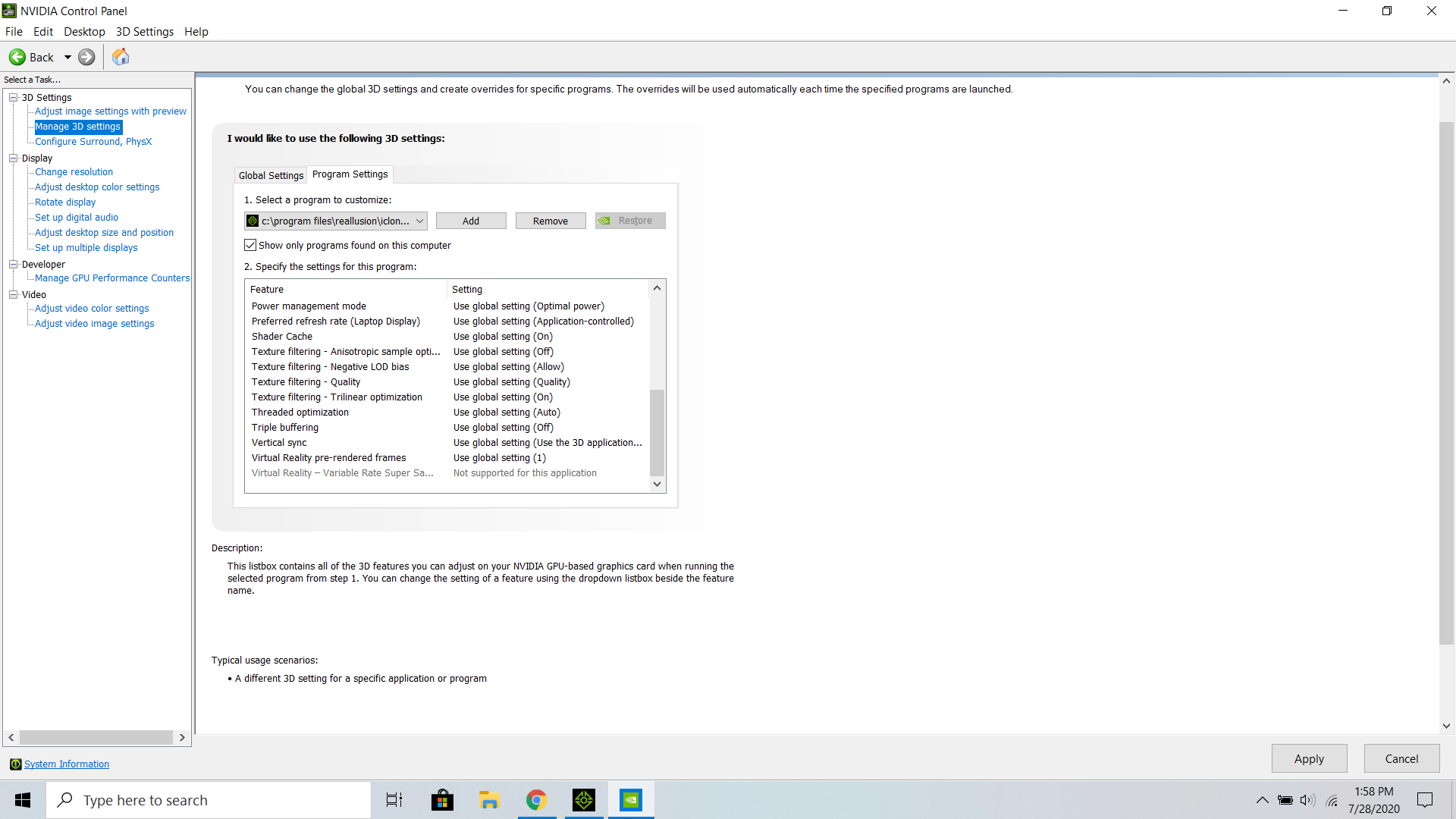
I'm having a similar issue. Iclone runs great most of the time, but if I add a lot of special effects to the scene, it crashes more than I would like. I went into the Nvidia Control Panel like you said (I just downloaded the most recent driver), and wasn't sure if these settings were correct or if I'm using my graphics card correctly.
Thanks for your time,
Stephen
|
|
By Khalid Abusaud - 6 Years Ago
|
|
No , I didn't customize any of the nVidia Control Panel driver settings at all , but i'll try the solution that you've mentioned , thanks for the help
|
|
By Peter (RL) - 6 Years Ago
|
StephenIAm (7/28/2020)
Hey Peter! I'm having a similar issue. Iclone runs great most of the time, but if I add a lot of special effects to the scene, it crashes more than I would like. I went into the Nvidia Control Panel like you said (I just downloaded the most recent driver), and wasn't sure if these settings were correct or if I'm using my graphics card correctly. Thanks for your time, Stephen
Hi Stephen
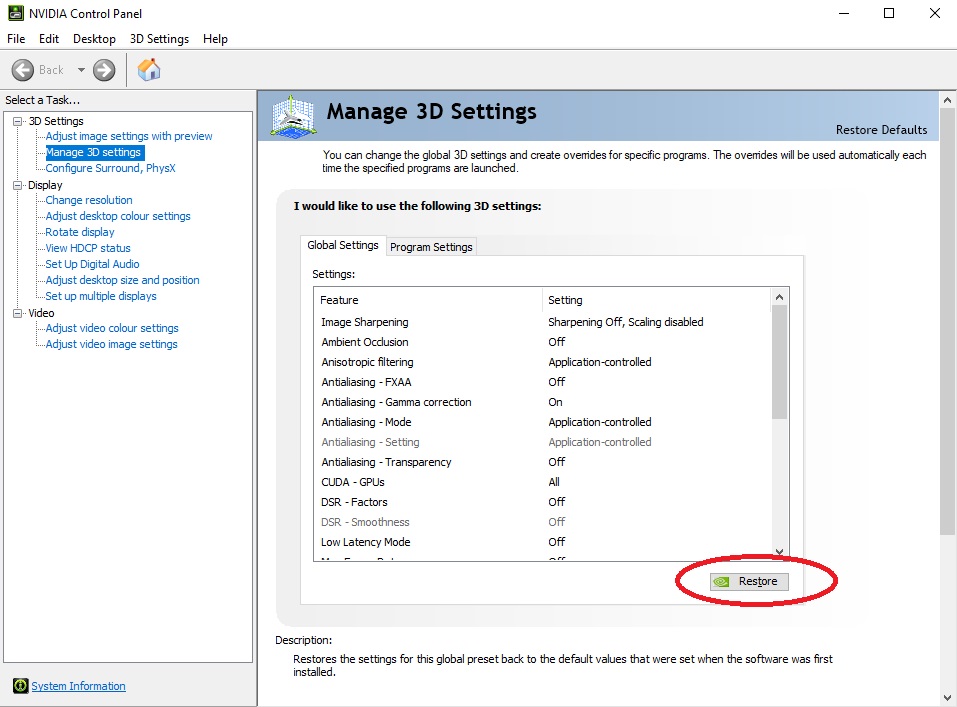
Your screenshot shows that iClone is using the Global Setting. However, if you have customised the Global Setting then that will naturally affect iClone also. Try going to the Global tab as shown below and ensure your Global Setting is set to default (it will look similar to the screenshot below). If in doubt you can click the "Restore" button and this will set your Global Settings back to default.
|
|
By Khalid Abusaud - 6 Years Ago
|
|
Hey Peter , I've tried the solution you've mentioned , and unfortunately , nothing is changed , iClone is still slow as it is
|
|
By argus1000 - 6 Years Ago
|
Hi Peter,
I tried the solution you mentioned with the nVidia Control panel, but I can't seem to find the MSI DEforce 2080ti and the "application controlled " default. The speed remains the same.
It seems to me that the more plugins you add to iClone and Character creator, the slower they get. For example, it takes me 5 minutes to load a scene in iClone now after the latest update (I also bought the Skin Gen Premium plugin). On top of that, I have to wait a little too long for practically every move I make in those programs. It seems iClone, in spite of all its priceless features, is getting seriously bloated.
And I don't have a slow computer. I have an 24 cores AMD Threadripper with an nVidia Titan RTX with 24 GB of VRAM.
|
|
By Khalid Abusaud - 6 Years Ago
|
|
Hello Peter , Unfortunately , none of the things you suggested helps iClone be faster , it's still slow as it is , while other software like Unreal Engine 4 and Unity are so much faster
|
|
By oisilener1982 - 6 Years Ago
|
First: Are you using the licensed version of iClone 7.8?
Second: If you have an extra m.2 SSD you may try to reformat then install just iClone 7.8 using the reallusion hub. It worked for me.
|
|
By Khalid Abusaud - 6 Years Ago
|
I'm using licensed iClone 7.72 , but i'll update it from the Reallusion Hub
and my m2 NVME SSD is still new only used for month
is there a big difference in performance between 7.72 and 7.8 ?
|
|
By oisilener1982 - 6 Years Ago
|
|
Have you tried the 2nd suggestion? Just try to reformat if you have extra ssd and try not to upgrade, Just install the 7.8 using Hub
|