Transfer characters from Daz to CC3, strange problem


https://forum.reallusion.com/Topic451486.aspx
Print Topic | Close Window

By temado400 - 6 Years Ago
Dear colleagues, I ask for your help!
I have the following problem: I experimented with FaceTransfer and FaceGenerator in Daz, and exported my characters to CC3 via Transformer. I added morphs to fbx, then made custom morphs based on them in CC3. Added hair, then made Custom hair in CC3 from it. 
After all this, I have already finished these experiments, and make new project. I simply export any basic characters from Daz to CC3 through a Transformer, and all characters are immediately imported with two problems:
1. They all have the same hair on their heads that I used in previous experiments, although now I'm exporting characters without hair;
2. Everyone has their tongues sticking out of their mouths, and I can't fix that.
When exporting from Daz - I cleared the morph rules list, and the hair does not appear in the export at all.
Can't figure out where to look for the problem - in Daz or in CC3?

My transfer process:
https://forum.reallusion.com/uploads/images/9b254807-54f8-42f4-9b01-90dd.jpg
https://forum.reallusion.com/uploads/images/2553a7d8-2352-487d-b1fe-c796.jpg
https://forum.reallusion.com/uploads/images/f1f1a98b-d34a-4be7-adda-d552.jpg

https://forum.reallusion.com/uploads/images/c9757fbb-4c2c-4367-a500-de1e.jpg
https://forum.reallusion.com/uploads/images/8d3a65f2-9b55-4bca-9c74-4696.jpg

https://forum.reallusion.com/uploads/images/9c1173e4-b631-4e14-85df-1532.jpg

I would be infinitely grateful for any hints!
By StyleMarshal - 6 Years Ago
When exporting from DAZ , use "FBX 2012 -- Binary"  not "2014".
By temado400 - 6 Years Ago
I've tried this but it doesn't help.
Usually I always use "fbx2012-binary", but out of impotence I started trying 2014 and others ...
By StyleMarshal - 6 Years Ago
1, When you don't use any morph , untick morphs in fbx export.

2. What happened when you import the fbx exported Character into Daz via fbx again , how does it look like ?

Can you open the exported fbx in another app like Autodesk FBX Viewer (free) to see if it exports right....
By temado400 - 6 Years Ago
Bassline303 (7/21/2020)
1, When you don't use any morph , untick morphs in fbx export.

2. What happened when you import the fbx exported Character into Daz via fbx again , how does it look like ?

Can you open the exported fbx in another app like Autodesk FBX Viewer (free) to see if it exports right....


1. I tried it. Does not help.

2. I didn't understand right away, so I'm editing:
https://forum.reallusion.com/uploads/images/07abc9bb-3c48-46cc-8850-632b.jpg
By temado400 - 6 Years Ago
I don't know how to turn off the display of bones, but from this angle it seems that everything is ok with tonguehttps://forum.reallusion.com/uploads/images/3001b805-19a0-4579-adc8-bca9.jpg. And no hair.
So the problem is most likely in CC3
By StyleMarshal - 6 Years Ago
Export looks ok .... which CC3 version are you using ?
By temado400 - 6 Years Ago
Bassline303 (7/21/2020)
Export looks ok .... which CC3 version are you using ?

Сharacter Сreator 3.2 Pipeline
By temado400 - 6 Years Ago
Bassline303 (7/21/2020)


Can you open the exported fbx in another app like Autodesk FBX Viewer (free) to see if it exports right....


In FBX viewer is all right:https://forum.reallusion.com/uploads/images/f86f4190-203c-494c-9dd0-23f5.jpg
By temado400 - 6 Years Ago
In general, it is very likely that I did something in CC3, maybe with a transformer, maybe baked some morphs or parameters somewhere that are now applied to each model that I import.
By StyleMarshal - 6 Years Ago
Maybe you changed your default project , thats the project that starts up.
It is located here : C:\Program Files\Reallusion\Character Creator 3\Program\Assets\Creator\ Do you have any saved project ? Can you load it and try the transform again? Otherwise you need a new default project. https://forum.reallusion.com/PrintTopic385084.aspx
By yamaalemi2006 - 6 Years Ago
Hi guys,
i am new to realussion and i bought the iclone 7 with character creator which came for free and i also bought some extensions which drained all my money so know i am not able to buy the UN TASK FORCE asset  https://www.reallusion.com/ContentStore/Character-Creator/Pack/UN_TaskForce-Uniforms/default.html
 and the Professional Outfits Clothes pack https://www.reallusion.com/contentstore/iClone/pack/ClothBaseForCharacterCreator_ProfessionalOutfits/default.html
 I was hoping to know whether anyone could give me these assets for free if you have them, as i paid a good amount of money and realusion cdoes create exceptional softwares but for someone like me who has a tight budget to work around, especially around these times, it will be good to have.
Thanks really appreciate it.
By StyleMarshal - 6 Years Ago
C:\Program Files\Reallusion\Character Creator 3\Program\Assets\Creator\Default - Load this Project , save it under project and make it your default project again ... (right click / set default project)
By temado400 - 6 Years Ago
Bassline303 (7/21/2020)
C:\Program Files\Reallusion\Character Creator 3\Program\Assets\Creator\Default - Load this Project , save it under project and make it your default project again ... (right click / set default project)


Thank you so much my friend!
You showed me absolutely the right direction, although I did a little differently.

However, I was already ready to reinstall CC3, and you helped me avoid it. I'm ready to buy you coffee if you tell me how I can do it online (maybe via PayPal or something else!))

I will write for those who might encounter a similar problem.
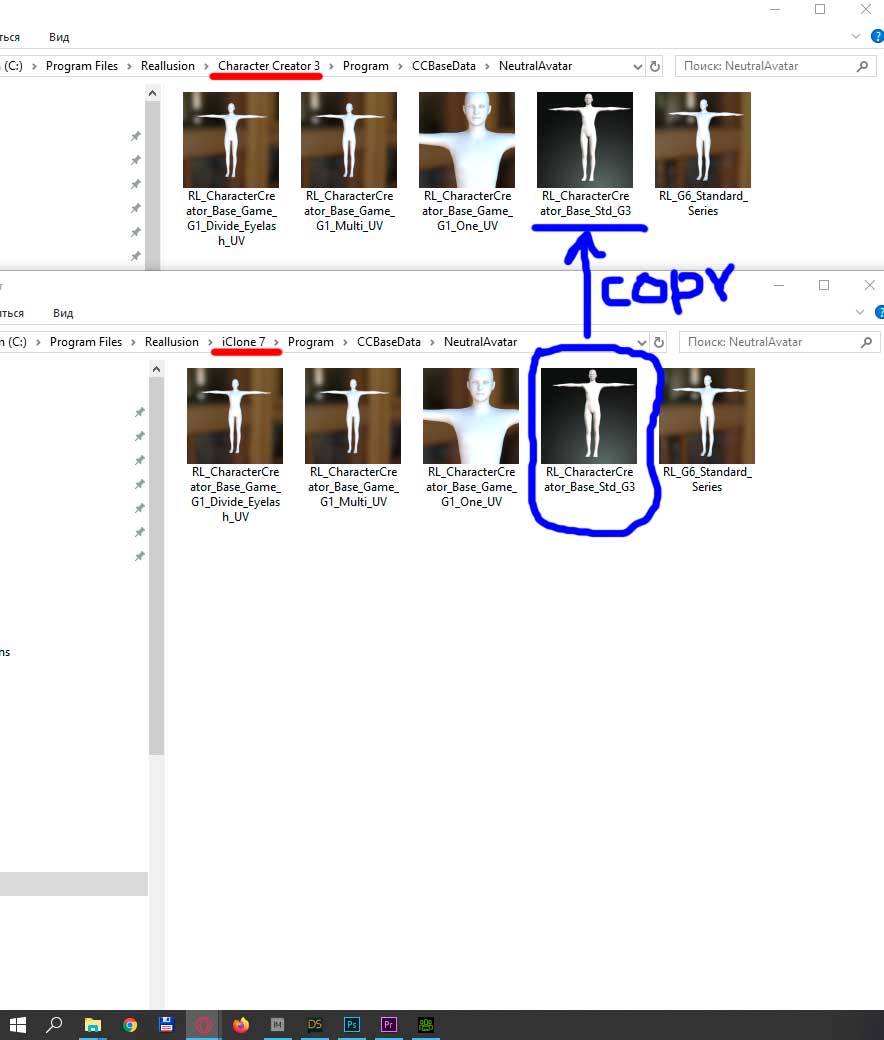
The fact is that in my experiments I overwritten the original file in the folder:
"C: \ Program Files \ Reallusion \ Character Creator 3 \ Program \ CCBaseData \ NeutralAvatar \"
Perhaps I just accidentally clicked "Yes" when asked "Would you like to save the current base project?"
In my case, it was the file "RL_CharacterCreator_Base_Std_G3", which saved the morphs and hair of the avatar, which I imported from Daz.
So, to bring back the old original NeutralAvatar - I found the same file in the iClone folder:
"C: \ Program Files \ Reallusion \ iClone 7 \ Program \ CCBaseData \ NeutralAvatar"
and just replaced the wrong file in the CC3 folder with this correct file.https://forum.reallusion.com/uploads/images/e09247c9-c501-484f-bae8-712b.jpg
By StyleMarshal - 6 Years Ago
Cool, glad it works again for you :-)
And thx for sharing your solution !
No need to paypal me , coffee is cool :D:D
By zhangkaimengm - 6 Years Ago
Thanks for sharing, I also encountered the same problem. The tongue of the imported character will stick out, and some extra clothes will be produced. I will go back to try it in the evening