|
By wsessoms - 6 Years Ago
|
Hi,
I ran across this YouTube video about using Alembic animations inside of iClone 7. The problem with the video is one it has no sound / dialogue and two the explanation as to how to get Alembic animations to work in iClone 7 is very vague. It would be very useful to be able to use Alembic animations in iClone.
Below is the link to the YouTube video. Can you take a look at it and see if you can tell how he was able to get the Alembic animation to work in iClone and explain how he did it.
I'm still learning the application and have no idea as to how this can be done but I would really appreciate any help with learning how to do this.
https://www.youtube.com/watch?v=4qKw7cZHwpg
Thanks in advance for your help
|
|
By 4u2ges - 6 Years Ago
|
Import Alembic is experimentally implemented in Python.
Reference: https://wiki.reallusion.com/IC_Python_API:RLPy_RFileIO
LoadAlembic function does not import mesh from the file and only loads animation. You have to have a respective mesh (which should completely match the one in .abc file) in iClone in order for it to work.
It also only works on soft cloth.
Thus it is very limited at the moment
|
|
By wsessoms - 6 Years Ago
|
Thanks for the reply. Have you tried importing Alembic animation into iClone 7 using a python script?
What I would like to do is import Alembic animation from Marvelous Designer into iClone 7.
Thanks for the link. I'll check it out. In the process of learning Python. This would be a great plugin if it can be done.
|
|
By 4u2ges - 6 Years Ago
|
|
Have you tried importing Alembic animation into iClone 7 using a python script?
Yes, I have done that. The only problem is, I only was able to import alembic to props.
I could not figure out how to import alembic directly to the soft cloth weighted to the avatar.
There is no way to select a cloth via Python and using GetSelectedObjects function cannot get a hold of the cloth either.
(If someone was able to pull this through, please post the code).
Here is how it applied to props:
And this is a script I was using:
import RLPy
file_path = "PATH TO ALEMBIC FILE"
object = RLPy.RScene.FindObject( RLPy.EObjectType_Prop, "Prop_Name" )
RLPy.RFileIO.LoadAlembicFile(object, file_path, RLPy.ECoordinateAxis_Y)
Note: Mesh name in the alembic file and the Mesh name of the prop it would be applied to MUST be the same.
Prop_Name (and I think mesh names as well) are case sensitive!
|
|
By wsessoms - 6 Years Ago
|
Thanks 4u2ges. That is very interesting. I'm am going to try to give it a go and see what I come up with. Will keep you updated on any progress.
Thanks again!
|
|
By Tugpsx - 6 Years Ago
|
|
Do i need 3DXChange pipeline for this exporter to work? i get <class 'NotImplementedError'>, when running the script.
|
|
By 4u2ges - 6 Years Ago
|
|
Tugpsx (8/7/2020)
Do i need 3DXChange pipeline for this exporter to work? i get <class 'NotImplementedError'>, when running the script.
Hmm, good question. I do not know. Maybe someone from RL dev team can answer that.
|
|
By animagic - 6 Years Ago
|
4u2ges (8/7/2020)
Tugpsx (8/7/2020)
Do i need 3DXChange pipeline for this exporter to work? i get <class 'NotImplementedError'>, when running the script.Hmm, good question. I do not know. Maybe someone from RL dev team can answer that.
You do need 3DXchange Pipeline as that enables Alembic and other export functions in iClone.
|
|
By ahingel - 6 Years Ago
|
thank you for the script so much
but how do you create the .py file?
do you export if from blender?
im not good at all in code
thank you
|
|
By ahingel - 6 Years Ago
|
thank you for the script so much
but how do you create the .py file?
do you export if from blender?
im not good at all in code
thank you
|
|
By 4u2ges - 6 Years Ago
|
Python scripts can be ASCII text files. Open Notepad app on PC, copy/paste script lines. Save As file with any name, but make sure the extension of the file .py
|
|
By ahingel - 6 Years Ago
|
you didnt import the alembic file though
how the prop got the animation?
please if you could do a tutorial how we can do this
i would be so grateful
|
|
By 4u2ges - 6 Years Ago
|
iClone does not yet fully support alembic import. So you may not bring the mesh along with simulation at this time.
What it does support as I have shown, is importing alembic simulation alone (just animation) onto the prop which you need to import by any other means.
So you import the object as a prop first, and then from alembic file (which contains the mesh and simulation) you import simulation only and apply to imported object via Python script.
|
|
By ahingel - 6 Years Ago
|
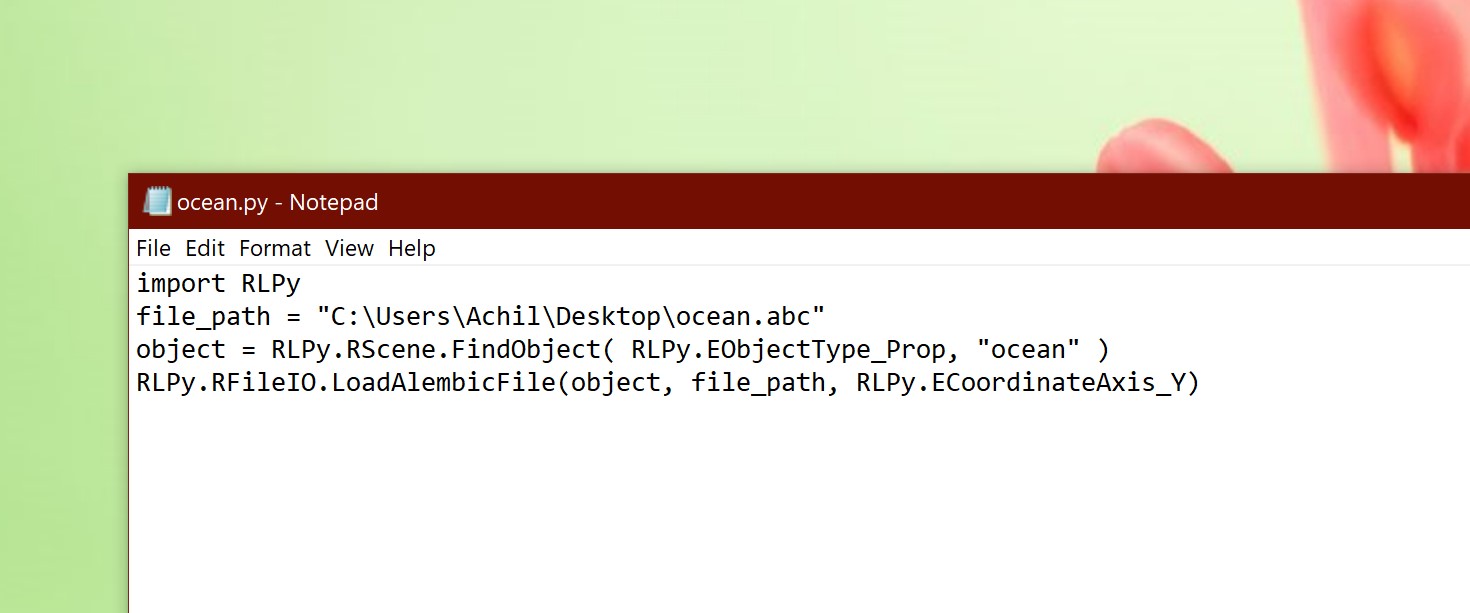 i did it but its not working i did it but its not working
the animation doesnt import to the prop on iclone :(
Please please show us a more detailed tutorial ❤❤
this is so usefull and i cant get it to work :(
|
|
By 4u2ges - 6 Years Ago
|
There are couple of reasons it is not working
1. Make sure your "ocean" prop is set as a soft cloth while you are running the script. After you run the script you may disable it.
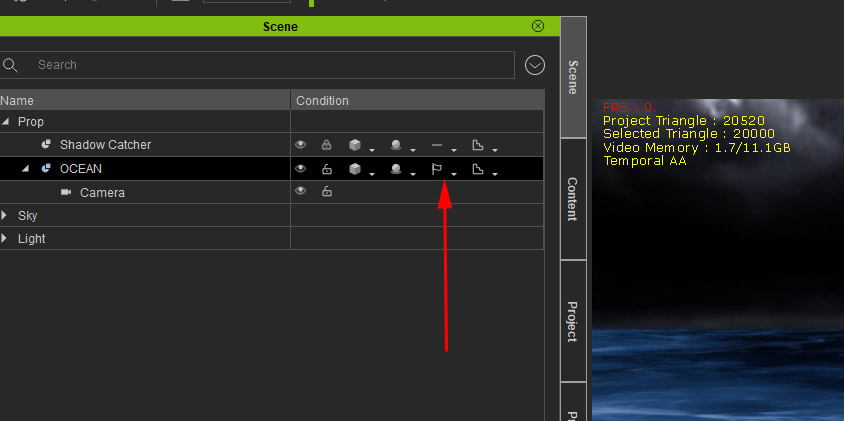
2. Make sure the alembic file you are importing the animation from has exact the same prop as you have it in iClone
3. It is a good practice to have the mesh name of the prop in iClone and mesh name of the prop in the alembic file be the same and have the same letter case
|
|
By ahingel - 6 Years Ago
|
i did everything exactly how you said step by step
its not working to me 😰😰
|
|
By 4u2ges - 6 Years Ago
|
Upload your .abc file to some cloud storage and send me a link to it via PM.
I'll try to look at it tonight...
|
|
By ahingel - 6 Years Ago
|
here it is
cant wait for your response
i really apreciate your help
thank you ❤
https://www.dropbox.com/s/rmwl9zsph27made/ocean.zip?dl=0
|
|
By Rampa - 6 Years Ago
|
|
If you check the video from earlier, he has the slashes in the path "/" rather than"\".
|
|
By ahingel - 6 Years Ago
|
oh my god
i cant believe it
that was it !!! it worked :D
i just copying pasting the path from the properties of the file and it was using \ instead of /
THANK YOU SO MUCH ❤😁😁😁😁😁😁😁😁❤❤❤❤❤❤❤❤❤❤❤
|
|
By Rampa - 6 Years Ago
|
|
ahingel (9/29/2020)
oh my god
i cant believe it
that was it !!! it worked :D
i just copying pasting the path from the properties of the file and it was using \ instead of /
THANK YOU SO MUCH ❤😁😁😁😁😁😁😁😁❤❤❤❤❤❤❤❤❤❤❤
I caught on to that one pretty slowly too! LOL
|
|
By 4u2ges - 6 Years Ago
|
lol... Sorry folks, the slashes direction does not matter (at least on my computer)
At some point I though it does. And then I figured the problem was elsewhere but left slashes as is.
It works either way for me :)
|
|
By ahingel - 6 Years Ago
|
haha omg
i did it with a cube but i couldnt import the ocean and make it work as you did. because i got the error message for 20000 verts on iclone . and i thought it has to be under 20000
what was the other false you found?
|
|
By 4u2ges - 6 Years Ago
|
You just click OK and disregard that error. Ocean still gets Soft Cloth status regardless :)
|
|
By Rampa - 6 Years Ago
|
It's just a warning, to keep performance good. You can use more though.
If you used a cube before, that's why it would not work. You need to import the same prop as an OBJ that you saved as Alembic. Make sure it has the same name too. You can change the name by double-clicking it in the Scene Manager if you need to.
You can also un-check the physics for just that prop after loading the Alembic.
|
|
By ahingel - 6 Years Ago
|
finally i got it moving too 😁😁😁
on the script i just cut off some spaces and finally it worked :D
thank you guys for your help ❤❤❤❤❤
import RLPyfile_path = "C:/Users/Achil/Desktop/ocean.abc" object = RLPy.RScene.FindObject(RLPy.EObjectType_Prop,"Plane") RLPy.RFileIO.LoadAlembicFile(object,file_path, RLPy.ECoordinateAxis_Y)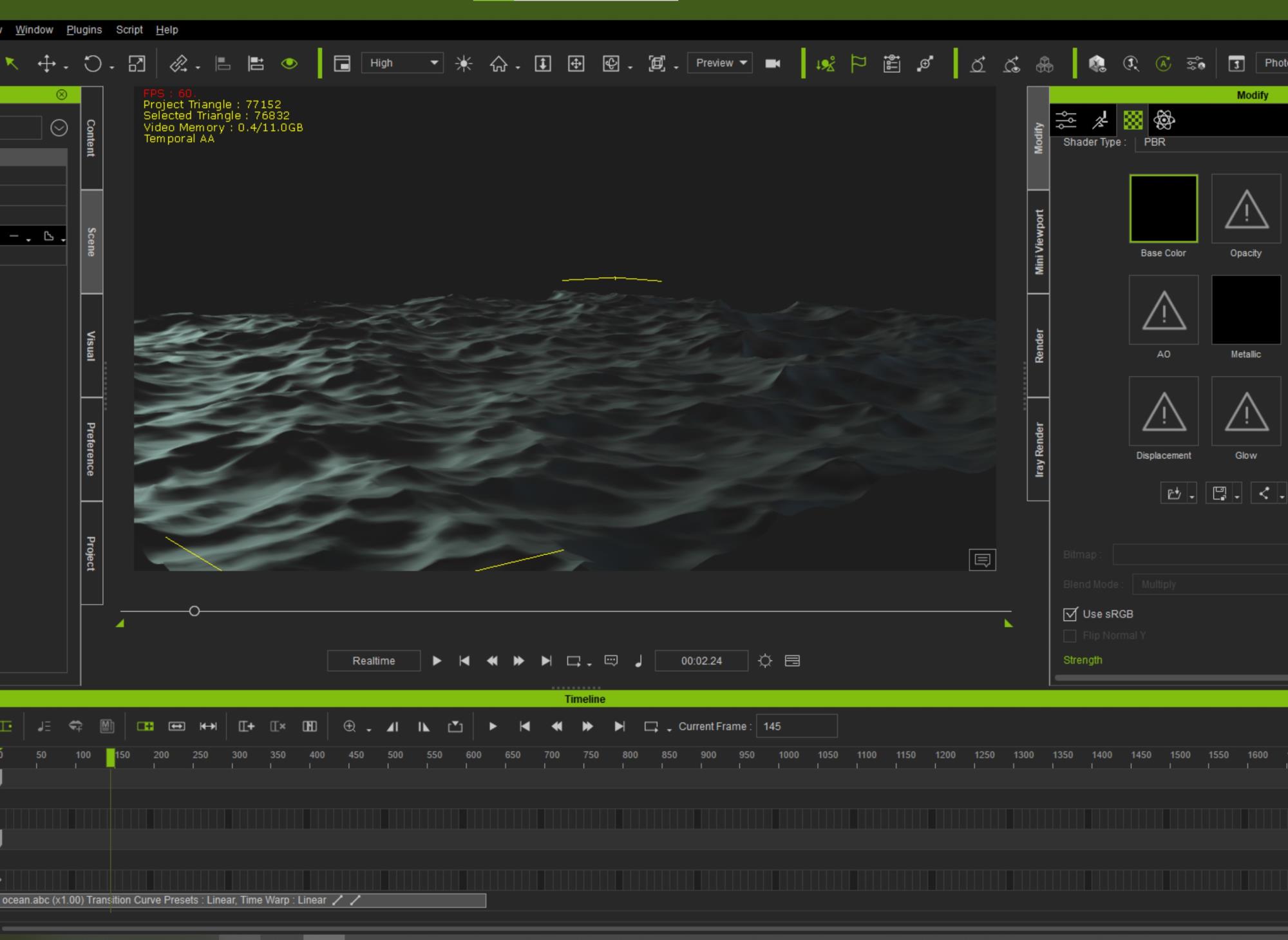
|
|
By 4u2ges - 6 Years Ago
|
-
|
|
By 4u2ges - 6 Years Ago
|
Just to be even more clear:
|
|
By 4u2ges - 6 Years Ago
|
|
finally i got it moving too 😁😁😁
Good! :)
|
|
By 4u2ges - 6 Years Ago
|
Just a word of advise for those making oceans. Make a loop sim. Here is how to easily make an *extendable* sim with 2 ocean modifiers:
|
|
By Rampa - 6 Years Ago
|
|
Don't forget that you can save the prop, and it retains the animation you load this way. So you can build up your library of oceans! ;)
|
|
By Rampa - 6 Years Ago
|
I went ahead and made an extended tutorial. The script I used is the same as below (mostly). The script is in the video description.
|
|
By Rampa - 6 Years Ago
|
Here is iProp of directional waves. It can be looped in the timeline. It can also be tiled.
https://drive.google.com/file/d/10nws3V12BumVgBruZBNn9koohmlnLMM4/view?usp=sharing
|
|
By Nebula480 - 5 Years Ago
|
|
Did you ever find out? I’m in the same boat as you are
|
|
By edivea6 - 5 Years Ago
|
Hello everyone
I'm running an AMD Ryzen 3 2200G with a Radeon RX 580 series, 8GB RAM.
I'm bringing this post up again, because I have been following the instructions here to make an ocean, but I can't get it to work; I always got an "assertion failed" error. My original goal was not the ocean, but an import of another alembic animation, which I couldn't get to work either, so I switched to the ocean to see if that would work, since it has such clear instructions.
I did my research, I updated visual C++ and my graphic card drivers, and now here are the issues I get:
1) When the python script has the default slashes, iclone says the file can't be found. So I guess the slashes' direction matter, at least sometimes.

2) When I change the script and use forward slashes, as suggested by Rampa, I get an "assertion failed" message.

At this point, I downloaded some visual studio stuff to get this JIT debugging working. When I pressed retry, Visual Studio opened and I got what is shown below.
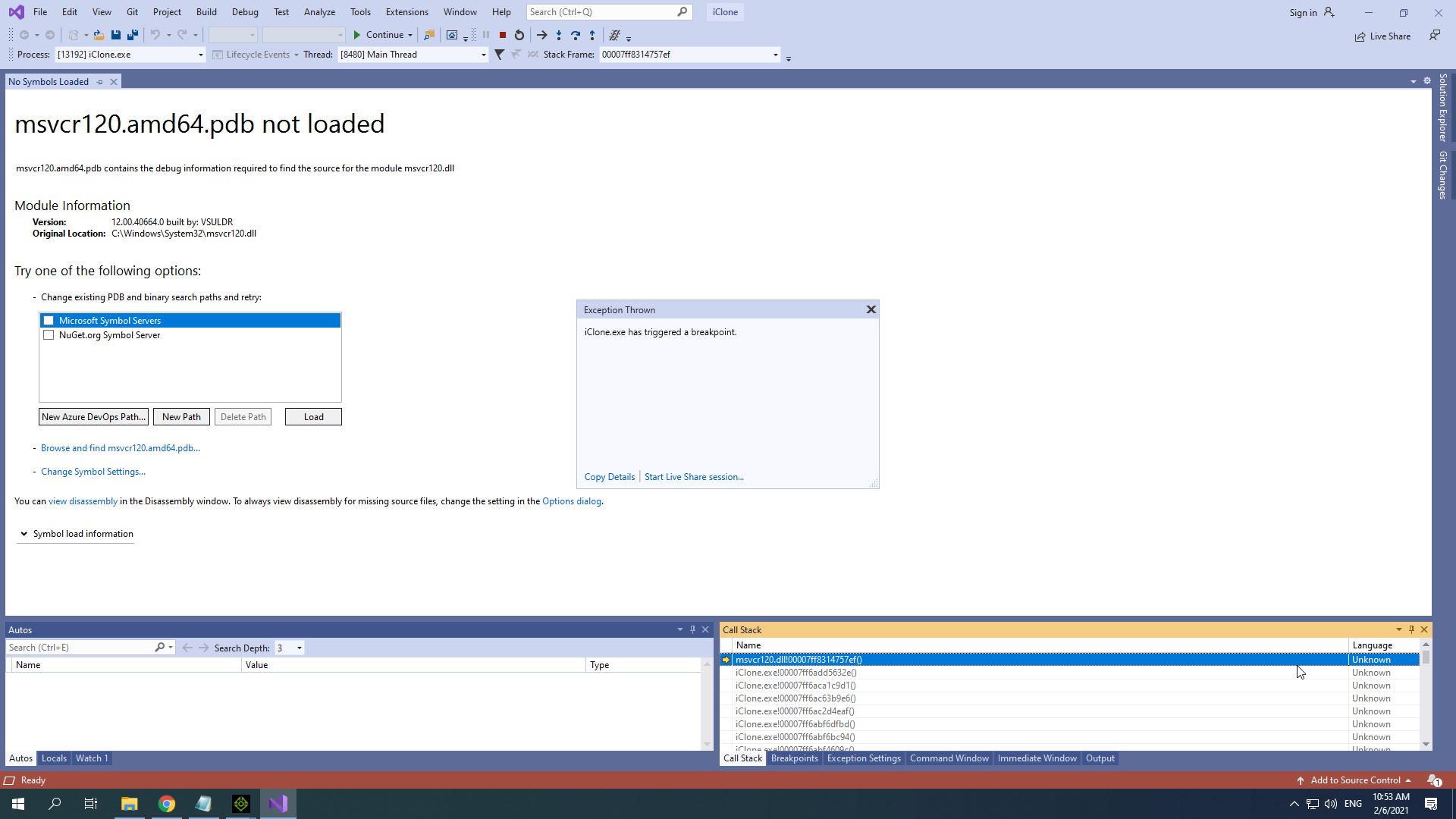
Unfortunately, I don't know what any of this means, so I have no idea know how to fix it. The only thing I haven't tried yet, is to uninstall and reinstall iclone. I thought that since I haven't used it this much yet, it couldn't be "corrupt" already.
Any help would be much appreciated
|
|
By ahingel - 5 Years Ago
|
wait for iclone 7.9 update
we will be able to import the alembic files onto an fbx
|
|
By edivea6 - 5 Years Ago
|
That is good news. I guess there is no announcement as to when this update will be available.
However, why is it that some of us have this issue and others don't, or at least didn't 1 year ago?
|
|
By hugh_cherry - 5 Years Ago
|
Did they add the alembic functionality in the update?
|
|
By StyleMarshal - 5 Years Ago
|
yes !
|
|
By ahingel - 5 Years Ago
|
amazing
did you bring it in from marvelous?
|
|
By ahingel - 5 Years Ago
|
amazing
did you bring it in from marvelous?
|