|
By steve.cullum - 5 Years Ago
|
I'm trying to create a custom morph in Blender for CC3, but everytime I try and load the modified OBJ file back in, CC3 just crashes out. :(
My exact steps:
1. In CC3 - Modify character to Load Neutral Base
2. Export as OBJ (full body, no changes to Axis)
3. Import Obj to Blender
4. Sculpt a change - (just moved some point with the grab brush as a test)
5. Export Obj
6. Back in CC3, Create > Morph slider editor (Source morph set as Default Morph, Target Morph set as File and choose my modified OBJ. Use ObjKey from original export.
7. Click OK > Gets to 30%, then crashes out.
Can somebody tell me what steps I'm missing?
Many thanks
|
|
By mars007007 - 5 Years Ago
|
Same problem here.
Windows 10, CC3.21
|
|
By 4u2ges - 5 Years Ago
|
Mind Blender Import/Export settings for 2.8 and up:
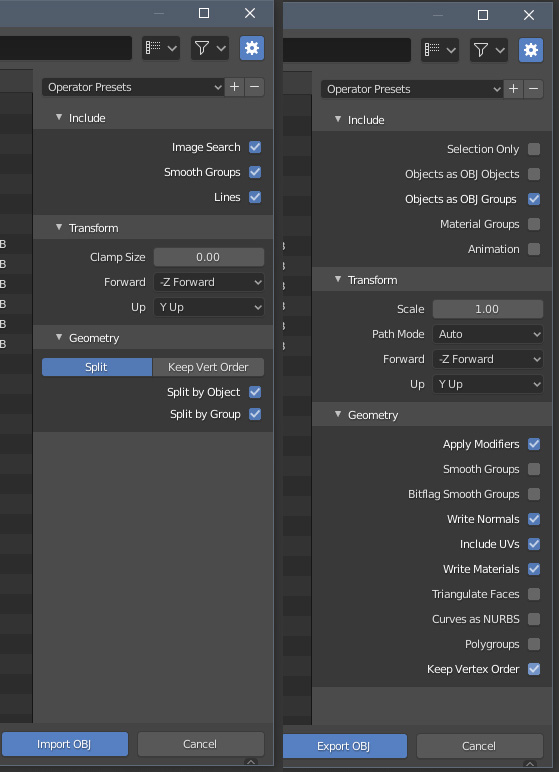
UPDATE: THIS ONLY WORKS WITH CC V3.2
SEE BELOW FOR CC V3.3
|
|
By steve.cullum - 5 Years Ago
|
Nice one! Those setting worked. :)
That information should be included in the official documentation.
|
|
By MiddleEnd - 5 Years Ago
|
I'm using those exact settings for OBJ import and export, but the slider makes the figure explode. Sounds like the vertex order gets mixed up? I wonder why you didn't use "keep vert order" when doing the import.
I'm using CC3.3 and Blender 2.83. And it's the CC3+ figure in neutral base.
|
|
By MiddleEnd - 5 Years Ago
|
|
Nevermind. Just saw another thread suggesting to use polygroups. Worked for me!
|
|
By 4u2ges - 5 Years Ago
|
New for CC v3.3 Blender Import - Export Settings
(thanks to rosuckmedia)
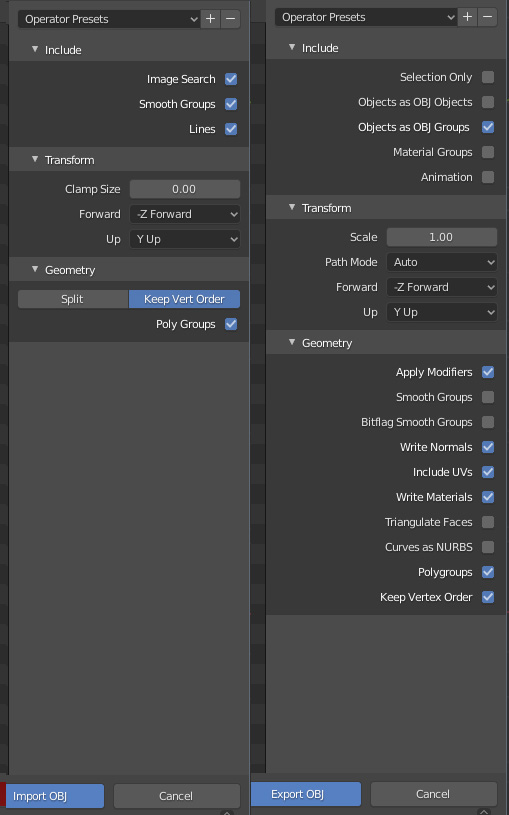
I totally agree, those things need to be in official paper!
|
|
By steve.cullum - 5 Years Ago
|
|
I've not had time to try the new version yet, but thanks for posting the update!
|