|
By wtadlock - 6 Years Ago
|
Hello all,
In need of some assistance with bringing Daz3d materials into Character Creator 3.
I have followed the information here:
https://manual.reallusion.com/Character_Creator_3/ENU/3/Content/Character_Creator_3/3/09_Transformer/Advanced_Conversion.htm
Kellytoons tutorial here.(Awesome channel!)
https://www.youtube.com/watch?v=m1kn5DlXabQ
And the Reallusion video regarding the same thing. However, with that being said, it is not working for me.
I am using:
Daz Studio 4.12 (latest)
CC3 (Latest)
Genesis 8 Female
Sci-Fi Battlesuit
http://www.daz3d.com/sci-fi-battle-outfit-for-genesis-8-females
Below are my settings and their results.
This is what I see in Daz3d
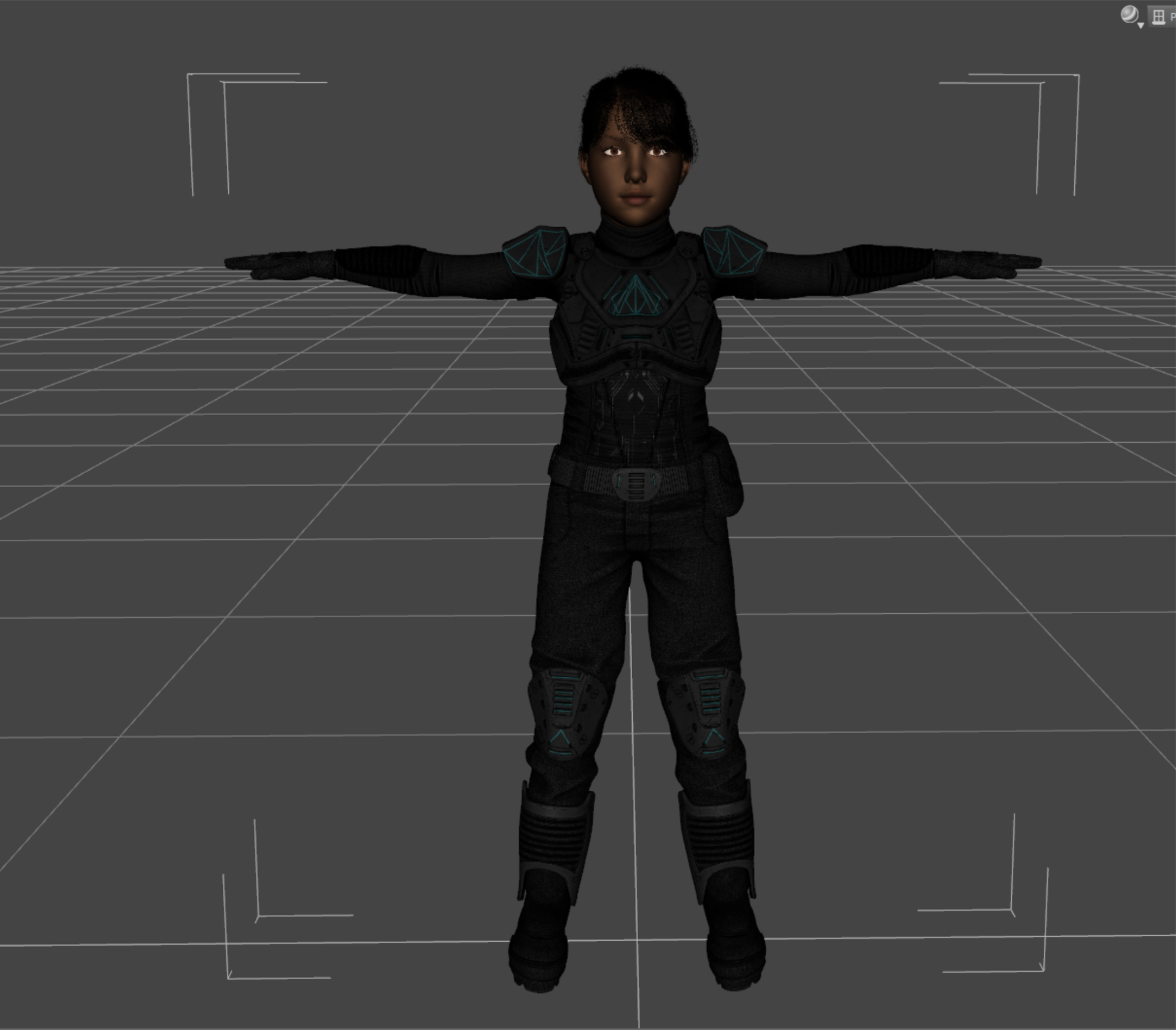
These are my export settings from Daz3d

These are my transformer import settings.
 This is what appears in CC3 after import. This is what appears in CC3 after import.

Any ideas or thoughts on what I am missing?
Thanks in advance,
Walter
|
|
By Kelleytoons - 6 Years Ago
|
I've talked about this in some of my tutorials (so I'm not sure which one you watched).
MOST Dav developers use a naming convention that Transformer can pick up on, and then load the appropriate textures (other than diffuse, which is contained in the file) to match. However, there are a few devs who follow their own...um, drum beat, and it's impossible for any automated system to figure this out. That's where you, as a human with a brain, come in.
In this case the textures (located in Daz Content/Runtime/Textures/Demian) have to be placed in manually, It's not difficult, although it's annoying. For example, the chest piece (called "Shirt" and also called "Armour" which fits over the shirt) needs the GLOSS, MET, EMISSIVE (In the glow channel),DM (in the Displacement as a greyscale height) and NORM put into all the slots (just select them all and drag the various textures in from the folder). Do this for the rest of the pieces and all will be well (this comes about because the Diffuse texture is either named with a _BLUE or an _CAMU at the end and thus Transformer is looking for other textures with those endings and then things like "NORM" tacked on to them).
If you can't figure it out I can make a video.
|
|
By wtadlock - 6 Years Ago
|
|
Kelleytoons (5/24/2020)
I've talked about this in some of my tutorials (so I'm not sure which one you watched).
MOST Dav developers use a naming convention that Transformer can pick up on, and then load the appropriate textures (other than diffuse, which is contained in the file) to match. However, there are a few devs who follow their own...um, drum beat, and it's impossible for any automated system to figure this out. That's where you, as a human with a brain, come in.
In this case the textures (located in Daz Content/Runtime/Textures/Demian) have to be placed in manually, It's not difficult, although it's annoying. For example, the chest piece (called "Shirt" and also called "Armour" which fits over the shirt) needs the GLOSS, MET, EMISSIVE (In the glow channel),DM (in the Displacement as a greyscale height) and NORM put into all the slots (just select them all and drag the various textures in from the folder). Do this for the rest of the pieces and all will be well (this comes about because the Diffuse texture is either named with a _BLUE or an _CAMU at the end and thus Transformer is looking for other textures with those endings and then things like "NORM" tacked on to them).
If you can't figure it out I can make a video.
Thanks Kellytoons,
But the issue isn't the armor, it's the character. The armor, to me, came across fine. I am trying to get the dark skin texture to and the dark hair to comes across properly. The video I watched was the one I linked to in my original post. I will go through and see if I can find the other videos where you addressed this issue.
Thanks,
Walter
|
|
By Kelleytoons - 6 Years Ago
|
The armour actually didn't come across fine -- look and you'll see there are no glossy materials, for example (and yet there are in the armour).
However, to get ANY character textures after you choose "Advanced" (which you must ALWAYS choose no matter what you are importing) you must checkmark Bake Body Texture and then choose your resolution.
If you don't, the default CC3 body textures are assigned. So -- rule of thumb is this: for clothing/hair only, do not checkmark this (it will slow things down TREMENDOUSLY particularly if you choose 4K). But if you want the avatar's skin to come over, you MUST checkmark this.
|
|
By wtadlock - 6 Years Ago
|
|
Kelleytoons (5/24/2020)
The armour actually didn't come across fine -- look and you'll see there are no glossy materials, for example (and yet there are in the armour).
However, to get ANY character textures after you choose "Advanced" (which you must ALWAYS choose no matter what you are importing) you must checkmark Bake Body Texture and then choose your resolution.
If you don't, the default CC3 body textures are assigned. So -- rule of thumb is this: for clothing/hair only, do not checkmark this (it will slow things down TREMENDOUSLY particularly if you choose 4K). But if you want the avatar's skin to come over, you MUST checkmark this.
I didn't focus on the armor as what got my eye was the skin shading and so the armor became secondary. As you can see in my settings in my original post, is I did check bake textures and they did not come across. I am not too concerned with speed due to the specs of my system. If I have to wait longer for something to look the way I want, I can deal with that, but thank you for the heads up on the hair. Do I need to change any of the settings with the material when I click bake? I see options for default, use original, etc next to each individual item that it is bringing in.
Thanks,
Walter
|
|
By Kelleytoons - 6 Years Ago
|
|
Just checkmark bake -- that will bring the textures over (and if you still have a problem let me know which character you used -- you didn't mention which avatar just a "gen 8 female").
|
|
By wtadlock - 6 Years Ago
|
|
Kelleytoons (5/24/2020)
Just checkmark bake -- that will bring the textures over (and if you still have a problem let me know which character you used -- you didn't mention which avatar just a "gen 8 female").
Kelleytoons,
That was what I did and I have the issue. I used the standard gen 8 female that comes with Daz3d. I morphed it using the Growing Up Bundle here https://www.daz3d.com/growing-up-bundle-for-genesis-8-female-s-and-male-s to maker her a child and then used a skin from Toon Generations 4 from here. https://www.daz3d.com/toon-generations-4-mega-bundle-for-genesis-8. I made sure to use all items that were for Gen 8.
Thanks,
Walter
|
|
By Kelleytoons - 6 Years Ago
|
|
Which skin specifically?
|
|
By wtadlock - 6 Years Ago
|
|
Kelleytoons (5/24/2020)
Which skin specifically?
Kelleytoons,
I chose the TG Skingtone - Medium Brown

|
|
By Kelleytoons - 6 Years Ago
|
Okay, I looked deeper into this.
Toon "skin" isn't a texture -- it's just a base color. So that won't come over, no matter what you do. IOW, there are no maps whatsoever with the Toon Generations stuff, just a skin color setting (which you can do yourself -- just select all the skin surfaces and use the Adjust Color tab to adjust them to whatever color you'd like).
So -- no real error there, just a misunderstanding on your part.
|
|
By wtadlock - 6 Years Ago
|
|
Kelleytoons (5/24/2020)
Okay, I looked deeper into this.
Toon "skin" isn't a texture -- it's just a base color. So that won't come over, no matter what you do. IOW, there are no maps whatsoever with the Toon Generations stuff, just a skin color setting (which you can do yourself -- just select all the skin surfaces and use the Adjust Color tab to adjust them to whatever color you'd like).
So -- no real error there, just a misunderstanding on your part.
ok, thank you for the information. This product changes the color information for me, a script per se. The colors that are changed under the surface tab of the material are changed, via this script, which I can do myself. I then export the file as usual, and bring in the textures from Daz3d into CC3, and they should be a modified version of the base gen 8 female with my colors. Those colors, are still not coming in. So the issue still stands. What I have in Daz3d is not coming over to CC3.
Thanks,
Walter
|
|
By Kelleytoons - 6 Years Ago
|
No, it's not an issue, it's just the way Transformer works.
It brings over TEXTURES -- there are no textures there. As I said, it takes two seconds to color it yourself the way you want (it's a trivial task). No real point in worrying about it otherwise.
|
|