|
By mike_207433 - 6 Years Ago
|
I am a newbee, but I followed a tutorial and I am at the import into Cartoon animator 4. There is a import error that states "Please make sure your PSD image mode as 8 bits/Chanel and try to save this file again in your PSD editor, and then reload to Cartoon Animator 4."
well,,,,, it is an 8 Bit file? Any guidance?
|
|
By kylelee - 6 Years Ago
|
|
mike_207433 (5/18/2020)
I am a newbee, but I followed a tutorial and I am at the import into Cartoon animator 4. There is a import error that states "Please make sure your PSD image mode as 8 bits/Chanel and try to save this file again in your PSD editor, and then reload to Cartoon Animator 4."
well,,,,, it is an 8 Bit file? Any guidance?
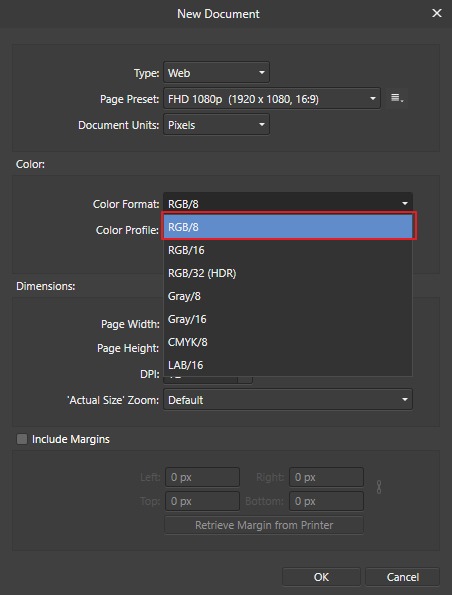
You can change your color format in your PSD editor.
This figure is Affinity settings.
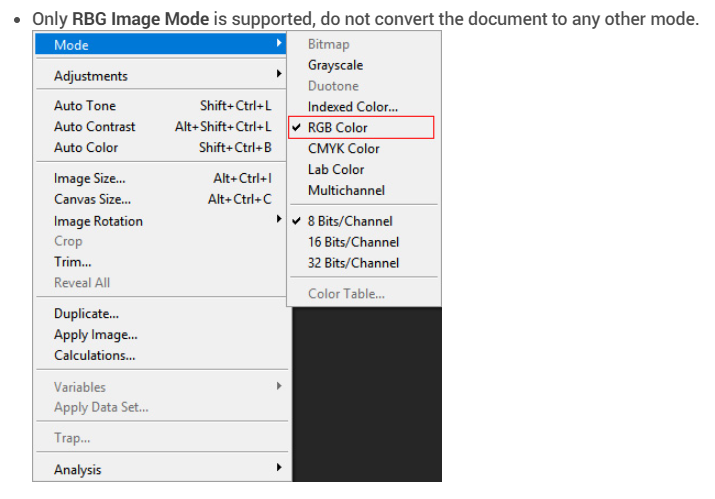
Please refer to this online manual: https://manual.reallusion.com/Cartoon_Animator_4/ENU/Pipeline/Content/Resources/ENU/07_PSD_Out/Limitations_for_PSD_Out.htm
|
|
By mike_207433 - 6 Years Ago
|
|
Thank you for your reply, The PS file was 8bit, I even tried Greyscale, The file originated in AI, exported as a PS file layered, then saved out of PS after linking all the layers and saved as a 8bit PSD.
|
|
By Life On Marzj - 6 Years Ago
|
|
I'm facing the same problem. The PSD file is in RGB/8bit, but still I get the message in CA4: "The PSD file cannot be recognized. Please make sure your PSD image mode as 8 bits/Chanel and try to save this file again in your PSD editor, and then reload to Cartoon Animator 4."
I have no idea what to do now...
anybody??
|
|
By Peter (RL) - 6 Years Ago
|
Have you tried resaving the file? Does this make a difference.
If not, perhaps you could share your PSD file so we can test it and also let us know which image editing software are you using?
If you don't want to post the PSD file publicly you can send it to me using private message.
|
|
By Life On Marzj - 6 Years Ago
|
Hi Peter,
Thank you for your reply! Yes I saved it! But luckily I’ve found the problem! The error message was a bit unclear to me and was making me look the wrong direction in Photoshop. Apparantly 8bit/chanels are two seperate things but I read it as one.
The problem was an empty folder that didn’t belong there that I’ve overlooked during rigging. Instead of getting an error about that I get this 8bit/channels error. Therefor I was looking at the PSD file itself...
so the message was misleading for me. But now I know, and am always happy to learn 😊
|