|
By Miranda (RL) - 6 Years Ago
|
Updated on June 8th:
Hi everyone,
Unity Auto Setup v1.02 just released to be compatible with Unity 2019.1 / 2019.2 / 2019.3. You can download the Auto Setup tool HERE. Unreal Auto Setup & Live Link are also updated to be compatible with UE4.25. You can download the Auto Setup tool HERE. *Please be noted that there is no feature added in this version. Updated on May 27th:
Hi everyone,
We encountered some development issues on the Auto Setup tools for Unity and Unreal Engine, so the launch date will be postponed to the week of June 8th.
To Unity users,
We understand that many of you have been waiting for the update for a long while, if you have urgent cases, please message me. Thanks! -- Hi everyone, To be compatible with the latest released version of Unity (2019.3) and Unreal Engine (4.25), we will release new versions of Unity Auto Setup and Unreal Auto Setup this month (May).
The new version of Auto Setup tools will be compatible with Character Creator 3.22 and iClone 7.22.
The specific release date is not firmed yet, please wait for further announcement, thank you!
Reallusion Team
|
|
By rosuckmedia - 6 Years Ago
|
Hello Miranda RL
Thank you for the information, I'm looking forward to the physics.
Best regards rosuckmedia:)
|
|
By Miranda (RL) - 6 Years Ago
|
Hi rosuckmedia,
Sorry for not writing clearly.
The main update for this new version is the compatibility with latest UE / Unity version. (May)
The Unreal Auto Setup which support physics transfer will be released along with CC 3.3 and iClone 7.8. (June)
Miranda
|
|
By rosuckmedia - 6 Years Ago
|
Hallo Miranda,
Thank you very much I can wait.:)
Greetings rosuckmedia
|
|
By Jfrog - 6 Years Ago
|
|
That's great news. Thank you Miranda!
|
|
By sibi_naayagam - 6 Years Ago
|
|
Miranda (RL) (5/14/2020)
Hi rosuckmedia,
Sorry for not writing clearly.
The main update for this new version is the compatibility with latest UE / Unity version. (May)
The Unreal Auto Setup which support physics transfer will be released along with CC 3.3 and iClone 7.8. (June)
Miranda
Can someone please point me to where I can find more details about the physics transfer she mentions here?
|
|
By Miranda (RL) - 6 Years Ago
|
|
sibi_naayagam (5/17/2020)
Can someone please point me to where I can find more details about the physics transfer she mentions here?
Hello!
You can find it from iClone 2020 roadmap:
https://forum.reallusion.com/437781/What-to-Expect-in-2020-iClone
|
|
By deidrereaystudios - 6 Years Ago
|
Is there any release that came out (that i must have missed) for Unity 2019.2???? I thought last was 2019.1 and now seeing something about upcoming 2019.3...
|
|
By Jaydead - 6 Years Ago
|
Looking forward to the release! I'm holding off from upgrading my project to UE 4.25 until the updated plugin drops.
|
|
By Miranda (RL) - 6 Years Ago
|
|
deidrereaystudios (5/20/2020)
Is there any release that came out (that i must have missed) for Unity 2019.2???? I thought last was 2019.1 and now seeing something about upcoming 2019.3...
Hi deidrereaystudios,
The coming Auto Setup will be compatible with Unity 2019.2 too. The compatible version will be 2019.1, 2019.2 and 2019.3.
|
|
By Miranda (RL) - 6 Years Ago
|
|
zarsky88 (5/24/2020)
Looking forward to the release! I'm holding off from upgrading my project to UE 4.25 until the updated plugin drops.
Hi zarsky88,
I just got the news that the release will be postponed to the week of June 8th. Please consider about it again. Sorry about that!
|
|
By Miranda (RL) - 6 Years Ago
|
Hi everyone,
We encountered some development issues on the Auto Setup tools for Unity and Unreal Engine, so the launch date will be postponed to the week of June 8th.
To Unity users,
We understand that many of you have been waiting for the update for a long while, if you have urgent cases, please message me. Thanks!
|
|
By Jfrog - 6 Years Ago
|
|
It's disappointing. But thank you for the update Miranda.
|
|
By Jaydead - 6 Years Ago
|
Sad to hear about the delay but thank you for keeping us in the loop!
I prefer stable software over constant crashing. I'll wait a little more.
|
|
By Miranda (RL) - 6 Years Ago
|
|
Hi everyone, Unity Auto Setup v1.02 just released to be compatible with Unity 2019.1 / 2019.2 / 2019.3. You can download the Auto Setup tool HERE. Unreal Auto Setup & Live Link are also updated to be compatible with UE4.25. You can download the Auto Setup tool HERE. *Please be noted that there is no feature added in this version. If there is any issues, please let us know. Thank you! Miranda |
|
By Necka - 6 Years Ago
|
Miranda (RL) (6/8/2020)
Hi everyone, Unity Auto Setup v1.02 just released to be compatible with Unity 2019.1 / 2019.2 / 2019.3. You can download the Auto Setup tool HERE. Unreal Auto Setup & Live Link are also updated to be compatible with UE4.25. You can download the Auto Setup tool HERE. *Please be noted that there is no feature added in this version. If there is any issues, please let us know. Thank you! Miranda
Just the day Unity releases the LTS version 2019.4
I hope it will work with that version as well as it's only providing bug fixes and stability
|
|
By patrick.wheeler - 6 Years Ago
|
Thanks for the update.
I was waiting on the v1.02 update as I was having some glowing white materials issues with CC3 models after droping them in the CC3_Assets directory (HDRP project) and picking up the generated prefab. Perhaps I am doing something wrong but this is still the same for me using Unity 2019.1.0f2 and the AutoSetup 1.02 for Unity 2019.1.
|
|
By Miranda (RL) - 6 Years Ago
|
|
Necka (6/9/2020)
Just the day Unity releases the LTS version 2019.4
I hope it will work with that version as well as it's only providing bug fixes and stability
Hi Necka,
It shall be compatible as the LTS has the same feature set of 2019.3. :)
|
|
By Miranda (RL) - 6 Years Ago
|
|
patrick.wheeler (6/10/2020)
Thanks for the update.
I was waiting on the v1.02 update as I was having some glowing white materials issues with CC3 models after droping them in the CC3_Assets directory (HDRP project) and picking up the generated prefab. Perhaps I am doing something wrong but this is still the same for me using Unity 2019.1.0f2 and the AutoSetup 1.02 for Unity 2019.1.
Hi patrick.wheeler,
I received your message. We will contact you if we need more information, thanks!
|
|
By dragonattackthegame - 6 Years Ago
|
|
patrick.wheeler (6/10/2020)
Thanks for the update.
I was waiting on the v1.02 update as I was having some glowing white materials issues with CC3 models after droping them in the CC3_Assets directory (HDRP project) and picking up the generated prefab. Perhaps I am doing something wrong but this is still the same for me using Unity 2019.1.0f2 and the AutoSetup 1.02 for Unity 2019.1.
Check my post, that's one of the issues I have (I've posted a video there)
To remove the glowing check the color set at the right of all the base map. In my case is set to 191,191,191. Set it to: 255,255,255
My post
|
|
By luke (RL) - 6 Years Ago
|
|
patrick.wheeler (6/10/2020)
Thanks for the update.
I was waiting on the v1.02 update as I was having some glowing white materials issues with CC3 models after droping them in the CC3_Assets directory (HDRP project) and picking up the generated prefab. Perhaps I am doing something wrong but this is still the same for me using Unity 2019.1.0f2 and the AutoSetup 1.02 for Unity 2019.1.
Hi, patirck.wheeler
can you replace the hdrp package with a followed link, maybe that can solved the problem.
https://drive.google.com/file/d/1mheo0mbUXV8oHKUX0lDxfLuBitR04dl3/view?usp=sharing
|
|
By dragonattackthegame - 6 Years Ago
|
Can you please take a look at my post?
I reported a similar issue and then took the time to record some videos and still waiting for an answer. At least say "we will take a look" or something...
Link to my post
|
|
By luke (RL) - 6 Years Ago
|
dragonattackthegame (6/11/2020)
Can you please take a look at my post? I reported a similar issue and then took the time to record some videos and still waiting for an answer. At least say "we will take a look" or something... Link to my post
Yes, can you give us the ccproject and fbx with json file to us? And what unity version are you using
|
|
By patrick.wheeler - 6 Years Ago
|
dragonattackthegame (6/11/2020)
patrick.wheeler (6/10/2020)
Thanks for the update.
I was waiting on the v1.02 update as I was having some glowing white materials issues with CC3 models after droping them in the CC3_Assets directory (HDRP project) and picking up the generated prefab. Perhaps I am doing something wrong but this is still the same for me using Unity 2019.1.0f2 and the AutoSetup 1.02 for Unity 2019.1.Check my post, that's one of the issues I have (I've posted a video there) To remove the glowing check the color set at the right of all the base map. In my case is set to 191,191,191. Set it to: 255,255,255 My post
Hi. Thanks for the response and thanks to Miranda. I actually tried that and it solved some issue but left a number of others in terms of issues with the skins having shadows as if one of the textures was mapped incorrectly (dark lines on the face for example). I'll look into it more. I found the best way was to use the CC3 Auto Setup for a standard Unity project, then move that char to a HDRP project and upgrade the materials. Needed some tweaking. Also, a slightly unusual behaviour has emerged when using the standard 3d Auto setup (2019.3.0f1 in this case). It works just fine, but on two occasions there were subsequent errors. Somehow the CC3 editor script decided to jump into life even though there were no changes in the CC3_Assets folder (I may have set a normal map to a normal map I think -I didn't take note at the time but will check next time) which caused it to "eat" all the characters it had auto-setup in the CC3 directory. So that was slightly annoying. :) Now I move the prefab out of that directory post-import. As I say, I'll add more detail when this happens again.
|
|
By dragonattackthegame - 6 Years Ago
|
|
luke (RL) (6/11/2020)Yes, can you give us the ccproject and fbx with json file to us? And what unity version are you using
It happens with any character, even with unmodified templates
I sent you a PM with an example
I use 2019.3.06f but it happen in 2019.3.03f and it happened the same with the previous setup tool
In my post there is more info and videos importing characters
|
|
By patrick.wheeler - 6 Years Ago
|
luke (RL) (6/11/2020)
patrick.wheeler (6/10/2020)
Thanks for the update.
I was waiting on the v1.02 update as I was having some glowing white materials issues with CC3 models after droping them in the CC3_Assets directory (HDRP project) and picking up the generated prefab. Perhaps I am doing something wrong but this is still the same for me using Unity 2019.1.0f2 and the AutoSetup 1.02 for Unity 2019.1.Hi, patirck.wheeler can you replace the hdrp package with a followed link, maybe that can solved the problem. https://drive.google.com/file/d/1mheo0mbUXV8oHKUX0lDxfLuBitR04dl3/view?usp=sharing
I assume this was for 2019.1.0f2? I tried this with a default character and one with some custom items. The results are as attached. The Warnings relate to custom clothing, so those are less important. Changing the base skin color from #BFBFBF to #FFFFFF made no difference.
I also tried this in 2019.3.0f1 (the updated version you provided). That didn't create the prefab and threw a TypeLoad exception:
TypeLoadException: Could not resolve type with token 0100004c (from typeref, class/assembly UnityEditor.Experimental.Rendering.HDPipeline.HDEditorUtils, Unity.RenderPipelines.HighDefinition.Editor, Version=0.0.0.0, Culture=neutral, PublicKeyToken=null) RLPlugin.RLEditor.OnPostprocessAllAssets (System.String[] kImportedAsset, System.String[] kDeletedAssets, System.String[] kMovedAssets, System.String[] kMovedFromAssetPaths) (at <ddbb7f90f3734a4fa3f84a16f149a083>:0)
However, the materials were actually better on the unprocessed character.



|
|
By sabrx - 6 Years Ago
|
Hello, I tested this latest Unity Auto Setup, specifically AutoSetup 1.02 for Unity 2019.3 in 3D version and it does not work well. While the "Hip" bone error has been fixed by migrating to this new version, and avatar is being setup correctly now, this version causes much worse errors: animations stored with the character are now not editable in Unity because of the plugin, even when it is turned off in Tools menu. Any changes I make to the animations (e.g. set Loop Time, Clamp Ranges etc.) are always reverted back despite confirming them. It must be the plugin that's doing this, because I reverted back to version 1.01 and it started to work again. Could you please fix that and publish a new version?
|
|
By luke (RL) - 6 Years Ago
|
patrick.wheeler (6/12/2020)
I want to confirm that did you use Maya or Unity preset for exporting fbx?, thanks
|
|
By sabrx - 6 Years Ago
|
None of that, I am using 3DXchange 7 for exporting multiple animations with one character, because iClone does not support this. However, it is roughly the same config as Unity in iClone. Anyway, what does this have to do with it? With the previous version, it worked well regardless of configuration.
|
|
By Miranda (RL) - 6 Years Ago
|
|
sabrx (6/12/2020)
Hello, I tested this latest Unity Auto Setup, specifically AutoSetup 1.02 for Unity 2019.3 in 3D version and it does not work well. While the "Hip" bone error has been fixed by migrating to this new version, and avatar is being setup correctly now, this version causes much worse errors: animations stored with the character are now not editable in Unity because of the plugin, even when it is turned off in Tools menu. Any changes I make to the animations (e.g. set Loop Time, Clamp Ranges etc.) are always reverted back despite confirming them. It must be the plugin that's doing this, because I reverted back to version 1.01 and it started to work again. Could you please fix that and publish a new version?
Hi sabrx,
Thanks for addressing this out. We are now checking this issue.
|
|
By luke (RL) - 6 Years Ago
|
|
sabrx (6/15/2020)
None of that, I am using 3DXchange 7 for exporting multiple animations with one character, because iClone does not support this. However, it is roughly the same config as Unity in iClone. Anyway, what does this have to do with it? With the previous version, it worked well regardless of configuration.
I will strongly suggest you to use iClone or CC to export Unity fbx, because the fbx from 3dx7 isn't compatible with autosetup because we add lots of info which don't implement in 3dx.
According to your request for iClone, I made a simple script that can allow you to export multiple motions with selected avatar without mesh, you can try it.
https://youtu.be/s2MGg9O6BhQ
|
|
By sabrx - 6 Years Ago
|
Hi, thank you very much! I will test the script later today and let you know how it works out.
|
|
By sabrx - 6 Years Ago
|
Hello, I tested your script for exporting multiple animations, and while it works for standard motions, it does not support iMotionPlus, which is my case, because I need to animate props and attach them to character, which is not supported by standard motions. Moreover, the import process is quite tedious with so many animation files - I have to set avatar and all other settings one by one in Unity, as Auto Setup 1.01 does not create it automatically due to missing Hips bone. I will therefore stick to my proven and the only fully functioning worfklow for now - 1) export character in CC3/iClone 7 and 2) export all animations in one go using 3DXChange.
|
|
By patrick.wheeler - 6 Years Ago
|
|
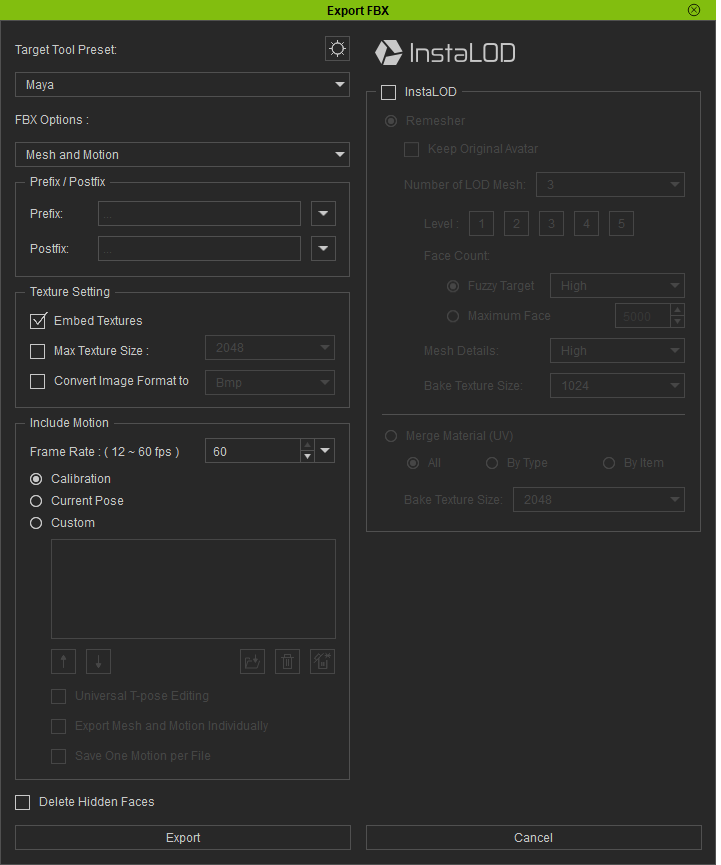
Sorry, wrong screenshot, I used Unity, default settings with "deleted hidden faces" enabled.
|
|
By marek_063044 - 6 Years Ago
|
I'm fighting with this for two days and really tired... plugin doesn't work at all. After import is done I have only blank materials and lot of wierd looking textures.
I've tried different models and clean setups: - Unity 2019.3.7f1 / URP 7.3.1 and URP 7.4.1 - Unity 2019.3.7f1 / Unity 3D - Unity 2019.4.0f1 / URP 7.3.1 and URP 7.4.1 - Unity 2019.4.0f1 / HDRP 7.4.1
Reinstalling CC doesn't help. |