|
By shiroed - 6 Years Ago
|
Hey gang,
I'm new to Headshot and I'm loving it so far but I'm struggling to achieve the very particular shape of Donald Trumps neck wattle.
Could any of you fine folks point me towards the best approach to achieve this shape?
Any help much appreciated!

|
|
By 3DChick - 6 Years Ago
|
|
To attempt that much "hang" I'd probably not try to use Headshot features or morphs at all. I'd bring it in, then use "'edit mesh" to pull the skin down and out. You might end up having to sort of visually "suggest" it, rather than replicate it, because it might distort the mesh if you do too much, but you could get the "look." I've had some good luck adding extra jowls that way.
|
|
By shiroed - 6 Years Ago
|
Thanks dude,
What do you mean 'bring it in' and use 'edit mesh'? Or do you mean bring it in to an external modelling program like Maya et al.
Is there mesh editing features within Headshot or is that in iClone?
Sorry for the noob questions.
|
|
By 3DChick - 6 Years Ago
|
Totally reasonable question!
I meant bring in the face to CC3 using Headshot pro (I think that's what it's called), normal procedure, then (out of Headshot, just working in CC3), select the character's mesh and click edit mesh under Modify.
I don't use Headshot itself, just the morphs, but if you want I can put up some screenshots later today of the edit mesh procedure...It would be several hours because I have elderly-mother chores to do in the interim...
For the Headshot part, there are some great tuts here in the forums, if you search Headshot.
|
|
By 3DChick - 6 Years Ago
|
Ok, here's how I would do it. Not necessarily the best way--just what I learned to do to get specific details I wanted.
For this, I started with just the base model, no slider-based morphs at all--there are some to increase neck width and double chin that you'd probably want to use, with the method I'll show below just to tweak--but I thought it would be more clear to just start with base...
I don't really know how to do screen casting, so I made it a slide show. I hope it comes through right...
https://docs.google.com/presentation/d/1Sip_ZVUps57cERjfJFCcIIZfudK4Og-PEZR5ZMVypBA/edit?usp=sharing.
If it doesn't I'll make it a PDF and upload that if you want...
Hope it helps,
Nicole
|
|
By shiroed - 6 Years Ago
|
Nicole, you are a Superstar!
THIS is what the InternetZ promised me! Finally!
Helpful lovely people!
Many thanks.
E
|
|
By 3DChick - 6 Years Ago
|
You're very, very welcome!
:-D
|
|
By ruscular - 6 Years Ago
|
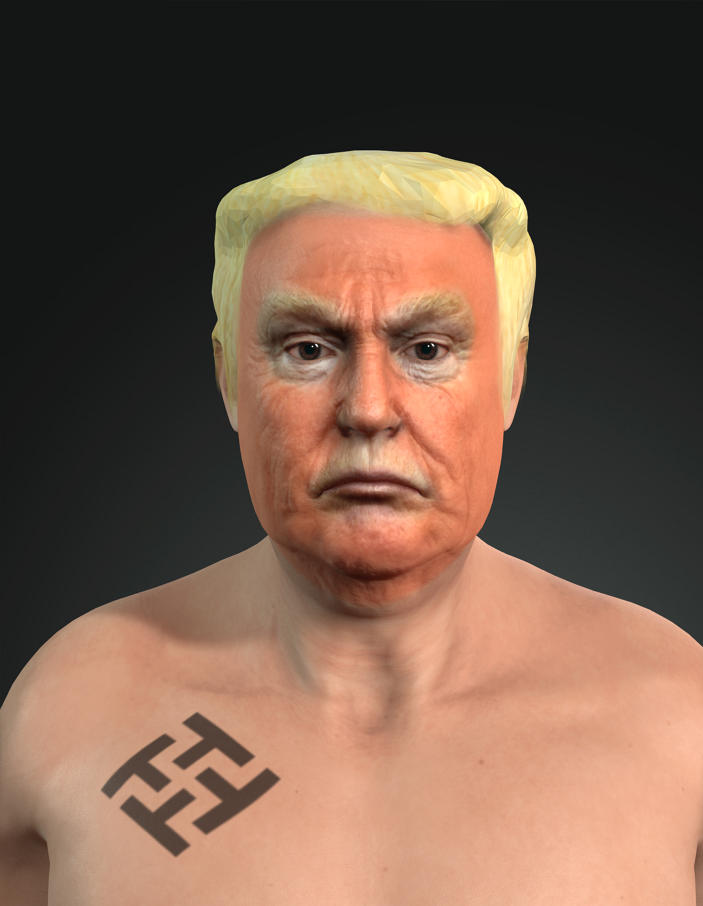
I took a shot at this! The headshot program is amazing! 
|
|
By 3DChick - 6 Years Ago
|
|
That is wonderful! LOLOLOL
|