|
By mark_060449 - 6 Years Ago
|
Hi everybody,
This is my first post here.
My goal is to get a high detail OBJ hand from CC3 to work on in Zbrush.
I'm just getting started with 3D so sorry if my terminology is not correct.
To achieve this I thought it would help to bake the skin texture into the mesh of the actor.
However, I found no way to do this in CC3/Google.
I know there are ways to bake textures into acessories/cothing, but I haven't found options for baking the actor.
Maybe I'm doing it all wrong and baking isn't even the right solution haha.
I'm just looking for a way to get a higher detail model out of CC3 and I hope that somebody can help me achieve this.
With higher detail I mean: getting the wrinkels of the skin out onto the mesh.
I hope somebody can help me with this.
Cheers!
Mark.
|
|
By Peter (RL) - 6 Years Ago
|
Hi Mark
When you export from Character Creator 3 Pipeline you are exporting the entire character. You can't choose to just export the hand for example.
When you choose the FBX export option you can choose to export with embedded textures. The max texture size that can be exported is 4096 which should give a very detailed skin texture. However you will of course need to be using a character with 4K textures to start with to maintain the quality on export.
Unfortunately I'm not really sure what your overall goal is after export. Do you plan to bring the edited characters hand back into CC3? Do you wish to animate the hand after editing? Generally if you only want a highly detailed hand that isn't to be animated, then you might be better to source a much higher resolution hand model to start with such as those below.
https://www.3dscanstore.com/bundle-3d-models/ultimate-male-female-hand-pack
|
|
By mark_060449 - 6 Years Ago
|
Hey Peter,
Thank you for your reply, I will start playing with the FBX export to see if this does what I want it to do.
To goal is to get a high detail hand into Zbrush so i can sculpt on it.
So exporting the entire body isn't really a problem, that just gets cut off.
The "problem" is that the .OBJ files i'm getting out of CC3 don't hold any detail.
That's why I thought I might bake the texture into the model to retain the detail in other applications like Zbrush.
The end goal is 3D printing.
|
|
By TonyDPrime - 6 Years Ago
|
Hello -
Think of the exported CC3 OBJ as a rough sculpt, and then apply the detail in Zbrush.
It will be lower poly than you want so you will probably want to subdivide the mesh once inside Zbrush, making it a higher poly object.
As far as texture baking, I would kind of do the same. Export the lower quality CC3 texture as a reference and then work on it from there in another application to achieve the detail you want.
CC3 is kind of like the rough draft machine.
With the texture increase the size from like 2048 x 2048 and then make it to 6000 x 6000, or whatever you think the image size should be. From there you will have work on enhancing your image.
Sculpt people seem to say it winds up being faster to plow through the hard stuff and get good at it, vs spending time looking for a shortcut that ultimately yields disappointing sub-par results.
PS - I never did this myself, but thinking out loud..!
|
|
By mark_060449 - 6 Years Ago
|
I understand that the CC3 model is low poly and that is fine, I can sub divide it in Zbrush.
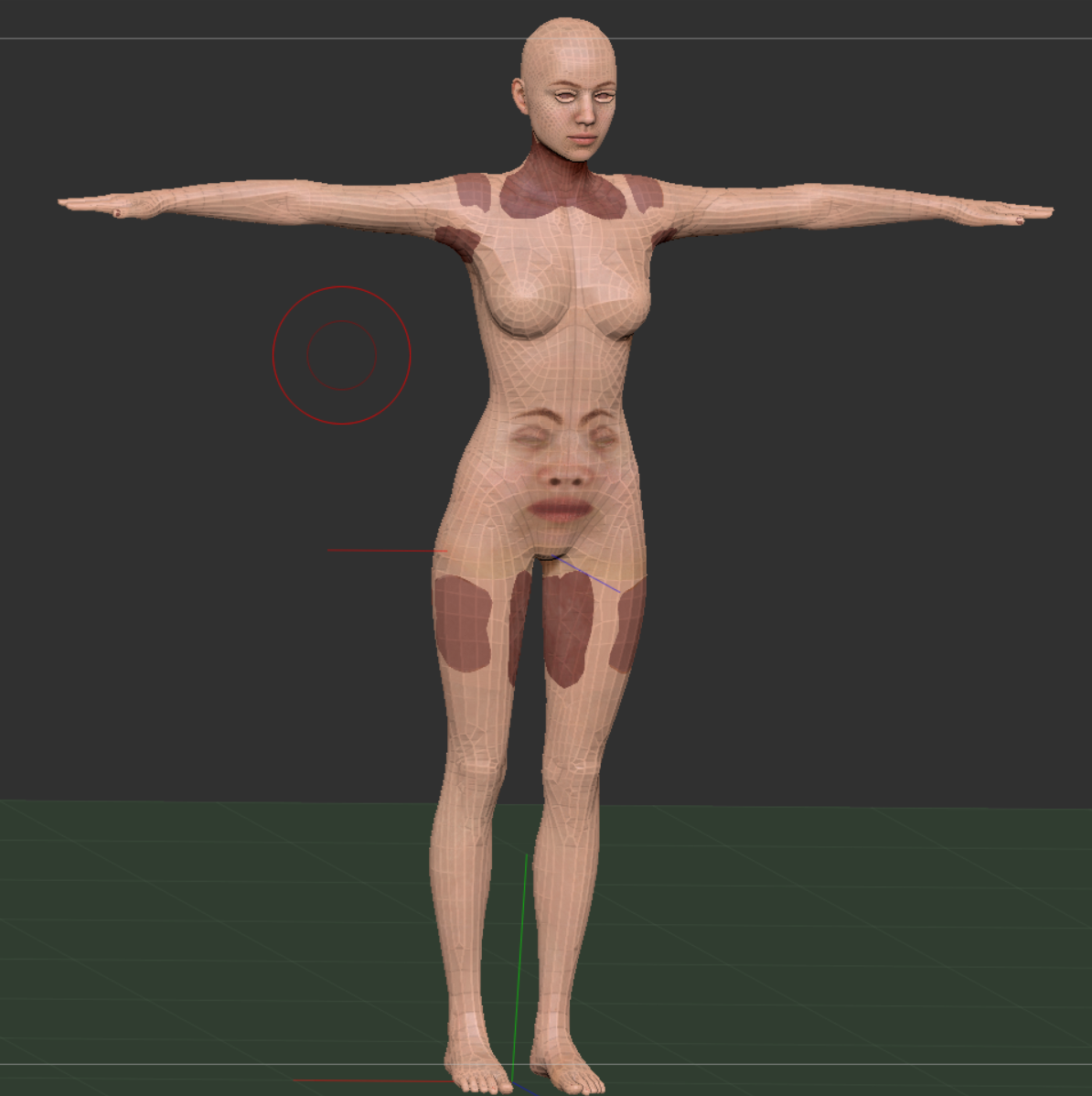
But I need a little help with getting the FBX into Zbrush, because when I import a CC3 FBX into Zbrush... I get this haha:
I tried the Blender and Maya preset, but the result is the same.
I have no clue what is happening here (i'm a traditional sculptor, not a 3d guy)
|
|
By mark_060449 - 6 Years Ago
|
|
Nevermind, merging the textures fixed the problem
|