|
By toystorylab - 6 Years Ago
|
Today I took the plunge and bought "Walker" ;)
It's a real cool thingee...
By the way UVI has easter sales, I paid 109,- € instead of 149,- €
I always wanted such a thing after seeing this 2 years ago:
https://www.boomlibrary.com/sound-effects/virtual-foley-artist-footsteps/
199,- and you need Kontakt 6, another 400,-... :pinch:
Yesterday I looked at this again, hm, consider, think twice,...
Searched for alternatives and found WALKER ;)
https://www.uvi.net/en/soundfx/walker.html
The UVI Workstation needed to use this is free, so I only payed 109,- € for a footstep maker...
Though additional you will need a recorder, which I already had; I use Cubase LE...

No video to show yet, but if someone sees this in the next 2 days, remember EASTER sales!
So, my question is: anybody else using WALKER?
|
|
By animagic - 6 Years Ago
|
|
Interesting, I never heard of Walker. I usually use footsteps from a sound library and then adjust them.
|
|
By toystorylab - 6 Years Ago
|
It's really cool, easy to handle, and you simply watch your footage and press 3 keys; left foot - stop - right foot.
That's the simple way...
You also have manual control over each component of the step sound including;
toe, heel and scuff for both the left and right foot independently.
A Stair switch disables the heel sound component to simulate the sound of stepping up or down a flight of stairs.
I'm very happy with it, and as these are midi signals, you can easily adjust them if you are a bit off...
And the costs are, compared to the "Boom Library" variant very low, and it's a lifetime investment! :satisfied:
|
|
By jlittle - 6 Years Ago
|
I have Impact Soundworks Cinema Sound Foley Library which has footsteps, clothing and a few other sounds and runs on the free Kontakt player. Currently it's on sale for $139 (from $199).
Here is the complete list of sounds.
The footsteps are not as customizable as Walker but pretty close and it has the ability to fade/transition from one type of step to another (i.e. stone to sand).
Jeff
|
|
By nealtucker - 6 Years Ago
|
I use EDWARD Foleyart, $79.00 and I just looked at walker and I would say Edward was a bit better bet in my opinion, you have the usual walk stop, heal stuff PLUS, scuffs, turns, landing jumps, fast walk, slow walk and creep so you can mix and match all the keys for a lot of variety very quickly.
I think it's worth a look for anyone interested, Oh and it runs in the Kontakt player. and there may be a COVID discount as well.
https://tovusound.com/shop/edward-foley-artist-instrument/

|
|
By toystorylab - 6 Years Ago
|
Wow, that's a nice pack! Hm, consider... :ermm:
|
|
By toystorylab - 6 Years Ago
|
nealtucker (4/12/2020)
I use EDWARD Foleyart, $79.00 and I just looked at walker and I would say Edward was a bit better bet in my opinion, you have the usual walk stop, heal stuff PLUS, scuffs, turns, landing jumps, fast walk, slow walk and creep so you can mix and match all the keys for a lot of variety very quickly. I think it's worth a look for anyone interested, Oh and it runs in the Kontakt player. and there may be a COVID discount as well. https://tovusound.com/shop/edward-foley-artist-instrument/
Oh, that's interesting too... Maybe I was too fast in my decision. Anyway, I'm happy with it.
Thanx for sharing...
|
|
By nealtucker - 6 Years Ago
|
Yes I agree,,,LOL.... you were too quick to post, your post just relieved me of another $47.00 as, when I went to my EWARDS website and saw the addon pack, "Real outdoor footsteps and forest paths, etc" on a discount I just had to get it.
Cheers
Neal
|
|
By toystorylab - 6 Years Ago
|
Damned, that was a hard decision but yesterday I bought as well the "Cinema Sound Foley Library" as "Edward + Expansion"... :D
And I am very happy to have these tools in my kit. And it really makes fun to work like this.
The only ennoying thing is you can't scale those "Instrument" windows as desired...

|
|
By thebiz.movies - 6 Years Ago
|
This is a pretty neat program.
Long ago I requested footstep foley be included with the walk motions and then soon after RL added a footstep audio track to the characters (likely had nothing to do with my request). I originally envisioned it kind of like this program with the ability to change the terrain, shoe and distance from the camera (volume) but the audio that was added was just a pretty flat footstep sound. It was useful for adding your own foley as a replacement but it seemed to irritate most Iclone users (hard top find the audio file) and was removed from future characters. Similar to the wasd character controls. So it goes.
|
|
By jlittle - 6 Years Ago
|
|
toystorylab (4/13/2020)
The only enoying thing is you can't scale those "Instrument" windows as desired...
Yea, that's Kontakt for you. It only resizes based on the instrument not the users preference.
I think it is because they don't do any scaling of the images.
Jeff
|
|
By argus1000 - 6 Years Ago
|
|
Very interesting information in this thread. I just bought Edward foleyhart. Let’s see what I can do with it. I’m now looking into the Cinema sound foley library.
|
|
By AlbinosGambit - 6 Years Ago
|
I never heard of this walker either.
What's your opinion of it, do we need and is it worth the steep price? Also, does it make the process any easier?
toystorylab (4/11/2020)
Today I took the plunge and bought "Walker" ;)It's a real cool thingee... By the way UVI has easter sales, I paid 109,- € instead of 149,- € I always wanted such a thing after seeing this 2 years ago: https://www.boomlibrary.com/sound-effects/virtual-foley-artist-footsteps/199,- and you need Kontakt 6, another 400,-... :pinch:Yesterday I looked at this again, hm, consider, think twice,... Searched for alternatives and found WALKER ;)
https://www.uvi.net/en/soundfx/walker.html
The UVI Workstation needed to use this is free, so I only payed 109,- € for a footstep maker...
Though additional you will need a recorder, which I already had; I use Cubase LE...
No video to show yet, but if someone sees this in the next 2 days, remember EASTER sales! So, my question is: anybody else using WALKER?
|
|
By toystorylab - 6 Years Ago
|
|
AlbinosGambit (4/14/2020)
I never heard of this walker either.
What's your opinion of it, do we need and is it worth the steep price? Also, does it make the process any easier?
Well, it is definitely way easier to get nice footsteps sound in your movies and you get huge libraries,
so, much more versatile in what you can use.
There are free footstep audio files (here are quite a lot):
http://eng.universal-soundbank.com/soundeffects-footsteps.htm
https://freesound.org/search/?q=footsteps
I used them for years, but you won't get results so fast and so varied...
|
|
By jlittle - 6 Years Ago
|
|
AlbinosGambit (4/14/2020)
I never heard of this walker either.
What's your opinion of it, do we need and is it worth the steep price? Also, does it make the process any easier?
It's a Sound library for footstep sounds and has nothing directly to do with iClone animation other than providing foley sounds.
Jeff
|
|
By kungphu - 6 Years Ago
|
|
This is a good thread. I’ve just been using normal foley for steps and have been interested in walkers for a while. Curious to hear which one people have been most happy with that have tried differnt libraries. I always have the full version of Kontakt so I’d prefer Kontakt libraries, but as long as its good any format would do!
|
|
By AlbinosGambit - 6 Years Ago
|
Sounds very interesting, but a very steep price to pay just for making sounds for footsteps?
Can it be used for something else?
Would have been nice to have something implemented with iClone:-)
toystorylab (4/14/2020)
AlbinosGambit (4/14/2020)
I never heard of this walker either.
What's your opinion of it, do we need and is it worth the steep price? Also, does it make the process any easier?Well, it is definitely way easier to get nice footsteps sound in your movies and you get huge libraries, so, much more versatile in what you can use. There are free footstep audio files (here are quite a lot): http://eng.universal-soundbank.com/soundeffects-footsteps.htmhttps://freesound.org/search/?q=footsteps I used them for years, but you won't get results so fast and so varied...
|
|
By AlbinosGambit - 6 Years Ago
|
I understand its a sound library, but only for footsteps right? It sounds very expensive just for this function, or what do you guys think, is it worth it?
What do you mean by providing "foley" sounds?
jlittle (4/14/2020)
AlbinosGambit (4/14/2020)
I never heard of this walker either.
What's your opinion of it, do we need and is it worth the steep price? Also, does it make the process any easier?It's a Sound library for footstep sounds and has nothing directly to do with iClone animation other than providing foley sounds. Jeff
|
|
By toystorylab - 6 Years Ago
|
|
AlbinosGambit (4/16/2020)
Can it be used for something else?
Nope, only foley...
And these guys create those sounds:
https://www.studiobinder.com/blog/what-is-a-foley-artist/
AlbinosGambit (4/16/2020)
Would have been nice to have something implemented with iClone:-)
I don't think this is a good idea...
AlbinosGambit (4/16/2020)
understand its a sound library, but only for footsteps right? It sounds very expensive just for this function, or what do you guys think, is it worth it?
It is worth as soon you have done,
- several animations with lots of footsteps...
- AND tried the "oldschool" route doing the "foley" job in your NLE with existing sounds:
http://eng.universal-soundbank.com/soundeffects-footsteps.htm
https://freesound.org/search/?q=footsteps
So, first you will need animations with footsteps, so I wouldn't focus too much on this, for the moment,
especially if your budget isn't that big... Buy props/assets/figures and ANIMATE.:D
|
|
By jlittle - 6 Years Ago
|
|
AlbinosGambit (4/16/2020)
I understand its a sound library, but only for footsteps right?
Depends upon the library. The Walker is footsteps only where the Cinema Sound Foley Library has cloth sounds, body impact sounds, and a few others.
Each library is different and is either specific or covers several categories of sounds.
AlbinosGambit (4/16/2020)
It sounds very expensive just for this function, or what do you guys think, is it worth it?
Keep in mind that when Kontakt is referred to that it is another system that is used in MCS (Music Creation Software, i.e. CuBase, LogicPro, etc) and is not really for standalone use and is not an add on for iClone.
Some sound libraries contain wav files that can be used directly in an NLE (since you just import the wav file) but the Walker and Cinema Sound Foley libraries also allow you to "play" the foot steps, as you would play an instrument (using an MCS), while watching the movie rather than having to import each footstep into an NLE and syncing each one manually.
Boom Library is a well know supplier of wav file libraries and has many libraries of various sounds. Not the cheapest but very good samples and lots of them.
Another one is Sampletraxx. There are many suppliers of libraries of wav file sound effects.
Foley, sound effects (sfx), music and dialogue are typically applied in the video NLE (Non-linear Editor).
If you are creating your own music you would have an MCS program.
The MCS program allows you to import video and other audio (i.e. dialogue and SFX) and then create your music for it while watching the video plus allows you to add any additional foley and other SFX needed.
You would then export that audio from the MCS and combine it back in the NLE to export the final product.
Here are a couple of workflows to illustrate this:
(Keep in mind that everyone has there own workflow based on what works best for them)

A Basic workflow has iClone doing everything and exporting using the native renderer.

A more Advanced (and typical) workflow has iClone creating an image sequence and everything (dialogue, SFX, music) is combined in the NLE to create the final product.

If you create your own music then you would use an Advanced+ workflow.
This workflow uses an MCS to create the music and any additional SFX and then feeding the MCS audio export back into an NLE to create the final product.
If you don't have an MCS then that is an additional expense above and beyond the sound library.
There are some free and somewhat inexpensive ones out there but I'm not sure how many of the free ones support VST (i.e. Kontakt and similar).
Also, some sound libraries for Kontakt require the Full (paid) version rather than the free Kontakt Player version which is another expense.
If you don't already have an MCS and the paid Kontakt then this is an expensive way to go just for footsteps.
I use CuBase Pro with the Full Kontakt version since many of my instrument libraries require it.
This is an expense that I paid out many years ago so for me any new expense is just the cost of the library.
Jeff
|
|
By AlbinosGambit - 6 Years Ago
|
Thanks for the extensive reply back and explaining the typical workflow that can be used, appreciates you taking the time!
I know something about MCS, I used to make some music back in my youth with Fruity Loops, but also used Kontakt from Native Instruments:-) I can understand that this could have a useful meaning.
May I ask what setup do you use for your production?
|
|
By animagic - 6 Years Ago
|
These was an interesting topic, although it has cost me some money. I ended up with the Cinema Sound Foley Library. They have some nice tutorials on how to combine footstep sounds with clothing sounds.
I suppose buying them all is another option...:P
|
|
By jlittle - 6 Years Ago
|
|
AlbinosGambit (4/16/2020)
May I ask what setup do you use for your production?
OS: Win 10 Pro
Computer: Digital Storm
CPU: 8 core i9-9900K @3.6Ghz
Memory: 32 GB (soon to be expanded)
Motherboard: ASUS ROG STRIX Z390-H
Display: NVidia RTX 2080 Ti 11GB
Storage:- System: 1 TB SSD
- Music Libraries: 4TB (over half full)
- Export Drive: 3TB x2 striped (5.5TB total)
- Misc. Data: 2TB
- Additional network drives
Jeff
|
|
By jlittle - 6 Years Ago
|
|
animagic (4/17/2020)
These was an interesting topic, although it has cost me some money.
LOL, I know what you mean.
I get mail from lots of the sound library sites and end up buying things because they sound cool.
My last random purchase was a neat Didgeridoo library called Didhgybridoo from Fluffy Audio for $39 and was one instrument sound I did not have.
I hate to think how much money I've spent on sound libraries over the years and currently have a little over 2TB of them.
Jeff
|
|
By argus1000 - 6 Years Ago
|
I bought the Edward Foleyhart for $79 and it was the most difficult program to install ever for me, so much so that I gave up and had to ask for a refund (why don't they have a trial period?).
What I am really looking for though is a program that can make all kinds of foley or sound effects and is reasonably priced.
|
|
By AlbinosGambit - 6 Years Ago
|
Yes good specs, a bit better than mine.
I was really thinking more of the setup, like basic, advanced or advanced +?
What software do you use in your production?
jlittle (4/17/2020)
AlbinosGambit (4/16/2020)
May I ask what setup do you use for your production?OS: Win 10 Pro Computer: Digital Storm CPU: 8 core i9-9900K @3.6Ghz Memory: 32 GB (soon to be expanded) Motherboard: ASUS ROG STRIX Z390-H - System: 1 TB SSD
- Music Libraries: 4TB (over half full)
- Export Drive: 3TB x2 striped (5.5TB total)
- Misc. Data: 2TB
- Additional network drives
Jeff
|
|
By jlittle - 6 Years Ago
|
|
AlbinosGambit (4/17/2020)
I was really thinking more of the setup, like basic, advanced or advanced +?
What software do you use in your production?
BASIC
The BASIC workflow is the most simplistic in that all you need is pretty much an animation program, be it 2D (Cartoon Animator) or 3D (iClone). Dialog can be recorded or created by Speech-To-Text programs with SFX and Music coming from any of the many free sound (freesound.org, soundsnap.com. etc.) and music (free-stock-music.com, freeplaymusic.com, etc.) sites available.
If audio editing is needed then the free Audacity audio software can be used.
For characters and sets one would use the Reallusion and/or DAZ markets.
ADVANCED
In an Advanced workflow you add an video NLE which you use to compose your final product.
With an NLE you use it to add all your dialog, SFX and music with greater control than in an animation program. You would still use the dialog in the Animation program to create the mouth movement but the actual audio would be added in the NLE. One of the best NLE’s with advanced features is DaVinci Resolve. There are other free video editors but offer a more basic set of controls.
ADVANCED+
The ADVANCED+ workflow would be used if you plan on creating your own music and/or advanced SFX. Here you add an MCS such as CuBase, Pro Tools, Reaper, etc. and import you video file (and optionally the dialog and SFX audio) and create and sync your music and SFX to the video in the MCS. You then export the MCS audio out and import it into your NLE to create the final product.
NOTE: If you look at any of the free MCS programs make sure it has the ability to import video files else you won’t be able to sync your music to the video very well. You would just be creating music stems and trying to sync then in the NLE as you would using music from a free site or such.
Also, for any of the workflows there are always sets and props. Usually you can find something already made in the RL and DAZ markets or some from Sketchup and other 3D modeling sites.
Usually 3DXChage is required for some of those (especially Sketchup) so is an added expense. If you are into creating your own props then Blender (it's free) is good for that.
Your workflow will depend upon what you want to accomplish and how much work you want to put into it which also determines which programs you will use/need.
What I have:
ANIMATION 3D- iClone Pipeline (+ most of the add-ons)
- 3DXChange Pipeline
- CC3
- Blender
ANIMATION 2D
- Cartoon Animator 4 Pipeline (+add-ons)
- CrazyTalk 8 Pipeline
PHOTO & DRAWING
- Affinity Designer
- Affinity Photo
- DrawPlus X8
- Gimp
- Filter Forge
- Topaz
- 3D Coat
- Substance Designer
- Substance Painter
SOUND
- CuBase
- Kontakt (Full)
- A bazillion sound libraries
- Adobe Audition (V1.0)
- Audacity
- Various iZotope Tools
VIDEO
- DaVinci Resolve
- HitFilm Pro
STORY BOARDING
MISC
- BluffTitler
- FlowScape
- Marvelous Designer
I also have a bunch of other programs I hardly use but have just in case they are needed and what I use would depend on the project and it’s needs.
Jeff
|
|
By animagic - 6 Years Ago
|
Jeff, thanks for sharing your setup and workflow.
I have something similar with different products (spread out over a few PCs), but what happened was that I initially was keen on composing music for my own animations because I did music long before starting with animation. Then animation slowly took over and now the music composition has more or less vanished although I do have the setup for it. So it goes...
|
|
By jlittle - 6 Years Ago
|
|
animagic (4/17/2020)
I have something similar with different products (spread out over a few PCs), but what happened was that I initially was keen on composing music for my own animations because I did music long before starting with animation. Then animation slowly took over and now the music composition has more or less vanished although I do have the setup for it. So it goes...
I was into music long before animation also (and other things) but there doesn't seem to be time for all of it.
Like you, I'm hoping to create my own music for my animations. We'll see...
Jeff
|
|
By AlbinosGambit - 6 Years Ago
|
Thank you so much Jeff for your extensive answer.
Do you use BASIC, ADVANCED, or ADVANCED+?
You say you have iClone Pipeline? what do you mean by that? I have iClone 7, 3DXchange Pro and CC3 Pipeline.
I am just a NOOB, and my dream is to one day create "ToyStory" like animation movies, Realistic like animated movies, or Chess Animations for my Chess Tutorials Chess Courses. Is it really possible to create realistic like animation movies just with iClone?
As a beginner, I am not sure what I need, Do I have to buy this or that content, should I not etc... So not so easy to know anything I am just stumbling in the dark and feel overwhelmed by everything.
Many have told me that the only thing you need to start with is iClone, CC3 and 3DXchange to get started. At first I really wanted just to use UE4 with Quixel, but I changed my mind and purchased RL software because it seemed so much easier, now I feel its really not so easy and no clear path how to learn it. Could I really create
Then just try to learn everything the software has to offer, then start simple projects like camera, lights, keyframing, etc. So, I watch a lot of tutorials, try to learn and test everything I can, but really I just want to start animating a movie he he... If I have ideas like creating a Toy Story like animation film, should I just start to try do it? I do not want to buy to much content, but what I really need to buy for my Toy Story like movie and do not find any content, then I have to create it on my own, but I do not know how to. What's the easiest and cheapest software to create my own 3D models? I have been trying out Blender, but feel it so advanced and not so easy to learn. Hmm...
By the way, FlowScape is really a nice software. I have been impressed by what it can produce! May I ask, what you use it for ? Can it be used with iClone in any way?
jlittle (4/17/2020)
AlbinosGambit (4/17/2020)
I was really thinking more of the setup, like basic, advanced or advanced +?
What software do you use in your production?BASIC The BASIC workflow is the most simplistic in that all you need is pretty much an animation program, be it 2D (Cartoon Animator) or 3D (iClone). Dialog can be recorded or created by Speech-To-Text programs with SFX and Music coming from any of the many free sound (freesound.org, soundsnap.com. etc.) and music (free-stock-music.com, freeplaymusic.com, etc.) sites available. If audio editing is needed then the free Audacity audio software can be used. For characters and sets one would use the Reallusion and/or DAZ markets. ADVANCED In an Advanced workflow you add an video NLE which you use to compose your final product. With an NLE you use it to add all your dialog, SFX and music with greater control than in an animation program. You would still use the dialog in the Animation program to create the mouth movement but the actual audio would be added in the NLE. One of the best NLE’s with advanced features is DaVinci Resolve. There are other free video editors but offer a more basic set of controls. ADVANCED+ The ADVANCED+ workflow would be used if you plan on creating your own music and/or advanced SFX. Here you add an MCS such as CuBase, Pro Tools, Reaper, etc. and import you video file (and optionally the dialog and SFX audio) and create and sync your music and SFX to the video in the MCS. You then export the MCS audio out and import it into your NLE to create the final product. NOTE: If you look at any of the free MCS programs make sure it has the ability to import video files else you won’t be able to sync your music to the video very well. You would just be creating music stems and trying to sync then in the NLE as you would using music from a free site or such. Also, for any of the workflows there are always sets and props. Usually you can find something already made in the RL and DAZ markets or some from Sketchup and other 3D modeling sites. Usually 3DXChage is required for some of those (especially Sketchup) so is an added expense. If you are into creating your own props then Blender (it's free) is good for that. Your workflow will depend upon what you want to accomplish and how much work you want to put into it which also determines which programs you will use/need. What I have: - iClone Pipeline (+ most of the add-ons)
- 3DXChange Pipeline
- CC3
- Blender
ANIMATION 2D
- Cartoon Animator 4 Pipeline (+add-ons)
- CrazyTalk 8 Pipeline
PHOTO & DRAWING
- Affinity Designer
- Affinity Photo
- DrawPlus X8
- Gimp
- Filter Forge
- Topaz
- 3D Coat
- Substance Designer
- Substance Painter
SOUND
- CuBase
- Kontakt (Full)
- A bazillion sound libraries
- Adobe Audition (V1.0)
- Audacity
- Various iZotope Tools
VIDEO
- DaVinci Resolve
- HitFilm Pro
STORY BOARDING
MISC
- BluffTitler
- FlowScape
- Marvelous Designer
I also have a bunch of other programs I hardly use but have just in case they are needed and what I use would depend on the project and it’s needs.
Jeff
|
|
By jlittle - 6 Years Ago
|
|
AlbinosGambit (4/17/2020)
Do you use BASIC, ADVANCED, or ADVANCED+?Depends on whats needed.
If it is a single simple scene then BASIC works fine. If there are multiple scenes then the ADVANCED is needed. If adding custom music then ADVANCED+.
Think of iClone as a Scene generator. You setup one iClone project file per scene, export each scene and then use your video NLE to stitch them together.
It is difficult and very resource intensive to try to do a lenghty animation in a single iClone project file which also makes edits and changes problematic.
Just as you break down your animation into scenes and shots you do the same when creating them in iClone.
You can use multiple cameras in a single scene to get various shots, exporting them one at a time, then combining in the video NLE to build the scene shot sequence.
You say you have iClone Pipeline? what do you mean by that? I have iClone 7, 3DXchange Pro and CC3 Pipeline. iClone use to come in different flavors: Standard, Pro, and Pipeline. Now it is just one flavor but out of habit I said iClone Pipeline since I've pretty much always used the top tier version.
I am using iClone 7.
I am just a NOOB, and my dream is to one day create "ToyStory" like animation movies, Realistic like animated movies, or Chess Animations for my Chess Tutorials Chess Courses. Is it really possible to create realistic like animation movies just with iClone? There have been discussion here in the Forums about "realistic" animations. Two basic things came out of that discussion, at least for me, and they were:
- You can get "close" to realistic but the human eye can still tell the difference and know it's off so why bother with the extreme effort to do "realism".
- It is better to tell your story with a good animation in months rather then with a Pixar like animation that would take you years to complete, if ever.
Yes, we all would like to do Pixar like animation but we are usually one man shops, not a company with hundreds of people all working on a project at once using expensive hardware, so we do what we can, with what we have, in a reasonable time frame and live with the results.
As a beginner, I am not sure what I need, Do I have to buy this or that content, should I not etc... So not so easy to know anything I am just stumbling in the dark and feel overwhelmed by everything.
Many have told me that the only thing you need to start with is iClone, CC3 and 3DXchange to get started. At first I really wanted just to use UE4 with Quixel, but I changed my mind and purchased RL software because it seemed so much easier, now I feel its really not so easy and no clear path how to learn it. The mistake of many beginners is that they think they can just jump right in and create short or feature length animations right away.
The first step is learning the tools. Create small projects at first. Have each project highlight a couple of features to learn. Don't try to do everything at once. Learn each aspect of the tool one or two at a time.
Look at first learning how to apply motions to a character (using a stock character) and merge the motions then customize them. That in itself is enough to worry about before using lighting techniques, scenes and props. Once you get the basics of that down move on to character interaction with props. Pick up a prop, drop it, throw it, etc. Then move on to terrain and scene construction.
There is so much to iClone that it can be overwhelming and confusing. Take a piece at a time and learn it.
Keep in mind that in using iClone your hold many roles: Set designer, Costume designer, Character designer, Lighting designer, Location scout, Cinematographer, Director, Choreographer, etc.
Learn each role and then you can start creating completed animations.
Then just try to learn everything the software has to offer, then start simple projects like camera, lights, keyframing, etc. So, I watch a lot of tutorials, try to learn and test everything I can, but really I just want to start animating a movie he he... If I have ideas like creating a Toy Story like animation film, should I just start to try do it? I do not want to buy to much content, but what I really need to buy for my Toy Story like movie and do not find any content, then I have to create it on my own, but I do not know how to. You are doing the right thing. Watch tutorials and practice, practice, practice.
Yes, it is frustrating that you want to start animating right away but you need baby steps. Just like learning to drive a car. You don't just jump in an win a race, you practice and eventually you will.
You can use your script and start animating it but you don't have to have the final characters in it. Use a standard character instead for you can always replace them with another character down the road.
If you use your script to practice with you can start to get close to what you want without going all in on sets and characters.
Use substitutes until you get to the point where you want to use the proper character and props.
It will be good practice.
What's the easiest and cheapest software to create my own 3D models? I have been trying out Blender, but feel it so advanced and not so easy to learn. Hmm... Blender is probably the best and it's free. It, like iClone, has many features but you will not likely use but a 1/4 of them in creating props so only concentrate on the sculpting features.
By the way, FlowScape is really a nice software. I have been impressed by what it can produce! May I ask, what you use it for ? Can it be used with iClone in any way? Mostly just playing with for the moment but have plans down the road to use it for backgrounds in the future. You can't import it into iClone but can use it as backgrounds, either still or video.
Jeff
|
|
By jlittle - 6 Years Ago
|
@AlbinosGambit
As for what you need you first have to determine what you are looking to do. You have iClone for creating the animations and CC3 for creating characters and 3DXChane to import external items.
If you want to create your own clothing then Blender or Marvelous Designer.
If you want to create your own props then Blender or similar.
If you don't want to waste time creating all your own stuff then you can farm the RL and DAZ markets for items that come close to what your looking for.
It's the old adage of: do i spend time on making my own or do I buy it ready made and save the time so I can animate faster?
A lot of animators want to tell a story so they do that and rather than waste their time creating characters and props they use what is available with maybe a few tweaks.
It just boils down to time vs money. You want it fast, spend money. You want it your way, spend the time.
Jeff
|
|
By AlbinosGambit - 6 Years Ago
|
|
@ jlittle (4/17/2020)
Hi Jeff!
Wow! amazingly good explanations and advice, this will definitively get me on the right path:-) I will take all your advice to heart, and I have to send you a BIG THANKZ. This have answered many of my questions so far in starting up in the world of animations!
By the way, do you have a long time experience working with animation and iClone? If I have some questions, may I ask you for advice on what I should be learning next and so fort? It seems to me like you are THE WIZE YODA guy to ask for guidance:):D
So for now, I should start with:
The first step is learning the tools. Create small projects at first. Have each project highlight a couple of features to learn. Don't try to do everything at once. Learn each aspect of the tool one or two at a time.
Look at first learning how to apply motions to a character (using a stock character) and merge the motions then customize them. That in itself is enough to worry about before using lighting techniques, scenes and props. Once you get the basics of that down move on to character interaction with props. Pick up a prop, drop it, throw it, etc. Then move on to terrain and scene construction.
There is so much to iClone that it can be overwhelming and confusing. Take a piece at a time and learn it.
This is how you started out to learn?
I would appreciate some more detailed advice on what I should be learning, what order and so forth because there is really no guide to what I should be learning..
Again THANK YOU for being so kind to guide me:):), I wish there would be a general guide for us Noobs of what to start learning from A-Z:D:D
Regarding Flowscape you say:
Mostly just playing with for the moment but have plans down the road to use it for backgrounds in the future. You can't import it into iClone but can use it as backgrounds, either still or video.
Do you know how to use it as stills or video? Doesn't flowscape allow export? What can we use it for? It creates some stunning visuals!
|
|
By jlittle - 6 Years Ago
|
|
AlbinosGambit (4/17/2020)
By the way, do you have a long time experience working with animation and iClone?I started with CrazyTalk 6 (about 8 years ago) and then moved on to CrazyTalk Animator (now Cartoon Animator 4) a year later when it first came out.
I have had iClone since version 5 but only dabbled with it here an there and really only started to learn it once I got version 6.
I'm not the wisest on iClone here for there are far more knowledgeable users here on the forum than me.
We are all still learning as we also practice creating animation videos.
If I have some questions, may I ask you for advice on what I should be learning next and so fort? It seems to me like you are THE WIZE YODA guy to ask for guidance:):D You can post your questions here on the forum for there are many here who will help answer your questions. I don't pretend to know it all for I am still learning.
So for now, I should start with:
The first step is learning the tools. Create small projects at first. Have each project highlight a couple of features to learn. Don't try to do everything at once. Learn each aspect of the tool one or two at a time.
Look at first learning how to apply motions to a character (using a stock character) and merge the motions then customize them. That in itself is enough to worry about before using lighting techniques, scenes and props. Once you get the basics of that down move on to character interaction with props. Pick up a prop, drop it, throw it, etc. Then move on to terrain and scene construction.
There is so much to iClone that it can be overwhelming and confusing. Take a piece at a time and learn it.
This is how you started out to learn? I would appreciate some more detailed advice on what I should be learning, what order and so forth because there is really no guide to what I should be learning..
If you take it a step at a time it is not so overwhelming. Get comfortable (you don't have to become an expert) with each area before moving on to the next area.
Keep practicing by creating simple scenes and animating them.
Once you cover the basics try creating a more complex animation with multiple scenes and camera shots and use a video NLE to stitch your clip together.
Regarding Flowscape you say:
Mostly just playing with for the moment but have plans down the road to use it for backgrounds in the future. You can't import it into iClone but can use it as backgrounds, either still or video.
Do you know how to use it as stills or video? Doesn't flowscape allow export? What can we use it for? It creates some stunning visuals!
Jeff
|
|
By toystorylab - 6 Years Ago
|
|
argus1000 (4/17/2020)
I bought the Edward Foleyhart for $79 and it was the most difficult program to install ever for me,
so much so that I gave up and had to ask for a refund (why don't they have a trial period?).
What I am really looking for though is a program that can make all kinds of foley or sound effects and is reasonably priced.
Hm, not sure what went wrong.
There are several things to do, but not really difficult...
Create iLok account
Install UVI Workstation
Create Native Access account and install
Install Kontakt player
EDIT, forgot last step:
finally install "Walker" via "add a serial" in "Native Access"...
Be sure to have a DAW (Digital Audio Workstation), like Cubase, Reaper,...
Optional a hardware "instrument-keyboard", but your "normal" keyboard from your PC will work too with "Walker"...
|
|
By toystorylab - 6 Years Ago
|
jlittle (4/17/2020)
animagic (4/17/2020)
I have something similar with different products (spread out over a few PCs), but what happened was that I initially was keen on composing music for my own animations because I did music long before starting with animation. Then animation slowly took over and now the music composition has more or less vanished although I do have the setup for it. So it goes... I was into music long before animation also (and other things) but there doesn't seem to be time for all of it. Like you, I'm hoping to create my own music for my animations. We'll see...
Funny :D
I also was into music long before animation...
Besides 3 decades of Rockbands, in 1990 I started digital with a Roland D70 and an Atari ST with Cubase as Music Sequencer.
In 2009 I started with, I call it "visuals". Edited existing footage with Sony Vegas to my digital music.
This is my first ever Video I made (February 2009):
In 2010 I started animating puppets (stop-motion), this is my first ever "animation"
As I already had a huge collection of action figures,
only a year later I started my own business with a stop-motion Studio, focused on workshops for kids.
www.toystorylab.com
For a commisioned work (stop-motion) I started using CrazyTalk to animate speaking puppets,
and only a few months later, as soon iClone 6 arrived, I fell in love with 3D animation...
As I am in "lockdown" too {don't have to work (I help disabled kids at basic school) and still get payed),
I reactivated my "Digital Music Production" :P, it's a nice diversion from animating...

And, yeah there is a huge amount of digital instruments, I would like to have :w00t:
I have to take care this does not cut a hole in my "animation budget" or even distract me from animating :D
|
|
By illusionLAB - 6 Years Ago
|
|
Blackmagic has a free SFX foley library for Davinci Resolve. If you didn't already know Resolve is free and offers professional colour grading, editing, compositing and sound editing/mixing. This video shows how to get the free SFX library https://www.youtube.com/watch?v=qVZGJwYfyCM I'm also a big fan of UVI software... they have a 10GB SFX library for $99 too... Xtreme FX
|
|
By argus1000 - 6 Years Ago
|
Thank you for the procedure, toystorylab.
|
|
By toystorylab - 6 Years Ago
|
|
argus1000 (4/18/2020)
Thank you for the procedure, toystorylab.
I forgot the last step :blush:, see my EDIT in previous post!
And if you try it again, would be nice to get some feeback if everything works...
|
|
By AlbinosGambit - 6 Years Ago
|
@]jlittle (4/18/2020) Hi Jeff. So you do have a great deal of experience and to me, your advice seems so wise and sound, so that's why I named you Wize Yoda :-) anyway, I will ask the forum here if I am stuck at something and thanks for taking the time! When you say start with animation first, thats a wide concept no? I looked at the manual from RL, first it writes about the Knowing the environment, main menu, docking areas, 3D realtime viewer, system requirements, visual enhancements, performance notes, project, #d Character generation, Digital Human shader... Then comes 3D Character Animation and it has a section with "Body Animation" thats divided into: HIK Motion Layer EditingHuman IK Reaching Targets
Body PuppeteeringDirect Puppeteering
MixMove
Body Mocap
Motion Modifier
So I started to look at: HIK Motion Layer EditingIts divided into_ Introducing Edit Motion Layer Panel Producing Custom Pose or Key-frame Motions Layering Motion Layer Keys to Existing Motions Setting Default Keys and Resetting Motion Layer Keys Creating Custom Default Pose Fixing G3 Motions for G5 Character Locking Bones Animating Hand Gestures Fine Tuning Actor with IK, FK What is IK / FK How to Use IK How to Use FK IK, FK for Actors or Extend Bones So, I also started to look at the first part of HIK Motion Layer Editing ----> Producing Custom Pose or Key-frame MotionsIs it good to start here? and taking it one by one chronologically? I could not find any good tutorials of HIK Motion Layer EditingAnyone who knows?
|
|
By AlbinosGambit - 6 Years Ago
|
Hi again.
I try to learn this example:
Producing a Custom Pose- Select a character.
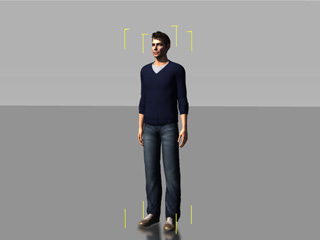 - Click the Edit Motion Layer
 button under the Animation tab of the Modify panel. button under the Animation tab of the Modify panel. - Set a motion key by editing the effector points in the dummy pane. Please refer to the Using the Edit Motion Layer Panel section for more information.
Producing a Key-frame MotionWhen you are familiar with the usage of setting one motion layer key in a certain time frame, then you can go to another time frame to set more motion layer keys, which can produce so-called key-frame motions. The transition between two keys will be auto-generated by iClone. - Set a pose in a time frame.
- Go to another time frame and set again another motion layer key.
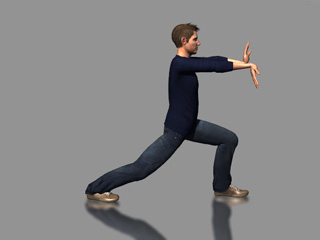 | 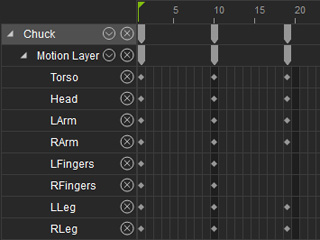 | Setting another motion layer key. | The motion layer keys in the tracks. |
- The in-between animation is automatically generated.
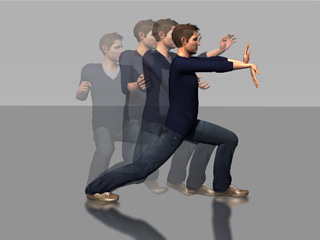 | | Key-frame animation is auto-generated. |
1. I first set a dummy key at frame 1 using Chuck as in the example
2. I set a pose in time at frame 10 similar to the photo.
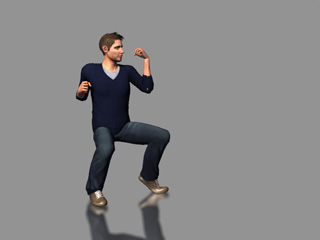
3. I set another pose in time at frame 20 similar to the photo
But the problem is that I do not get the same result as in the video. I get sliding feet and very very fast motion. I don't get it. Does anyone know what I do wrong?
|
|
By jlittle - 6 Years Ago
|
@AlbinosGambit
I think the example video slowed down the motion so that it could been seen clearly.
You have three keyframes: one at 0, 10 and 20.
The closer together they are the faster the character moves between positions.
Move them farther apart and it will slow the motion down.
The character will move from the position at 0 to the position at 10 moving each body part to obtain the new position automatically (tweening).
If the foot position is moved or different in each keyframe then you will get foot sliding.
Try keeping one foot (the left foot in this case) in the same position for each keyframe.
Jeff
|
|
By AlbinosGambit - 6 Years Ago
|
Hi Jeff.
Thanks for your reply. You are right, the further apart the keyframes are, the slower it gets.
Yes 3 key frames. 0,10, and 20.
In frame 0 then Chuck is in a T-pose? Or?
Frame 10 he has his first pose,
and at 20 his last pose.
So in the example, they set chuck in a pose at frame 10?
Set a pose in a time frame.
Then they go to frame 20? to set the final pose. below.
- Go to another time frame and set again another motion layer key.
| | Setting another motion layer key. | The motion layer keys in the tracks.
|
So, why do I not get the same end results as below? They must have forgotten some steps to explain? How do I achieve this? I dont get it.
The in-between animation is automatically generated. | | Key-frame animation is auto-generated. |
jlittle (4/19/2020)
@AlbinosGambit I think the example video slowed down the motion so that it could been seen clearly. You have three keyframes: one at 0, 10 and 20. The closer together they are the faster the character moves between positions. Move them farther apart and it will slow the motion down. The character will move from the position at 0 to the position at 10 moving each body part to obtain the new position automatically (tweening). If the foot position is moved or different in each keyframe then you will get foot sliding. Try keeping one foot (the left foot in this case) in the same position for each keyframe. Jeff
|
|
By jlittle - 6 Years Ago
|
@AlbinosGambit
In frame 0 the character is standing with his arms at his side, not a T-Pose.
Ah, if you notice, the video provided in the example only runs from frame 10 to frame 20 since the pose at frame 0 is not shown.
The video is also shown in slow motion so that you can see the transition from the pose at frame 10 to that at frame 20 which is also onion skinned in the still image.
Do you not get the same/similar transition from frame 10 to frame 20?
Jeff
|
|
By AlbinosGambit - 6 Years Ago
|
Aha.
So, no motion is added in keyfram 0, he just stands with arms on the side.
So, actually the motions is from key frame 10-20.
Ok, I see slow motion I understand.
I will try again to see if I get similar motion after some tries.
Is there a step in the example thats not mentioned. Because of the sliding feet and all that I mean
jlittle (4/20/2020)
@AlbinosGambit
In frame 0 the character is standing with his arms at his side, not a T-Pose.
Ah, if you notice, the video provided in the example only runs from frame 10 to frame 20 since the pose at frame 0 is not shown.
The video is also shown in slow motion so that you can see the transition from the pose at frame 10 to that at frame 20 which is also onion skinned in the still image.
Do you not get the same/similar transition from frame 10 to frame 20?
Jeff
|
|
By 4u2ges - 6 Years Ago
|
Enable Foot Contact for the character. That would cutback some of the sliding.
Here is I put together a quick demo based on the sample +. That might give you some ideas.
|
|
By animagic - 6 Years Ago
|
|
No matter... I'm revising my comment to say that it would make more sense to have the initial pose at frame '0".
|
|
By AlbinosGambit - 6 Years Ago
|
I have foot contact checked, thanks for the tip, I will take a look at the file to get the idea:-) Hope it will help
4u2ges (4/20/2020)
Enable Foot Contact for the character. That would cutback some of the sliding.
Here is I put together a quick demo based on the sample +. That might give you some ideas.
|
|
By AlbinosGambit - 6 Years Ago
|
Hi. What pose is that? The pose just standing with arms on the side? Or?
animagic (4/20/2020)
No matter... I'm revising my comment to say that it would make more sense to have the initial pose at frame '0".
|
|
By AlbinosGambit - 6 Years Ago
|
I still dont get it how to actually do this example.
Help anyone?
I tried so many many hours following the example from the manual, replicating the example but impossible it feels.
4u2ges (4/20/2020)
Enable Foot Contact for the character. That would cutback some of the sliding.
Here is I put together a quick demo based on the sample +. That might give you some ideas.
|
|
By 4u2ges - 6 Years Ago
|
|
I tried so many many hours following the example from the manual, replicating the example but impossible it feels.
Can you show what you came up with and the timeline for it? Even it's *bad*...
|
|
By AlbinosGambit - 6 Years Ago
|
Hi.
Sure I can do this later, when I have the time to show you.
Just a screenshot of the time line and a video uploaded to youtube?
4u2ges (4/28/2020)
I tried so many many hours following the example from the manual, replicating the example but impossible it feels. Can you show what you came up with and the timeline for it? Even it's *bad*...
|
|
By AlbinosGambit - 6 Years Ago
|
Here is my YouTube video of my attempt to replicate RL´s Karate Kid Test.
Printscreen of the timeline:

4u2ges (4/28/2020)
I tried so many many hours following the example from the manual, replicating the example but impossible it feels. Can you show what you came up with and the timeline for it? Even it's *bad*...
|
|
By 4u2ges - 6 Years Ago
|
lol, sorry (could not resist) :w00t:
First of all, take a look at the initial Chucks' pose. Unless you have iron toes, you would never be able to pull this stunt.
So before you begin moving forward animating next pose, make sure the current pose looks natural. This would save you a lot of trouble up ahead.
Rest his right foot firmly on the ground without bending toe, move torso slightly forward.
Switch to Orthogonal camera view. Use A, S, D, F, G keys to observe an avatar from all sides. Again, make sure all bones are posed natural, specially torso.
On the next key begin with torso. Move it forward until his right leg is almost straight. But do NOT overstretch! This would cause feet sliding.
Next, move his left feet into position, rotate until parallel to the ground and level it by Z. Do not push too much to the ground.
When Foot contact is enabled, pushing it down too much would deform torso.
Observe from all sides and workout upper body and arms (I would use FK mode for upper body as it does not affect lower parts).
Note: Small feet sliding would still occur. Try fixing it in between keys, but ONLY after you settled and happy with the last key pose.
I am working on a motion ruler tool, which would help in fixing feet slide and in general assist in making precise walk loops, etc... Will post the tool as I am done with it.
|
|
By AlbinosGambit - 6 Years Ago
|
LOL! ha ha... no worries at all I am not offended.
Thanks for the help and reply, will try this next and see:-)
4u2ges (4/28/2020)
lol, sorry (could not resist) :w00t:
First of all, take a look at the initial Chucks' pose. Unless you have iron toes, you would never be able to pull this stunt.
So before you begin moving forward animating next pose, make sure the current pose looks natural. This would save you a lot of trouble up ahead.
Rest his right foot firmly on the ground without bending toe, move torso slightly forward.
Switch to Orthogonal camera view. Use A, S, D, F, G keys to observe an avatar from all sides. Again, make sure all bones are posed natural, specially torso.
On the next key begin with torso. Move it forward until his right leg is almost straight. But do NOT overstretch! This would cause feet sliding.
Next, move his left feet into position, rotate until parallel to the ground and level it by Z. Do not push too much to the ground.
When Foot contact is enabled, pushing it down too much would deform torso.
Observe from all sides and workout upper body and arms (I would use FK mode for upper body as it does not affect lower parts).
Note: Small feet sliding would still occur. Try fixing it in between keys, but ONLY after you settled and happy with the last key pose.
I am working on a motion ruler tool, which would help in fixing feet slide and in general assist in making precise walk loops, etc... Will post the tool as I am done with it.
|
|
By AlbinosGambit - 6 Years Ago
|
Hi again.
My other problem is actually how to get him into such a pose from the manual example. I try using Human IK and FK but struggle to get a pose done and using so much much time....
I will try your explanation now, I am spending some time right now to learn again:-)
Practice practice practice, its the only thing to make things happen and to help me understand, but feels so overwhelming when you are a beginner. Thats not only in 3D animation but with everything in life. I feel learning chess was much easier because the game of chess has CLEAR & CHRONOLOGICAL learning paths, 3D animation does not have this. Rampa told me that using the RL manual and especially character animation first is a really good way to try learning and using the forum and ask for advice. This was his way of learning, so I will try to do the same. Also, I have just got my Richard Williams The Animator's Survival Kit, so I will use this for trying to learn from the ancient masters of animation. I was so amazed the first time I saw Roger Rabbit in the cinema!
A ruler animation helper tool? So that you use an image layer to help you see if feet are sliding?
4u2ges (4/28/2020)
lol, sorry (could not resist) :w00t:
First of all, take a look at the initial Chucks' pose. Unless you have iron toes, you would never be able to pull this stunt.
So before you begin moving forward animating next pose, make sure the current pose looks natural. This would save you a lot of trouble up ahead.
Rest his right foot firmly on the ground without bending toe, move torso slightly forward.
Switch to Orthogonal camera view. Use A, S, D, F, G keys to observe an avatar from all sides. Again, make sure all bones are posed natural, specially torso.
On the next key begin with torso. Move it forward until his right leg is almost straight. But do NOT overstretch! This would cause feet sliding.
Next, move his left feet into position, rotate until parallel to the ground and level it by Z. Do not push too much to the ground.
When Foot contact is enabled, pushing it down too much would deform torso.
Observe from all sides and workout upper body and arms (I would use FK mode for upper body as it does not affect lower parts).
Note: Small feet sliding would still occur. Try fixing it in between keys, but ONLY after you settled and happy with the last key pose.
I am working on a motion ruler tool, which would help in fixing feet slide and in general assist in making precise walk loops, etc... Will post the tool as I am done with it.
|
|
By AlbinosGambit - 6 Years Ago
|
By the way, pose bones naturally, what is meant by this? In the RL manual example, I see in the starting pose he has slightly twisted torso to one side, and some head rotation, right? Or should I just pose full body straight?
4u2ges (4/28/2020)
lol, sorry (could not resist) :w00t:
First of all, take a look at the initial Chucks' pose. Unless you have iron toes, you would never be able to pull this stunt.
So before you begin moving forward animating next pose, make sure the current pose looks natural. This would save you a lot of trouble up ahead.
Rest his right foot firmly on the ground without bending toe, move torso slightly forward.
Switch to Orthogonal camera view. Use A, S, D, F, G keys to observe an avatar from all sides. Again, make sure all bones are posed natural, specially torso.
On the next key begin with torso. Move it forward until his right leg is almost straight. But do NOT overstretch! This would cause feet sliding.
Next, move his left feet into position, rotate until parallel to the ground and level it by Z. Do not push too much to the ground.
When Foot contact is enabled, pushing it down too much would deform torso.
Observe from all sides and workout upper body and arms (I would use FK mode for upper body as it does not affect lower parts).
Note: Small feet sliding would still occur. Try fixing it in between keys, but ONLY after you settled and happy with the last key pose.
I am working on a motion ruler tool, which would help in fixing feet slide and in general assist in making precise walk loops, etc... Will post the tool as I am done with it.
|
|
By 4u2ges - 6 Years Ago
|
|
By the way, pose bones naturally, what is meant by this? In the RL manual example, I see in the starting pose he has slightly twisted torso to one side, and some head rotation, right? Or should I just pose full body straight?
Well, it's easy. Print a screenshot of the pose, stand in front of the mirror and try mimic it. RL pose has right foot straight on the ground, bent slightly outward (giving more support to the body weight) and different knee bent angle (though it is also might be questionable).
Your pose on the other hand is impossible to take by any human being. It is against the laws of gravity and physics.
But that is not the main problem. Feet slide I see on your video, is not even a feet slide perse. It's more like some abnormality, like when you push a foot too much to the ground while foot contact is enabled.
When foot contact is enabled you have to be very careful while placing foot on the ground (I mentioned it in previous post). A quick check is to disable Foot contact for a moment and see if the feet(foot) dive(s) deep into the ground.
It also could be one of those iClone bugs some people reported, where limbs might go into uncontrollable spin between poses, where they are not supposed too.
In which case just delete the clip and start over.
And do not play with reach effectors yet (replying to the other thread). Try to animate and gain confidence with limbs animation first.
Animation ruler helper is here: https://forum.reallusion.com/442990/3D-Motion-Ruler-Boxes
|
|
By jlittle - 6 Years Ago
|
I've just come across this interesting sound design package (VST/AU/AXX) that allows you to trigger/mod sounds by using your voice (or any recorded sound).
This is a Foley like library but the triggering/mising is unique and provides various results compared to just key presses.
You can even easily add your own sound libraries!
Product Overview:
Reformer Pro allows sound designers, producers, musicians and performers to design, automate and perform any sound in real-time, like never before.
Whether you already hear the sound in your mind, or you’re looking to experiment and search for the never-before-heard, Reformer Pro gives you powerful sonic tools to bring your sound to life.
Reformer Pro also utilizes the world’s first Dynamic Input technology, taking procedural, sample-based audio processing to new heights and into previously unexplored territory.VST/AU/AAX plugin comes with the Krotos Bundle 1 for FREE (Regular price $449) . That’s over 3.8 GB of high-fidelity sounds to get you started.
and the walk thru:
Available at a discounted price of $347 (reg $399) HERE and or directly from KrotosAudio
Cost is a little high but comes with the following free sound libraries:
Bengal Tiger, Black Leopard, Electronic, Leather,
Fruit & Veg: Crunch, Fruit & Veg: Squash, Fruit & Veg: Stabs,
Polystyrene, Gun Foley, Sizzle
It is so general purpose that it should cover most all Foley needs and you can use your own or other sound recordings easily for unlimited expansion.
Damn, just what I need, another neat program to buy.
I am seriously considering this and just have to convince myself it is worth it.
Anybody using this that can provide feedback on it?
Jeff
|
|
By jlittle - 6 Years Ago
|
There is also a great voice changer software package Dehumanizer on sale for less than 2 days now.
Krotos also has something similar to Walker called Weaponizer.
Jeff
|
|