|
By AncientWire - 5 Years Ago
|
I have a scene. 642 frames in I added some props and put them in their proper place.
When I play it, the props appear on frame one and move around until frame 642, then sit still like they should.
I tried at frame 1 to turn the visibility off, then back on at 642, but either the prop is visible the whole time or invisible the whole time. Switching on and off throughout the timeline doesn't work.
I tried turning the visibility on and off from the timeline, but that doesn't work.
I went in to all of the tracks for the prop (main, visibility, animation, about 6 of them) and deleted its presence for all of them up to 642, and the prop still shows beginning in frame 1.
What I have managed to make work is to place the prop at frame 1 below the floor, keep it below the floor until 641, then raise it in to place at 642.
I think that something is wrong with this. It is doing it for 8 props. Is there some setting that I may have changed on accident to make the visibility settings not work properly?
Thanks!
|
|
By Peter (RL) - 5 Years Ago
|
Hi...
Visibility settings are working fine for me in iClone 7.73.
Take a look at the props visibility track. When the prop is set to invisible you should have no line on the track and when visible you will have a line. See the image below where visibility is set to off from frame 1 to 99.
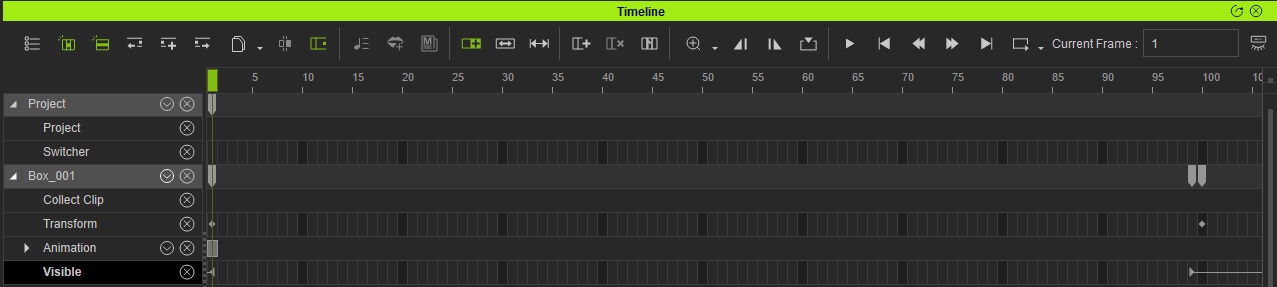
Please Note: Try right clicking the Timeline > Visible track at the appropriate frames and choose On/Off to toggle the visibility.
If you still have problems, try starting a new project and just load a single 3D Block. Then try setting the visibility on and off at different frame numbers. If this works then the issue is with the project itself.
|
|